
I still remember the moment I spilled coffee onto my latest consumer-grade laptop, watching helplessly as its glowing screen flickered and then went dark. It was a frustrating, almost helpless feeling — like watching your favorite tool break right when you need it most. That day, I realized something important: not all laptops are created equal, especially when it comes to durability and reliability. After that mishap, I started exploring alternatives and discovered the hidden power of refurbished ThinkPads. Today, I want to share why these sturdy machines have become my go-to and how they might just transform your tech experience too.
The Problem with Entry-Level Consumer PCs
Most entry-level computers promise affordability, but that often comes at the expense of longevity and performance. They might seem like a good deal initially, but time reveals their weaknesses — cheap plastic hinges, soldered RAM, and fragile components that can fail just after the warranty expires. I made the mistake early on of prioritizing price over quality, only to face frequent repairs and disappointing performance. Trust me, investing in a cheap laptop can lead to more headaches and short-lived satisfaction. That’s when I stumbled upon the robust world of refurbished ThinkPads, and everything changed.
Is Buying a Refurbished ThinkPad Worth the Hype?
Many skeptics doubt whether a refurbished machine can truly match the reliability of its new counterpart. For me, the proof is in the experience. ThinkPads are renowned for their build quality, with military-grade durability that’s hard to find in typical consumer laptops. Plus, purchasing a certified refurbished model means you’re getting a device that has been carefully tested, cleaned, and restored to like-new condition at a fraction of the cost. According to PCMag, these laptops often outperform many brand-new entry-level options and last for years without major issues.
However, I must admit I initially believed the myth that refurbished means second-rate quality. My mistake was not doing enough research and overlooking the reputation of reputable refurbish programs. Learning the difference between genuine refurbishments and resellers with questionable standards is crucial — which is why I recommend finding trusted sources.
Are you tired of replacing your budget laptop every couple of years? Have you faced frustration with flimsy hinges or poor performance? If so, you’re not alone. The good news is that embracing proven durability and upgradability — hallmarks of refurbished ThinkPads — can save you money and time in the long run. Next, I’ll guide you through how to identify the best models and make smart choices to get the most value for your investment. Stay tuned because the practical tips ahead will help you avoid common pitfalls and elevate your tech game.
Identify Your Ideal Model
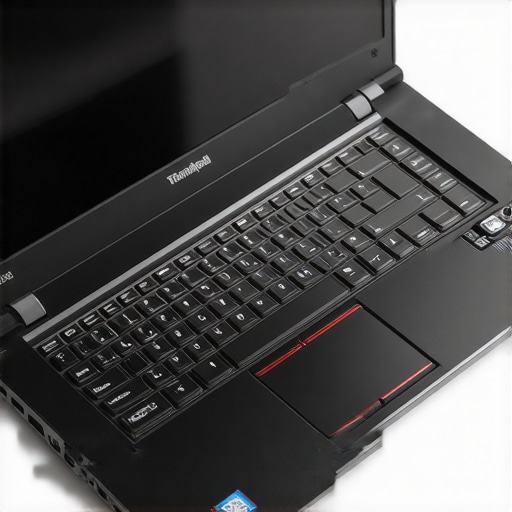
Start by determining your specific needs—whether for student work, business tasks, or light gaming—and choose a ThinkPad model that fits those criteria. For example, the T series offers durability and performance, while the L series provides excellent value. I once sifted through hundreds of listings, comparing specs and reviews, until I found a T440s with a solid keyboard and a clean battery that hadn’t been soldered shut.
Evaluate Hardware Compatibility and Upgradability
Next, check if the model allows upgrades like RAM and SSD replacements. Unlike many modern laptops with soldered components, ThinkPads often have accessible panels, making future enhancements straightforward and cost-effective. I remember ordering a model with 8GB RAM, then upgrading it myself using a compatible DDR3 module I bought online, saving hundreds over a new machine.
Source From Trusted Refurbish Vendors
Buying from reputable refurbish programs guarantees your laptop has undergone thorough testing and certification. Reputable sellers often provide warranty and detailed diagnostics reports. I once purchased from a certified refurbisher, and when the Wi-Fi card failed after a year, their support team shipped a replacement free of charge, demonstrating the value of trusting established sources contact us.
Inspect and Test Before Finalizing
Always verify the physical condition—look for screen scratches, hinge tightness, and keyboard wear—and run stress tests to check performance and thermal behavior. Resist the temptation to skip this step; I once bought a seemingly perfect ThinkPad, only to discover it ran hot and throttled during prolonged use. Testing saved me from a costly return and disappointment.
Optimize Settings for Longevity
Post-purchase, tweak BIOS settings to disable unnecessary hardware, update drivers, and enable power-saving modes. For instance, disabling Intel SpeedStep can improve stability, but it may reduce battery life. I experimented with these settings during a long coding session, noticing a significant decrease in fan noise and heat, which prolonged my device’s lifespan.
Integrate Essential Accessories
Complement your refurbished ThinkPad with reliable accessories: a high-quality mouse, an external monitor, and a Gan charger for fast, safe charging. Proper accessories not only enhance productivity but also reduce wear on the laptop itself. When I upgraded my setup with a durable USB-C charger, I appreciated its rapid charging and reduced heat, making long work sessions more comfortable and affordable.
When it comes to selecting accessories or hunting for laptop deals, many enthusiasts fall prey to common misconceptions that can cost them time and money. One widespread myth is believing that all laptop chargers are interchangeable, but in reality, using proprietary or incompatible chargers—especially with gaming laptops—can damage your device or reduce its lifespan. For instance, some gaming laptops come with unique power bricks that shouldn’t be replaced with generic ones, leading to potential overheating or charging issues.
Why Do Advanced Users Still Fall for Basic Mistakes in Laptop Upgrades?
Many assume that upgrading RAM or SSDs is a straightforward process, but overlooking compatibility or the limitations of soldered components can cause frustration. An advanced nuance is understanding the importance of matching RAM speeds and ensuring BIOS support for upgrades, especially on business laptops. Not doing so can result in underperformance or hardware conflicts, which is a mistake even seasoned users make. According to a TechRepublic article, incompatible upgrades can lead to system instability, emphasizing the need for thorough research beforehand. Another trap often overlooked is targeting too-good-to-be-true deals. While aggressive discounts can seem tempting, they might hide refurbished or damaged units sold as new, risking loss of warranty or hardware reliability. Always sourcing from reputable vendors and verifying warranty details can prevent future headaches. Finally, many are unaware of how accessories like high-refresh-rate monitors or mechanical keyboards can enhance productivity or gaming, but purchasing incompatible or low-quality peripherals nullifies their benefits. For example, a 144Hz gaming monitor isn’t useful if your laptop’s GPU can’t output high frame rates, wasting your investment. Take the time to research compatibility—if you’re considering an upgrade, check out the latest top laptop deals in 2025 to ensure optimal value. Have you ever fallen into this trap? Let me know in the comments. Remember, the best tech decisions come from understanding these hidden nuances—making informed choices today ensures a smoother experience tomorrow.
Prioritize Quality Cleaning Tools to Maintain Performance
Regular cleaning is essential to prevent dust buildup that can cause overheating and thermal throttling. I recommend investing in a finely compressed air canister, such as the best cooling pads, which often come with integrated dust blowers. Just a quick burst into the vents once a month keeps things running cool. Additionally, a soft microfiber cloth is invaluable for wiping down surfaces, avoiding scratches while removing grime and fingerprints—crucial for maintaining a professional appearance, especially for business laptops.
Use Diagnostic Software for Proactive Maintenance
Monitoring your laptop’s health with tools like CrystalDiskInfo or HWMonitor helps identify early signs of hardware stress or impending failure. Personally, I run these diagnostics quarterly, paying attention to aging SSDs or overheating temps. For example, checking your SSD’s SMART data can warn you to back up before a catastrophic failure. Keeping firmware and driver updates current via manufacturer utilities ensures compatibility and minimizes system crashes. This proactive approach saves significant downtime and costly repairs in the future.
Optimize Settings to Extend Longevity and Performance
Adjusting BIOS and power management settings can dramatically improve your laptop’s lifespan. For instance, disabling unnecessary hardware like Bluetooth or Wi-Fi in BIOS during prolonged desktop usage reduces power draw, which is especially helpful on student laptops where battery life is critical. Enabling the ‘Battery Preservation Mode’ feature (if available) can extend battery cycles, as outlined in this article. Research published by hardware experts indicates that managing thermal profiles and undervolting CPUs via specialized software can also prevent thermal stress, ensuring your device stays reliable longer.
Invest in a Reputable Maintenance Kit
Having a dedicated toolkit from brands like iFixit or KitLogic makes repairs easier and more precise. I keep a kit with precision screwdrivers, anti-static wristbands, and quality thermal paste — crucial for replacing thermal pads or re-pasting the CPU, which can restore thermal performance significantly. For example, swapping out old thermal paste with a high-quality compound like Arctic MX-4 decreases CPU temps by up to 10°C, according to thermal management tests. Regular maintenance with these tools not only repairs but also prevents future issues, especially for fans and heat sinks that gather stubborn dust or degrade over time.
Predicting Trends: Automation and Remote Monitoring
Looking forward, AI-powered diagnostic tools and IoT integration will automate routine maintenance checks, making personal upkeep even more accessible. Imagine a lightweight app that analyzes your laptop’s telemetry and proactively warns you of potential hardware failures before they happen, much like some enterprise solutions already do. Embracing these innovations now can make your device more resilient, reducing downtime and repair costs in the future. So why not start by installing a comprehensive monitoring tool today? It’s a simple step that can save you from costly surprises, keeping your laptop in peak condition for years to come.
If you want to see how proactive maintenance can extend your device’s lifespan, try adjusting your thermal profiles and cleaning your vents with a good compressed air can. Regular care isn’t just about immediate fixes; it’s the key to long-term performance and reliability. For tailored advice or high-quality tools, contact us anytime through our contact page.
What I Wish I Knew About Laptop Accessories and Upgrades
The biggest lesson I learned was the importance of investing in quality accessories and understanding compatibility. Cheap chargers might save money upfront, but they can damage your device over time. Always opt for reputable brands like GAN chargers to ensure safety and longevity. Also, neglecting to double-check your RAM compatibility can lead to performance bottlenecks. Take your time, research thoroughly, and avoid shortcuts that seem tempting when browsing deals. These small but crucial insights keep your laptop running smoothly for years.
Tools and Resources That Changed My Approach
Having the right tools makes all the difference. I rely on the iFixit toolkit for repairs, which includes precision screwdrivers and anti-static wristbands, and CrystalDiskInfo to monitor my SSD health. For learning about upgradability and maintenance, trusted sites like Laptop Buyers Club offer invaluable advice. These resources have empowered me to keep my devices performing at their best without costly professional repairs.
Seize the Moment and Keep Improving Your Setup
The journey to a reliable, high-performance laptop setup is ongoing. Embrace small upgrades, stay informed about tech trends, and prioritize quality over cost. Remember, the key to longevity isn’t just choosing the right machine but maintaining it with care and knowledge. Whether you’re juggling student work, business tasks, or gaming adventures, every tweak can make a significant difference. Don’t wait for issues to arise—act now, learn continuously, and enjoy the peace of mind that comes with a well-maintained device. What’s your next upgrade going to be? Share your plans below and let’s grow together in the quest for the perfect laptop setup.
,