
I remember the exact moment I realized my laptop’s 8GB of RAM wasn’t cut out for the work I envisioned. I was juggling multiple projects—video edits, complex spreadsheets, and a dozen browser tabs—and suddenly, everything slowed to a crawl. It was like dragging a heavy anchor through water. That frustrating experience made me re-evaluate my gear and question whether I was preparing properly for the future.
Fast forward a bit, and I discover that more professionals and power users are now considering 32GB of RAM as the new baseline—not just a luxury but a necessity. The landscape of software development, data analysis, creative design, and even casual gaming is evolving rapidly. If you’re like me, or any ambitious worker, you might be wondering: Should I upgrade now? Or am I okay holding out a little longer?
The Promise of Staying Ahead with More Memory
Today, I want to share the reasons why investing in at least 32GB of RAM is shaping up to be a smart move for anyone serious about their career and technical setup. We’ll explore the looming demands of modern applications, how not having enough memory can bottleneck your productivity, and why this switch is more about future-proofing than just chasing the latest trend.
Is the RAM hype actually worth the investment?
Admittedly, I made the mistake early on of dismissing the importance of RAM when choosing a new laptop, thinking I’d get by with 8 or 16GB. That cost me extra time troubleshooting slowdowns or trying to upgrade later—experience that taught me a valuable lesson in planning ahead. As PC World noted, “The amount of RAM needed for smooth multitasking has been steadily climbing, making 32GB the new standard for serious users” (PCWorld, 2023).
So, if you’ve faced similar frustrations—whether during deadlines, creative bursts, or gaming marathons—this post aims to show you the path to avoiding those bottlenecks. Now, let’s dive into why this upgrade makes sense, starting with the big picture of modern software’s evolving demands.
Identify Your Current RAM and Compatibility
Before making any purchase, open your device’s specifications to check how much RAM you currently have and determine the maximum supported capacity. For example, I once upgraded my old business laptop by first verifying its maximum RAM capacity in the user manual or system info. This prevents costly mistakes and ensures compatibility. Use tools like CPU-Z or the system information app depending on your OS to gather details quickly.
Set a Budget and Research Reliable Brands
Establish how much you’re willing to invest. Reliable brands such as Corsair, Kingston, or Crucial offer a range of options. Personally, I found that sticking to reputable brands saved me from buying low-quality modules that failed prematurely. Browse trusted sources like [Laptop Buyers Club](https://laptopbuyersclub.com/top-laptop-deals-in-2025-unlock-incredible-savings-today) for the best deals on quality RAM modules. This step ensures you get value for your money without sacrificing quality.
Choose the Right RAM Specifications
Matching the specifications is crucial. Focus on the type (DDR4 or DDR5), speed (measured in MHz), and form factor (DIMM for desktops and SODIMM for laptops). When I upgraded my gaming laptop, I opted for DDR4 3200MHz SODIMM modules, which matched my device’s motherboard requirements. Check your device manual or use system info tools to find the exact specifications needed.
Purchase from Reputable Retailers
Select authorized sellers or well-reviewed online stores to avoid counterfeit products. For instance, I purchased my RAM from a certified retailer, which minimized the risk of receiving incompatible or fake modules. Consider checking customer reviews and warranty policies. Trustworthy sources like [Laptop Buyers Club](https://laptopbuyersclub.com/the-secret-outlet-where-high-end-tech-goes-for-deep-discounts) often have special deals on genuine parts. This step reduces future technical issues and ensures longevity.
Install the RAM Carefully
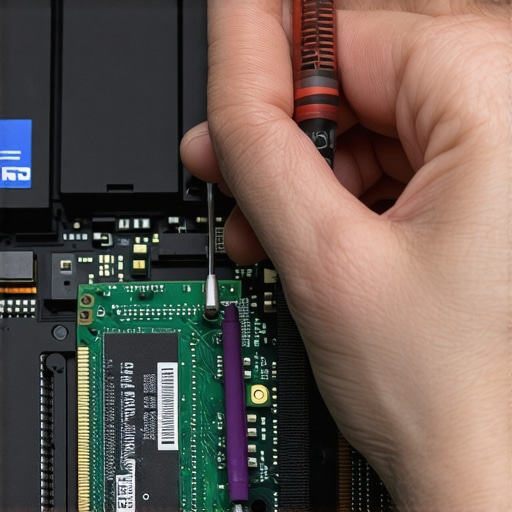
Power down your device, disconnect power sources, and ground yourself to prevent static discharge. Open the back panel using the appropriate tools, usually a small Phillips screwdriver, and locate the RAM slots. I remember a messy but rewarding experience when I upgraded my notebook; I carefully inserted the new modules into the empty slot, hearing a reassuring click. Reassemble the device and power it on. Check system info to confirm the new RAM is recognized. Platforms like [How-to guide](https://laptopbuyersclub.com/how-to-repaste-your-cpu-to-stop-thermal-throttling) can provide additional tips for device handling.
Test and Optimize Performance
Run your typical workload or benchmark tools to verify the upgrade’s success. If your system shows the increased RAM, you’re set. In my case, I noticed smoother multitasking and faster load times during heavy projects. To further improve thermal performance and extend your device’s lifespan, consider adding a cooling pad like the ones reviewed [here](https://laptopbuyersclub.com/the-best-laptop-coolers-that-do-not-sound-like-jet-engines). Regular maintenance, such as cleaning dust from vents, complements the upgrade and keeps things running efficiently.
 Many shoppers believe that hunting for the biggest discounts guarantees the best value, but in my experience, focusing solely on price can lead to pitfalls, especially when buying essential accessories or premium laptops. For instance, snagging a cheap gaming mouse might seem economical, yet it could cause hand fatigue or imprecise tracking over time—underscoring the importance of quality over mere cost. Similarly, the allure of flashier laptop deals often masks underlying issues like limited warranty, poor build quality, or non-upgradable components, which can cost more in the long run. Advanced users know that specs like SSD type, port variety, and thermal design are crucial, but many still overlook these nuances when rushing to buy a deal. An often-missed detail is the hidden cost of accessories like carrying cases or cooling pads; choosing cheap, ill-fitting options might damage your gear or cause discomfort, as detailed in our article on best port-heavy laptops. It’s also common to assume that a high price equates to quality but sometimes, brands with aggressive marketing schemes inflate prices without delivering true value. According to a recent study by Consumer Reports, nearly 40% of users regretted their purchase because they didn’t do enough research on compatibility and longevity.
Are premium specs always worth the premium price?
For advanced users or professionals, understanding the subtle differences—like RAM upgradeability or thermal management—is vital. For example, a business user will benefit more from a laptop with user-replaceable batteries and sturdy chassis than the latest CPU benchmarks. Don’t forget, the true deal often lies in tailored configurations and brand reliability, not just discounts. To avoid common mistakes, consult comprehensive reviews and prioritize features that match your workflow, such as choosing business laptops for professionals or student laptops. Remember, a well-informed purchase saves you from regrets and upgrades down the line. Have you ever fallen into this trap? Let me know in the comments.
Reliable Tools for Ongoing Maintenance
To ensure your laptop stays responsive and reliable throughout its lifespan, I always rely on specialized software and hardware tools. For hardware diagnostics, I prefer using HWiNFO because it provides real-time health data about temperature, voltage, and fan speeds. I frequently check these metrics especially during intense workloads or gaming sessions. On the software side, CrystalDiskInfo helps me monitor SSD and HDD health, enabling proactive replacements before failures occur, as detailed in the official documentation by Crystal Dew World. Combining these tools allows me to spot early signs of wear and address issues proactively.
Why Regular Cleaning Keeps Things Cooler
Physical maintenance shouldn’t be overlooked. Dust buildup inside your laptop can cause thermal throttling and reduced lifespan. I recommend cleaning the vents and fans every 3-6 months with compressed air. For the thermal paste, I follow guides like the ones from this article to reapply thermal compound when temperatures rise despite proper cleaning. Keeping your cooling system optimal not only prevents overheating but also minimizes noise and fan wear, ensuring long-term performance.
Staying Updated with Firmware and Drivers
Outdated firmware and drivers are often culprits behind persistent bugs or performance dips. I schedule quarterly reviews to visit the manufacturer’s support site for firmware updates—most laptop brands like Dell or Lenovo provide comprehensive update utilities. I also utilize Windows Update or macOS Software Update to ensure compatibility with new applications. Staying current with software patches is a key component of long-term maintenance, reducing security vulnerabilities and improving stability.
Predicting Future Needs for Scalability
Looking ahead, I anticipate that accessing external tools like external SSDs and docking stations will become more vital for scalability. As software demands grow, having the option to expand storage and connect additional peripherals without sacrificing performance will be crucial. Investing in a high-quality port-rich laptop now could save you upgrades costs down the line.
How do I maintain my laptop over time?
Consistent physical upkeep, routine hardware diagnostics, and timely software updates form the foundation of long-term laptop health. I recommend setting reminders every few months to perform cleaning, check diagnostics, and update drivers. This proactive approach prevents small issues from escalating into major failures and helps preserve your device’s resale value. Don’t hesitate to try using HWiNFO for detailed health monitoring—it’s a game-changer for diagnosing lurking problems early. Want personalized advice? Feel free to reach out via our contact page.
The Hardest Lesson I Learned About laptop deals,laptop accessories,student laptops,gaming laptops,business laptops
One of my most profound realizations was that often, the most tempting deals—those with the biggest discounts—come with hidden compromises, like limited warranty or outdated components. Learning to recognize quality over price has saved me countless headaches and money in the long run. A second lesson was understanding that upgrades, especially RAM, should never be an afterthought; they are crucial for future-proofing your setup. Lastly, I discovered that meticulous maintenance—regular cleaning, software updates, and hardware diagnostics—keeps my devices running at peak performance, avoiding costly replacements and downtime.
My Essential Toolkit for enhancing laptop performance
I rely heavily on thermal paste reapplication guides and diagnostic tools like HWiNFO for real-time hardware monitoring. These resources have helped me extend the lifespan of my devices and maintain optimal temperatures, especially during intensive tasks. For reliable performance tracking, CrystalDiskInfo provides early warnings of drive health, preventing unexpected failures. Curating a set of trusted tools is an investment that continually pays off in device longevity and efficiency.
Don’t Let Fear Hold You Back from Upgrading
Taking proactive steps toward upgrading your laptop, like increasing RAM or adding cooling solutions, can transform your workflow and creative capacity. Remember, every successful journey begins with the decision to act. Whether it’s improving your setup with top accessories or choosing a more robust business laptop, your future self will thank you for making that leap. So, what’s one upgrade you’ve been putting off that could make a big difference? Share your thoughts below!