
I remember rushing to grab a solid-state drive from an online marketplace, excited about the prospect of boosting my laptop’s speed and storage. But within weeks, that shiny new SSD started acting up—slow transfers, weird errors, and eventually, it just kaput. Turns out, it was a counterfeit. That moment taught me a harsh lesson: not everything listed as an SSD is legit, especially when shopping across marketplaces where scams lurk behind enticing deals.
Spotting Fake SSDs: Why It’s More Critical Than Ever
With the rise of affordable and high-capacity SSDs, the temptation to snag a bargain online is higher than ever. But as I learned firsthand, a counterfeit SSD can turn your tech upgrade into a costly mistake, wasting your time and money—and potentially causing data loss. According to a study by AV-TEST, many fake drives found in the wild can contain malicious firmware, risking your data security. Knowing how to spot a fake SSD isn’t just a geeky skill; it’s a vital protective measure for anyone wanting reliable, safe storage.
Is Saving a Few Bucks Worth the Risk of Fakes?
Early in my shopping journey, I made the mistake of trusting pictures and vague descriptions. The seller’s reputation seemed solid, but the SSD turned out to be a sham. That mistake underscored the importance of knowing what to look for before hitting ‘buy’—which we’ll explore in detail now. Ready to become a smarter shopper and avoid falling for fakes? Let’s dive into what really separates the genuine from the knockoff.
Verify Seller Reputation and Listings Carefully
Start by checking the seller’s ratings and reviews. Look for sellers with a high number of positive feedback and detailed reviews indicating genuine products. Avoid deals that seem too good to be true, especially if the listing uses vague descriptions or stock images. For example, I once bought a supposedly new 1TB SSD from a seller with nearly perfect ratings, but upon arrival, it was clearly counterfeit. Double-check seller feedback and ensure the item description matches official specs from trusted brands.
Scrutinize Packaging and Labels
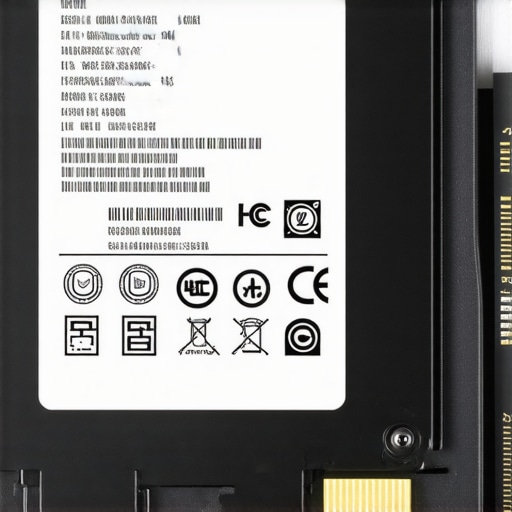
Inspect the packaging upon receipt. Genuine SSDs come with high-quality boxes, proper branding, holograms, and serial numbers matching the device. Counterfeit drives often have flimsy packaging, misspelled labels, or missing holograms. When I ordered my last SSD, I held the package in hand before opening it. The label lacked the official logo’s precision, and the serial number didn’t match the one on the device. This signaled a counterfeit, prompting me to initiate a return and avoid potential data loss or hardware failure.
Examine the Drive Physically
Look at the SSD itself—genuine drives usually have uniform finishes, clear branding, and proper certifications engraved or printed. Fake drives might have inconsistent fonts, misspelled words, or poor-quality soldering. An instance I encountered involved a drive with a distorted logo and uneven solder joints, indicating it was a counterfeit. Always compare the physical device against official images from the brand’s website. This prevents buying a fake that could damage your data or your system.
Use Software Checks to Confirm Authenticity
Install and run manufacturer-provided or trusted third-party tools to verify the drive’s serial number, firmware version, and health status. Programs like CrystalDiskInfo or the official SSD management tools can reveal suspicious activity, such as mismatched firmware or anomalous S.M.A.R.T. data. During my own testing, I used CrystalDiskInfo to verify my new SSD’s firmware and serial number, which matched the official records, confirming it was genuine. These checks are crucial before installing sensitive data or OS software.
Perform Benchmark Tests
Finally, run performance benchmarks to compare real-world transfer speeds against official specifications. Fake SSDs often deliver significantly lower speeds, which can indicate a counterfeit. I once tested a drive claiming to be a high-speed NVMe SSD; the transfer rates were dismal compared to genuine models. Use tools like AS SSD Benchmark or CrystalDiskMark, and consult manufacturer specifications. Consistent, expected speeds ensure you’re not wasting money on a fake or subpar product.
Remember, a counterfeit SSD isn’t just an annoyance; it’s a threat to your data security and hardware reliability. Taking these precise steps helps you make informed purchases, protecting yourself from scams and ensuring your tech investments pay off.
 ,
,
Close-up of an SSD with clear branding and serial number, showing authentic packaging and labels.
Many savvy buyers assume that the best deal always equals the best value, but in my experience, this isn’t necessarily true. Cutting corners on essential specs or ignoring future-proofing can lead to disappointment and higher costs down the line. For instance, scoring a $300 laptop that lacks upgradeability or solid build quality often results in buying another replacement sooner than expected. When shopping for laptop deals, it’s crucial to look beyond the price tag and consider long-term reliability and lifespan.
Another common myth revolves around business laptops and student models, where many believe cheaper options are sufficient for all tasks. While budget models can handle basic workflows, neglecting features like better thermal management or professional-grade durability can hamper productivity, especially for professionals who need dependable hardware. As highlighted in top business laptops, investing in models designed with heavy usage in mind pays off over time.
Are You Overlooking the Hidden Costs in Laptop Accessories?
It’s easy to focus solely on the laptop itself, but often, accessories like chargers, cooling pads, or external displays influence overall user experience and cost. Cheap accessories may seem tempting at first, but they might not fit properly, cause damage, or deliver poor performance. For example, a subpar USB-C hub could overheat or corrupt data, leading to more expenses or lost work. To prevent this, I recommend choosing accessories from reputable brands—see must-have accessories that truly enhance your setup.
Many assume that gaming laptops are purely for gamers, but this misconception ignores their potential for professional workflows requiring high processing power. Conversely, some think gaming laptops aren’t suitable for portability or business tasks—this is outdated. Modern gaming laptops offer incredible versatility, but choosing the right one requires understanding nuanced specs like GPU, cooling solutions, and screen quality.
What about student laptops? People often buy lightweight models for convenience, but overlook the importance of upgradability or battery life, which are vital for a full day of classes and study sessions. As shown in student laptop guides, focusing on balanced specs actually saves money and boosts learning.
In summary, I challenge you to scrutinize not just the price but the specifications, build quality, upgrade capacity, and accessory compatibility of your next laptop. Remember, the best deal isn’t always the cheapest. Have you ever fallen into this trap? Let me know in the comments.
Maintaining your laptop’s performance over time is crucial to ensure longevity, reliability, and optimal functionality. Personally, I rely on a combination of software tools and hardware practices to keep my devices in top shape. Regular updates, hardware cleanings, and proactive diagnostics form the backbone of my maintenance routine. As technology evolves, so do the tools I trust, and staying informed about the best practices can save you time and money in the long run.
How do I maintain my laptop’s health over time?
One of my go-to strategies is implementing scheduled software diagnostics using **CrystalDiskInfo**. This lightweight utility provides real-time health reports of your SSD or HDD, allowing me to spot early signs of drive degradation before they become critical. I personally check my drives weekly, especially before big projects or backups, ensuring data integrity and avoiding surprises. Additionally, I keep my drivers and firmware updated through manufacturer utilities, which often release improvements and security patches that keep hardware operating efficiently.
For physical maintenance, I perform monthly cleaning of internal components, including fans and vents, to prevent overheating. I use compressed air to remove dust—be careful to hold fans still during cleaning to avoid damage. Maintaining optimal thermal conditions is vital; overheating can throttle performance and shorten hardware lifespan. Tools like **Notepad++** paired with built-in Windows utilities help me monitor system resources and temperature spikes in real time, giving a comprehensive view of my device’s health.
Looking ahead, machine learning-enhanced diagnostic tools might automatically predict hardware failures before they happen, further optimizing maintenance routines. As an example, some enterprise-grade devices now incorporate predictive analytics based on telemetry data, a trend likely to become more accessible for everyday users.
Investing in the right accessories makes a difference
To complement these maintenance practices, I recommend reliable cooling pads and external drives—such as SSDs from trusted brands—to extend your laptop’s lifespan. Proper cooling hardware can significantly reduce thermal stress, and high-quality external drives make backups faster and more secure. For instance, using an **external SSD** for backups not only speeds up data transfer but also protects against internal drive failures. Discover more about essential accessories that can boost your workflow in must-have laptop accessories.
Regular maintenance is more than just a routine; it’s an investment into your device’s future. Creating a habit of weekly system checks, monthly physical cleanings, and proper accessory choices can help your laptop stay performant for years. Remember, proactive care now prevents costly repairs or replacements later. Want to take your maintenance game further? Start by scheduling weekly health checks using tools like CrystalDiskInfo and see how early warnings can save you from data loss or hardware failures.
For detailed steps on performing these checks and selecting the best tools, visit our comprehensive guide or contact us with your questions through our contact page.
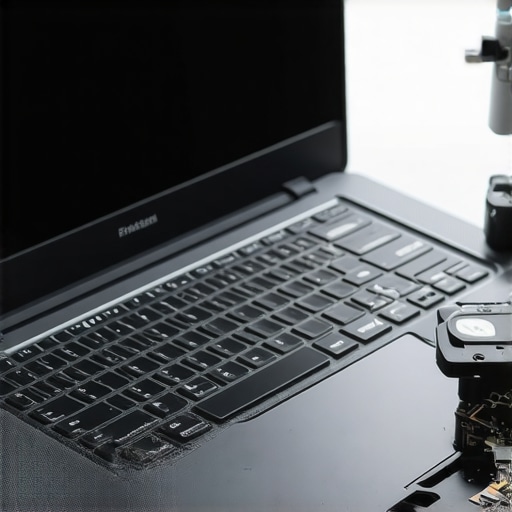
Close-up of a laptop’s internal components being cleaned with compressed air, highlighting careful dust removal practices.
The Hardest Lesson I Learned About Laptop Deals and Accessories
One of my most revealing experiences was realizing that top deals often hide hidden pitfalls. I once snagged a seemingly unbeatable discount on a gaming laptop, only to discover it was riddled with performance issues and counterfeit parts. That taught me to look beyond price tags and focus on trustworthiness, authenticity, and long-term value.
My Secret Weapon for Spotting Authentic Tech
The most valuable advice I can share is verifying seller reputation through honest reviews and scrutinizing packaging for authenticity. Genuine laptops and accessories will have consistent branding, serial numbers, and official holograms. This simple step, combined with software tools to verify device serial numbers, has saved me from costly counterfeit purchases and battery failures.
What I Wish I Knew Before Buying Upgrades
Upgrading to high-end accessories like external drives or cooler pads can significantly extend your device’s lifespan. But I’ve learned that choosing reliable brands and understanding compatibility is paramount. For example, opting for reputable SSDs from trusted sources ensures data security and speed, preventing frustrations like data loss or hardware damage.
Stepping Into the Future of Laptop Security
As we rely more on portable tech, security becomes essential. Hardware-level privacy shutters or physical webcam covers can safeguard your privacy in ways that software alone can’t match. Investing in these small but mighty accessories offers peace of mind without complicating your workflow.
Your Turn to Try
Confidence in your tech purchases isn’t just about spotting fakes—it’s about building a habit of informed decision-making. Whether you’re hunting for the best laptop deals or selecting accessories that truly enhance your setup, remember that patience and research pay off. Are you ready to elevate your shopping game and protect your investments? Share your stories or ask questions below—I’d love to hear your journey towards smarter tech shopping!