
It was the worst moment—my laptop’s keys felt sticky, grimy, and almost impossible to type on. I had just bought a new gaming notebook, excited to dive into the latest releases, only to be stopped dead in my tracks by a messy keyboard that refused to cooperate. Sound familiar? That sudden realization that your trusty laptop is turning into a miniature dirt trap? You’re not alone. Many of us have faced the frustration of a clogged, grimy keyboard that hampers productivity or gaming performance. The challenge is clear: how can you clean your laptop’s keyboard thoroughly without risking damage to the delicate switches and circuitry underneath?
The Balancing Act: Clean Without Causing Harm
Cleaning a laptop keyboard might seem straightforward—just wipe it down, right? But here’s the catch: using harsh chemicals or too much moisture can actually harm the switches, leading to sticky keys or worse. Early in my own journey, I made the mistake of spraying cleaning fluids directly onto the keys, which caused internal corrosion and a handful of unresponsive keys. Trust me, that was a costly lesson. Now, after some trial, error, and research, I’ve perfected a safe, effective approach that keeps your keyboard spotless without risking any damage. Today, I’ll share that routine with you, so you can restore your keyboard’s hygiene and functionality—safely.
Is Scrubbing Your Keyboard Worth the Risk?
A lot of folks think they need aggressive scrubbing or industrial-grade cleaners to tackle grime. But the truth is, overdoing it can damage the rubber domes or the switches, especially if they’re mechanical or membrane-based. My early attempts to scrub furiously often left behind more harm than good, and I realized the importance of gentle methods. Recognizing these mistakes has helped me develop a cleaning process that’s both thorough and gentle, and I want you to avoid the same pitfalls.
So, have you ever faced the dilemma of cleaning a grimy keyboard without the fear of breaking switches? If so, stay tuned. The next steps will show you exactly how to tackle this mess efficiently and safely, restoring your keyboard to pristine condition. And if you’re curious about how to upgrade or maintain your laptop’s overall health, check out some of our related guides, like must-have accessories or top student laptops for productivity. Ready to get your hands dirty? Let’s dive into the practical cleaning techniques that really work.
Power Down and Prepare
Start by turning off your laptop and unplugging it from any power source. Remove any external peripherals like USB drives or external keyboards. Carefully flip your laptop upside down and gently shake to dislodge loose debris. Use compressed air (not canned air with moisture) to blow out dust and crumbs from between the keys. Hold the can upright and spray in short bursts, moving in a zigzag pattern across the keyboard. For stubborn debris, use a soft brush or a microfiber cloth to sweep around the keys without applying too much pressure.
Clean Without Water: The Gentle Approach
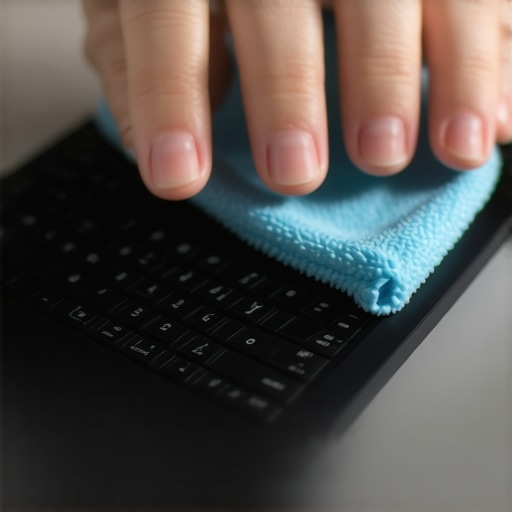
Moisture is the enemy of electronic components; hence, avoid using any liquids directly on the keyboard. Instead, dampen a microfiber cloth with a small amount of isopropyl alcohol (at least 70%) or a 50/50 mixture of water and alcohol. Wring out excess liquid until the cloth is just slightly damp, not wet. Wipe the keys and surrounding areas in a gentle circular motion. This method effectively removes grime and kills germs without risking damage. I learned this lesson after a botched attempt with a spray disinfectant, which led to sticky keys and an expensive repair.
Target Sticky or Dirty Keys
For particularly sticky or stubborn grime, use a cotton swab dipped lightly in isopropyl alcohol. Carefully run the swab around the edges of problematic keys. Avoid saturating the swab to prevent excess liquid from seeping under the keys. If the problem persists, consider removing the affected keys carefully using a small plastic pry tool (check this guide for key removal tips). Once removed, clean the keycap and the area beneath with alcohol and allow them to dry thoroughly before reattaching. This eliminates buildup that causes sticking, restoring smooth keystrokes.
Deep Cleaning Under the Keys
In cases of severe grime, some laptops allow for disassembling the keyboard or even removing it entirely. If yours is accessible, follow detailed guides specific to your model. Use a soft brush or compressed air to clear dust and debris from beneath. Never force anything or use excessive moisture. Regular maintenance like this prolongs your keyboard’s lifespan and prevents keys from failing unexpectedly.
Prevent Future Messes
To minimize grime accumulation, consider investing in a silicone keyboard cover — available at this resource. These thin, transparent sheets block out dust, crumbs, and liquids while still feeling like a normal keyboard. When eating or drinking near your laptop, use the cover or keep food at a distance. Additionally, regular cleaning routines—such as weekly dusting and monthly wipe-downs—help maintain hygiene and performance over time.
 Many consumers believe that hunting for the biggest discounts guarantees the best laptop purchase, but this often leads to overlooked nuances. In my experience, most people get this wrong by focusing solely on price rather than the value or long-term performance of their device. For instance, a bargain-basement deal on a laptop may seem attractive, but it might lack crucial features like ample RAM or upgradable components, which are essential for students and professionals alike. The key is to scrutinize the specifications and consider future-proofing rather than just initial savings.
A common myth is that newer models always mean better deals. However, in reality, previous generation laptops often offer reliable performance at a significantly lower price, especially if you know where to look. Sites like these deal aggregators can help you identify such opportunities. But beware of aggressive marketing tactics that inflate prices before discounts—always compare the actual value.
When it comes to student laptops, many assume that buying the latest tech ensures efficiency. Yet, a slim, ultraportable Chromebook tailored for basic tasks might be more suitable and cost-effective than a high-end gaming notebook that’s overkill for coursework. For a balanced choice, explore options listed in this guide. Similarly, for gaming laptops, many gamers believe that the most RGB-lit, high-refresh-rate models are the only way to go. But in practice, optimized cooling and a strong GPU are more critical for performance—and some models with fewer flashy features outperform their gaudy counterparts in real-world gaming.
Now, a crucial hidden nuance many overlook involves laptop accessories. The right accessories can improve both performance and longevity. For instance, investing in a quality cooling pad or an ergonomic keyboard can significantly enhance your experience. Conversely, overpaying for unnecessary gadgets can drain your budget without much benefit. I recommend checking out must-have accessories that truly add value.
But here’s the most overlooked aspect: how you evaluate deals and devices aligns with your actual needs. Don’t get swept up in trends or the shiny allure of high specs. Instead, focus on compatibility, durability, and upgradeability. For example, many assume that soldered RAM or storage are permanent limitations, but some brands still offer models with user-upgradeable parts, which can extend the lifespan and save you money in the long run. To avoid pitfalls, consider reading reviews on used hardware and upgrading options.
Have you ever fallen into this trap of chasing shiny specs or deep discounts without assessing real utility? Let me know in the comments. Remember, a wise investment considers more than just the sticker price—it’s about long-term satisfaction and functionality.Maintaining your laptop’s performance over time requires a combination of the right tools, software, and habits. Personally, I rely on specific cleaning accessories like a precision brush set and compressed air cans to keep dust out of vents and keyboard crevices. These tools allow me to perform quick yet thorough cleanings without risking damage. For software maintenance, I exclusively use lightweight system optimizers such as CCleaner to remove junk files and ManageEngine’s Endpoint Central for remote management of multiple devices, ensuring updates and security patches stay current. I also schedule regular BIOS updates directly from the manufacturer’s website to fix bugs and improve hardware compatibility.
For physical upgrades, I prefer SSDs over traditional HDDs because they significantly speed up boot times and software launches. When selecting an external drive, I opt for NVMe-based external SSDs like the Samsung T7, which offer fast data transfer speeds essential for students handling large files or content creators working on the go. Upgrading RAM is another effective way to extend your laptop’s longevity, especially if multitasking becomes sluggish. Brands like Crucial provide easy-to-install modules with compatibility guides tailored to specific models.
As for long-term results, establishing a routine of monthly cleanup and hardware checks minimizes the risk of unexpected failures. For software, I use Malwarebytes Premium to prevent malware infections that can slow down or compromise your system, and I ensure all drivers are up-to-date using manufacturer tools or Windows Update. Regularly cleaning your cooling fans with compressed air prevents overheating, which is a common cause of thermal throttling and reduced lifespan.
The future of maintaining laptops seems to emphasize automation and AI-driven diagnostics. For instance, emerging tools are now able to predict hardware failures before they occur, similar to Tesla’s predictive maintenance systems, but for consumer devices. Keep an eye on integrated system health dashboards that alert you to impending issues, allowing proactive interventions rather than reactive repairs.
**How do I maintain my laptop over time?** One highly recommended advanced technique is to recalibrate your battery periodically. This process involves a full discharge followed by a full charge to help your battery’s internal chemistry stay accurate in its capacity reporting. Tools like BatteryBar provide detailed insights into your battery’s health and can guide you through this process.
For a seamless experience, I suggest trying the detailed cleaning routine with a precision brush and compressed air, combined with scheduled software checks and hardware upgrades as needed. These efforts not only extend your device’s lifespan but also ensure consistent performance, whether you’re tackling assignments, gaming, or professional work. If you’d like personalized advice on your current hardware setup, don’t hesitate to contact us through our contact page. Remember, a proactive approach to maintenance saves you time and money in the long run.
Stretching Beyond the Surface: The Hardest Lesson About Laptop Care
One insight that truly transformed my approach was realizing that superficial cleaning often does more harm than good. For instance, I once cleaned my keyboard with harsh chemicals, only to find keys sticking and circuits affected. The lesson: gentle, targeted methods rooted in understanding your device’s anatomy are vital.
The Power of Patience in Upgrades
Upgrading components like RAM or SSDs isn’t just about saving money—it’s about realizing that maintaining hardware health requires patience and careful handling. Rushing can lead to irreversible damage, so I now dedicate time to research and execute upgrades meticulously, prolonging my laptop’s lifespan.
My Essential Toolkit for Laptop Longevity
- Compressed air — to keep dust out of vents and beneath keys, preventing overheating.
- Microfiber cloths and isopropyl alcohol — for safe, effective screen and keyboard cleaning.
- Spare RAM modules and SSDs from trusted brands — for easy upgrades that breathe new life into aging machines.
Your Journey Starts Here — Keep Moving Forward
Your laptop is more than a device; it’s a trusted partner in your daily pursuits. Regular maintenance, mindful upgrades, and using the right tools foster confidence and ensure peak performance over time. Remember, proactive care today saves you headaches tomorrow. If you’re looking to equip yourself with essential accessories, explore options at this guide.