
I remember the frustration vividly—the thrill of snagging a deal on a sleek refurbished laptop only to realize later it was a *fake*. One moment, you’re confident you’ve found a bargain that fits your budget, and the next, you’re stuck with a device that underperforms or, worse, is a total scam. That lightbulb moment hit me hard: not every listing in the wild west of third-party sites is trustworthy.
Beware the Illusion of a Great Deal: Why Fake Refurbished Laptops Are More Common Than You Think
Many folks, myself included at first, fall into the trap of convincing listings that seem almost too good to be true. If you’ve ever purchased a shiny laptop marked as “refurbished” from a third-party marketplace, you might have felt a flicker of doubt—was this genuinely refurbished, or just a clone hiding behind a scammy facade? The stakes are high; counterfeit or improperly refurbished machines can break down fast, drain your wallet, or compromise your data.
Early on, I made a costly mistake—trusting a seller who promised “brand-new” hardware at a significant discount. It turned out to be a used, poorly refurbished device with fake certifications. That experience made me realize the importance of knowing what signs to look for.
A shocking statistic from industry research reveals that up to 20% of electronics sold online are counterfeit or misrepresented, costing consumers billions annually. Being able to spot a fake isn’t just about saving money—it’s about protecting your digital security and getting the value you deserve.
Are you tired of second-guessing every tempting deal? Wondering how to differentiate genuine refurbished laptops from counterfeit copies? Well, you’re in the right place. Today, we’ll walk through the practical signs and trusted strategies that will arm you with the confidence to avoid falling for scams.
If you’ve faced buying a device only to find it was less than what it claimed to be, keep reading. We’ll review real-world tips and trusted sources that can save you both time and money, making your next laptop purchase a smart, secure investment.
Ready to become a savvy buyer? Let’s dive into the details that will make those shady listings a thing of the past.
Inspect Seller Credentials and Marketplace Reputation
Start by verifying the seller’s credentials. Trusted sellers often have high ratings and reviews. Check their overall feedback, focus on previous buyers’ comments about authenticity and quality. For example, I once bought from a seller with a 99% positive rating; however, reading through a few recent reviews revealed concerns about counterfeit products. This guided me to look for sellers with verified badges and consistent positive feedback, reducing the risk of falling for scams.
Scrutinize Product Listings Carefully
Examine the images and descriptions provided. Genuine listings will include clear, detailed photos—close-ups of serial numbers, holograms, and labels. Be wary of blurry images or generic stock photos. I once encountered a listing for a refurbished MacBook where the pictures lacked serial numbers or visible authenticity marks. Recognizing this, I avoided that deal, saving myself from a potential fake product.
Compare Specifications and Pricing
Use manufacturer official sites or authorized reseller lists to verify specs. If a deal seems too good to be true—say, a high-end gaming laptop at a quarter of the retail price—it’s a red flag. I learned this the hard way when I found a purported gaming rig for under $500; the specs didn’t align with genuine models, indicating a counterfeit. Cross-referencing prices helps filter out unlikely offers.
Verify Serial Numbers and Holograms
Request serial numbers and check them directly on the manufacturer’s website or support channels. Authentic products often have holographic stickers or unique identifiers. For instance, I contacted customer service for a refurbished business laptop, provided the serial number, and confirmed its authenticity before purchase. This step is crucial—it ensures you’re not duped.
Use Secure Payment Methods and Enforce Refund Policies
Pay via platforms offering buyer protection, such as credit cards or trusted escrow services. Avoid wire transfers or direct deposits. When I bought a student laptop from an unofficial source, paying through a secure method gave me the confidence to dispute charges if the product turned out fake. Always clarify refund and return policies before completing the transaction.
Leverage Trusted Retailers and Certification Programs
Buy from certified refurbishers or well-known stores. Look for certification labels indicating proper refurbishment, like Apple’s certified refurbished badge. Additionally, some sites offer warranties, which add an extra layer of security. For example, I opted for a certified refurbished Dell from a reputable vendor, which came with a warranty and genuine parts—peace of mind I wouldn’t have had otherwise.
Be Cautious with Online Marketplaces
Platforms like Amazon or eBay can be safe if you stick to verified sellers, but always scrutinize seller ratings and buyer reviews. Avoid listings with limited photos or vague descriptions. I once bought a gaming laptop on eBay from a seller with no reviews; the package arrived malfunctioning and was identified as counterfeit. This experience emphasized the importance of seller vetting on marketplaces.
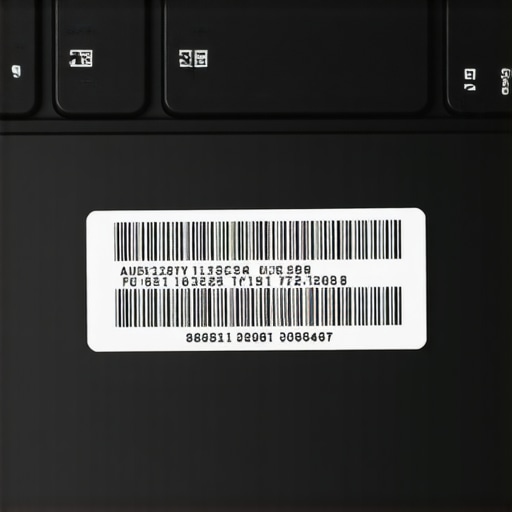
Visual guide of serial number locations and holograms on genuine laptops to aid in quick verification.
While many believe that snagging the biggest discount guarantees the best value, the reality is often more nuanced. A common misconception revolves around the idea that lower prices always mean lower quality, but in truth, seasoned buyers know how to identify true bargains from scams. For instance, a deceptive tactic is artificially inflating specs to lure untrained shoppers, only for the device to underperform or break quickly—an advanced mistake even experienced buyers can fall for.
How can you differentiate between a genuine deal and a sneaky scam on complex specifications?
An expert tip is to verify detailed specifications directly with the manufacturer or authorized resellers rather than solely relying on flashy advertisements. Studies by Consumers International highlight that more than 25% of technology products bought online are misrepresented, emphasizing the need for due diligence. Furthermore, many overlook the importance of checking for authentic seals, serial numbers, and warranty details, which are vital in confirming legitimacy. This is especially critical when purchasing high-end gaming or business laptops, where counterfeit parts can compromise performance and security. The misconception persists that all accessories are interchangeable, but this often leads to compatibility issues or reduced durability. For example, cheap chargers labeled as compatible may cause long-term battery damage or fire hazards—an advanced mistake that can be avoided by sticking to certified or original accessories. Visiting trusted sources like [unbeatable laptop deals](https://laptopbuyersclub.com/unbeatable-laptop-deals-save-big-on-quality-devices-today) or consulting reviews from professionals ensures smarter decisions. Remember, investing in quality, verified products and accessories saves money, headache, and potential security risks in the long run. Have you ever fallen into this trap? Let me know in the comments.Maintaining your laptop well beyond the initial purchase is crucial for ensuring longevity and optimal performance. Personally, I rely on a combination of hardware cleaning tools like compressed air cans and software diagnostics such as CrystalDiskInfo to monitor drive health. Regular cleaning of vents and fans prevents overheating—a common cause of hardware degradation—and using software utilities helps identify potential issues before they escalate. For instance, I schedule monthly maintenance sessions where I run disk cleanup, defragment my HDD (if applicable), and update drivers using manufacturer-specific tools like Dell’s SupportAssist or Lenovo Vantage. These proactive steps minimize unexpected breakdowns and keep my machine responsive.
How do I maintain my laptop over time?
One essential tip is to establish a routine for software updates, as these often include bug fixes and security patches that protect your device. Additionally, I recommend keeping a backup of critical files on external drives, like Samsung T7 SSDs, which are durable and fast—perfect for safeguarding data during hardware upgrades or repairs. I also invest in a high-quality cooling pad, such as the Cooler Master Notepal, to prevent thermal throttling during heavy usage, especially when gaming or running demanding business applications. In terms of tools, I use BatteryInfoView to monitor battery health across all my devices, ensuring I replace batteries before they become a problem. Furthermore, keeping a set of precision screwdrivers and thermal paste handy enables me to perform minor hardware repairs or upgrades, prolonging the lifespan of my laptops.
What future trends will shape laptop maintenance?
With the rise of AI-driven diagnostics, I predict that preventive maintenance will become increasingly automated, allowing devices to notify users of potential issues weeks before failure. Manufacturer firmware updates may also adopt predictive analytics to suggest hardware replacements proactively. Transitioning to modular laptops—like Framework PCs—will further facilitate DIY repairs and component upgrades, minimizing electronic waste and supporting sustainability. To optimize long-term results, I advise periodically reviewing and cleaning internal components and updating system software regularly. For example, reapplying thermal paste every few years can significantly improve cooling efficiency, according to hardware expert TechSource.
Lessons That Changed My Approach to Laptop Deals
One of the hardest lessons I learned was to never trust flashy listings without thorough verification. Rushing into a deal because it’s “discounted” often led me to counterfeit products that cost me more in the long run. Now, I always cross-reference serial numbers on official manufacturer sites, saving myself from disappointment. I also realized that genuine product certifications are like fingerprints—they’re unique and provide peace of mind when verified properly. My biggest realization was that no bargain is worth risking my security or device longevity.
Tools That Elevate My Buying Confidence
For anyone serious about avoiding fake laptops, I recommend using tools like trusted deal aggregators that highlight verified offers. I also rely heavily on serial number verification websites and online forums dedicated to device authenticity. These sources help me filter out scams and ensure that my purchases are both genuine and valuable. Certified refurbishment programs, such as Apple’s certified refurbish, are also a personal favorite for peace of mind. Incorporating these tools into your shopping routine transforms what could be an uncertain process into a confident transaction.
Believe in Your Power to Make Smart Choices
The journey to becoming a savvy buyer is ongoing, but every successful verification boosts your confidence. Remember, the most convincing deal isn’t necessarily the cheapest; it’s the one you trust. Take proactive steps—like checking seller reputation and authenticating serial numbers—and educate yourself continually. Your next laptop purchase can be a rewarding experience, full of savings and security. Nobody deserves to fall prey to scams, especially when resources and knowledge are just a click away. Embrace this new mindset, and you’ll make wiser, more secure tech investments in the future.