
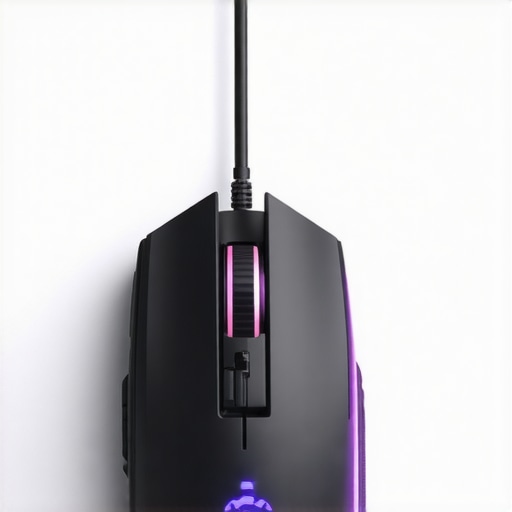
I’ll never forget the moment I realized my gaming setup was shouting, “I’m a spaceship!” every time I opened my drawer. It was a sleek, black mouse with glowing accents—sure—but it looked like it belonged in a sci-fi movie, not my cluttered desk. Not exactly what I wanted when aiming for a more mature, understated aesthetic. That lightbulb moment kicked off my quest for gaming mice that blend style and function without screaming for attention.
Why Your Mouse Matters More Than You Think
Here’s the thing: a gaming mouse isn’t just about flashy RGB lighting or high DPI; it’s about comfort, accuracy, and fitting seamlessly into your setup. When I first started, I was lured by all the bells and whistles, only to find that those bulky, spaceship-like designs often didn’t suit my hand or my style. Over time, I realized that a mouse’s appearance can influence your focus, especially if you’re gaming late into the night or juggling work and play from the same desk.
Ever Felt That Your Gear Isn’t Matching Your Style?
Trust me, I made the mistake early on of choosing a mouse based solely on specs without considering aesthetics. It was a flashy, over-the-top design that looked impressive online but felt awkward in my hand after an hour. A quick search revealed I wasn’t alone—many gamers crave equipment that works well and looks the part. Modern manufacturers now understand this, offering sleek, minimalist mice that suit professional, casual, or even minimalist setups. Want to learn how to find the perfect match? Keep reading.
If you’re tired of unintentionally making your setup look like a spaceship docking station, you’re in the right place. I’ll guide you through finding the best gaming mice that are both stylish and practical, so you can game comfortably without sacrificing your aesthetic. Ready to ditch the space theme and discover some real winners? Let’s dive in!
Identify Your Needs and Style
Start by assessing your gaming habits and aesthetic preferences. Do you prefer a minimalist look or a bold, RGB-lit design? Think about your grip style—palm, claw, or fingertip—and choose a mouse that supports your hand naturally. During a casual shopping trip, I tried out several mice in-store, noting how each felt in my hand and whether their design matched my workspace’s aesthetic. This hands-on approach saved me from future frustrations.
Select the Right Sensitivity and Features
Next, focus on core functionalities. Decide on DPI range, switching buttons, and customizable settings. For instance, I opted for a mouse with adjustable DPI and programmable buttons that could handle both gaming and productivity tasks. Remember, a mouse with too many buttons may look flashy but could be distracting. Test different models by connecting them to your setup, ensuring responsiveness and comfort. This step prevents buyers’ remorse and helps you find a model that suits your needs without overkill.
Prioritize Compatibility and Build Quality
Ensure your chosen mouse is compatible with your operating system and has a sturdy build. Check reviews for reports on durability and button responsiveness. I once purchased a mouse that looked sleek but developed dead buttons after a month. To avoid this, I looked for reputable brands known for quality and warranty support. Additionally, consider weight adjustments if you prefer a heavier or lighter feel—many mice now offer customizable weights for personalized comfort.
Compare Aesthetic Options and Price
Once functionality is settled, compare aesthetic options. Manufacturers like Razer, Logitech, and Corsair offer minimalist designs that blend seamlessly into professional setups. Use online reviews and unboxing videos to gauge real-world look and feel. During my search, I found a sleek matte black mouse that matched my desk perfectly, costing less than flashier options. Balance your budget with features to avoid overspending on unnecessary extras.
Make Your Purchase and Customize
Finally, buy from trusted retailers, preferably with return policies in case the mouse doesn’t meet expectations. Once at home, optimize your settings—adjust DPI, assign buttons, and calibrate for precision. I customized my mouse’s DPI per game genre, which improved my accuracy remarkably. For additional comfort, consider upgrading your setup with complementary laptop accessories like ergonomic mousepads or cable organizers to create an environment that boosts both style and performance.
 Many professionals and students alike fall prey to misconceptions about laptops, often leading to costly mistakes. Let’s dig deeper into some nuanced truths that often go unnoticed. Contrary to popular belief, higher specs don’t always equate to better performance—especially if the components are not well-suited to your specific needs. For instance, upgrading to the latest processor might seem wise, but if you work with software that favors GPU power or memory bandwidth, that CPU boost may be negligible. Experts suggest focusing on balanced configurations tailored to your workflows, as advised in detailed reviews like those in [top business laptops for 2025](https://laptopbuyersclub.com/top-business-laptops-for-productivity-in-2025-expert-recommendations).!
Another common myth is that expensive laptops are inherently more durable. While build quality is crucial, many mid-range models now use premium materials and undergo rigorous testing, making them as reliable as their pricier counterparts. It’s a trap to assume that price correlates directly with longevity; instead, research the specific model’s durability ratings and user feedback.
Be cautious of the notion that all laptop deals are equally good. The truth is, many discounts lure buyers into purchasing outdated or under-spec devices at seemingly bargain prices. Always verify if the deal includes current generation hardware and warranty support. For savings on high-quality devices, check out [unbeatable laptop deals](https://laptopbuyersclub.com/unbeatable-laptop-deals-save-big-on-quality-devices-today) to ensure you’re not compromising on longevity or performance.
When it comes to student laptops, the misconception is that cheaper is always better. However, selecting a budget device that struggles with multitasking or lacks essential ports can hamper learning and productivity. The right choice balances affordability with features that support diverse tasks, like those highlighted in [student laptops that boost productivity](https://laptopbuyersclub.com/student-laptops-that-boost-productivity-and-learning).
Finally, many overlook the importance of accessories in optimizing their setup. Good-quality laptop accessories, like ergonomic stands or external keyboards, can enhance comfort and extend device lifespan. Check out [must-have accessories](https://laptopbuyersclub.com/must-have-laptop-accessories-for-a-seamless-setup) to fractionalize your investment into both the device and its peripherals.
Have you ever fallen into this trap? Let me know in the comments. Remember, the key lies in digging beyond surface-level assumptions to make smarter, more informed choices about your tech investments.
Investing in Reliable Maintenance Tools
To keep your business, gaming, or student laptops performing optimally over time, having a set of dependable maintenance tools is crucial. I personally rely on a precision Phillips screwdriver kit for quick internal inspections, especially when upgrading or cleaning components. A magnetic anti-static wrist strap ensures safety from static discharge during hardware handling, preventing costly damage. These tools might seem simple, but their quality directly influences the longevity of your devices.
Smart Software Solutions for Longevity
Beyond physical tools, effective software utilities are paramount. I recommend Crucial Storage Executive for SSD maintenance; it allows me to monitor drive health and perform firmware updates, which are often overlooked but critical for sustained performance. Additionally, Malwarebytes helps me keep my system secure from vulnerabilities that could degrade performance over time. Regularly updating your drivers and OS patches also plays a vital role, especially with the rapid evolution of hardware compatibility standards.
Implement Routine Checks and Cleaning
Establishing a maintenance routine prevents small issues from becoming major headaches. I schedule quarterly deep cleaning sessions, using compressed air to clear dust from vents and fans—crucial for preventing overheating, which can significantly reduce component lifespan. During these sessions, I also verify system temperatures with tools like HWMonitor, ensuring that cooling systems operate efficiently. Consistent cleaning extends the hardware’s life cycle and maintains optimal performance, saving money and downtime in the long run.
Plan for Long-Term Upgrades and Scalability
Thinking ahead about upgrades is a smart move. For example, choosing laptops with easily accessible RAM and storage slots simplifies future enhancements. As I expect my workload to grow, I opted for systems with user-replaceable batteries and modular components, aligning with recommendations from industry insiders. This approach ensures my investment remains viable over several years, avoiding premature obsolescence.
The Future of Maintenance: Automation and Remote Monitoring
Looking forward, I predict a rise in AI-powered maintenance solutions that automatically detect hardware irregularities and suggest preventive actions. Tools integrated with systems like Intel’s VROC or upcoming cloud-based monitoring services could enable remote diagnostics, minimizing downtime. Embracing these technologies now can position you ahead of the curve—imagine diagnosing and even resolving issues before you notice any performance drops. Why not start exploring automation tools today?
How do I maintain my devices over time?
Consistent hardware checks, routine cleaning, updating firmware and drivers, and planning upgrades are fundamental. Pair these habits with dedicated tools like hardware maintenance kits and monitoring software, and you’ll extend your laptops’ lifespan significantly. By doing so, you not only save money but also ensure your setup remains reliable during demanding workloads or gaming marathons. Start small—try implementing a quarterly cleaning schedule combined with a system health check using tools like HWMonitor or Crucial Storage Executive. Once you see how manageable and beneficial it is, scale your maintenance routine for even better results.

Picture a tidy workspace featuring organized tech tools: screwdrivers, compressed air cans, monitoring software displays, and neatly arranged devices—a visual reminder of the importance of regular upkeep.
The Hidden Wisdom I Gained from My Laptop Journey
One of the most valuable lessons I learned was that equipment tailored to your specific needs can transform your experience. Whether you’re gaming, working, or studying, understanding what truly matters—like durability, upgradability, and aesthetics—makes all the difference. I once tried chasing the latest high-end gaming laptop, only to find that its bulky design and noisy fans hampered my long-term use. Instead, focusing on a balanced setup that aligns with my workflow proved more rewarding.
Another insight was the importance of keeping an eye beyond specs. A device might boast a powerful processor, but if it’s not paired with good build quality or an ergonomic design, the experience suffers. I realized that investing in accessories—like a quality mouse or a reliable laptop stand—significantly enhances comfort and productivity. It’s these smaller, often overlooked choices that create a seamless tech environment.
Finally, I discovered that routine maintenance and thoughtful upgrades can breathe new life into older devices. Regular cleaning, monitoring utilities, and component upgrades not only extend lifespan but also save money. Learning about these insider tips opened my eyes to the potential hiding in devices that many overlook. So, don’t wait for a total replacement—improve from within and tailor your gear to your unique journey.
Tools and Resources That Changed My Approach
For those seeking to refine their setup, I recommend exploring unbeatable laptop deals to find high-quality devices within your budget. Additionally, the must-have laptop accessories for a seamless setup have personally helped me optimize workspace ergonomics and convenience. These resources guide you toward smarter choices, ensuring your investments pay off long-term.
Harness Your Inner Tech Coach
Now it’s your turn—embrace the lessons learned and tailor your tech environment to support your goals. Whether you’re hunting for a new business laptop, upgrading your gaming rig, or enhancing your student setup, remember that understanding your needs is key. Think ahead about upgrades, maintenance, and aesthetics. The journey to an optimal setup is ongoing, but every step clarifies your preferences and boosts your confidence. Don’t be afraid to start today—your perfect setup is within reach.
What aspect of your current tech setup do you think needs the most attention? Share your thoughts below and let’s improve together!
**