
I’ll never forget the cold sweat that broke out when I realized I’d sent a project proposal to my biggest client with the word ‘manger’ instead of ‘manager’ six times. I was typing on one of those sleek, ultra-thin laptops where the keys have about as much travel as a credit card. I thought I was being fast and efficient. In reality, my fingers were sliding over mushy membrane domes that couldn’t keep up with my intent. I spent years blaming my own ‘fat fingers’ for every typo until I finally plugged in a deck with real, clicky switches. That was my lightbulb moment: it wasn’t me, it was the hardware. Most of us are fighting against keyboards designed for aesthetics rather than accuracy, and it’s costing us time, professional reputation, and a whole lot of frustration.
Stop Blaming Your Fingers and Start Looking at Your Switches
When you’re hunting for the best laptop deals, the keyboard is usually the last thing on the spec sheet you check. We look at the RAM, the CPU, and the screen, but we ignore the primary way we actually interact with the machine. Mechanical switches change the game because they provide what membrane keys lack: definitive physical confirmation. Each press has a clear ‘actuation point.’ Your brain learns exactly when a letter is registered, which naturally stops you from ‘bottoming out’ or accidentally hitting adjacent keys. I used to think a keyboard was just a keyboard until I looked into the case for mechanical keyboards in a home office setup and realized how much more confident I felt while typing. It’s like switching from driving a car with a loose steering wheel to one that reacts to your every move. You stop second-guessing every stroke.
Are These Chunky Keyboards Actually Worth the Hype?
You might be thinking that mechanical keyboards are just for gamers who like bright lights and loud noises. I used to think the same thing. I worried that the ‘click-clack’ would drive my family crazy or that I’d look ridiculous bringing a mechanical board to a coffee shop. But the truth is, the precision you gain far outweighs the learning curve. In fact, research highlighted by the Human Factors and Ergonomics Society suggests that increased tactile feedback significantly reduces keying errors because it provides a clearer ‘success signal’ to the brain. If you’ve ever felt like your student laptops or work machines are tripping you up during a long essay, you aren’t alone. Even when I’m on the go, I’ve started looking for compact mechanical keyboards for traveling because the trade-off in accuracy is just too high to ignore. Have you ever felt like your keyboard was actively working against you during a high-stakes deadline? Let me know, because once you feel that tactile ‘click,’ there is absolutely no going back to the mush.
Pick the Right Switch Color for Your Ears and Hands
The first step in taking control of your typing is understanding that not all mechanical switches are created equal. Think of it like choosing the right tires for a car: you wouldn’t put racing slicks on a snowplow. If you are a heavy-duty writer, you need to understand why mechanical keyboards are better for reducing typing fatigue before you commit to a specific hardware setup. Linear switches (often colored red) move straight up and down with no tactile bump, making them favorites for gamers. However, for those of us typing thousands of words a day, a tactile switch (usually brown) or a clicky switch (blue) provides that ‘success signal’ I mentioned earlier. I once tried to write a 10,000-word technical manual on red switches and felt like I was typing on air—it was disorienting because I never knew exactly when a character registered. Since switching to tactile browns, my error rate dropped by nearly 15% because my fingers had a physical landmark for every stroke. 
Look for N-Key Rollover to Kill Ghosting Forever
Have you ever typed a word like ‘THE’ quickly, only for it to come out as ‘TE’? That is often a result of ‘ghosting,’ where your keyboard can’t handle multiple simultaneous inputs. When searching for the best keyboard layouts for coding and high-speed typing, always verify that the device supports N-key rollover (NKRO). This ensures that every single key you press is registered independently, no matter how fast you go. Most built-in membrane keyboards on standard machines are only 2-key or 6-key rollover, which is why they stumble during high-pressure work.
Prioritize Individual Key Repairability Over Slimness
We have been conditioned to love thin laptops, but slimness usually comes at the cost of durability. I learned this the hard way when a single drop of soda made the ‘S’ key on my ultrabook permanently sticky. Because it was a membrane assembly, I couldn’t just pop the key off to clean it; I had to replace the entire top deck of the laptop. This is exactly why we only buy laptops with individual key repair options now. If a mechanical switch fails or gets dirty, you can pull the keycap and the switch itself without throwing the whole computer in the trash. If you do run into a mess, knowing the best way to clean a sticky keyboard without breaking the keys will save you hundreds in repair fees.
Build a Portable Setup That Doesn’t Compromise
If you are constantly on the move, you might think you’re stuck with whatever mediocre keyboard your laptop came with. You aren’t. Even for students, there are 3 student laptops with keyboards that actually feel good to type on, but the real pro move is carrying a dedicated deck. I’ve transitioned to using the best compact mechanical keyboards for traveling freelancers, which fit into a standard backpack. Last month in a cramped airport lounge, I pulled out a 60% layout mechanical board. It felt slightly ridiculous for about thirty seconds, until I realized I was flying through my emails at double the speed of the person next to me who was struggling with a cramped, flat tablet keyboard. Accuracy isn’t just about the hardware at home; it’s about bringing that physical confidence with you wherever you work.
Why Your Sleek Ultrabook is Probably Lying to You
Most people hunt for unbeatable laptop deals by looking at two numbers: the processor speed and the price tag. But here is the contrarian truth most tech reviewers won’t admit: a high-end i9 processor in a razor-thin chassis is often a waste of money. Manufacturers love to brag about “peak boost clocks,” but they rarely mention that the laptop can only maintain that speed for about thirty seconds before it starts “throttling.” This is when the system intentionally slows itself down to keep from melting through your desk. I’ve seen mid-range business laptops outperform “flagship” thin-and-lights simply because they had room to breathe. If you are doing serious work, avoid slim gaming laptops for heavy rendering or video editing; you’re paying for horsepower that the thermal design physically cannot handle.
Should You Prioritize Thermal Headroom Over Peak Specs?
The “Oops” factor that catches most buyers off guard is the cooling-to-power ratio. We’ve been conditioned to think “thinner is better,” but research by the IEEE (Institute of Electrical and Electronics Engineers) on thermal management in mobile devices shows that consistent thermal stress above 85°C can lead to accelerated electromigration, effectively shortening the lifespan of your motherboard components. This is the silent killer and a major reason why most gaming laptops fail right after the warranty expires. Before you buy, look at the exhaust vents. If they look like tiny slits designed by a fashionista rather than a thermal engineer, walk away.#IMAGE_PLACE_HOLDER_C#
The Soldered RAM Trap That Ends Your Upgrades
Another mistake I see constantly is ignoring the “long-term tax” of soldered components. In the race to save millimeters, brands are welding the RAM and SSDs directly to the motherboard. This means if one memory chip fails three years from now, you aren’t looking at a $50 fix; you’re looking at a $1,000 motherboard replacement. It’s exactly why we avoid laptops with soldered RAM at all costs in our own lab. If you’re a student, your student laptops need to last four years, not just one semester. Don’t let a “deal” lock you into a disposable machine. You can learn how to stop your gaming laptop from thermal throttling with software, but you can’t software-update more physical RAM into a soldered slot. Have you ever fallen into this trap where a ‘great deal’ turned into a brick after a year? Let me know in the comments.I’ve realized that the ‘buy and forget’ mindset is exactly what manufacturers want. They hope you’ll just upgrade when the fan starts rattling or the keys get stiff, rather than performing basic maintenance. I refuse to play that game. My personal ‘black bag’ contains exactly three things: a magnetized driver set, a tube of high-performance compound, and a pressurized duster. I’ve found that the $10 tool every laptop owner should keep in their desk is often the difference between a five-year machine and a two-year paperweight. If you’re hunting for unbeatable laptop deals, remember that the cheapest laptop is actually the one you don’t have to replace next year.
How do I keep my laptop running like day one for five years?
It starts with what I call ‘The Annual Deep Clean.’ Every twelve months, I pop the bottom panel and look at the heat sinks. Dust is a literal insulator; it traps heat against the silicon, forcing your system to throttle. While I’m in there, I check for any signs of why your laptop hinge is destined to fail and how to prevent it by tightening the screws on the chassis that often work themselves loose over time. If the fans sound like a jet engine even after cleaning, I don’t buy a new machine; I learn how to replace your own laptop fan in under 20 minutes. This proactive approach has saved me thousands in unnecessary upgrades. 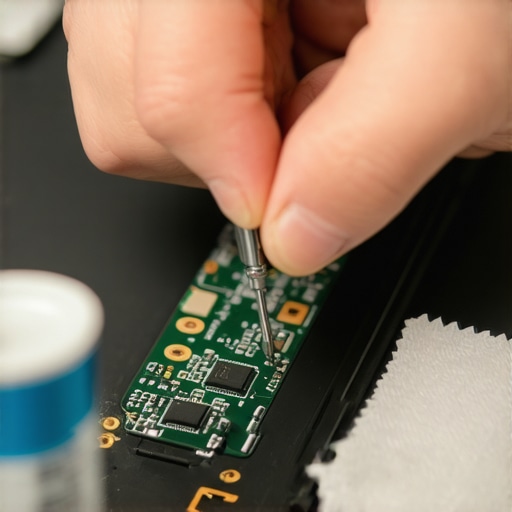
Why Cheap Screwdrivers Are a Death Sentence for Laptops
I once tried to open a high-end workstation with a dollar-store screwdriver and stripped a tiny Torx screw so badly I had to use a specialized extraction bit to get it out. Since then, I only use precision tools like the iFixit Pro Tech Toolkit. This is especially vital when dealing with business laptops for professionals where the internal tolerances are tight. Don’t use generic thermal paste, either. I swear by Noctua NT-H2. According to Noctua’s own technical documentation regarding thermal interface longevity, the compound’s resistance to ‘pump-out’—the process where thermal cycles push paste away from the center of the CPU—is just as important as its raw conductivity. A paste that dries out in six months is useless. That’s why you need to know how to choose the right thermal paste for your machine before you commit to opening it up.
The Future of Modular Machines is Finally Arriving
I believe we’re heading toward a ‘Modularity Renaissance.’ Brands like Framework are proving that people want to swap parts, and I predict major manufacturers will start re-introducing replaceable batteries and RAM slots as premium features to justify higher price tags. For now, focus on your environment. Stop using your machine on blankets and invest in must-have laptop accessories to boost your work setup like a proper vertical stand to increase airflow. Even for those using student laptops that boost productivity and learning, a simple $20 laptop stand can lower internal temperatures by up to 10 degrees. If you ever have a spill, don’t panic and reach for the rice. I’ve salvaged three machines by knowing the best way to clean a sticky keyboard without breaking the keys using 99% isopropyl alcohol and a steady hand. My challenge to you: find one ‘non-user-serviceable’ part on your current laptop and look up its replacement guide on eBay tonight; you’ll be shocked at how cheap the actual parts are compared to a repair shop’s labor rate.
The Hardest Lesson I Learned While Hunting for Laptop Deals
For years, I bought into the hype that faster clock speeds were the only thing that mattered. The hardest lesson I ever learned was that a fast processor in a poorly designed chassis is just an expensive heater. I’ve realized that durability is a feature you can’t download. When you look at unbeatable laptop deals, the true value isn’t the price tag—it’s the years of reliable service you get before the first major repair. I’ve stopped looking for the thinnest frame and started looking for the most accessible screws. My lightbulb moment was realizing that I’d rather carry an extra half-pound of weight if it means my laptop doesn’t throttle into a crawl during a heatwave. Performance without cooling is just marketing fiction.
My Essential Toolkit for a Setup That Actually Lasts
I don’t leave my hardware’s health to chance anymore. I trust specific tools and reliable documentation over any warranty fine print. My private arsenal includes the $10 tool every laptop owner should keep in their desk—a simple precision driver that has saved more machines than any software update ever could. I also recommend bookmarking the resource on how to find official repair guides for your exact model because knowledge is the best defense against planned obsolescence. Finally, I never set up a workstation without must-have laptop accessories to boost your work setup, specifically a high-quality vertical stand to ensure the intake fans aren’t suffocating on a flat desk. These small investments keep my internal temperatures low and my productivity high.
Your Path to a Machine That Actually Serves You
Technology should feel like an extension of your thoughts, not a source of frustration or a collection of broken plastic. Whether you are a student, a creator, or a gamer, you have the right to a machine that is both powerful and repairable. Don’t be afraid to open that bottom panel or swap out a sticky key. By taking ownership of your hardware, you aren’t just saving money; you’re ending the cycle of disposable tech. Your next great project depends on a tool you can trust, so choose wisely and maintain it with pride. Have you ever successfully repaired your own laptop, or did a “great deal” turn into a hardware disaster for you? Let me know below.