
I remember sitting in a dimly lit airport terminal in Denver, staring at a 1% battery icon on my expensive workstation. My proprietary “brick” was somewhere between my home office and the Uber I’d just stepped out of. I asked ten people for a charger; none of them had that weird, barrel-shaped plug unique to my brand. That was the moment I realized my $2,000 machine was basically a paperweight because of a $30 cable. It was infuriating. I had work to do, emails to send, and a deadline breathing down my neck. I felt like I was being punished for choosing a machine that didn’t play well with others. If you have ever felt that sinking sensation in your stomach when you realize your charger is miles away, you know exactly why I’ve changed my buying habits forever.
The Night I Realized Proprietary Plugs Are a Trap
I’ve been there, and I’ve made the mistake of ignoring the power port in favor of a shiny screen or a fast processor. We’ve all seen those unbeatable laptop deals that look perfect on paper until you realize you’re tethered to a specific, bulky brick that costs $90 to replace and is never in stock at the local tech store. Early in my tech journey, I bought a high-end machine thinking the custom power supply was a sign of “professional” quality. I was dead wrong. When that brick eventually frayed, I had to wait a full week for shipping while my productivity hit zero. These days, I strictly hunt for top business laptops that support universal standards like USB-C Power Delivery. It isn’t just about convenience; it is about insurance for your workflow. Transitioning to a setup where I can use GaN chargers for everything from my phone to my workstation has been a total game-changer.
Does Universal Charging Actually Support High Performance?
You might be skeptical, thinking, “But my beefy gaming laptop needs 300W of power!” and you aren’t entirely wrong for the absolute top-tier rigs. However, for 90% of us, the shift toward USB-C Power Delivery is a godsend that doesn’t sacrifice speed. According to the European Parliament, the move to a common charger will save consumers up to 250 million euros a year and significantly reduce e-waste. If you’ve ever had to learn how to find a replacement charger without frying your motherboard, you know the struggle of proprietary hardware is real. Whether you are scouting for student laptops or serious professional gear, the power port matters more than the RAM sometimes. Have you ever been stranded because of a unique power cord? I want to hear your horror stories—I promise I’ve lived through most of them myself. We are finally moving toward a world where one cable rules them all, and it is time your hardware reflected that.
Transitioning Your Gear to a One-Cable Life
To stop being a slave to the proprietary brick, you first need to identify the exact power requirements etched into the bottom of your machine. Look for the ‘Input’ section, usually measured in Watts (W). If you see Volts (V) and Amps (A), just multiply them together—19V times 3.42A equals roughly 65W. This is your target. Most top business laptops today only require 65W to 100W, which is the current ‘sweet spot’ for universal charging. If your laptop has a USB-C port with a small lightning bolt or a ‘D’ shaped icon next to it, congratulations: you are likely ready to ditch the barrel plug. However, don’t just grab any phone charger. I once tried to power my workstation with a generic 15W phone block during a meeting in Chicago; the laptop didn’t just charge slowly, it actually drained faster because the ‘handshake’ between the charger and the laptop failed. It was embarrassing to watch my screen go black while presenting a budget proposal.
Finding the Power Sweet Spot for Your Specific Machine
Once you know your wattage, you need a charger that uses Gallium Nitride (GaN) technology. These are the must-have laptop accessories because they pack high power into a footprint smaller than a deck of cards. When shopping for unbeatable laptop deals, always check if the manufacturer includes a USB-C charger in the box. If they don’t, you’ll need to buy a third-party GaN brick. Ensure it supports the ‘Power Delivery’ (PD) protocol. Think of PD as a digital negotiation; the charger asks the laptop how much power it can handle, and the laptop responds. This safety feature is why you can use a 100W charger on a 45W student laptop without blowing anything up.
Why You Should Double Check Your Cable Specs
The most common mistake I see—and one I’ve made myself—is pairing a high-end 100W charger with a cheap, 3-foot cable bought at a gas station. Most standard USB-C cables are only rated for 60W (3 Amps). If you try to pull 100W through a 60W cable, the charging speed will be capped, or worse, the cable will overheat. You must look for cables explicitly labeled as ‘E-Marked’ or rated for 100W/5A. This is especially critical if you are running game-changing gaming laptops, which have much higher power draws. I keep a dedicated 100W braided cable in my bag at all times now. It’s an insurance policy against the frustration of seeing ‘Plugged in, not charging’ on your taskbar. If you are ever unsure, learning how to find a replacement charger that matches your OEM specs is a skill that will save your motherboard from a premature death.
The Hidden Risks of Cheap Generic Cables
Not all ports are created equal. Some laptops feature a ‘data-only’ USB-C port alongside a ‘charging’ USB-C port. I spent twenty minutes panicking at a coffee shop last month because I thought my port had died, only to realize I had plugged my 100W GaN charger into the wrong hole. If you’re looking at student laptops for your kids, teach them this distinction early. It saves them from thinking their computer is broken when it’s just a user error. Also, be wary of ‘vampire’ drain. Some cheap hubs and adapters will actually pull power from your laptop even when nothing is plugged into the hub itself. I always recommend using USB-C docks that don’t overheat to ensure your power delivery remains stable during heavy file transfers.Most people think that a sleek, razor-thin chassis is the ultimate sign of a premium machine, but I’ve found the opposite to be true for power users. We’re often told that portability is the primary goal, yet when you’re pushing a machine to its limits, that thinness becomes its greatest enemy. I’ve seen countless unbeatable laptop deals on ultra-slim models that look stunning in an office but fail miserably under a heavy workload. This is exactly why you should avoid slim gaming laptops for heavy rendering or intense data processing; the physics of heat dissipation simply doesn’t allow for sustained performance in a tiny frame. According to technical analysis by iFixit, machines that prioritize extreme thinness often score significantly lower on repairability, leading to a much shorter lifespan and a higher total cost of ownership.
Can Your USB-C Port Actually Handle a Full Workspace Setup?
Many advanced users assume that any USB-C port is a universal gateway to productivity. This is a dangerous misconception. I once watched a colleague try to run two 4K monitors and a high-speed external drive through a single port on one of those student laptops that happened to have a Type-C port but lacked Thunderbolt 4 certification. The result? A flickering screen and a corrupted hard drive. You need to ensure your port supports the specific bandwidth requirements of your must-have laptop accessories. It isn’t just about the plug fitting; it is about the controller behind it. If you’re shopping for top business laptops, look for the ‘Thunderbolt’ or ‘USB4’ branding specifically to ensure your workstation doesn’t bottle-neck your workflow. 
The Soldered RAM Trap You Need to Avoid
Another nuance people miss while hunting for top laptop deals in 2025 is the rise of non-upgradable hardware. Manufacturers love to solder components to the motherboard to save space, but it’s a nightmare for the longevity of your device. This is why we avoid laptops with soldered RAM at all costs in our professional builds. When that 8GB or 16GB of memory eventually becomes insufficient for future software updates, your entire investment becomes obsolete. Even on game-changing gaming laptops, always verify if there is at least one open SO-DIMM slot for future expansion. Have you ever fallen into this trap and realized you couldn’t upgrade your machine six months later? Let me know in the comments below—I’d love to hear your experiences.
Maintenance isn’t just about wiping the screen with a sleeve; it’s about preventing the slow, silent death of your hardware. I’ve realized that even the most top business laptops will eventually throttle if you don’t treat them like the precision instruments they are. Every six months, I do a ‘deep clean.’ This involves more than just cleaning a sticky keyboard. I actually crack the case open. If you’re terrified of doing that, I get it, but learning how to properly ground yourself is the first step toward true hardware independence.
I’ve seen too many people ignore a bulging trackpad until it’s too late. Knowing how to tell if your laptop battery is swelling can literally save your house from a fire. I personally use a toolkit from iFixit—the Mako Driver Kit—because generic screwdrivers often strip the tiny Torx screws found on modern chassis. When you are scouting unbeatable laptop deals, always factor in the cost of a few maintenance tools. It’s the difference between a three-year lifespan and a six-year one.
How do I maintain my laptop’s performance over the years?
The biggest performance killer is heat. Over time, the factory thermal paste dries out and loses its ability to transfer heat to the copper pipes. This is where most game-changing gaming laptops start sounding like jet engines. According to technical testing by Igor’s Lab, the ‘pump-out effect’ in high-performance laptops—where the paste literally squeezes out from between the die and the cooler—can degrade thermal efficiency by up to 20% within the first year of heavy use. I make it a point to learn how to choose the right thermal paste and re-apply it annually. If you’re seeing temperatures spike above 90°C during basic tasks, it’s time to act. Don’t wait for the motherboard to warp.
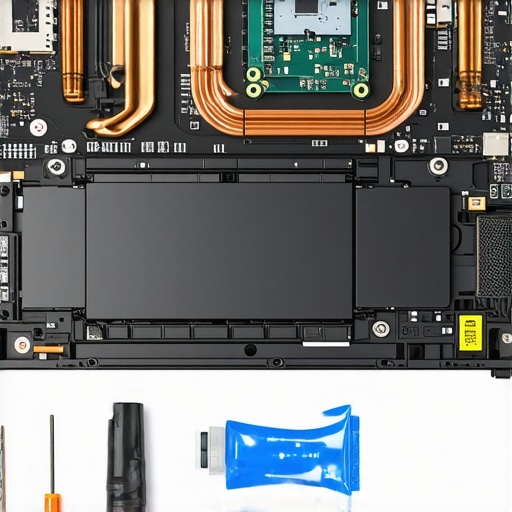
Looking ahead, I predict the ‘sealed box’ era of laptops is finally reaching its end. With the Right to Repair legislation gaining momentum, we are seeing a shift toward modularity. I’m already keeping a close eye on brands that allow you to swap out ports or upgrade the motherboard entirely. Whether you’re buying student laptops or high-end workstations, the ability to fix your own gear is becoming a premium feature again. My advice? Grab a high-quality screwdriver set and start by learning how to replace your own laptop fan; it’s an empowering skill that pays for itself the first time you avoid a $150 repair shop fee.
Hard-Won Truths from a Decade of Fried Motherboards
After years of tinkering, I’ve realized that the most expensive part of a laptop isn’t the CPU—it’s the downtime. One major “lightbulb moment” was discovering that even unbeatable laptop deals can be a trap if the battery isn’t user-serviceable. I also learned the hard way that not all Type-C ports are equal; just because it fits doesn’t mean it charges properly. Finally, I stopped ignoring my fans. A noisy fan isn’t just annoying; it’s a cry for help from a system that is literally baking itself alive. #IMAGE_PLACEHOLDER_E#
The Essential Gear That Keeps My Mobile Office Alive
I don’t go anywhere without my specialized kit. First, I always carry the $10 tool every laptop owner should keep in their desk—a simple spudger and a precision bit set. For power, understanding why we only use GaN chargers for traveling now is a philosophy I live by; they are lighter and more efficient than any OEM brick. When I’m at home, I prioritize stability by using the most reliable USB-C hubs for multi-monitor setups, which prevents the data corruption issues I faced early in my career.
Stop Being a Victim of Your Own Hardware
Technology should empower you, not leave you stranded with a dead battery in an airport terminal. By investing in universal standards and taking 20 minutes every few months for basic maintenance, you are reclaiming control over your productivity. Whether you are hunting for student laptops or high-end workstations, remember that you are the one in the driver’s seat. Have you ever had a charging nightmare that made you want to throw your machine out a window? Let me know your horror stories in the comments below!