
I still remember the smell of slightly singed electronics during a frantic summer deadline back in 2018. I was absolutely convinced that ‘pro’ meant ‘sleek,’ so I’d dropped a small fortune on a wafer-thin machine that looked incredible in a coffee shop. Halfway through a 4K export, the frame rate dropped to zero and the chassis became hot enough to blister skin. It was a humiliating realization. My mistake was simple: I thought I could outsmart physics. For those of us living in timelines and color grades, thinness isn’t a feature—it’s a thermal prison. Today, I’m going to show you why trading portability for a bit of ‘heft’ is the best decision you’ll ever make for your creative workflow. If you have been hunting for top laptop deals in 2025, you might be tempted by the lightest options, but let’s talk about why you should look at the heavyweights instead.
Stop Chasing the Ultra-Thin Dream for Video Editing
The obsession with slim profiles has forced manufacturers to make compromises that kill productivity. When you’re rendering, your CPU and GPU are basically running a marathon at a dead sprint. In a thin chassis, there is nowhere for that heat to go. I’ve seen gorgeous laptops throttle their performance by 50% within ten minutes of starting a render. That is why many of the game-changing gaming laptops for serious players in 2025 are actually the secret weapon for video editors; they have the internal volume for massive copper heat sinks and high-static-pressure fans. According to hardware stress-testing benchmarks from Puget Systems, thermal management is the single most critical factor in maintaining high clock speeds during long exports. If your machine can’t breathe, it can’t work. This is also why you should never use your laptop on a soft blanket, especially when you’re pushing its limits. Real video production requires a machine that can handle the heat without throwing a tantrum.
Is a five-pound beast actually worth the backache?
I get the skepticism. No one likes carrying a brick in their backpack. But here is the thing: a slightly heavier laptop usually includes a proper port selection, meaning you can finally stop carrying those fragile dongles. I can’t tell you how many times cheap USB-C hubs might be killing your ports while you’re just trying to plug in a card reader. A thick machine often has a built-in SD slot and enough USB-A ports for your peripherals. Plus, you’ll have the peace of mind knowing you can stop your gaming laptop from thermal throttling in summer simply because the cooling system was actually designed for the task. Have you ever had a render crash right at 99% because your laptop got too hot to function? It’s a rite of passage I’d like to help you avoid. We are going to dive deep into the specific hardware components that make these ‘heavy’ machines the only logical choice for anyone serious about their craft.
Choose Hardware That Can Actually Breathe
To get the most out of a high-performance machine, you need to treat it like a workstation rather than a portable tablet. The first step in any serious creative workflow is ensuring your machine has a thermal strategy. Think of a thin laptop like a sports car engine squeezed into a lawnmower frame; it might look fast for a few seconds, but it will eventually melt under pressure. I learned this the hard way while trying to color grade a 20-minute short film on a ‘pro’ ultrabook. Every time I adjusted the shadows, the UI lagged by three seconds because the processor was already hitting 100 degrees Celsius. I finally bit the bullet and switched to a thick-chassis model, and the lag vanished. This wasn’t just about raw specs; it was because the larger chassis allowed for proper airflow. One of the best things you can do for a new machine is learn how to choose the right thermal paste for your machine to further bridge the gap between your chips and those massive copper heat sinks. 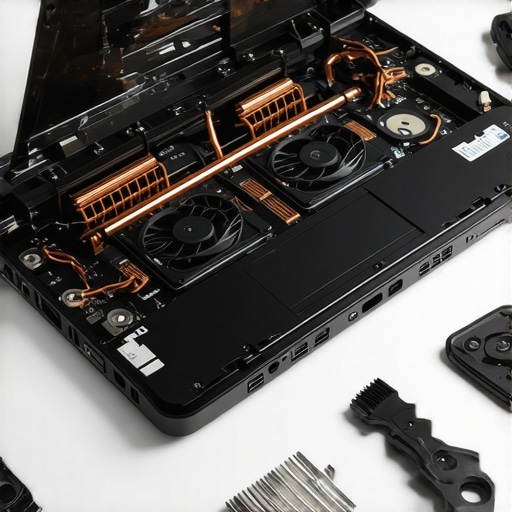
Maintain Your Performance Ceiling with Better Airflow
Maintaining peak performance isn’t just about buying the right gear; it’s about how you position it. When you are using a beefy machine for 4K exports, you need to provide a clear path for intake and exhaust. Even the simple hack for better airflow on thick gaming rigs, such as slightly propping up the back of the laptop, can lower your internal temperatures by as much as 10 degrees. This keeps your GPU from downclocking, which is why why every engineering student needs a dedicated GPU laptop is a sentiment echoed by video editors too—the hardware is designed for sustained loads that thin office machines simply cannot handle.
Stop Relying on Fragile External Dongles
A major benefit of the ‘heavier’ laptop is the return of the I/O port. During a shoot last year, I saw a colleague lose an entire day of work because their single USB-C hub failed. We often forget that why cheap USB-C hubs might be killing your ports is a real risk for professional users. A thicker laptop usually houses full-sized HDMI ports and SD card slots, meaning you have fewer points of failure between your footage and your timeline. When you look at business laptops for professionals essential picks 2025, you’ll notice the best ones don’t sacrifice connectivity for a few millimeters of thickness.
Build a Setup That Actually Works for Your Body
Once you have the machine, you need to optimize how you interact with it. Many high-end editors have realized that trackpads, no matter how large, are a recipe for carpal tunnel during 12-hour sessions. This is why we switched to trackballs for professional video editing in our own studio. These adjustments, combined with a machine that doesn’t thermal throttle, turn a frustrating creative process into a seamless one. You want a laptop that acts as a reliable partner, not a temperamental piece of jewelry that requires a cooling fan just to stay awake.Continuing this line of thought, let’s address the most common myth: that ‘new’ always equals ‘better’ when hunting for top laptop deals in 2025. In my experience, a brand-new $500 consumer laptop is almost always a worse investment than a three-year-old refurbished enterprise workstation. Why? Because budget consumer machines are built with planned obsolescence in mind. They use ‘milk-carton’ plastic that flexes and hinges that eventually snap under the pressure of daily use. If you are a student or a creative professional on a budget, you should learn how to snag a refurbished enterprise machine for under 300 instead. These machines were designed to be dropped, spilled on, and easily repaired in the field. I’ve seen used ThinkPads outlive three generations of budget ‘student’ laptops because their internal frames are made of magnesium alloy, not recycled soda bottles. This is a critical factor for student laptops that boost productivity and learning: durability is a silent feature you simply cannot see on a spec sheet. The ‘Oops’ factor often comes in the form of hidden compromises that manufacturers hope you ignore. They love to advertise a ‘Core i7’ processor but then pair it with a screen so dim and low-resolution that you can’t use it in a well-lit room. Specifically, why you should never buy a laptop with a 720p screen becomes painfully obvious the moment you try to multitask; you simply don’t have the pixel real estate to work efficiently. And don’t get me started on the power drain. You might think those colorful lights look impressive, but the hidden battery drain caused by your RGB keyboard can shave up to an hour off your unplugged time. It’s a classic trap—trading actual utility for aesthetic flair.
Can a refurbished workstation really outlast a brand-new ultra-thin?
The short answer is a resounding yes. According to the Rescuecom Reliability Report, brands that focus on enterprise-grade hardware consistently outperform consumer-focused brands in repair frequency and overall lifespan. When you look for the best budget laptops that dont use cheap plastic hinges, you are moving away from the ‘disposable’ tech culture. You are looking for a tool, not a toy. Even for students, choosing student laptops that balance power and portability perfectly means looking at the build quality first and the CPU clock speed second. 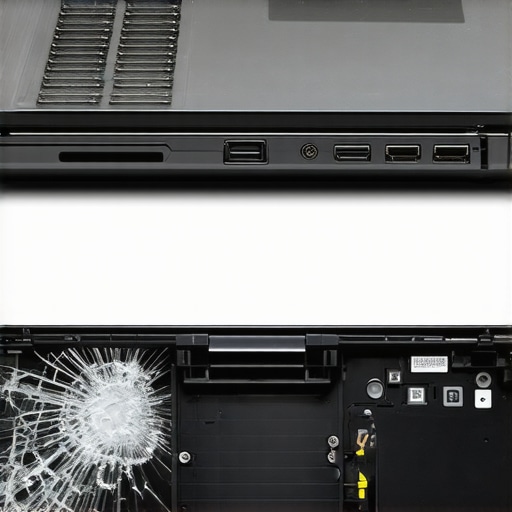 Once you have a solid machine, focus on the ecosystem. I always tell my clients that must-have laptop accessories to boost your work setup aren’t just about productivity; they are about preventing physical burnout. A proper mouse and a dedicated stand can save your neck while the machine handles the heavy lifting. If you are looking at business laptops for professionals essential picks 2025, remember that the ‘pro’ label should represent reliability, not just a higher price tag. Have you ever fallen into this trap of buying for specs only to have the hardware fail you within a year? Let me know in the comments.Once you’ve secured a machine that doesn’t melt under pressure, the real work begins: keeping it that way. I used to think ‘maintenance’ was just for old cars, but after seeing a $3,000 workstation die because of a simple dust clog, I changed my tune. You need to know how to find official repair guides for your exact model. I personally keep a PDF of my laptop’s service manual on my phone; it’s saved me more times than I can count when I’m out in the field. Beyond the digital guides, there is the 10 tool every laptop owner should keep in their desk, and a simple T5 Torx driver is usually at the top of that list. If you can’t open your machine, you don’t really own it.
How do I maintain my machine’s performance for five plus years?
Maintenance isn’t just about blowing air into the vents. It’s about managing the chemistry of your battery and the friction of your fans. I’ve found that the reason your laptop battery wont charge past eighty percent is actually a feature you should be using. Keeping your battery between 20% and 80% can double its lifespan. Also, don’t be afraid of mechanical failures. Learning how to replace your own laptop fan in under 20 minutes is a skill that turns a ‘broken’ laptop back into a brand-new one for less than twenty bucks. According to iFixit’s Laptop Repairability Scores, machines like the Framework or older Dell Latitudes score much higher because they don’t use excessive glue, making these DIY fixes possible.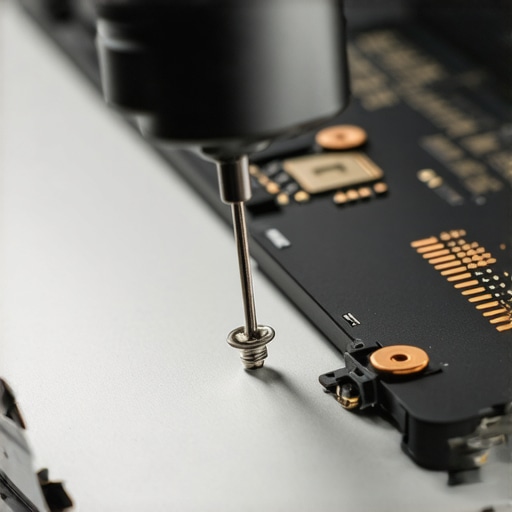 I believe we are entering an era where ‘repairability’ will be the ultimate luxury. As AI starts taking over local processing tasks, your hardware will be pushed harder than ever before. This is why your next business laptop needs a user replaceable battery 2; you shouldn’t have to throw away a perfectly good motherboard just because the lithium cells are tired. Before you buy anything else, how to find out if your laptop can be upgraded should be your first search query. Invest in a proper workspace with must-have laptop accessories for a seamless setup, and treat your laptop as a long-term asset. My challenge to you: Go to your manufacturer’s site today and download the ‘Hardware Maintenance Manual’ for your current device. Even if you never use it, knowing the internal layout takes away the fear of the machine.
The Most Expensive Mistake I Ever Made with Thin Tech
I used to think that spending more money always meant getting a better experience, but in the world of high-end creative work, that isn’t always true. Here are the lightbulb moments that changed how I shop for gaming laptops and workstations:
- The ‘Pro’ Label is Often Marketing: Many laptops labeled ‘Pro’ are designed for people who write emails in first-class, not people who render 8K footage. Real professional gear is often thicker and uglier.
- Weight is a Sign of Reliability: In the world of thermals, weight usually translates to copper. More copper means better cooling, which leads to a longer lifespan for your internal components.
- Check the Hinge Before the CPU: A fast processor is useless if the screen falls off. I always look for the best budget laptops that dont use cheap plastic hinges to ensure the chassis lasts as long as the silicon.
- Second-Hand is Often Superior: Don’t overlook unbeatable laptop deals on older, thicker workstations; they often outperform brand-new ultra-thins in sustained workloads.
My Essential Survival Kit for Editing Rigs
Building a workstation that lasts requires more than just a big credit card balance; it requires a maintenance mindset. #IMAGE_PLACEHOLDER_E# These are the resources I personally trust to keep my setup running at peak performance:
- The Service Manual: Every time I get a new machine, I use how to find official repair guides for your exact model to understand its cooling layout. It’s the first thing I bookmark.
- Thermal Management: If you find your fans screaming, it might be time to learn how to choose the right thermal paste for your machine. It’s a cheap fix that can drop temps by ten degrees.
- Connectivity Support: Since I avoid dongles whenever possible, I only use the most reliable usb-c hubs for multi-monitor setups when I’m at my home desk to avoid frying my ports with cheap alternatives.
- Expert Advice: I always cross-reference my picks with top business laptops for productivity in 2025 expert recommendations to see how machines handle real-world stress.
Start Building a Setup That Actually Works
At the end of the day, your laptop is an extension of your hands. It should be the thing you think about the least while you are in the flow of editing or designing. By choosing a machine with the thermal headroom to breathe and the physical durability to survive a commute, you are investing in your own peace of mind. Whether you are hunting for top laptop deals in 2025 or looking at student laptops that balance power and portability perfectly, remember that your creative potential shouldn’t be limited by a thin piece of aluminum that gets too hot to touch. Choose the beast, maintain it well, and let it work for you for years to come. Have you ever had a laptop fail you right in the middle of a major project because it overheated? Let me know in the comments below.