
I still remember the smell of burnt plastic wafting from under my desk during a late-night work session. My laptop, which I desperately needed for a client presentation the next morning, suddenly went black. In an effort to save a few bucks, I had ordered a cheap, unbranded replacement charger online. It was a massive mistake that cost me a motherboard and taught me a painful lesson about laptop power delivery. Finding reliable laptop accessories shouldn’t feel like playing Russian roulette with your expensive hardware, yet the market is flooded with dangerous counterfeits. Today, we are going to demystify the world of power bricks so you can charge your device without fear.
Why Third-Party Power Bricks Are Tempting But Risky
We have all been there. You pack your bag for a trip, arrive at your destination, and realize your proprietary charger is still plugged into the living room wall. Buying an official replacement from the manufacturer can cost upwards of eighty dollars, which makes those fifteen-dollar alternatives on online marketplaces look incredibly attractive. Some third-party chargers are engineering marvels, while others are literally fire hazards waiting to happen. The core issue is that many cheap manufacturers skimp on essential safety features like over-current protection and thermal regulation. If you want to keep your machine running safely, you need to understand how to tell if your laptop charger is actually safe to use. Underneath that simple plastic shell lies a complex transformer that must cleanly convert high-voltage alternating current from your wall into steady direct current. When a cheap charger fails to do this smoothly, it can cause your device to run hot, exhibit strange trackpad behavior, or even suffer catastrophic hardware failure.
Is a cheap replacement brick actually worth the risk?
The short answer is almost always no, especially when you consider that a bad charger can permanently fry your computer. According to safety reports from Electrical Safety First, a staggering number of counterfeit chargers failed basic electrical safety tests, presenting genuine risks of shock or fire. It is simply not worth saving fifty dollars on a charger only to destroy a thousand-dollar machine. To make matters worse, some low-quality chargers do not output their rated wattage, meaning your computer might slowly lose battery even while plugged in. If you have ever wondered how to tell if your laptop is being throttled by its charger, look no further than sluggish performance during intensive tasks. Have you ever plugged in a replacement charger only to watch your trackpad go wild or your laptop get hot enough to cook an egg? Drop a comment below and let me know your worst charger horror stories.
Read the Tiny Print on Your Original Power Brick
To safely power your device, you need to match the voltage and equal or exceed the amperage of your original charger. Think of voltage like water pressure in a pipe; if the pressure is too high, it will burst your laptop’s sensitive internal circuits. Amperage is the flow rate, and your laptop will only draw what it needs. I once made the mistake of grabbing an old printer brick that matched the connector pin of my travel notebook but pushed out 24 volts instead of the required 19 volts. The notebook hissed, let out a tiny puff of blue smoke, and died instantly. To avoid this, locate the ‘Output’ section on your original charger and write down the exact volts (V) and amps (A). Multiple these two numbers together to get the total wattage (W). For example, a 20V at 3.25A configuration equals a 65W charger. If you are looking to replace your power source, you can check out some of the unbeatable laptop deals available right now to find a bundled bundle, or look specifically for high-quality charging replacements.
Look for Trusted Safety Certifications
Never buy a charger that lacks recognized safety stamps on its chassis. Look for the UL (Underwriters Laboratories) logo, the CE mark, or the FCC symbol. These stamps indicate that the charger has undergone rigorous testing to handle electrical spikes safely. Cheap knockoffs often print fake logos, but you can usually spot them by their suspiciously light weight. A robust, safe charger contains heavy copper shielding and solid heatsinks inside to dissipate heat, while dangerous clones feel like hollow plastic shells. If you want to know more about keeping your hardware running cool, find out why some laptop chargers get dangerously hot during use.
The Rise of Smart USB-C Power Delivery
If your machine charges via a Type-C port, you are in luck. Modern USB-C Power Delivery (PD) is an intelligent protocol where the charger and the laptop negotiate the voltage before any serious current flows. This completely removes the risk of frying your machine with the wrong voltage. However, this safety net only works if you use premium cables. Many people purchase high-end student laptops that balance power and portability perfectly, only to pair them with cheap checkout-counter cords. These budget cables lack the necessary e-marker chips to handle high wattages, leading to melted ports and slow charging speeds.
Invest in GaN Technology for Travel
Gallium Nitride (GaN) chargers are the modern gold standard for power on the go. By replacing traditional silicon with GaN crystals, manufacturers can build chargers that are half the size of standard bricks while running significantly cooler. These are essential must-have laptop accessories to boost your work setup, allowing you to power your phone, tablet, and power-hungry laptop from a single pocket-sized block. When I switched to a multi-port GaN charger, I freed up nearly two pounds of cable clutter from my backpack. Just ensure the charger supports the Power Delivery standard required by your specific device to maintain stable charging under heavy workloads.
The Great Power Supply Myth: Why Wattage Numbers Lie
Many users believe that as long as a charger matches the total wattage of their original power brick, their machine will run flawlessly. Everyone says that any generic 65W USB-C brick will deliver identical power, but in my experience, the quality of that power matters far more than the raw number printed on the plastic shell. Cheap third-party chargers often output incredibly dirty power filled with high-frequency voltage ripples. This electric noise is the primary culprit behind erratic trackpad behavior and can slowly degrade your laptop’s sensitive internal voltage regulator modules over time. Even when buying highly rated student laptops that balance power and portability perfectly, pairing them with a bargain-bin charger effectively bottlenecks their hardware. A study by the Power Sources Manufacturers Association reveals that sub-standard power converters can exhibit up to five times the electrical noise of OEM counterparts under heavy loads, proving that not all watts are created equal.
Are you accidentally shortening your laptop battery’s lifespan?
The most common trap users fall into is ignoring how their machine reacts to high-stress scenarios on cheap power. When you play demanding games or render video, your system relies on clean, sustained power delivery. If you are using substandard charging equipment, your system may experience severe thermal and electrical limitations. This explains why your gaming laptop performance drops when unplugged or when connected to an inadequate power source that cannot keep up with the transient power spikes of a dedicated GPU. To protect your investment, I always suggest looking for original equipment manufacturer replacements or high-end third-party options from reputable brands. Have you ever fallen into this trap and noticed your laptop behaving strangely on a cheap charger? Let me know in the comments below!
The Secret Danger of Unrated Charging Accessories
Another major point of failure lies in the accessories we use to route that power. Many professionals purchase premium business laptops for professionals and then connect them to cheap hubs or uncertified cables. These budget accessories lack proper thermal protection, which explains why some laptop chargers get dangerously hot during standard work tasks. When cheap hubs struggle to regulate the incoming current, they can back-feed voltage directly into your motherboard, causing catastrophic failure. If you want to keep your mobile workspace safe and highly efficient, investing in the right must-have laptop accessories to boost your work setup is just as important as choosing the computer itself.Over the years, I have realized that buying a great charger is only half the battle; maintaining your charging setup is what actually prevents hardware failure down the road. I keep my gear in pristine condition by performing a quick quarterly audit on my power cables and ports. I personally use a simple physical tool called a USB-C power meter (specifically the Makerhawk Type-C Tester) to verify exactly how many volts and amps my bricks are outputting under load. It takes the guesswork out of the equation and lets me catch failing components before they damage my motherboard. If you want to keep your setup running flawlessly, you also need to ensure you are using the best usb-c cables for fast charging and data. A high-quality cable acts as the ultimate line of defense between your power brick and your laptop’s internal battery controller.
How do I maintain my laptop power delivery system over time?
To protect your battery and ports from premature aging, you must avoid tension on your charging cables and prevent debris from building up inside your USB-C or proprietary power ports. I recommend using a wooden toothpick or a dedicated anti-static brush to gently clear out pocket lint from your laptop’s charging slot every few months. Additionally, never wrap your cables tightly around the power brick, as this causes internal copper fraying near the strain relief joint. For your workspace, you should always make sure you are plugging into a high-quality surge protector rather than a cheap power strip. In fact, safeguarding your machine is why we only use high-quality surge protectors for laptops in our daily editorial office. By keeping your ports clean, your cables loosely coiled, and your input power surge-protected, you can easily double the lifespan of your charging hardware. Looking ahead, I predict we will soon see smart AI-driven GaN chargers that dynamically monitor individual battery cell health over local wireless protocols, adjusting transient response times in real-time to prevent heat buildup entirely. For now, my favorite advanced trick is to manually cap your laptop’s maximum charge level at 80% using your manufacturer’s companion software (like Lenovo Vantage or MyASUS). This single adjustment reduces chemical stress on your lithium-ion cells, preserving your runtime for years. Go ahead and open your laptop’s battery settings right now to enable this feature—it is the easiest way to protect your long-term investment!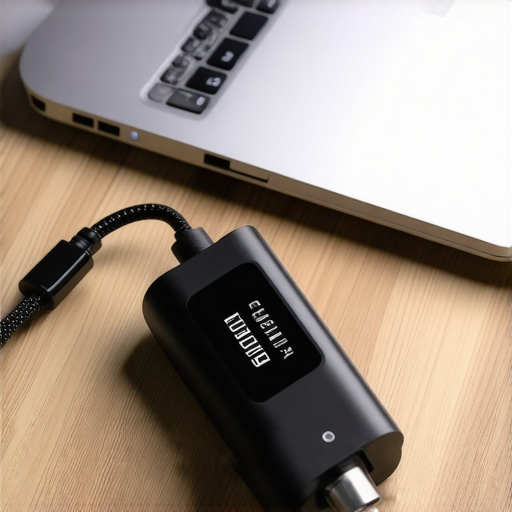
3 Myths About Laptop Accessories That Could Ruin Your Workspace
Over the years, I have seen a lot of bad advice circulating online about how to power high-value tech. The first big misconception is that all USB-C ports on your computer behave exactly the same way. Many users plug high-power equipment into a low-power data port, causing unexpected system instability. Another common myth is that high-end business laptops for professionals have built-in defenses that make them immune to cheap external hardware. The truth is that a bad charger can bypass many built-in motherboard safeties, leading to a dead system in seconds. Lastly, many people believe that if a power brick doesn’t feel hot to the touch, it is working perfectly. In reality, some cheap clones don’t get hot because they lack proper thermal transfer materials internally, trapping extreme heat directly on the sensitive transformer coils inside the casing.
My Essential Toolkit for Perfect Power Delivery
I don’t leave my electrical safety to guesswork, and neither should you. Over the years, I have built a reliable, highly portable toolkit that keeps my devices safe on the road. First, I always carry a dedicated USB-C power meter to monitor real-time wattage and voltage negotiation. Second, I rely on the best compact chargers for mobile professionals to ensure I have a certified, GaN-powered brick that handles multi-device charging without breaking a sweat. For travel safety, I never head out without the best way to manage multiple chargers in your travel bag, which protects my cables from sharp bends and strain. Finally, I always plug my rig into a certified portable surge protector before connecting to any unfamiliar hotel or cafe outlet.
Take Control of Your Charging Safety Today
Your computer is the gateway to your work, your hobbies, and your daily life. Don’t let a budget power brick compromise your investment. By learning to read the labels on your hardware and investing in high-quality, verified laptop accessories, you can ensure a reliable, clean flow of power to your machine for years to come. Take a look at your current charging setup today, inspect your cables for damage, and verify that your hardware is getting the clean energy it deserves.
Have you ever had a cheap charging cable or a knockoff power brick cause weird behavior on your computer? Let me know your experiences in the comments below!