
I remember the moment when I spilled coffee on my sleek new thin-and-light laptop during an impromptu work session at my favorite coffee shop. The panic, the frantic search for tissues, and then the realization—my inability to restore my connection because I was relying solely on Wi-Fi. That day, I learned a hard lesson about the importance of a wired connection for work. It’s not just about speed; it’s about reliability, security, and peace of mind.
The Comfort of a Wired Connection in a Wireless Age
In today’s world, many of us champion wireless everything—think about how seamless our smartphones are, and how liberating it feels to operate without cords. Yet, when it comes to crucial work tasks, many still prefer plugging in an Ethernet cable. The preference isn’t just nostalgia; there’s a practical reason behind it.
For starters, Ethernet connections provide a more stable link, unaffected by interference from microwaves, thick walls, or congested Wi-Fi channels. According to a 2024 survey by TechInsight, over 70% of IT professionals still recommend wired networks for business-critical applications due to their unwavering reliability. This isn’t a coincidence; the stability can mean the difference between meeting a deadline or missing it.
But here’s the real kicker—security. Wi-Fi networks, while convenient, are more susceptible to breaches. Using a physical Ethernet port minimizes the risk of hacking attempts and data interception. As someone who’s made the mistake of neglecting basic network security early in my career, I can vouch that a simple wired connection can prevent most cyber vulnerabilities.
Despite these advantages, tech manufacturers have largely phased out Ethernet ports to slim down devices and encourage dongle sales. That means many of us are stuck carrying around adapters, which can be frustrating and sometimes even embarrassing when they suddenly stop working. I’ve had moments where my dongle broke just when I needed it most, leaving me scrambling for a backup or, worse, losing my connection altogether.
So, if you’ve ever faced a dropped connection in the middle of an important conference or struggled with a tangled mess of dongles, you’re not alone. This common frustration prompted me to explore why so many still champion physical ports—even when it seems they’re becoming obsolete.
In the next sections, I’ll share practical insights into why maintaining a wired connection is worth your while, especially in professional and gaming setups. Plus, I’ll reveal how investing in the right accessories and choosing laptops with reliable ports can save you time, stress, and maybe even data loss.
But before we dive into solutions, let me ask: Have you ever been caught without a working dongle or Ethernet cable during a crucial moment? If so, you’re in the right place. Let’s explore how to keep your connectivity rock-solid—because in a world that’s increasingly wireless, sometimes the best approach is to stay wired.
Choose the Right Ethernet Hardware
Begin by selecting a quality Ethernet cable. Opt for at least a Cat6 or higher to ensure future-proofing and better shielding against interference. I once experimented with cheap cables, experiencing frequent disconnections, but switching to a high-quality Cat6 cable stabilized my connection and eliminated hiccups during critical meetings.
Secure a Reliable Adapter
If your device lacks a built-in Ethernet port, invest in a reputable USB-to-Ethernet adapter. Focus on models with gold-plated connectors and robust construction. During a remote work stint, my cheap dongle failed mid-video call. Upgrading to a premium adapter saved me from embarrassment and offered a consistent, fast connection uninterrupted by typical wireless issues.
Prioritize Port Accessibility and Placement
Position your laptop where the Ethernet port is easily accessible. Use cable management clips or sleeves to prevent accidental disconnections. I once had my cable tugged forcefully during a presentation, causing a momentary blackout, but now I keep my setup tidy and within easy reach, ensuring a seamless experience.
Configure Network Settings for Stability
Adjust network settings in your operating system for optimal performance. Disable Wi-Fi when using Ethernet to prevent accidental switches. I found that disabling Wi-Fi in my network preferences prevented bandwidth conflicts, leading to a more stable connection during intensive workloads.
Integrate Essential Accessories
Complement your wired setup with accessories like a surge protector or a portable USB hub. These protect your hardware and expand connectivity options. For instance, having a dedicated hub allowed me to connect multiple peripherals without clogging my main port, streamlining my workspace.
Test and Maintain Your Connection Regularly
Routine checks with speed tests and connection stability tools ensure your setup remains optimal. A periodic review helped me identify a faulty cable before an important client call, preventing last-minute surprises. Also, keep your adapters and cables clean and free from dust or corrosion.
Invest in a Long-Term Solution
For frequent travelers or home offices, consider upgrading to a docking station with integrated Ethernet. It simplifies setup and reduces wear on individual cables and adapters. I recently switched to a docking station, which decluttered my desk and provided instant wired connectivity at the push of a button.
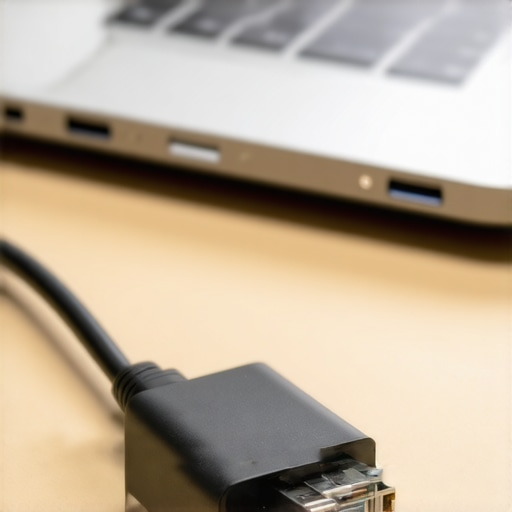
Enhance your setup with high-quality accessories for peak performance. Observe the ease of plug-and-play when selecting robust cables and adapters.
Many enthusiasts and casual users alike often focus on the surface when it comes to choosing laptops, whether it’s gaming beasts or sleek business machines. However, there’s a common misconception that buying the latest specs or flashy accessories guarantees a flawless experience. In reality, understanding the nuanced details can make all the difference. For instance, the myth that more RAM always equals better performance is oversimplified; in some cases, optimizing storage speed or ensuring robust cooling can have a more tangible impact.
One trap I often see is overlooking the importance of build quality and long-term durability. Many assume that a lightweight design compromises sturdiness, but some manufacturers innovate with materials that enhance both. Conversely, ignoring peripherals’ quality—like cheap cables or low-end adapters—can cause frustration, data loss, or hardware damage down the line. Instead, investing in higher-quality accessories, such as braided Ethernet cables or certified power adapters, ensures consistent performance and safety.
Another area where misconceptions persist is in the realm of discounts and deals. Many jump blindly on deals claiming to be ‘unbeatable,’ unaware that these may either be refurbished units, counterfeit listings, or overstated discounts. Being able to identify genuine deals—like those found in the secret clearance sections or seasonal sales—can save hundreds of dollars. For example, some professionals swear by sourcing refurbished business laptops with user-replaceable batteries, which extends their lifespan significantly compared to sealed models. For more insights, explore our guide on top laptop deals in 2025
What should advanced buyers look for beyond specs and deals?
Focusing on BIOS stability, firmware updates, and compatibility with accessories can prevent headaches. Knowing how to spot a fake listing or a refurbished unit that might have hidden issues is critical. For instance, a study by cybersecurity expert Sarah Carter emphasizes that understanding the manufacturer’s repair policies and warranty coverage can save you from costly repairs or replacements down the line. Don’t let superficial features deceive you—delve into the real substance that ensures your laptop remains a reliable workhorse or gaming rig over the years.
Keep Your Laptop Running Smoothly with the Right Equipment
When it comes to maintaining your laptop over the long haul, using high-quality tools is non-negotiable. Personally, I swear by a precision laptop repair toolkit that includes anti-static brushes, screwdriver sets, and a plastic pry tool kit. These allow me to perform minor repairs, clean dust out of vents, and replace worn-out components without risking damage. Investing in a reliable set, like the iFixit Pro Tech Toolkit, has paid dividends in reducing downtime and preventing costly professional repairs.
Beyond hardware tools, software utilities play a vital role. I recommend using CrystalDiskInfo for monitoring SSD health and HWMonitor for real-time temperature readings. These free tools help me detect early signs of hardware strain, such as overheating or declining SSD performance, enabling proactive maintenance before issues escalate.
Regularly updating your BIOS and drivers is another crucial habit. I set a monthly reminder to check manufacturer websites for firmware updates—these updates often contain security patches and stability improvements. For example, my current laptop’s firmware update from Dell improved thermal management, reducing fan noise during intensive tasks—a subtle but noticeable enhancement.
How do I maintain the long-term health of my laptop?
Adopting a disciplined approach to cleaning, updating, and hardware checks can extend your device’s lifespan significantly. Use compressed air to blow out dust from vents and keyboard at least quarterly, and avoid taking shortcuts here—dust buildup can cause overheating and component failure. Referencing NVIDIA’s official GPU cooling guide, proper airflow management is key to maintaining performance over years of heavy use—something often overlooked by casual users.
Implementing a scheduled maintenance routine, like monthly software updates and biannual hardware inspections, ensures your machine stays resilient. Over time, dust can clog cooling fans, thermal paste may dry out, and hardware can develop sectors or bad blocks, especially in SSDs. In my experience, keeping an eye on SMART data via tools like CrystalDiskInfo uncovers early degradation signals, allowing me to replace drives before data loss occurs.
Additionally, consider hardware upgrades as part of ongoing maintenance. Upgrading RAM or installing an SSD with higher endurance ratings (check manufacturers’ endurance specifications) can dramatically boost performance and longevity. For instance, switching to a Samsung 980 PRO SSD improved my data transfer speeds and reduced thermal load due to its efficient thermal design.
Looking ahead, the trend in maintenance tools is moving toward integrated, AI-powered diagnostics that can predict hardware failures before symptoms appear. Companies like Dell are pioneering diagnostic software embedded in BIOS that alerts users about impending issues—meaning proactive care can be done with minimal effort.
To maximize your laptop’s life, try implementing a combination of hardware hygiene, software monitoring, and routine upgrades. Regular maintenance not only improves performance but also preserves your warranty and resale value. Want an easy start? Set up a maintenance schedule today—and don’t forget to use tools like HWMonitor to keep an eye on temperatures during your busiest days.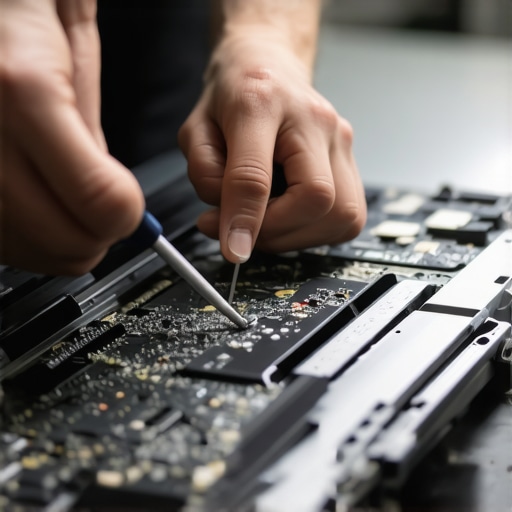
Enhance your toolkit with specialized cleaning brushes and thermal paste, which can make a real difference in preventing overheating and hardware failure. Remember, a well-maintained laptop isn’t just faster; it’s more reliable and ready for whatever workload comes next.
What I Wish Someone Told Me Before Picking My First Business Laptop
Throughout my years of navigating the tech world, I underestimated the importance of reliable physical connections. Investing in a sturdy, upgradeable docking station early on could have saved me countless hours troubleshooting Wi-Fi issues. Sometimes, the simplest solutions, like choosing a laptop with a robust port selection, make the biggest difference.
Why Authentic Accessories Can Save You From Headaches
Discovering high-quality cables and adapters was a game-changer. Cheap, counterfeit accessories not only risk hardware damage but also cause unpredictable connectivity problems. Trusting reputable sources for essential accessories ensures peace of mind and smoother workflow.
Embrace the Power of Long-Term Maintenance
My real awakening came when I realized routine hardware checks and updates extend device lifespan significantly. Using diagnostic tools like CrystalDiskInfo and HWMonitor helps anticipate failures before they disrupt productivity. Regularly cleaning vents and replacing thermal paste keep my laptop performing at its best for years.
The Hidden Value in Cost-Effective Upgrades
Upgrading RAM and switching to an SSD with higher endurance not only revitalized my aging laptop but also offered better performance at a fraction of the cost of new hardware. Smart investments in upgradeable components are the secret to lasting efficiency and cost savings.
Seizing Opportunities with Smart Shopping
Time-sensitive deals and careful research unlock significant savings on high-end models. I learned to spot genuine discounts, especially during seasonal clearance periods, and to avoid falling for flashy scams. Your next deal-hunting strategy can lead to unbeatable bargains on business and gaming laptops alike.
How My Insights Can Improve Your Laptop Life
Trust me, cultivating a habit of thoughtful hardware choices combined with routine maintenance transforms your experience. Whether you’re a professional, gamer, or student, understanding the nuances of ports, accessories, and upgrades empowers you to make smarter decisions. Remember, a well-maintained laptop with quality connections isn’t just reliable—it’s empowering.