
I remember sitting in my home office last March, three minutes into a presentation for a potential client, when the chat box started blinking. ‘We can’t hear you over the static,’ it said. I was using a top-tier machine I’d snagged from some top laptop deals in 2025, but it didn’t matter. I sounded like I was broadcasting from inside a wind tunnel. It was a wake-up call. We spend so much time looking at screen resolution and RAM that we forget the one tool that actually carries our voice to the world. I had made the classic mistake of assuming that a high price tag automatically meant a high-quality microphone array. I was wrong, and it cost me that contract.
Don’t Let a Bad Mic Kill Your Professionalism
I’m here to make sure you don’t make the same mistakes I did. I’ve tested dozens of rigs, from business laptops for professionals to sleek ultrabooks, and I’ve learned exactly where manufacturers cut corners. Today, we’re going to find you a laptop that makes you sound crisp on Zoom, even if your environment isn’t perfect. It is a scientific fact that people will forgive bad video, but they won’t forgive bad audio. According to researchers at the University of Southern California, poor audio quality makes a speaker seem less intelligent and less likable. If your mic is clipping or muffled, your message is getting lost.
Can a laptop mic really replace a dedicated headset?
I used to be a total skeptic. I thought if you weren’t wearing a bulky gaming headset, you were doomed to sound like a robot. But the tech has shifted. Many modern machines now use ‘beamforming’ arrays—basically two or three mics working together to ignore your background noise and focus only on your mouth. It’s the same tech that helps student laptops that boost productivity handle noisy dorm rooms. However, you have to know what to look for in the spec sheet because ‘HD Audio’ is a meaningless marketing term. I once bought a machine specifically because it had a ‘noise-canceling mic,’ only to realize it was just a single, cheap condenser hidden under the hinge where it caught every vibration of the internal fan. You can actually increase your laptop mic quality with software, but starting with good hardware is half the battle. Have you ever been told you sound like you’re ‘in a tin can’ during a meeting? Let me know in the comments, because I want to help you fix it.
How to Spot a Winner Without Testing It in Person
Since we can’t always walk into a store and record a test clip, we have to look for physical clues. Look at the top bezel of the screen. Are there two little holes flanking the webcam? That’s usually a dual-array setup, which is the bare minimum for decent Zoom calls. If the mic hole is on the side of the chassis, run away. It will pick up every single click of your mouse. This is a common issue why most gaming laptops fail the coffee shop noise test—they prioritize cooling over acoustic isolation for the microphone. We’re going to dive into the specific models that get this right.
Look for the Twin Pinholes Near the Lens
When you are browsing through business laptops for professionals, your eyes should go straight to the top of the display. You are looking for two distinct pinholes, usually spaced about an inch or two apart. This isn’t just for symmetry; it is a physical requirement for ‘spatial filtering.’ Think of it like your own ears. Having two points of entry allows the internal processor to calculate the time difference between sounds hitting each hole. It can then digitally ‘cancel’ the sound coming from the sides—like your neighbor’s lawnmower—and focus entirely on your mouth. 
Identify the Dual-Array Layout
If you see only one hole, you are dealing with a mono-microphone. No matter how much the marketing team brags about ‘crystal clear audio,’ a single mic is a funnel for every noise in the room. I once tried to record a voiceover in a Seattle coffee shop with a single-mic ultrabook. Every time the barista steamed milk, the audio levels peaked so hard it sounded like white noise. It didn’t matter that I knew how to increase your laptop mic quality via settings; the hardware simply couldn’t distinguish between my voice and the espresso machine.
Watch Out for the Vent Placement
One of the biggest design flaws in modern portable machines is placing the microphone near the cooling fans. This is exactly why most gaming laptops fail the coffee shop noise test. When your processor works hard, the fans spin up. If the mic is on the chassis near those fans, you will have a constant, low-frequency hum on every call. It sounds like a hair dryer is running in the background. If you have noticed why your laptop fan only gets louder after cleaning, you know that physical vibration is your microphone’s worst enemy. You want the mics isolated at the top of the screen, as far away from the motherboard heat as possible.
Software Can’t Always Save Cheap Hardware
Many manufacturers now include AI noise suppression. This is essentially a digital ‘gate’ that tries to guess what is a human voice and what is a barking dog. While helpful, it can make your voice sound ‘watery’ or robotic if the incoming signal is weak. This is why I always recommend must-have laptop accessories to boost your work setup if you are stuck with a budget machine. A dedicated hardware mute button is also a godsend for professionals. I remember a colleague who thought her AI noise-canceling was working, only for the entire board to hear her toddler having a meltdown in the next room because the software glitched. Don’t trust the software to do a job that the hardware was never built for. Check the specs for ‘Four-Microphone Array’ or ‘Studio-Quality Mics’—these are the buzzwords that actually correlate with higher-voltage components and better signal-to-noise ratios.I’ve seen people drop three grand on game-changing gaming laptops for serious players in 2025 only to be told they sound like they’re underwater. The nuance most people miss is chassis resonance. While an aluminum body feels premium, it acts like a tuning fork for internal fan vibrations. This is a massive oops factor: the stiffer the frame, the more it transmits the high-frequency whine of a cooling system directly into the microphone array. If you are hunting for top laptop deals in 2025, don’t assume a metal finish means better quality; sometimes, a well-damped plastic housing actually produces cleaner audio.
The Premium Material Trap
Let’s dig deeper into why your high-end machine might be sabotaging your voice. Everyone says aluminum is the gold standard for business laptops for professionals, but in my experience, it’s a double-edged sword for audio. A plastic chassis on student laptops that boost productivity actually absorbs much of the mechanical noise from the keyboard and fans better than rigid alloy. In contrast, metal transmits every vibration. If you type while talking, your colleagues won’t hear your brilliant ideas; they’ll hear what sounds like a construction site directly in their ears. 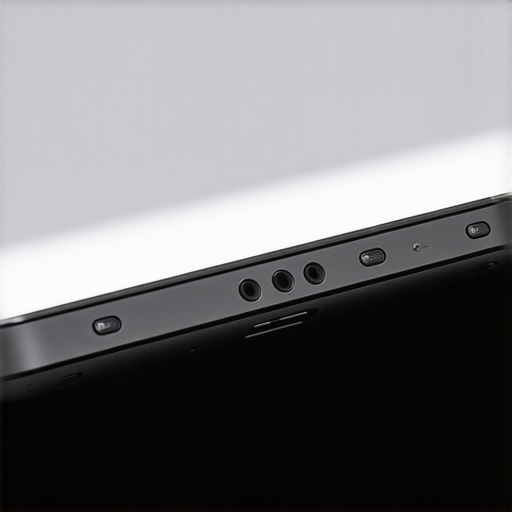
Why do $3,000 flagships often lose to budget machines?
It sounds counterintuitive, but it comes down to internal space and electrical interference. According to hardware testing by the acoustics experts at RTINGS, high-performance laptops often suffer from electromagnetic interference on the motherboard. Because these machines are packed with high-voltage GPU traces located too close to the audio components, they create a low-level hiss. This is exactly why gaming laptops still struggle with thermal throttling in small frames and why their audio chips are often shielded poorly. They prioritize frame rates over signal-to-noise ratios, leading to that annoying digital ‘buzz’ during quiet moments in a call.
Don’t Fall for the High Sampling Rate Myth
Another common mistake is thinking that ’96kHz Studio Quality’ in the settings menu will fix a bad mic. In reality, most laptop microphones don’t have the hardware sensitivity or the diaphragm size to benefit from those higher rates. You’re just creating larger files that capture more background hiss and system noise. If your hardware is lackluster, I highly recommend looking into must-have laptop accessories to boost your work setup, such as a simple USB audio interface or a dedicated external mic, rather than trying to ‘overclock’ your internal settings. Have you ever fallen into this trap where your most expensive device had the worst mic? Let me know in the comments.
The Secret to Testing Your Own Mic
Before you commit to a new machine, there’s a simple expert-level test you can do if you’re at a store or have a trial period. Open the voice recorder, set the laptop on a hard surface, and start the fans by opening a few 4K videos or a benchmark tool. If you can hear the ‘whir’ in your recording even when you aren’t speaking, that mic is poorly isolated from the cooling system. No amount of software can fully strip that out without making you sound like a robot. Don’t let a glossy finish distract you from the reality of the internal acoustics.Once you have successfully navigated the field of high-end specs, the real battle begins: keeping that hardware performing like day one. I have seen so many people snag one of the top business laptops for productivity in 2025 only to sound like they are trapped in a basement six months later. The culprit? It is almost always environmental buildup. Those tiny pinholes for your microphone array are absolute magnets for skin oils, dust, and lint from your laptop bag.
Keep the dust out of your voice
If you want to keep your audio crisp, you have to treat those mic ports with the same respect you give your screen. Maintaining the physical health of your microphones is just as important as knowing the best way to clean your laptop keyboard from crumbs and oil. I personally use a very soft-bristled camera brush to sweep the top bezel once a week. Whatever you do, never use compressed air directly into the mic holes; the pressure can actually tear the delicate diaphragm of a MEMS (Micro-Electro-Mechanical Systems) microphone, permanently muffling your sound. #IMAGE_PLACE_HOLDER_D#
How do I maintain my laptop’s audio hardware over time?
Beyond physical cleaning, you should periodically check your driver stack. I have found that Windows Update often replaces high-quality OEM audio drivers with generic ones that lack the proper noise-cancellation profiles. If your colleagues suddenly complain about background noise, roll back that driver. For those using student laptops that balance power and portability perfectly, space is at a premium, meaning internal components are packed tight. This makes heat management crucial; as I mentioned before, a hot fan is a loud fan. Keep your vents clear to keep your mic clear.
The $20 solution for studio sound
If you have tried everything and still aren’t happy, it might be time to look at must-have laptop accessories to boost your work setup. I often tell my clients that it’s similar to why we skip the built-in webcam and use a 20 external one—sometimes the physics of a thin laptop lid simply cannot compete with a dedicated piece of hardware. A simple USB-C lavalier microphone can provide better isolation than even the most expensive ‘Studio Quality’ internal array because it moves the point of capture away from the machine’s cooling system.
Where laptop audio is headed in 2026
Looking ahead, I predict we will see a shift toward ‘Acoustic Intelligence’ chips that don’t just filter noise but actually reconstruct your voice using local AI models. According to the Audio Engineering Society (AES) Paper 10324, the future of portable communication lies in ‘blind source separation’—where the laptop uses its multiple mics to create a literal 3D map of the room, digitally deleting anything that isn’t your mouth. We are already seeing early versions of this in the latest firmware updates. If you really want to level up today, here is my advanced tip: go into your advanced sound settings and disable ‘Allow applications to take exclusive control of this device.’ It prevents Zoom or Teams from hijacking your gain levels and making you sound like a distorted mess. Give it a try on your next call and see if people notice the difference.
3 Brutal Lessons from the Recording Trenches
After years of testing and a few embarrassing client calls, I’ve realized that the spec sheet is only half the story. First, never equate a high price with high audio fidelity. I have seen budget machines outperform flagships simply because their microphones were physically further away from the buzzing cooling fans. Second, your environment is your silent enemy. Even the best top business laptops for productivity in 2025 will struggle in a room with hardwood floors and bare walls. A few well-placed pillows or a rug can do more for your voice than a $200 software suite. Third, software ‘enhancements’ often do more harm than good. If you find your voice sounding metallic, go into your settings and disable the manufacturer’s ‘voice beautification’—it’s usually just a heavy-handed compressor that ruins your natural tone.
My Personal Kit for Flawless Audio
To ensure I always sound my best, I rely on a few specific tools and habits. I always recommend checking RTINGS for their objective microphone frequency response graphs before buying. For those using student laptops that balance power and portability perfectly, I suggest keeping a dedicated USB-C lavalier microphone in your bag for noisy environments. I also swear by using a high-quality charging block, as cheap third-party chargers often introduce electrical ‘coil whine’ that leaks into your audio recordings. You can find more ideas in my guide on must-have laptop accessories to boost your work setup to see what actually works in the field.
Your Voice is Your Most Powerful Tool
At the end of the day, your ability to communicate clearly is what builds trust with clients and colleagues. Don’t let a poorly placed fan or a dusty pinhole mic be the reason you lose a contract or fail a presentation. Whether you are hunting for top laptop deals in 2025 or sticking with your current machine, taking ten minutes to test and clean your hardware makes all the difference. You now have the knowledge to spot the design flaws that lead to why most gaming laptops fail the coffee shop noise test and how to fix them. It is time to stop sounding like a robot and start sounding like the professional you are. Have you ever been embarrassed by your mic quality in a high-stakes meeting? Let me know your story in the comments below!