
I was sitting in a cramped airport terminal, frantically trying to finish a report, when the plastic casing around my screen literally snapped. It was a brand-new ‘back-to-school’ special I’d bought just eight months prior. I felt like a total fool. Meanwhile, a guy sitting across from me was typing away on this boxy, matte-black slab of a machine that looked like it belonged in a 1990s spy movie. He accidentally knocked it off the table, picked it up, and kept typing without even checking for a scratch. That was my ‘Aha!’ moment. I realized I didn’t need a shiny new toy; I needed a tool that wouldn’t quit on me. Since then, I’ve become somewhat obsessed with hunting down the best laptop deals on refurbished enterprise gear. [image_placeholder]
My First ThinkPad Was a Total Accident
I didn’t start as an expert. In fact, my first attempt at buying a used machine was a disaster. I found what I thought was an incredible bargain on a local marketplace, only to realize the seller had sold me a machine with a BIOS password lock I couldn’t bypass. It became a very expensive paperweight. That mistake taught me the hard way that there is a massive difference between ‘used’ and ‘refurbished.’ If you’ve ever felt that pit in your stomach after a tech purchase gone wrong, tell me—what’s the worst ‘deal’ you’ve ever snagged? Today, I’m going to pull back the curtain on how to snag a refurbished enterprise machine without getting burned. We’re talking about finding a used ThinkPad that will last five more years for less than the cost of a mediocre smartphone.
Is Buying Used Just Inheriting Someone Else’s Headache?
I get the skepticism. Most people assume ‘refurbished’ is just a fancy word for ‘pre-broken.’ But here is the secret: big corporations lease thousands of business laptops and swap them out every three years regardless of how well they work. According to report data from industry analysts like Gartner, enterprise-grade hardware is built with a significantly higher Mean Time Between Failures than consumer models, often designed to withstand spills, drops, and 24/7 operation. You aren’t buying trash; you’re buying a tank that just finished its first tour of duty.
How to Tell a Real Refurbished Deal from Junk
The most important step is knowing how to tell if that refurbished deal is actually just used. A truly refurbished machine has been inspected, cleaned, and often upgraded by a professional. When I look for a deal, I’m not just looking at the price tag; I’m looking at the vendor’s reputation and the specific model’s history. I also make it a point to verify the battery health immediately upon arrival, as that’s usually the first thing to go. Let’s look at the specific filters and keywords you should be using to find the units that IT departments just retired.
Filter Your Search Like an IT Professional
When you start hunting, you have to stop looking for generic terms like cheap computers and start searching for specific model numbers. Most business laptops follow a predictable release schedule that you can exploit. I personally focus on the Lenovo T-series or the Dell Latitude 7000 series. I remember finding a T480 on a local listing for $180 because it was marked as broken. The seller claimed it would not hold a charge and kept shutting down. I knew that often the reason your laptop battery won’t charge past eighty percent or fails entirely is usually a software calibration error or a single dead cell that can be swapped in minutes. I took the risk, bought it, and for the price of a fancy dinner, I had a machine that outperformed anything at a big-box retail store.
Hunt for the Three-Year Lease Cycle
Big corporations typically refresh their hardware every 36 months like clockwork. This creates a massive influx of machines that are still in their prime but are technically depreciated assets. When you browse, specifically look for Grade A or Grade B refurbishments from high-volume sellers. You need to know how to tell if that refurbished deal is actually just used to avoid buying a machine that has lived a hard life in a backpack. A real refurbisher will have run a full diagnostic suite on the CPU, RAM, and storage before listing it. 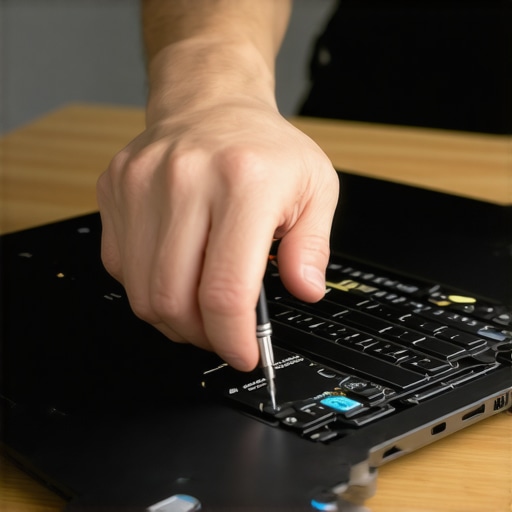
The BIOS Lock Check is Non-Negotiable
Before you click buy, message the seller one specific question: Is the BIOS password-locked and is Computrace disabled? If they say they do not know or cannot check, walk away immediately. I learned this the hard way with that expensive paperweight I bought years ago. You cannot easily verify the battery health or change boot orders to install a fresh OS if you are locked out of the firmware. It is like buying a house and finding out the seller does not have the keys to the front door.
Give an Old Machine New Life with Simple Swaps
The magic of enterprise gear is that it is actually designed to be opened and repaired. Unlike modern ultra-portables that are glued shut, student laptops from the corporate world usually have standard screws and accessible slots. I always budget an extra fifty dollars for a fresh drive. Knowing where to find the best budget SSDs for reviving older student laptops can turn a sluggish, frustrating boot process into a five-second startup. You should always learn how to find out if your laptop can be upgraded before committing, as some newer slim enterprise models have unfortunately started soldering the RAM to the motherboard.
Don’t Ignore the Screen and Port Integrity
I once bought a Latitude that looked mint in photos, but the USB-C port was so loose it only charged if I angled the cable at exactly forty-five degrees. Always check for physical damage or excessive wear around the ports. For any serious user, having a reliable connection is vital, so understanding why your business laptop needs a physical Ethernet port or at least sturdy USB-A ports is a game changer. Also, check the panel type in the specs. Avoid basic TN panels; they are the main reason why your laptop screen looks yellow and how to fix it troubleshooting guides exist, as low-quality hardware often has poor color reproduction from the start.One of the biggest lies we’ve been sold is that thinness equals quality. If you look at most modern ‘consumer’ flagships, they’ve sacrificed everything at the altar of aesthetics. I’ve seen so many people grab the slimmest machine on the shelf, only to find it sounds like a jet engine during a Zoom call because there’s no room for airflow. This is why you should never use your laptop on a soft blanket—those tiny vents get choked instantly. In fact, technical research from groups like the IEEE suggests that thermal stress is the primary factor in component degradation, yet consumer designs continue to prioritize style over thermal headroom. Have you ever fallen into the ‘thinness trap’ only to have your laptop overheat three months later? Let me know in the comments.
Your Cheap Accessories Are a Ticking Time Bomb
Everyone loves a good deal, but there is a dangerous line between saving money and sabotaging your hardware. I’ve noticed a massive surge in users reporting fried motherboards after using budget power supplies. I always tell my readers to learn how to find a replacement charger that won’t fry your board because the voltage ripple in knock-off bricks can be catastrophic. The same goes for connectivity. Most people ignore why cheap USB-C hubs might be killing your ports. These hubs often lack proper power delivery protection, meaning one static shock could take out your entire data bus. Furthermore, don’t let a ‘Grade A’ sticker fool you into thinking the internals are pristine. The biggest ‘oops’ I see is people ignoring the internal dust buildup. Even a refurbished unit needs a look under the hood. Understanding the truth about modern laptop warranties and repair rights is essential because many ‘certified’ refurbs come with stickers that try to scare you away from basic maintenance. 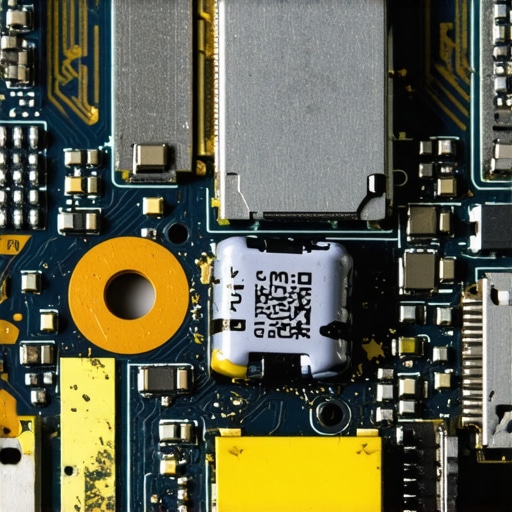
Do You Really Need a Gaming Rig for Engineering School?
This is where the nuance of student laptops that boost productivity comes in. Students often think they need a massive gaming laptop for CAD or video editing. However, the ‘oops’ factor here is the battery life. A gaming laptop will die in the middle of a two-hour lecture, whereas a solid business machine with a dedicated GPU is built for sustained work. It’s about balance. You should definitely check why every engineering student needs a dedicated GPU laptop, but don’t assume that more RGB lights mean more processing power. I’ve found that top business laptops often handle professional software more reliably than consumer-grade ‘pro’ models because of certified drivers. Before you commit to a purchase, make sure you understand the difference between a high refresh rate and color accuracy, because why you should never buy a laptop with a 720p screen is a lesson you don’t want to learn while trying to write a thesis. If you can’t open it to clean the fans or swap the drive, you’re buying a machine with a pre-set expiration date.Once you’ve secured your machine, the game shifts from hunting to preservation. Most people buy a laptop and treat it like a disposable toaster until it starts smelling like burnt silicon. I take a different approach. Every six months, I perform what I call a ‘thermal reset.’ I don’t just blow some compressed air into the vents; I actually open it up. Knowing how to choose the right thermal paste for your machine is the difference between a silent workstation and a thermal-throttling nightmare. According to technical documentation from Arctic Silver, specialized thermal interfaces can reduce core temperatures by up to 10-15 degrees Celsius compared to the cheap, dried-out factory gunk found in three-year-old corporate trade-ins. If you’re serious about longevity, this is a skill you need to master.
Stop Treating Your Hardware Like a Disposable Toaster
I’ve seen $2,000 business laptops crippled by nothing more than cat hair and laziness. Beyond the internals, you need to keep the interface clean. I’m a huge advocate for using the best keyboard cleaning slime we actually tested because it reaches the grit that a microfiber cloth just pushes around. Keeping the gunk out of your keys prevents the mechanical switches from sticking, which is vital if you’ve specifically sought out student laptops with keyboards that actually feel good to type on. 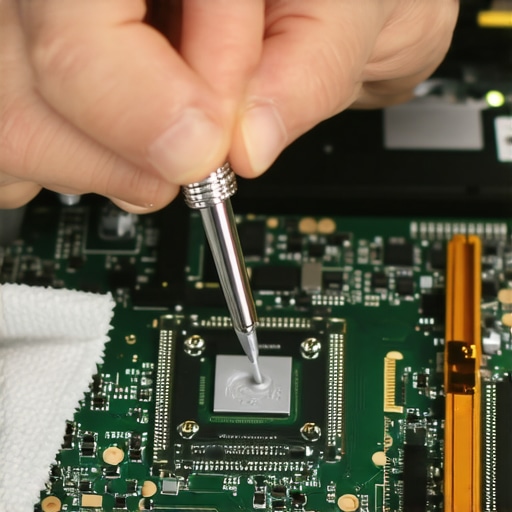
How do I maintain my laptop over time without breaking it?
The secret is incremental upgrades rather than total replacements. Instead of buying a new machine when yours feels slow, look at the bottlenecks. If you’re a student, student laptops that boost productivity are often just one SSD upgrade away from being ‘fast again.’ I always keep a few of the best budget SSDs for reviving older student laptops in my desk drawer. It’s the cheapest way to breathe life into a machine that others would have thrown in a landfill. Also, be mindful of your peripherals. I’ve learned that the only 3 USB-C docks that don’t overheat during transfers are worth their weight in gold because they won’t fry your motherboard’s data lines during a 100GB backup.
Why Your Accessories Should Cost More Than Ten Dollars
Scaling your setup is about quality, not quantity. I used to buy the cheapest must-have laptop accessories I could find on discount sites, but after losing a port to a $5 hub, I wised up. If you are using game-changing gaming laptops, you need a power delivery system that can handle the surge. This is why I stress knowing how to find a replacement charger that won’t fry your board. In the future, I predict we will see a massive shift toward modularity, similar to what the Framework laptop is doing now. The ‘Right to Repair’ movement is gaining enough steam that even the big players like Dell and Lenovo are starting to release official repair guides for your exact model. We’re moving away from the era of ‘sealed-shut’ black boxes and back to an era where you actually own what you buy. My advice? Grab a high-quality precision screwdriver set tonight and open your machine just to look at the fans—it’s the first step toward tech independence.
Moving from consumer-grade plastics to professional-grade alloys changed the way I work. It stopped being about the anxiety of a possible hardware failure and started being about the freedom to create anywhere. But getting to that point required unlearning everything the big-box stores want us to believe about tech lifecycles.
What the Big Retailers Won’t Admit About Real Durability
Over the years, I have realized that the shiny marketing of ‘thin and light’ is often a mask for ‘fragile and unrepairable.’ Here are the hardest lessons I have learned from my time in the tech trenches:
- The 70% Rule: A three-year-old enterprise machine at 70% of its original price is almost always a better value than a brand-new budget laptop. You are paying for the chassis and the motherboard quality, which are the parts you cannot easily replace.
- Port Reliability is a Safety Feature: I have seen more work lost to a failing USB-C dongle than to actual software crashes. This is why we prefer built-in Ethernet over USB adapters whenever possible.
- Software is Rarely the Bottleneck: Most ‘slow’ laptops are just thermal-throttling or running on mechanical drives. If you learn how to find out if your laptop can be upgraded, you can usually fix the speed issues for under fifty bucks.
- Brand Loyalty is a Trap: Don’t follow a logo; follow the build quality. There are the only 4 brands we trust for rugged build quality, and even they have ‘bad’ years. Always check the specific model generation.
[image_placeholder]
My Go-To Toolkit for Rescuing Older Hardware
I don’t just wing it when I buy a machine; I use a specific set of tools to ensure I am getting the best value. First, I always search for official repair guides for your exact model before I even bid. If the guide looks like a nightmare of glue and proprietary cables, I skip it. I also rely heavily on the hidden price history tools every deal hunter needs to make sure I am not buying during a seasonal spike. For the actual hardware, a simple precision screwdriver set and a tube of non-conductive thermal paste are all you really need to outperform a ‘Pro’ machine from the local mall. Finally, I always cross-reference my finds with top laptop deals in 2025 to see if the refurbished price is actually a win compared to current clearances.
Time to Reclaim Your Tech Independence
The cycle of buying a cheap laptop every two years is a tax on those who don’t know any better. By choosing to invest in a refurbished enterprise machine and maintaining it yourself, you are stepping out of that cycle. You are choosing a tool that respects your time and your wallet. Whether you are looking for unbeatable laptop deals or just want a machine that won’t snap in half at the airport, the power is in your hands. Don’t be afraid to open that case, blow out the dust, and take control of your hardware. Have you ever managed to fix a ‘dead’ laptop yourself, or are you still nervous about opening the case? Let me know in the comments below!