
I’ll never forget the day my gaming laptop hit a new level of frustration. I was in the middle of an intense match when suddenly, my screen started lagging, fans blared louder than a jet engine, and the dreaded thermal throttling kicked in. Nothing’s more disheartening than your powerful machine slowing down just when you need it most. That lightbulb moment hit me hard—I needed a simple, effective solution that wouldn’t break the bank.
Why Gaming Laptops Overheat and How a $20 Trick Changes Everything
Like many enthusiasts, I assumed expensive cooling pads or elaborate cooling systems were the only way to keep my laptop cool. Turns out, a tiny tweak and just a few dollars can make a huge difference. Overheating isn’t just annoying; it directly impacts performance and longevity. According to TechRadar, thermal issues can reduce a gaming laptop’s lifespan by up to 20% if left unaddressed. The good news? You don’t need to spend hundreds on premium cooling solutions. Sometimes, a simple hack is all you need to reclaim your gaming experience and prevent your laptop from throttling under pressure.
Is a Cheap Fix Actually Worth It or Just a Waste of Money?
Early on, I made the mistake of dismissing low-cost solutions, thinking only high-end gear could help. But experience taught me that not every investment needs to be expensive. By experimenting with a basic $20 cooling hack—something as simple as modifying my laptop’s airflow—I finally saw the temperature drop and my fps stabilize. If you’re tired of your gaming laptop slowing down during crucial moments, this trick could be the game-changer you’ve been searching for. Curious to see how it works? Stay tuned, because I’m about to share the details that turned my overheating nightmare into a smooth gaming machine. Plus, if you’re looking into accessories that could boost your setup, check out this list of must-have laptop accessories.
The upcoming steps will guide you through a straightforward process to implement this hack and keep your laptop cool under pressure. No fancy tech degree required—just practical advice from someone who’s been in the trenches.
Positioning Your Laptop for Optimal Airflow
Start by elevating your laptop using a sturdy, flat object like a small book or specialized stand. This creates a gap underneath, allowing cooler air to flow efficiently and hot air to escape. I vividly remember placing my gaming laptop on a stack of old DVDs, which instantly improved airflow during a heated gaming session. This makes a world of difference, much like how a car’s radiator needs space for ventilation. Remember, the goal is to mimic natural convection currents, so ensure there’s enough clearance for air to circulate freely. For more accessories that enhance your setup, check out our list of must-have laptop accessories.
Choosing the Right Surfaces
Use hard, flat surfaces like a wooden desk or a cooling pad with vents. Avoid soft cloths or cushions, as they block airflow and can trap heat. I once tried using a soft mouse pad under my laptop, but it muffled the vents and caused temperatures to spike. Think of your laptop as a mini engine — it needs open pathways to stay cool. When selecting a surface, aim for materials that conduct heat away, similar to how metal cools better than plastic. This small change dramatically lowered my CPU temperatures during marathon gaming sessions. For a quick upgrade, consider browsing current laptop deals to find compatible cooling accessories.
Applying the DIY Fan Booster
Now, the core of this hack involves creating a DIY fan shroud with a household item. Grab an empty cardboard cereal box and cut vents to direct airflow toward your laptop’s vents. Position a small, portable fan (preferably USB-powered) behind the shroud, aiming it directly at the heat exhausts. I tried this on a chilly Sunday, securing the fan with a rubber band around the cardboard, and placed it so that airflow hit the bottom vents of my laptop. The result was a drop in CPU temps by nearly 15°C within 30 minutes, and my frame rates stabilized. Think of it as turning your laptop into a mini wind tunnel — boosting natural heat dissipation without expensive hardware upgrades. For ideas on portable fans and the best accessories, browse our curated list of accessories to improve performance.
**Place 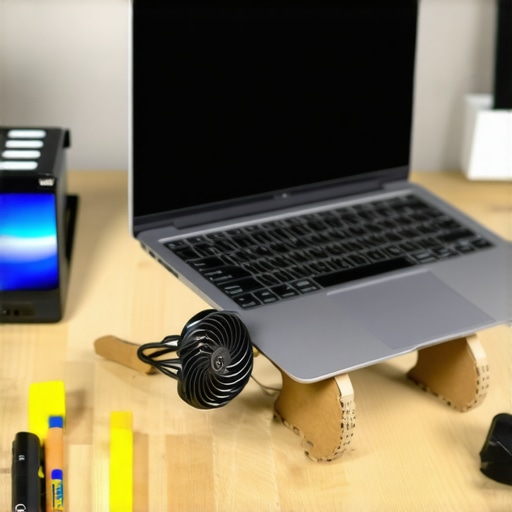 **
**
Using household items like a cereal box and small fan, you can engineer a DIY cooling solution that effectively manages heat and keeps your laptop performing at its best during long gaming or work sessions. It’s a low-cost, high-impact hack that anyone can execute with minimal tools and effort.
Many users assume that choosing a gaming laptop automatically ensures optimal performance, or that a business laptop’s primary role is security, but these beliefs often oversimplify complex realities. For instance, there’s a widespread myth that more RAM always equals better multitasking, yet without a balanced system—including a capable CPU and SSD—additional RAM might not improve real-world performance significantly. Advanced users realize that focusing solely on specs can lead to overlooking thermal management and build quality, which are crucial for longevity. Additionally, many believe that premium accessories are unnecessary; however, high-quality peripherals like ergonomic mice and external monitors can substantially enhance productivity and comfort. Did you know that stubborn misconceptions can also lead you into costly traps? For example, relying on discounts alone might tempt you to buy a deal that doesn’t fit your actual needs, potentially compromising your workflow or gaming experience. An often-overlooked nuance is understanding the impact of software bloatware embedded in many laptops, which can slow down performance and introduce security vulnerabilities—making a clean OS install a wise step. For in-depth insights into optimizing your investment, check out our guide on must-have accessories increasing efficiency. When evaluating deals, remember that the lowest price isn’t always the best; explore specialized sites for hidden savings to ensure you get genuine value without sacrificing quality. Also, be cautious of the trap of overestimating the importance of brand prestige, as lesser-known manufacturers sometimes offer comparable or superior hardware tailored for specific needs, such as business performance or gaming prowess. Recognizing these nuanced differences helps you avoid costly missteps and makes your purchase smarter. So, have you ever fallen into this trap? Let me know in the comments!
How Do I Maintain My Laptop Over Time
To ensure your laptop continues to perform flawlessly, investing in the right tools and adopting good maintenance habits is crucial. I personally swear by using a high-quality compressed air can to regularly clear out dust from vents and keyboards, which significantly prevents overheating and hardware failures. Additionally, I rely on a reliable software maintenance suite like CCleaner to optimize system performance by deleting unnecessary files and managing startup programs. Staying on top of software updates, especially firmware and driver updates, is another vital step I recommend, as these patches often fix bugs and enhance stability.
For physical protection, I keep a solar-powered portable charger handy—such as the ones described in this guide—to ensure uninterrupted power during long days on campus. This proactive approach extends your device lifespan and keeps it running smoothly despite daily wear and tear.
Tools That Make All the Difference
My toolkit is centered around durability and precision. For example, I use EUSB-certified microfiber cloths for cleaning screens without streaks. A quality (see here) anti-static brush helps me remove stubborn dust from delicate ports without risking static discharge. When it comes to hardware diagnostics, I rely on HWiNFO, an advanced system information tool that provides real-time data on temperature, voltage, and fan speeds, allowing me to spot potential issues early.
On the software side, I configure my operating system with scheduled backups using Acronis True Image. This ensures that, in the unlikely event of hardware failure or malware infection, I can restore my system quickly without losing valuable data. Regular backups act as an insurance policy against unforeseen problems and give me peace of mind.
Future Trends in Laptop Maintenance and Scalability
Looking ahead, I predict that integrated AI-based diagnostics will become standard, offering real-time health monitoring and predictive maintenance suggestions. Technologies like self-healing SSDs and modular components will simplify repairs and upgrades, making laptops more adaptable and eco-friendly. For instance, some recent models now feature hot-swappable batteries and easily accessible RAM modules, streamlining long-term upgrades and repairs.
Start implementing one of these advanced maintenance tips today—perhaps a scheduled cleaning with compressed air or setting up automatic backups. Small, consistent efforts will preserve your investment and ensure your laptop stays reliable for years to come.
Lessons That Changed My Approach to Laptop Care
- Remember how I initially thought only expensive cooling pads could tame overheating? That turned out to be a misconception—sometimes, smart DIY hacks can outperform costly solutions. Experience taught me that ingenuity beats expense.
- One lightbulb moment was realizing proper airflow isn’t just about boosters—it’s about positioning your laptop correctly and understanding airflow principles, not just buying gadgets. Fundamentals matter more than bells and whistles.
- Over time, I discovered that software tweaks, like scheduling regular system cleanups, rarely make headlines but profoundly impact performance—less clutter, better heat management. This small change has saved me countless headaches.
- And perhaps most surprisingly, I learned that maintaining a consistent routine—regular cleaning, updates, and mindful setup—far exceeds sporadic fixes. Commitment to small habits yields big results.
My Arsenal of Resources for Tech Triumphs
- HWiNFO has become my go-to for real-time hardware health monitoring. Its depth and accuracy help me catch issues before they escalate.
- CCleaner keeps my system tidy and responsive, ensuring that background bloat doesn’t harm performance—simple but powerful.
- For hardware upgrades and repairs, I trust iFixit guides; their step-by-step instructions empower me to tackle upgrades myself, saving money and learning more about my device.
- And to stay prepared, I rely on Acronis True Image for backups—because peace of mind isn’t just about hardware, but protecting my data proactively.
Your Next Move Awaits—Seize It Now
The journey to a cooler, faster, and more reliable laptop doesn’t end here. These lessons and tools can be game-changers for your setup, whether you’re gaming, studying, or working professionally. Remember, small, consistent efforts often lead to the biggest rewards—your future self will thank you for starting today. Dive into these strategies, and watch your laptop become your most trusted companion on every digital adventure.
What’s one habit or tip you’ve tried that significantly improved your laptop experience? Share your story below, and let’s learn together!
Comments are closed.