
I was sitting on the floor at O’Hare, surrounded by the smell of burnt coffee and the frantic hum of delayed travelers. My phone was at a terrifying 2%, and I was trying to coordinate a pickup while simultaneously checking some unbeatable laptop deals I’d spotted earlier. When I saw that glowing USB port on a public charging kiosk, it looked like a literal lifesaver. I didn’t think twice. I just plugged in. That split-second decision to grab ‘free power’ was the moment I unknowingly handed over the keys to my digital life. I’ve been a tech enthusiast for years, but in that moment of desperation, I forgot the golden rule of hardware: USB ports aren’t just for power; they are for data. Today, I want to walk you through why that ‘juice jacking’ risk is more than just a ghost story and how you can stay powered up without compromising your security.
Why That Airport USB Port is a Trap
The convenience of those public kiosks is exactly what makes them so dangerous. We’ve been conditioned to think of USB as a universal power source, but every time you plug into a public port, you’re essentially connecting your device to an unknown computer. In my early days of traveling with bulky gear, I actually ignored the warnings. I once plugged my device into a station in Chicago and, three days later, my inbox was flooded with login attempts from halfway across the world. It was a massive wake-up call. I learned the hard way that saving ten minutes of battery life isn’t worth the weeks of stress involved in recovering a compromised identity. If you’re traveling with high-end gear, like many of the top business laptops for productivity, the stakes are even higher because your professional data is on the line.
Is This Just More Tech Paranoia?
It’s easy to dismiss this as ‘it won’t happen to me’ talk, but even the FBI has stepped in to warn travelers. According to an official FBI security alert, bad actors have found ways to use public USB ports to export data or install malware. This isn’t just about someone reading your texts; it’s about persistent software that can track your keystrokes long after you’ve left the terminal. This is exactly why we only use GaN chargers for traveling now. They are incredibly compact, powerful enough for a laptop, and they plug into a standard AC outlet—the only truly ‘dumb’ and safe way to get power in a public space. Have you ever felt that nagging feeling of doubt when plugging into a public kiosk, or have you already made the switch to carrying your own wall brick? Staying safe often means carrying a few extra ounces in one of the best laptop bags that don’t scream steal me, but the peace of mind is worth every gram. Before we get into the hardware solutions that actually work, we need to understand exactly what happens to your device the second that connection is made.
How to Kill the Data Connection Before It Starts
The first thing you have to realize is that a USB cable is like a two-lane highway. One lane carries the electricity to fill your battery, and the other lane carries the data. When you plug into a kiosk, both lanes are open by default. To stay safe, you need to physically close that data lane. The most effective way is to stop relying on ‘mystery’ ports and bring your own interface. If you are browsing unbeatable laptop deals and finally pull the trigger on a new machine, your very next purchase should be a dedicated power brick.
Why Your Own Wall Plug Beats the Kiosk Every Time
The safest port in any airport or coffee shop is the standard AC wall outlet. These outlets are ‘dumb’ in the best way possible; they provide raw electricity with zero capability to read your hard drive. This is precisely why we only use GaN chargers for traveling now. They are small enough to fit in a pocket but powerful enough to juice up the top business laptops for productivity. I remember being in a crowded café in Berlin where the only available power was a shared USB hub under the communal table. Instead of risking it, I used my compact GaN brick in a wall socket behind a decorative plant. A guy sitting next to me used the hub and, ten minutes later, his screen started flickering with unauthorized ‘system update’ prompts. I just kept working, knowing my physical connection was air-gapped from any data-stealing hardware.
Stop Data Cold With a Physical USB Shield
If you absolutely must use a USB port—maybe the wall outlets are all taken by people charging their ancient tablets—then you need a ‘USB condom’ or a data blocker. This is a small adapter that sits between your cable and the charging port. It physically lacks the pins required for data transfer, effectively turning any smart port into a dumb power source. It acts like a screen door; it lets the breeze (power) through but keeps the bugs (malware) out. Even for student laptops that balance power and portability perfectly, this tiny $10 investment is a non-negotiable part of the kit. 
Avoid the Replacement Charger Trap
Not all charging issues are about data theft; some are about hardware safety. In my rush to stay powered up during a layover in Denver, I once bought a cheap, unbranded cable from a newsstand because I’d left mine in the seatback pocket. It didn’t steal my data, but it got so hot it nearly melted my charging port. Learning how to find a replacement charger that won’t fry your board is just as important as avoiding juice jacking. Stick to reputable brands and check the voltage requirements of your specific model before plugging in. These tools are among the must-have laptop accessories to boost your work setup because they ensure that your hardware lives to see another day.
Power Banks as Your Personal Safety Net
The ultimate way to avoid the kiosk entirely is to carry your own ‘fuel tank.’ A high-capacity power bank allows you to charge your devices on your own terms. When I’m traveling with a full gear load in one of the best laptop bags that don’t scream steal me, I always have a 20,000mAh battery tucked in a side pocket. It means I never have to participate in the ‘outlet hunt’ at the terminal. You aren’t just buying convenience; you’re buying a closed-loop system where your data never has to encounter a stranger’s hardware.
We’ve talked about the physical dangers of plugging into random ports, but the rabbit hole goes much deeper than just juice jacking. Most people think they are being savvy by hunting for the lowest price on a spec sheet, but after years of tearing these machines apart, I’ve realized that the ‘unbeatable price’ often hides a ticking time bomb. Most consumers fixate on the CPU or the amount of RAM, yet they completely ignore the thermal architecture or the BIOS security features that actually determine if a machine lasts three years or three months. Let’s look at the nuances that the big-box retailers usually leave out of the description.
The Hidden Math Behind Those Unbeatable Deals
Everyone tells you to hunt for unbeatable laptop deals, but in my experience, the cheapest machines are often the most expensive to own. I call this the ‘Consumer Grade Trap.’ A high-end consumer laptop might have the same processor as a business-class machine, but the similarity ends there. If you look at the research from industry analysts like Gartner, the Total Cost of Ownership (TCO) for enterprise-grade hardware is actually lower over time because of firmware stability and build quality. This is why business laptops use different CPUs than consumer models; they are designed for vPro or DASH management, which allows for remote security patching that consumer chips simply can’t handle. If you’re looking at top business laptops for productivity, you aren’t just paying for the name—you’re paying for a motherboard that doesn’t use the cheapest capacitors available.
Does Soldered RAM Actually Kill Your Long-term Value?
Here is the ‘oops’ factor that bites most students and professionals: the move toward thinness has led to a plague of soldered components. It’s a common myth that 8GB or 16GB is ‘enough for now.’ But the second a single memory chip fails on a soldered board, your entire laptop becomes a paperweight. This is exactly why we avoid laptops with soldered RAM at all costs. I once saw a friend lose an entire semester’s worth of data because a $20 RAM module failed, but since it was fused to the motherboard, the repair cost was higher than the value of the machine. For student laptops that balance power and portability perfectly, prioritize the ability to swap a part over a few millimeters of thickness. 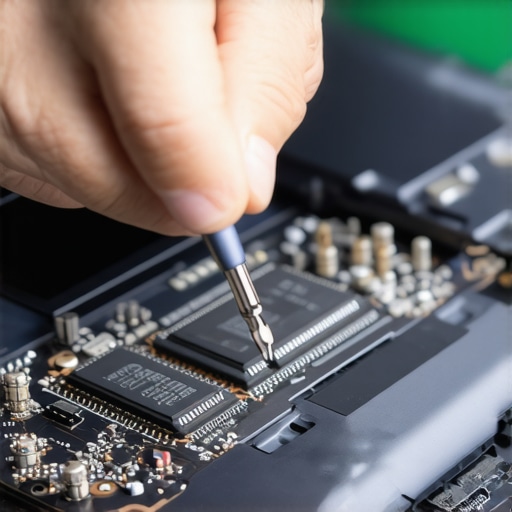
Don’t Fall for the Slim Gaming Laptop Myth
If you’re a creative or a gamer, you’ve probably seen those razor-thin machines that promise desktop-level performance. It’s a marketing lie. Physics doesn’t care about your aesthetic preferences. Heat is the number one killer of silicon, and why you should avoid slim gaming laptops for heavy rendering is simple: they thermal throttle within minutes. You might be paying for a high-end GPU, but if it’s trapped in a chassis with no airflow, it will perform like a chip half its price. Always look for individual key repair options and robust fan headers. In fact, why we only buy laptops with individual key repair options is a lesson I learned after a single crumb killed my entire ‘W’ key during a deadline. Have you ever fallen into this trap of choosing style over serviceability? Let me know in the comments. Before you click ‘buy’ on that next deal, check the maintenance manual. Knowing how to spot a dying SSD before your files vanish or how to swap a fan will save you more money than any Black Friday coupon ever could.
Maintaining your machine isn’t just about deleting temporary files; it’s about physical upkeep and knowing when to get your hands dirty. Once a month, I crack open my chassis—carefully. I’ve found that the $10 tool every laptop owner should keep in their desk is actually a simple nylon spudger and a P5 Pentalobe driver. Without these, you’re just stripping screws and praying. I personally perform a ‘dust audit’ every ninety days because pet hair and lint are the silent killers of even the best top laptop deals in 2025. If you can hear your fans spinning up during simple tasks, they are already struggling. Knowing how to fix a noisy laptop fan with a single drop of oil or even how to replace your own laptop fan in under 20 minutes can add years to your device’s lifespan.
The Sunday Ritual That Saves Your Motherboard
The secret to long-term performance is thermal management. Over time, the factory-applied ‘goop’ between your CPU and the heatsink dries out and becomes an insulator rather than a conductor. Learning how to choose the right thermal paste for your machine is an advanced move, but it’s the difference between a laptop that lasts three years and one that lasts seven. I remember the first time I repasted my workstation; I was terrified of static, but once I learned how to properly ground yourself before opening your laptop, it became as routine as an oil change for a car. This small act of maintenance prevents the heat-cycling that eventually cracks solder joints on your motherboard.
How do I keep my gear running like day one?
Consistency is key. Beyond the internals, you need to address the mechanical stress points. One of the most common hardware failures isn’t electrical—it’s the screen assembly. I see so many people grab their laptop by the corner of the screen to move it. This puts massive torque on the chassis. Understanding why your laptop hinge is destined to fail and how to prevent it is vital for long-term ownership. I always tell people to open the lid from the center and never, ever force a stiff hinge. If it feels like it’s catching, it likely needs a tension adjustment, not more muscle. Even the most expensive must-have laptop accessories to boost your work setup can’t save a snapped plastic mounting post inside your frame.

The Future Belongs to the Modular Machine
Looking ahead, I predict a massive shift back to modularity and repairability as a status symbol. We are seeing companies like Framework lead the charge, but even the tech giants are feeling the pressure from new ‘Right to Repair’ legislation. According to technical documentation and repairability scores from iFixit, the ease of disassembly is becoming a major selling point for savvy buyers who are tired of disposable tech. Soon, picking a laptop will feel more like building a desktop PC—you’ll choose your ports and your screen independently. For now, your best bet for longevity is to find the service manual before you even need it. Seriously, go to how to find official repair guides for your exact model and download yours today. My advanced tip for this weekend? Take a high-resolution photo of the motherboard before you touch anything; it’s the best ‘undo’ button you have. Give it a shot—just open the back panel and blow out the dust to see what’s actually going on inside.
Hardware Hard Truths I Had to Learn Through Failure
After years of fixing my own mistakes, I’ve realized that the most expensive part of a laptop isn’t the purchase price—it’s the downtime. First, always prioritize the chassis over the clock speed. A fast processor is useless if the hinges snap or the battery swells. Second, remember that convenience is often the enemy of security. That public USB port might save your phone’s life for ten minutes, but it could cost you your digital identity. Finally, treat your computer like a car. If you don’t change the oil (or the thermal paste), don’t be surprised when the engine seizes up. Owning a machine means taking responsibility for its physical health, not just its software updates.
The Toolkit That Keeps My Gear Running Forever
If you want to move beyond being a basic user, you need a few core items in your bag. I never leave home without my 20,000mAh battery pack and a high-quality GaN charger. I also highly recommend bookmarking how to find official repair guides for your exact model so you aren’t guessing when a screw comes loose. For those looking to upgrade, I always suggest checking out top laptop deals in 2025 while keeping an eye on serviceability scores. And for the love of your data, please learn how to secure your data before selling your old laptop so your personal life doesn’t end up on a stranger’s desk. These resources are the difference between a tool that lasts a decade and one that ends up in a landfill in two years.
Take Command of Your Digital Workspace
Owning technology shouldn’t feel like a ticking clock of inevitable failure. When you understand the physical limits of your hardware and the risks of public infrastructure, you stop being a victim of “planned obsolescence.” Whether you are hunting for unbeatable laptop deals or just trying to squeeze another year out of your current machine, the power is literally in your hands—as long as you have the right tools and a little bit of curiosity. Your laptop is an extension of your mind; protect it, maintain it, and it will serve you well into the future. Don’t let a public charging port or a dry thermal pad be the reason you lose your favorite workstation.
Have you ever had a “juice jacking” scare or a hardware failure that changed how you treat your tech? Let me know in the comments below!