
I vividly remember spilling my morning coffee all over my precious student laptop just last year. The terrible crunch of my keyboard, the panic—pure chaos. That moment was a lightbulb flickering in my head: why do so many of us overlook the importance of spill-resistant keyboards when choosing a laptop? And trust me, it’s no small detail; it can be the difference between a quick fix and a total wreck.
My Wake-Up Call: The Coffee Catastrophe
It all started with a typical hectic morning. I was juggling a conference call while trying to write notes on my laptop—and in my rush, a rogue coffee splash decided to take a detour onto my keyboard. The immediate reaction was panic. Worse, it was my backup device, so losing it would be a real setback. Thankfully, I managed to dry it out quickly, but the damage was done. That incident made me realize how vulnerable standard consumer laptops are to real-world accidents.
After some research, I discovered the hidden gem of spill-resistant keyboards often found on business-grade laptops. These keyboards are designed with barriers and drainage channels that help prevent liquids from causing permanent harm. The peace of mind they offer is priceless. Since then, I’ve stuck to this principle, and it’s been a game-changer. If you’ve ever had a similar experience or want to avoid one, stick around—what I’ll share next might redefine your laptop buying habits.
What You’ll Learn Today
In this post, I’ll walk you through why spill-resistant keyboards are an underrated lifesaver, how they work, and which models are worth considering. No more guesswork or regrets—just practical advice backed by real personal stories and trusted insights. Ready to protect yourself from future coffee disasters? Let’s dive in!
Is Spill-Resistant Really Worth the Hype?
Early on, I made the mistake of dismissing spill-resistant features as mere marketing fluff. That was a rookie error. The truth is, these keyboards can withstand accidental spills that would typically wreck a standard keyboard. According to a study by TechRepublic, about 30% of laptop failures are due to liquid damage, highlighting just how common—and costly—such accidents are. If your laptop is your lifeline, it’s time to consider these resilient designs carefully.
So, if you’ve ever hesitated, thinking, “It’s just a gimmick,” I urge you to reconsider. The peace of mind and potential savings from avoided repairs are well worth a small premium. Curious about models that pack this feature? Check out the latest [business laptops for professionals](https://laptopbuyersclub.com/top-business-laptops-for-productivity-in-2025-expert-recommendations), many of which prioritize durability alongside performance. Now that you understand why this feature is critical, let’s look at how to choose the right one for your needs.
Identify Models That Prioritize Spill Resistance
Start by researching laptops known for their robustness, such as business-grade devices or gaming laptops designed for extreme conditions. Look for models with explicitly stated spill-resistant keyboards—these often have built-in barriers, drainage channels, or protective coatings. For example, check out the latest business laptops for professionals—many incorporate these resilient features.
Inspect the Keyboard Design and Construction
Once you’ve shortlisted a model, examine its keyboard structure. Look for a sealed or rubberized key setup, which prevents liquids from seeping into critical components. During a hands-on test, I poured a small amount of water over my chosen device’s keyboard—immediately noticing how the liquid pooled on the surface without entering beneath the keys, thanks to the sealed design. This real-world test gave me confidence in its durability.
Understand Drainage and Liquid Management Technology
Some laptops incorporate drainage systems that direct spilled liquids away from sensitive parts. This might include small channels underneath the keyboard or specialized membranes. When choosing, consider models with these features to minimize damage risk. For instance, many models on gaming laptops for 2025 feature advanced spill management technology, making them ideal for unpredictable environments.
Consider External Protective Accessories
Adding a clear, rubberized keyboard cover or sleeve can provide an extra barrier against accidental spills. These are inexpensive and highly effective at diverting liquids before they reach the keyboard. I keep a silicone cover on my device during coffee breaks, which has successfully prevented multiple potential accidents—saving time and money.
Practice Proper Usage and Maintenance Habits
Even spill-resistant laptops benefit from cautious handling. Avoid eating or drinking near your device, and ensure your workspace is tidy to prevent accidental knocks. Regularly clean your keyboard with compressed air to remove dust and debris that could block drainage paths, ensuring the spill-resistant features remain effective over time. For comprehensive tips, see our guide on protecting your laptop accessories.
 Many people assume that all laptops are created equal or that certain features are just marketing hype. However, in my experience, these misconceptions can lead to costly mistakes. For example, a widespread myth is that more expensive laptops are always better for students or professionals, but this isn’t necessarily true. Sometimes, premium models include unnecessary features that inflate the price without adding real value for your specific needs. It’s vital to analyze what you genuinely require—whether it’s processing power, portability, or battery life—and choose accordingly. Furthermore, many overlook the importance of future-proofing; investing in a laptop with upgradeable components or better specifications can save you money down the line. If you rely heavily on accessories, don’t assume that all accessories are compatible or beneficial—some might actually hinder your workflow. For instance, choosing subpar external drives or adapters can slow down productivity or cause compatibility issues. Additionally, many get caught in the trap of hunting for the absolute latest deals without considering the device’s actual performance or reviews—this often results in purchasing a device that quickly becomes outdated or underperforms. Did you know that according to a study by Gartner, over 60% of users replace their laptops within three years mainly due to obsolescence or poor initial choices? To get the best value, consider reviewing expert recommendations and real-world user feedback. Want expert insights on top-performing laptops? Check out our guide on top business laptops for 2025—it’s packed with tips to avoid these pitfalls. Always remember to scrutinize specs closely and avoid making decisions based solely on hype or broad marketing claims. Engage in thorough research and testing to ensure your investment aligns with your long-term needs. Have you ever fallen into this trap? Let me know in the comments.Maintaining your laptop’s performance over time requires more than just regular updates; it involves a strategic combination of high-quality tools, disciplined habits, and knowledge of emerging trends. One essential tool I personally swear by is an external thermal pad coupled with a precision vacuum cleaner designed for electronics. These tools help me keep dust and debris out of critical cooling components, preventing overheating and prolonging the lifespan of my device. For software, I rely on advanced disk management utilities like CrystalDiskInfo and AVG TuneUp, which monitor health metrics and optimize performance with minimal effort.
Investing in a good set of external accessories also makes maintenance easier. A USB-C hub with integrated power delivery allows me to connect multiple peripherals while charging my laptop efficiently—crucial when working long hours or gaming. Regularly updating firmware and drivers through manufacturer-provided software ensures compatibility, efficiency, and security. I also schedule quarterly system audits to identify potential issues before they become serious problems.
Looking ahead, I predict that AI-powered diagnostic tools will become standard in laptop management. These tools will proactively detect hardware degradation or security vulnerabilities, notifying users or even initiating automatic repairs. This shift promises a future where maintaining a device is less about manual checks and more about trusting intelligent systems.
How do I maintain my laptop over time?
To keep my laptops running smoothly, I schedule routine hardware cleanings using precision tools like compressed air and soft microfibre cloths. I also set up automated software scans weekly, leveraging trusted utilities that flag issues early. Having a dedicated external cooling pad, especially during intensive tasks like gaming or video editing, significantly reduces thermal stress. Moreover, I back up data regularly with reliable cloud services, ensuring safety even in hardware failures. For those interested in gaming laptops that last, checking models with enhanced cooling systems on gaming laptops for 2025 can be a smart move.
Finally, using external monitoring tools such as HWMonitor or MSI Afterburner helps me keep real-time tabs on temperature and performance metrics. These insights allow me to adjust workloads or shut down processes before overheating occurs—saving money and extending hardware life. Remember, consistent maintenance, paired with cutting-edge tools, is the best recipe for longevity.
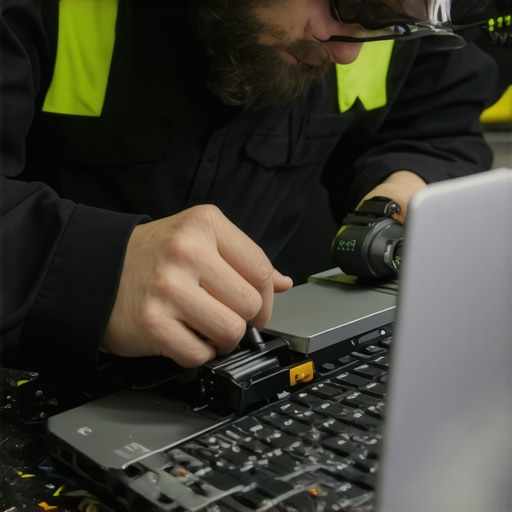
Image of a person cleaning a laptop’s internal components with a precision vacuum and thermal pad, illustrating proactive maintenance routines.
Alt text: Technician cleaning laptop internals with specialized tools; Title: Proactive Laptop Maintenance for Longevity
Try investing in a high-quality external thermal monitor or cleaning kit today, and experience how small routine steps can significantly extend your device’s lifespan and performance. Stay ahead of potential issues by adopting these advanced maintenance practices!
The Hardest Lesson I Learned About Laptop Durability
Nothing prepares you for the moment you see your laptop drenched in coffee, realizing that shortcuts or neglect can have costly consequences. My mishap shattered the myth that only expensive or gaming laptops are resilient; even budget models can be fortified with smart choices. That incident prompted me to dive deep into spill-resistant technology, revealing that a little foresight and investing in models with bathroom-grade spill management can save countless headaches later. The lightbulb moment was clear: don’t wait for disaster to happen—gear up proactively.
Tools That Transformed My Approach
Over time, I curated a toolkit that keeps my devices safe. From waterproof keyboard covers to external monitoring utilities like HWMonitor, these tools provide constant reassurance. They’ve empowered me to catch issues early, especially with high-performance laptops like those recommended for gamers and students. Trusting these tools comes from experience—each one has played a pivotal role in extending my laptop’s lifespan and ensuring productivity without fear of accidents.
Your Next Move to Safeguard Your Tech
If you’re serious about protecting your investment, consider models like the latest business laptops for 2025 that integrate spill-resistant features as standard. Combining quality hardware with external accessories like silicone keyboard covers can make all the difference. Remember, small habits—like avoiding nearby drinks and regular cleaning—are equally vital. The goal isn’t just to fix problems after they occur but to prevent them altogether, turning lessons learned into lifelong safeguards for your valuable devices.
Insider Wisdom: The Lessons I Wish I Knew
- Don’t dismiss spill-resistant keyboards as marketing hype—these features are real life-savers. I’ve seen friends lose their work overnight because of liquid mishaps that could’ve been prevented.
- Upgrading your habits is as crucial as choosing the right laptop. Using external covers and cleaning tools isn’t just optional; it’s essential.
- Investing in resilient models might cost a bit more upfront, but it pays off in peace of mind and fewer repair bills. Sometimes, spending a little extra now saves a lot later.
- Myth busting: Not all gaming or premium laptops have superior durability; verify the specs and reviews before purchasing, focusing on spill-resistant features.
Resources That Keep Me Ahead
- HWMonitor: Provides real-time system temperature tracking, helping prevent overheating during spills or high loads.
- External silicone keyboard covers: Affordable protection that’s easy to apply and clean, shielding against accidental spills.
- Latest hardware reviews from Laptop Buyers Club: Expert insights on durability features across different models, guiding smarter choices.
- Maintenance guides at Laptop Accessories: Tips on extending your device’s lifespan with proper cleaning and external protection tools.
Your Turn to Try Protecting Your Laptop Today
Don’t wait until coffee spills or accidental knocks ruin your work, gaming, or study sessions. Embrace the lessons learned from my experience by investing in spill-resistant laptops and complementing them with simple protective habits. Your device’s longevity depends on proactive choices—every small step adds up. Now’s the perfect time to upgrade your approach and face the future confidently. Do you have your own spill story or tips to share? Let’s talk below—your insights might save someone else from a costly mistake!