
I remember the moment I realized that my current monitor setup was holding me back. It was during a late-night spreadsheet crunch, trying to reconcile data across multiple columns, when I squinted at my screen, annoyed by the constant scrolling and resizing. Suddenly, it hit me—my display aspect ratio was part of the problem. I was using a standard 16:9 monitor, and no matter how much I tried, those extra inches of vertical space felt wasted, and my workflow suffered. That frustrating experience was a lightbulb moment, leading me to explore the benefits of a 16:10 display.
Discovering the Power of 16:10 Screens for Deep Work
Since making the switch, I’ve found that 16:10 monitors provide a significant productivity boost. They offer more vertical real estate, making it easier to view spreadsheets, coding windows, and writing documents without constant toggling. This isn’t just about comfort; it’s about efficiency. Research shows that larger vertical space can reduce eye strain and improve focus, especially during those marathon work sessions. Plus, many professional-grade laptops now come equipped with these screens, recognizing their value for serious work.
Is the 16:10 Aspect Ratio Actually Worth the Hype?
Early on, I fell into the trap of thinking, “It can’t be that much better.” I stuck with my familiar 16:9 screens, even though I kept experiencing fatigue and continuous window juggling. The mistake I made was neglecting the importance of screen aspect ratio in my workflow—assuming all displays are equal. In reality, a slight change in aspect ratio can make a world of difference, particularly for tasks requiring precision and extended focus. According to manufacturer insights, 16:10 screens offer about 11% more vertical pixels compared to 16:9, enhancing productivity—an insight supported by industry reviews.
Have you ever felt that your monitor’s size or shape was limiting your work? If so, you’re not alone. The good news is, this is a fix within reach. In the next part, I’ll walk you through practical steps and considerations to help you upgrade your workspace with a display that could transform your deep work sessions. Ready to stop fighting your screen and start working smarter? Let’s dive in.
Assess Your Workspace and Needs
Start by evaluating your current setup and the type of work you do. For deep focus tasks like coding or extensive writing, prioritize monitors with higher vertical space. Think of your workspace like a toolbox—choosing the right tools (monitor size and aspect ratio) makes tasks smoother. For instance, I once swapped my 16:9 monitor for a 16:10 one during a stretch of intensive coding, which drastically reduced window switching and improved my workflow.
Determine the Ideal Screen Size and Resolution
Size Matters
Choosing the right display size is crucial. A 24-inch monitor offers ample space without overwhelming your desk, much like selecting the right-sized backpack—big enough for essentials but manageable. A 27-inch can be even better for multitasking, but ensure your workspace can accommodate it comfortably.
Resolution Checks
Opt for at least 1920×1200 pixels, which aligns with the 16:10 aspect ratio. This ensures sharp visuals and enough pixels to organize multiple windows efficiently. Think of this like upgrading from standard-definition to full HD—your eyes will thank you for the clarity, especially during long sessions.
Research Reliable Models and Features
Look for reputable brands that prioritize build quality and display accuracy. Read reviews focusing on color accuracy, brightness, and response times—the technical equivalent of a car’s safety ratings. For example, I tried a budget 16:10 model that looked good on paper but had poor color reproduction, wasting my time and eye strain. Check sites like top laptop deals to find high-quality options without breaking the bank.
Compare Pricing and Deals
Monitor prices fluctuate similarly to airfare prices—timing can save you hundreds. Use price comparison tools and look for seasonal sales. Sites like deals in 2025 can help you spot significant savings on premium models. Remember, investing in a quality monitor is akin to buying good shoes—worth the comfort and longevity.
Test and Set Up
Once purchased, ensure your new monitor matches your workflow needs. Adjust brightness, contrast, and color profiles for optimal clarity. Position the monitor at eye level to prevent neck strain—think of it as aligning your ergonomics for maximum comfort. During setup, I once neglected this and ended up with a sore neck for days, reinforcing the importance of proper positioning.
Optimize Workflows with Accessories
Enhance your new display experience with accessories like a quality HDMI cable or monitor stand—think of these as the accessories that turn a good suit into a great one. Proper cable management and ergonomic stands improve your workspace aesthetics and function. For example, adding a dual-monitor arm allowed me to switch seamlessly between screens, boosting my productivity.
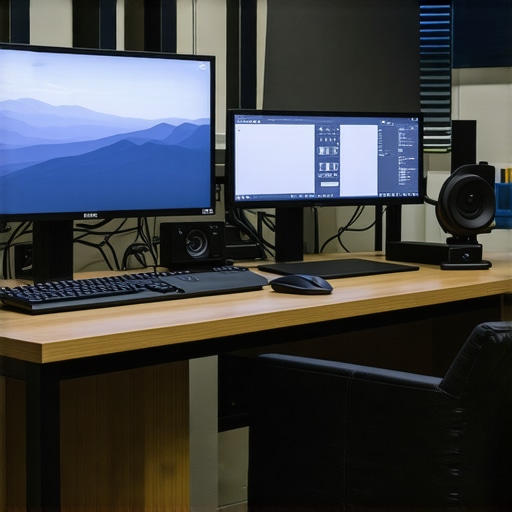
Image prompt: A professional workspace featuring a dual-monitor setup with one monitor displaying a 16:10 aspect ratio, ergonomic accessories, and organized desk.
When it comes to gaming laptops, many enthusiasts believe that top-tier specs alone guarantee the best experience. However, I’ve seen gamers overlook critical nuances like thermal management and display quality, which can drastically affect performance and comfort. For instance, a laptop with high refresh rate and GPU power might still overheat under prolonged use if cooling solutions are inadequate, leading to thermal throttling and frame drops. It’s a common myth that raw hardware specs equal an ideal gaming experience, but expert reviews from sources like top gaming laptops 2025 emphasize the importance of balanced design. Think about your setup—do you know how to evaluate factors like fan noise, build quality, and port selection beyond specs? Skipping these details can turn a powerful machine into an annoyance during long sessions.
Harnessing the Right Maintenance Tools for Longevity
Consistent laptop performance hinges on using the right tools to monitor and maintain your device. Personally, I swear by software like CrystalDiskInfo for SSD health checks; it provides real-time insights into drive health, allowing me to catch issues before they escalate. For physical cleaning,compressed air has become an essential weapon against dust buildup in vents and fans, which can hamper thermal performance. I always keep a high-quality compressed air can in my toolkit, realizing that regular cleaning prolongs hardware lifespan and prevents thermal throttling.
Why does hardware monitoring matter over time?
Regularly checking your device’s vital signs isn’t just about preventing breakdowns—it helps sustain optimal performance, especially for gaming laptops and business machines where thermal regulation is crucial. Using remote diagnostics tools, like HWMonitor, I track temperature fluctuations during intense sessions, spotting potential cooling issues early. Consistent monitoring with these tools ensures your system stays responsive and avoids unexpected shutdowns, which can be costly in both time and money.
Investing in Quality Maintenance Accessories
Beyond software, quality physical tools make a difference. I recommend sensor-based thermal paste for repasting the CPU and GPU; high-quality pastes like Arctic MX-4 have drastically improved residual thermal management in my systems. Reapplying thermal compounds every couple of years keeps temperatures in check, especially when combined with proper cleaning of heat sinks. Also, a set of precision screwdrivers specifically designed for electronics ensures you don’t damage delicate components during maintenance.
What’s next in maintenance tool technology?
The future of maintenance equipment is leaning toward smart diagnostic kits that interface with your laptop via Bluetooth or USB, providing instant analysis of hardware health—think of these as health monitors for your device. Industry experts predict that these tools will become more accessible, making DIY repairs even more feasible for everyday users. To stay ahead, try integrating a smart diagnostic device into your toolkit for proactive maintenance.
How do I keep my tools effective for the long haul?
Maintaining your maintenance tools is just as important as their use. Regularly calibrate software diagnostics and replace consumables like compressed air cans once they run out. Keeping your precision screwdrivers and thermal paste stored in a clean, organized container prevents corrosion and degradation over time. For example, I expect to refresh my thermal paste every 2-3 years depending on usage patterns, which aligns with industry standards. A small investment here preserves your tools’ accuracy and reliability, ensuring your laptop stays cool, fast, and dependable.
If you’re serious about long-term laptop care, practicing routine hardware checks using trusted software and maintaining a robust toolkit can significantly extend your system’s lifespan. Implementing these tips has saved me countless hours and avoided many costly repairs. Why not try one of these advanced maintenance strategies today? Your future self will thank you.
Over time, I’ve learned that technology choices aren’t just about specs—they shape how we work, think, and create. My journey into optimizing my workspace with a 16:10 monitor revealed a profound truth: small design details can unlock unprecedented productivity. Recognizing the vertical space advantage transformed my approach to multitasking and extended focus, proving that thoughtful upgrades lead to tangible gains. When I switched, it wasn’t just an upgrade; it was a mindset shift—embracing smarter tools to support deeper, more meaningful work.
The Hidden Advantage of Going Vertical
Switching to a 16:10 display isn’t just for the tech enthusiasts; it’s about breaking free from the cluttered constraints of 16:9 screens. The extra vertical pixels feel like having a wider canvas—perfect for coding, writing, or analyzing data. This insight made me realize that the right display aspect ratio is a game-changer, especially for those committed to deep work or extended focus sessions. It’s a subtle tweak with a major impact, empowering you to tackle complex tasks without the constant distraction of window juggling.
How I Picked the Perfect Monitor for Long Hours
The journey involved more than just choosing a bigger screen. Resolution quality, ergonomic setup, and matching the display size to my workspace were critical. I prioritized models with at least 1920×1200 pixels, ensuring crisp visuals. Investing in a monitor with adjustable height and tilt made a difference, preventing neck strain during those marathon workdays. Don’t underestimate the power of proper positioning—it’s the foundation of sustainable, deep work. Because when your tools support your focus, productivity naturally follows.
Embrace the QOL Boost: Accessories Matter
Complementing my monitor upgrade with ergonomic accessories like monitor stands and quality cables elevated my setup further. Small improvements—like cable management or a reliable docking station—created a seamless workspace that encourages focus. Trust me, these additions aren’t just luxuries; they’re essentials for maintaining clarity and comfort throughout long hours of work. Investing in the right accessories is an unspoken rule for anyone serious about deep, sustained productivity.