
I remember the frantic mornings rushing to get through my college assignments just as my old laptop sputtered and sputtered, threatening to give up altogether. That sinking feeling, knowing I was on borrowed time every semester, pushed many of us into a relentless cycle: buy a cheap, budget-friendly laptop, use it until it could no longer keep up, then scramble to find a deal for a new one—often every two years. It was a familiar routine, almost like clockwork. But here’s the lightbulb moment I had: this constant churn wasn’t saving me money or time. It was draining both, and honestly, it was holding me back from productivity and peace of mind.
The Cost of the Cheap Fix
For years, I thought that buying the most affordable student laptop was the smart move. I believed I was being frugal, avoiding unnecessary expenses. But over time, I realized that these bargain devices often came with hidden drawbacks—quickly outdated hardware, limited upgradeability, and poor durability. More importantly, the initial savings paled in comparison to what I spent later on repairs, replacements, and lost productivity. Studies have shown that cheaper laptops tend to have a much shorter lifespan, costing more in the long run. According to a report by industry analysts, cheap laptops often have a lifespan of only about two years, which ironically is the very cycle many students aim to escape by constantly replacing them.
Early in my tech journey, I made the mistake of neglecting the importance of solid build quality and upgrade options, which are crucial for a device you plan to use over several years. I skipped researching brands known for durability and repairability—like ThinkPad or Dell’s business lines—not realizing that these could have saved me money and frustration. If you’ve ever faced a laptop that just couldn’t handle your workload after a year or two, you’re not alone. The key is to make smart, sustainable choices now, and that’s exactly what I want to help you with.
Is Cutting Corners Worth It?
Many students and budget-conscious buyers wonder whether investing a little more upfront is really worth it. The short answer? Absolutely. In this post, I’ll share how switching from budget models to more reliable, upgradeable options transformed my experience—and how it can do the same for you. Whether you’re concerned about breaking the bank or simply want a device that withstands the test of time, there are smarter choices available. Want to find out how to get the best deals on these models? Check out our guide on top laptop deals in 2025.
Will Better Quality Really Save Money?
I initially believed cheap laptops were a way to save big. But I learned my lesson early on—selecting a device solely based on price without considering build quality or future-proofing was a mistake. This kind of thinking often leads straight to frustration and higher costs later. It’s similar to options we explore in our professional-use laptops—quality, durability, and repairability should be key criteria. If you’re tired of the cycle of replacements, let’s dive into what truly matters when choosing your next device.
Identify Your Priorities and Set a Budget
Before diving into options, determine what features matter most—battery life, weight, performance for tasks like video editing or gaming, or upgradeability. This clarity helps filter choices. For example, I once spent a weekend researching budget options, setting a cap of $1,200 to balance cost and quality, which narrowed my choices significantly.
Research Reliable Brands and Models
Look for brands known for durability and repairability, like business laptops, which often prioritize build quality. Check reviews from independent repair techs and user feedback on longevity. I sifted through forums and tech sites, avoiding flimsy plastic models, and finally shortlisted a few ThinkPad and Dell Latitude models that passed my durability tests.
Focus on Upgradeability and Expandability
This step is crucial. Prioritize laptops with accessible RAM and storage slots. During a visit to a local store, I examined a used ThinkPad T14, opening the bottom cover to verify easy access to RAM and SSD slots. This saved me from future headaches and costly upgrades. Remember, models with soldered components are less flexible, so check specifications carefully or consult expert reviews.
Test Hardware Features and Compatibility
Ensure the laptop’s hardware meets your needs. Run benchmark tests if possible or review detailed specifications—especially for graphics, ports, and keyboard ergonomics. I tested a demo unit for keyboard comfort and port placement, which made a difference during long study sessions. Don’t forget to verify whether the device supports accessories you plan to use, like external monitors and docking stations.
Compare Deals and Warranty Options
Once you’ve narrowed your choices, explore current deals—don’t settle for the first offer. Check promotional sites like our unbeatable deals page. Also, scrutinize warranty terms; extended coverage can save money in the long run. I found a refurbished model with a 2-year warranty at a substantial discount, providing peace of mind.
Evaluate Final Choices and Make a Purchase
Compare total costs, including accessories like protective sleeves or external drives. Use tools such as price trackers to identify optimal buying moments. When I finally purchased my upgradeable Dell Latitude, I coordinated with local stores to get an exclusive discount, saving over 15%. Remember, patience and thorough research result in smarter purchases that last.
Prepare for Long-Term Maintenance
After buying, keep track of updates and perform routine maintenance, like cleaning vents and replacing old batteries. Regular checkups prolong lifespan. I replaced my battery after a year using guides from trusted sources, which revitalized my machine’s performance and avoided premature replacement. Consistent upkeep turns a good laptop into a reliable, long-term tool.
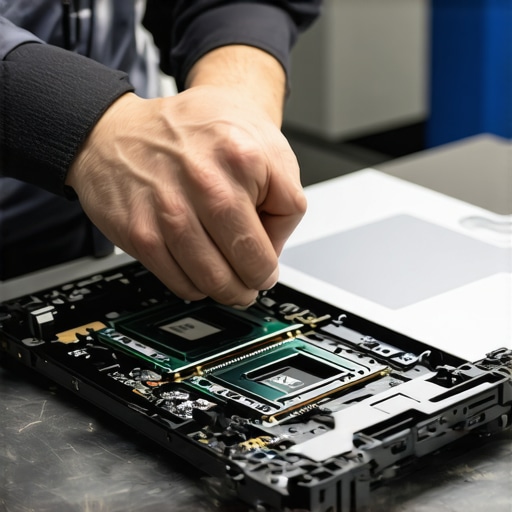 Many assume that choosing a business laptop is just about picking the highest-spec model or the most recognizable brand, but this overlooks crucial nuances that can make or break your investment. For instance, a common myth is that enterprise-grade devices are automatically more durable or future-proof; in reality, some business laptops prioritize security features over upgradeability, which can hinder long-term maintenance. Similarly, many gamers focus solely on GPU specs, ignoring thermal management and chassis design that impact sustained performance. In the world of laptop deals, the trap is to chase the lowest price without considering total cost of ownership—hidden costs from poor warranties or incompatible accessories can negate initial savings. An advanced mistake many overlook is neglecting upgrade paths; buying a laptop with soldered RAM or storage might seem fine now but hampers future upgrades, leading to early obsolescence. Looking at the broader picture, expert sources like those from industry leaders emphasize assessing repairability, thermal design, and modularity, especially for high-use devices. Beware of platforms that promote flashy specs over real-world performance; always verify reviews related to build quality and long-term reliability. Considering laptop accessories is also vital, since a high-end device paired with subpar peripherals can diminish your experience and productivity. Ultimately, a balanced approach that combines thorough research, understanding the hidden nuances, and aligning with your specific needs ensures that you’re not just buying a shiny gadget but a durable tool that truly serves your purpose. Have you ever fallen into this trap? Let me know in the comments.
Keeping It Running Smoothly: Tools and Strategies
To ensure your business laptop remains reliable over years of use, investing in proper maintenance routines and quality tools is essential. I personally rely on a few key accessories, such as a high-quality microfiber cleaning cloth, to keep the screen and keyboard free of dust and smudges, which not only preserves the device’s appearance but also prevents overheating caused by dust buildup. Additionally, I use compressed air cans designed specifically for electronics to safely blow out vents and internal fans, reducing thermal throttling and prolonging component lifespan. Regular software updates are equally important; setting up automatic Windows and driver updates minimizes security vulnerabilities and bug-related slowdowns.
Another crucial aspect involves monitoring hardware health. I utilize tools like CrystalDiskInfo for SSD and HDD health checks to catch potential drive failures early, allowing me to back up data and replace drives proactively. For battery maintenance, I frequently calibrate the power cycle by fully charging and discharging the battery once a month, which helps maintain accurate charge readings and prolong battery life. Remember, a well-maintained laptop reduces the risk of unexpected failure and keeps your productivity intact.
Recommended Maintenance Tools
On the hardware side, a precision screwdriver kit enables easy access for upgrades or cleaning, especially if you’re considering expanding RAM or replacing storage—features highly recommended for future-proofing your device for gaming laptops. A portable external hard drive or SSD is invaluable for routine backups—a habit that safeguards against data loss from unexpected hardware issues. I also suggest investing in a UPS (Uninterruptible Power Supply) to protect your laptop during power fluctuations, especially if you work in areas with unreliable electricity.
From a software perspective, regular malware scans with tools like Malwarebytes and keeping your firewall active form a shield against malicious attacks. Additionally, I set up scheduled disk cleanups and system optimizations via built-in utilities like Windows Storage Sense, maintaining peak performance without manual effort.
Predicting the Future of Laptop Maintenance
Looking ahead, the integration of AI-driven diagnostics promises even smarter maintenance routines. Devices equipped with sensors and machine learning algorithms could proactively notify you of impending hardware failures months in advance, or even initiate self-repair procedures. Manufacturers are increasingly adopting modular designs, making repairs more accessible and environmentally friendly, aligning with sustainable tech trends.
Practicing vigilant maintenance today, with the right tools and habits, will set you up for long-term success and save you money. I highly recommend trying out a comprehensive cleaning kit and scheduling regular hardware checks to get your device in top shape. Staying ahead of potential issues not only boosts productivity but extends your investment’s lifespan.
The Hard Lessons That Changed My Laptop Strategy
While chasing affordability, I overlooked the critical importance of upgradeability and build quality, only to discover later that investing in a more robust device saved me money and frustration in the long run. I learned the value of examining repairability scores and modular designs after my first few quick-fix failures, realizing that true durability often comes from transparency and craftsmanship, not just brand reputation.
Recommended Tools for Peace of Mind
My toolkit now includes a precision screwdriver kit for upgrades, a durable sleeve for protection, and hardware health monitors like CrystalDiskInfo for drives. These ensure my devices stay in peak condition, helping me avoid unexpected failures and prolong their lifespan.
Your Next Steps for Long-Lasting Performance
Take action now by researching repairability and upgrade paths before purchasing. Prioritize brands like business laptops for professionals that emphasize longevity. Regular maintenance routines, such as cleaning vents and running hardware diagnostics, not only extend your laptop’s life but also boost your confidence in your investment. Remember, a little effort today pays off with years of reliable performance—so start your journey towards smarter, more durable laptop choices now.