
I remember the exact moment my back finally gave out—metaphorically, of course. I was trying to wedge my 17-inch gaming powerhouse onto a tiny seat-back tray on a flight to Chicago, and between the brick-sized power adapter and the cooling fans that sounded like a jet engine taking off, I realized I wasn’t actually having fun. I was just managing a heavy, expensive machine. I had spent thousands on what I thought was freedom, but I was tethered to a wall outlet and a massive carrying case. That afternoon, I made the call to ditch the rig and switch to a handheld console, and I haven’t looked back since.
The Heavy Price of Truly Portable Power
Let’s be honest, we’ve all fallen for the marketing. We see those game-changing gaming laptops for 2025 and think we’re buying the ability to play anywhere. My biggest mistake early on was prioritizing raw specs over actual usability. I once bought a high-spec slim model thinking it was the best of both worlds, but I quickly learned why you should avoid slim gaming laptops if you actually want consistent performance. They get hot, they get loud, and they eventually throttle your frame rates just when the game gets good. I spent years trying to make it work, even making the rookie error of using my laptop on a soft blanket, which nearly fried the internals before I knew any better. I bought laptop accessories like cooling pads and specialized docks, but they just added more bulk to my bag. According to a report by Digital Trends, the rise of powerful APUs has made it so that handheld devices can now run 90% of a typical user’s Steam library at playable settings, effectively killing the need for a dedicated mobile furnace. If you are still struggling with the bulk, you might be looking for the best way to travel with a large gaming laptop, but I’m here to tell you there is a lighter path.
Is a handheld console actually worth the trade-off in power?
I know exactly what’s going through your head because I thought it too. You’re worried about losing those ultra-high settings or that crisp 4K resolution you spent so much money to get. I was terrified that a portable console would feel like a toy compared to a real computer. But here’s the secret I discovered: I actually play my games now. When the friction of setting up—finding a desk, plugging in the mouse, and managing the heat—is gone, gaming becomes a joy again. I’ve gone from playing once a week to playing every single night for twenty minutes before bed. Have you ever felt like your hardware was the very thing stopping you from actually finishing a game? Today, I’m going to show you how to stop hunting for unbeatable laptop deals and start looking at a gaming experience that actually fits into your life.
Audit Your Library Before You Jump Ship
You don’t need to be a tech wizard to make the switch, but you do need to be realistic about what you play. The first thing I did was look at my Steam library and check for that little green “Verified” checkmark. If you’re coming from high-end gaming laptops, you might be used to just cranking everything to ultra. In the handheld world, the strategy is different. You aren’t aiming for the stars; you’re aiming for a stable 40 or 60 FPS on a screen that’s small enough to hide a few jagged edges. I realized that 720p on a seven-inch screen actually looks sharper than 1080p on a cheap 15-inch panel. If you are a student, you might already know that student laptops that balance power and portability are the sweet spot, and handhelds are just the extreme version of that philosophy.
Ditch the Giant Power Brick for a GaN Solution
The biggest hurdle in my transition wasn’t the performance; it was the “tether.” I used to carry a power adapter that weighed as much as a literal brick. One of the first must-have laptop accessories I picked up for my new setup was a 65W GaN charger. It’s the size of a box of matches but provides enough juice to keep the console running while it charges. This is why we only use GaN chargers for traveling now—they eliminate the bulk without sacrificing safety. I once tried using a cheap phone charger on a train ride, and my device actually lost battery while plugged in. Don’t make that mistake; get a dedicated high-wattage plug that won’t fry your board.
Create a Seamless Docking Experience
The beauty of the modern handheld is that it can still pretend to be a “real” computer when you need it to. When I get home, I don’t mess with cables. I drop the device into a dock that’s connected to my monitor, keyboard, and mouse. It’s a cleaner version of the top business laptops for productivity setups you see in high-end offices. I specifically look for USB-C docks that don’t overheat, because the last thing you want is your game stuttering because your hub is melting on the desk. This setup saved my sanity during a week-long work trip where I had to edit spreadsheets by day and slay dragons by night. It’s about versatility, not just raw horsepower.
Stop Tinkering and Start Playing
We often get caught in the trap of checking frame counters instead of actually looking at the art. I spent years worrying if I had enough memory, constantly checking why your gaming laptop needs more than 16gb of ram now, but on a handheld, the optimization is often done for you. My micro-story of failure? I once spent three hours trying to “undervolt” a gaming laptop in a hotel room to stop it from thermal throttling, only to realize I had spent my entire free evening looking at graphs instead of playing the game. With a handheld, I just hit the power button and I’m in. It’s a paradigm shift from being a system administrator to being a gamer again.
Why the Best Specs Often Deliver the Worst Performance
Here is the hard truth that most tech influencers won’t tell you: a high-end component name means nothing if the thermal design is flawed. I’ve seen countless people hunt for unbeatable laptop deals, only to find that their shiny new i9 processor performs like an i5 because it starts overheating the second they open a browser. This is what I call the ‘Marketing Trap.’ In the world of game-changing gaming laptops for serious players in 2025, manufacturers often limit the Total Graphics Power (TGP) to fit components into slim chassis. You think you’re buying 140W of power, but you’re actually getting 80W. It’s a bait-and-switch that happens more often than you’d think, especially when brands prioritize aesthetics over airflow.
Why do business laptops actually survive years of abuse?
If you look at the business laptops for professionals, they rarely look exciting. There’s no RGB, no aggressive angles, and they often look like black slabs from the 90s. But there is a reason IT departments buy them in bulk. According to a study by SquareTrade, consumer-grade laptops are significantly more likely to fail within three years compared to enterprise-grade machines. This is because business units are designed for ‘serviceability’—the idea that a technician should be able to fix it in fifteen minutes. When you buy a budget student model, you’re often getting glued-in batteries and soldered RAM, which is exactly why most gaming laptops fail right after the warranty expires. If you want a machine that actually lasts, you’re often better off learning how to snag a refurbished enterprise machine rather than buying a brand-new plastic toy.
Stop Buying Laptops Based on Their Marketing Badges
One major ‘oops’ factor I see constantly is ignoring the chassis quality. We obsess over the screen resolution and the RAM, but we ignore the hinges—the very thing that connects the two halves of your digital life. I’ve had more screens die because of a failing hinge than because of a bad panel. This is a common nuance: the cheaper the laptop, the more likely the manufacturer saved money on structural integrity. You can find the best budget laptops that don’t use cheap plastic hinges if you know where to look, but it requires looking past the shiny stickers. We need to start demanding better modern laptop warranties and repair rights, because right now, many are essentially buying disposable tech. Have you ever fallen into this trap where a ‘great deal’ turned into a paperweight after just 13 months? Let me know in the comments.
I’ve spent a decade opening up everything from $200 Chromebooks to $4,000 workstations, and if there is one thing I’ve learned, it’s that a little bit of proactive maintenance beats a frantic trip to the repair shop every single time. Most people treat their computers like appliances—they use them until they break and then look for unbeatable laptop deals to replace them. But if you want to scale your setup and actually get a return on your investment, you need a maintenance kit. I don’t go anywhere without the $10 tool every laptop owner should keep in their desk, which is usually a high-quality Pentalobe or Torx precision driver. It’s the difference between being able to clean out a dusty fan and watching your motherboard slowly cook itself to death.
How do I keep my hardware healthy for the long haul?
The secret isn’t in software; it’s in physical care. Once every six months, I perform what I call a ‘health audit.’ I start by checking the battery cycles because I know how to verify the battery health of a used laptop purchase, and that same logic applies to my daily driver. If I see the capacity dropping below 80%, I start looking for a replacement. This is exactly why your next business laptop needs a user-replaceable battery. I also keep a close eye on my storage health. You don’t want to wait for the blue screen of death to realize your drive is failing; learning how to spot a dying SSD can save you months of lost work.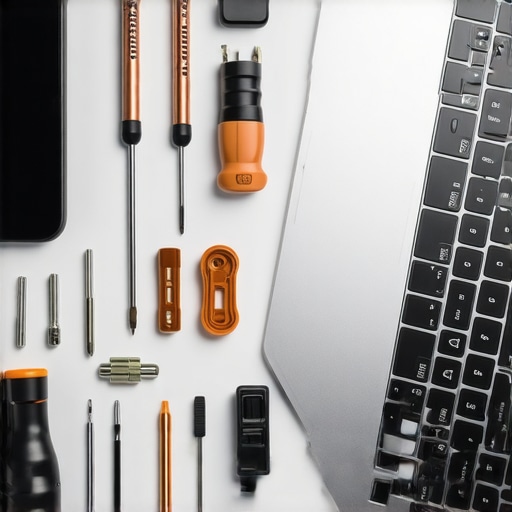
Don’t Fear the Thermal Paste Refresh
If you find your fans ramping up while you’re just checking email, it’s time to talk about thermals. Most factory thermal paste is ‘good enough’ for the first year, but it eventually dries out and loses its effectiveness. According to data from the experts at Gamers Nexus, the ‘pump-out effect’ in mobile processors can significantly degrade cooling performance over time due to the constant expansion and contraction of the heat sink against the thermal interface material. I make it a point to repaste my main machine every two years. If you’ve never done it, don’t panic. You just need to know how to choose the right thermal paste for your machine and follow a guide. I always look for official repair guides for your exact model before I even pick up a screwdriver. You’d be surprised how often you can replace your own laptop fan in under 20 minutes once you see how it’s actually laid out inside.
The Shift Toward Modular Productivity
Looking ahead, the ‘disposable’ era of tech is finally starting to crumble. We are moving toward a future where modularity is the standard, not the exception. Brands like Framework are proving that we don’t have to accept soldered components as a trade-off for thinness. I predict that by 2030, we will see a ‘Right to Repair’ score on every price tag, right next to the RAM and CPU specs. We’ll stop looking for the most powerful machine and start looking for the one that is easiest to upgrade. If you’re ready to stop being a victim of planned obsolescence, I challenge you to open your laptop this weekend—just to blow out the dust. It’s the first step toward actually owning your hardware. If you run into trouble, you can always contact us for advice on specific parts.
I’ve spent the better part of a decade chasing the dream of the all-in-one portable powerhouse, but the most important lesson I’ve learned isn’t found on a spec sheet.
The Three Lies We Tell Ourselves Before Buying Hardware
When you’re browsing those unbeatable laptop deals, it’s easy to fall into the trap of aspirational buying. We tell ourselves that we’ll definitely carry that 17-inch beast to the library every day, but the reality is usually much heavier. Here are the core truths I’ve gathered from years of testing:
- The ‘Future-Proof’ Fallacy: Many people obsess over why your gaming laptop needs more than 16gb of ram now, yet they completely ignore the thermal limitations of the chassis. A machine with 64GB of RAM is useless if it throttles after ten minutes of gameplay.
- The Portability Myth: If your setup requires a two-pound power brick, it isn’t portable. This is exactly why we only use GaN chargers for traveling now—if the manufacturer doesn’t provide a compact solution, you need to find one.
- The Specs vs. Usage Gap: You might think you need a workstation for school, but often, student laptops that balance power and portability perfectly lead to higher grades because you actually take them with you.
The Toolbox That Keeps My Setup Alive
Maintenance is the only way to beat planned obsolescence. I don’t care how expensive your machine was; if you don’t take care of it, it will fail. These are the tools I personally trust to keep my handhelds and laptops running like new:
- A Precision Driver Set: I cannot stress this enough—this is the $10 tool every laptop owner should keep in their desk. Being able to safely open your device to clean out the dust or how to replace your own laptop fan in under 20 minutes is a superpower.
- Thermal Management: Don’t let your machine cook itself. Learning how to choose the right thermal paste for your machine can drop your temperatures by 10 degrees instantly.
- Health Monitoring: I check my battery health monthly. Knowing how to verify the battery health of a used laptop purchase isn’t just for buying; it’s for keeping your current daily driver healthy.
Stop Managing Your Tech and Start Using It
At the end of the day, hardware is just a tool to help you reach a goal, whether that’s winning a match or finishing a thesis. I wasted years managing game-changing gaming laptops for serious players in 2025 that were simply too big for my actual life. By shifting to a handheld and a lean, docked setup, I regained the time I used to spend troubleshooting. Don’t be afraid to choose the device that actually fits your backpack, even if it doesn’t have the highest numbers on the box. It’s time to stop being a system administrator for your own life and start being a user again. Have you ever regretted buying a high-end gaming laptop because it was just too bulky to actually use? Let me know in the comments below.