
I remember standing at the checkout of a bright, sterile electronics store three years ago, my hand slightly shaking as I swiped my card for a brand-new ultrabook. I paid the full retail price, $1,300 plus tax, thinking I was getting a fair deal. A week later, I ran into a classmate in the library who had the exact same machine. When I asked him how he liked it, he casually mentioned he’d saved $300 just by flashing his student ID at the register. I felt like a total amateur. That plastic card in your wallet isn’t just for checking out library books or getting into the dining hall; it is literally the most powerful financial tool you own for tech. Today, I am going to show you how to never make my $1,300 mistake again. We are going to dive into how you can stack savings and find unbeatable laptop deals that the general public never even sees. Have you ever walked away from a tech purchase feeling like you left money on the table?
Stop Paying the Sticker Price Tax
For most people, the price on the tag is the price they pay. But as a student, that tag is just a suggestion. I used to think these discounts were just for the entry-level, clunky machines that no one actually wanted. I was wrong. Major manufacturers and retailers reserve their deepest price cuts for the education sector because they want to hook you into their ecosystem early. Whether you are looking for student laptops that balance power and portability perfectly or a beast of a machine for editing, your status as a learner is your ticket to a lower tier of pricing. According to data from SheerID, nearly 94% of students say that a specialized offer would make them more likely to shop with a brand, and companies know this. They aren’t just giving you a ‘nice’ discount; they are competing for your loyalty.
Do These Discounts Apply to the High-End Machines?
This is the biggest hurdle I see people face—the fear that student deals are limited to the ‘budget’ bin. It is a common misconception. In reality, some of the most aggressive price drops happen on premium hardware. I have seen workstation-grade business laptops discounted by hundreds of dollars because the manufacturer offers an education-storefront equivalent of their professional line. You aren’t just limited to basic word processing machines; you can often snag game-changing gaming laptops for the price of a mid-range office PC if you know where to look. My early mistake was assuming I didn’t qualify because I wasn’t a ‘tech major,’ but the truth is, if you have a valid .edu email or a current ID card, the door is wide open. It’s time to start treated that ID like a VIP pass to the hardware you actually want.
Look Beyond the Standard Retail Page
Most people go to a brand’s homepage and click the first big banner they see. This is your first mistake. To get the real unbeatable laptop deals, you need to find the specific education portals that are often buried in the footer or hidden behind a verification gate like UNiDAYS or SheerID. These portals don’t just shave off 5%; they often unlock entirely different inventory tiers. I remember trying to buy a mid-range rig during my sophomore year. I had three different browser tabs open: the manufacturer’s site, a student discount aggregator, and a cashback extension. I actually messed up the first time—I didn’t realize my student email alias wasn’t recognized by the verification system. I had to get a manual override from support, but that extra 20 minutes of messy troubleshooting saved me enough to buy a set of must-have laptop accessories that I still use today.
Stack Your Discounts Like a Pro
Think of tech pricing like a sandwich; one layer is the base sale, but the ‘meat’ comes from stacking. First, find a holiday or seasonal sale. Second, apply your student discount. Third, use a cashback browser extension. For example, when looking for student laptops that boost productivity and learning, I’ve seen students combine a back-to-school promotion with a student-exclusive coupon to walk away with a machine for 40% off the original MSRP. If you are a power user, this is how you afford the high-end specs. You might think you only need the basics, but why your gaming laptop needs more than 16gb of ram now becomes a very real concern once you start multitasking. By stacking, you can get 32GB of RAM for what others pay for 8GB. 
The Hidden World of Enterprise Refurbs
If your budget is truly tight, stop looking at consumer-grade plastic. The smartest move you can make is to pivot toward ex-corporate machines. Companies lease thousands of high-end business laptops and return them after two years. These are tanks—built with magnesium alloys and spill-resistant keyboards. You can learn how to snag a refurbished enterprise machine for under 300 dollars that will outlast a brand-new $600 budget laptop from a big-box store. These machines were originally $2,000+ and often come with professional-grade warranties that still have a few months left.
Wait for the Right Seasonal Cycles
Tech follows a rhythm. New CPUs usually launch in the spring or fall. Retailers get desperate to clear out ‘last year’s’ inventory right before these launches. This is when game-changing gaming laptops for serious players in 2025 will suddenly drop in price. I once saw a flagship model drop $500 overnight just because a newer chip was announced that only offered a 5% performance boost. Don’t chase the bleeding edge; chase the value of the ‘second-best’ which is still overpowered for 99% of your college tasks. Use price tracking tools to set alerts for these specific shifts so you don’t have to manually check every day.
Now that you know how to find a discount, we need to talk about the trap. Most people walk into a store and look at two numbers: the price and the resolution. They think a 4K screen for a student price is a steal. In my experience, it’s usually a curse. If you are hunting for unbeatable laptop deals, you have to look past the marketing fluff. High-resolution screens on mid-range laptops often have terrible backlighting. This is why I always tell people that why students should prioritize screen brightness over resolution is the hill I will die on. A 4K screen you can’t see in a sunny student lounge is a paperweight that drains your battery twice as fast.
The Thin and Light Performance Lie
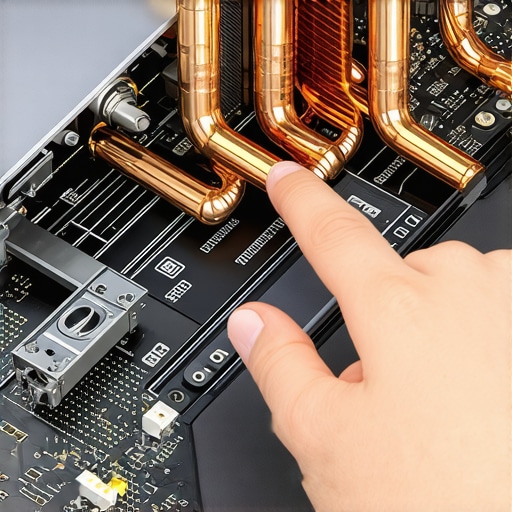
Here is a hard truth most influencers won’t tell you: that ultra-slim, sleek gaming laptop you’ve been eyeing is probably a thermal nightmare. We see students gravitate toward these because they look great in a backpack, but why you should avoid slim gaming laptops for heavy rendering or long study sessions comes down to physics. Small chassis cannot dissipate heat. According to extensive stress tests by NotebookCheck, many ultra-thin performance laptops experience thermal throttling within minutes, losing up to 30% of their advertised speed. You are essentially paying for a Ferrari engine that is electronically capped at 40mph because the radiator is the size of a postage stamp. If you want game-changing gaming laptops for serious players in 2025, you need to look at the ones with a bit of ‘heft’ to them.
Are Business Laptops Really Worth the Extra Premium?
This is the question that separates the amateurs from the pros. You’ll see top business laptops for productivity in 2025 that cost $400 more than a consumer laptop with the ‘same’ processor. Why? Because the silicon isn’t actually the same. Why business laptops use different CPUs than consumer models often boils down to vPro management and better binning for stability. Beyond the CPU, you are paying for the chassis. I’ve seen cheap plastic hinges snap after a semester of being shoved into a locker, whereas a magnesium-alloy frame can take a literal beating. If you are looking for student laptops that balance power and portability perfectly, spending that extra $100 on build quality instead of a slightly faster chip is the smartest investment you can make.
Don’t Get Locked Out of Your Own Hardware
The most expensive mistake I see students make today is buying ‘disposable’ tech. Brands are increasingly soldering components to the motherboard to force you to upgrade in two years. This is why we avoid laptops with soldered ram at all costs. If your needs change or a single 8GB stick fails, your entire $1,000 machine is e-waste. Always check the repairability scores. You might save $50 today on a sealed unit, but you’ll pay $1,200 in two years when you can’t upgrade. Have you ever fallen into this trap of buying a machine that you couldn’t upgrade later? Let me know in the comments. Before you pull the trigger on those top laptop deals in 2025, make sure you can actually open the back panel. Your future self (and your wallet) will thank you.
Owning the hardware is only half the battle; keeping it in peak condition is where the real money is saved. I have seen $2,000 machines turned into bricks simply because the owner didn’t know the best way to clean a sticky keyboard without breaking the keys or ignored a grinding fan for six months. If you want your investment to actually go the distance, you need a maintenance ritual. I personally keep the 10 tool every laptop owner should keep in their desk in a small magnetic tray. It is not about being a ‘tech person’; it is about basic stewardship. Most people do not realize that the factory thermal paste inside even the game-changing gaming laptops for serious players in 2025 is often applied poorly or dries out after 18 months. Learning how to choose the right thermal paste for your machine can drop your operating temperatures by 10-15 degrees Celsius instantly. According to technical deep-dives on Igor’s Lab, the difference between generic industrial paste and high-quality non-conductive compounds like Kryonaut is night and day for long-term chip health.

How can I make my laptop last five years or longer?
The secret isn’t software; it is physical preservation. First, you have to understand why your laptop hinge is destined to fail and how to prevent it. Never lift your screen from one corner; always open it from the center to distribute the torque evenly across both mounts. Second, check your internals at least once a year. Dust is a silent killer that leads to the heat cycles that eventually crack solder joints. If you have noticed your performance dipping, you need to know how to stop your gaming laptop from thermal throttling in summer by clearing out the heatsink fins. While you are in there, look at the battery. You should be able to how to tell if your laptop battery is swelling before it bursts. A slightly ‘puffy’ battery is a fire hazard and can warp your trackpad or keyboard frame from the inside out.
Modular Components Are the Future of Tech
Looking ahead, I predict a massive shift toward modularity. We are already seeing the ‘right to repair’ movement forcing brands to stop gluing components. In three years, the best student laptops that balance power and portability perfectly will likely feature swappable ports and easy-access storage doors as standard features. My advice? Do not wait for the manufacturers to make it easy. Grab a set of must-have laptop accessories to boost your work setup—specifically a quality screwdriver kit—and open your machine this weekend. Just blowing out the dust can extend your laptop lifespan by years.
Hard Truths from a Former Tech Amateur
After years of overspending, I realized that the “newest” tech is often a trap designed for marketing, not performance. I used to think a high price tag guaranteed reliability, but I’ve seen $2,000 consumer machines fail in ways a $400 business refurb never would. Another lightbulb moment was discovering how to check if a used gaming laptop was used for mining before handing over my cash. It turns out that the most expensive part of owning a laptop isn’t the purchase price; it’s the cost of neglect. If you aren’t opening your machine once a year to clear the dust, you’re effectively paying a “thermal tax” in the form of reduced lifespan.
The Toolkit That Keeps My Gear Alive
I don’t rely on luck to keep my workstation running. My go-to resources include NotebookCheck for the thermal benchmarks that manufacturers hide and iFixit for repairability scores. I also never travel without the 10 tool every laptop owner should keep in their desk to handle quick fixes on the fly. For anyone looking at the secondhand market, I highly recommend learning how to verify the battery health of a used laptop purchase. This simple check has saved me from buying “deals” that were actually just ticking time bombs with failing cells.
#IMAGE_PLACEHOLDER_E#
Stop Fearfully Refreshing the Checkout Page
Owning a high-performance machine doesn’t have to be a financial burden. By understanding the cycles of the market and treating your student ID like the asset it is, you can consistently secure unbeatable laptop deals that others overlook. You now have the roadmap to look past the shiny marketing and focus on the internal specs and build quality that actually matter. It is time to stop being a passive consumer and start being a hardware owner who knows exactly what’s happening under the hood. Go grab those top laptop deals in 2025 with confidence.
Have you ever found a tech deal that seemed too good to be true, only to discover a hidden flaw like a soldered SSD or a failing hinge later? Let me know in the comments below!