
I still remember the first time I pulled a wafer-thin gaming rig out of its box. It was sleek, machined from aerospace-grade aluminum, and felt more like a piece of art than a computer. I thought I had finally won the tech game. But thirty minutes into a session of Cyberpunk, the reality hit—literally. The chassis became too hot to touch, the fans sounded like a jet engine taking off in my living room, and my frames dropped from a buttery 90 FPS to a stuttering 25. It was a heartbreaking realization that I had traded actual power for the mere look of it. If you are currently hunting for game-changing gaming laptops for serious players in 2025, you need to know what happens behind those slim bezels before you swipe your card. Today, I am going to peel back the marketing curtain and show you how to find a machine that actually sustains its speed without melting your desk. Have you ever felt your laptop get so loud you had to put on noise-canceling headphones just to hear the game?
The physics of heat has no mercy on your slim chassis
The biggest mistake I made early on was believing the spec sheet over the laws of thermodynamics. Manufacturers love to brag about putting a high-end GPU into a body that is less than 20mm thick, but they rarely mention the ‘thermal ceiling.’ When you cram high-performance components into a tiny space, the heat has nowhere to go. This leads to a phenomenon called thermal throttling, where your expensive hardware intentionally slows itself down to prevent a literal meltdown. I spent months trying the best ways to cool your laptop without a bulky pad, only to realize that some designs are just fundamentally flawed from the start. According to thermal engineering research published by the IEEE, the efficiency of heat dissipation is directly proportional to the surface area of the cooling fins and the volume of airflow—two things ultra-thin laptops sacrifice by design.
Is the ultra-portable dream actually worth the hype?
You might be wondering if you can just ignore the heat if you play in a cold room or use a stand. Unfortunately, it is not just about the immediate lag. Constant high-heat cycles are the primary reason why most gaming laptops fail right after the warranty expires. I learned this the hard way when my first ‘stealth’ gaming machine turned into a very expensive paperweight just fourteen months after purchase. While top laptop deals in 2025 might make these thin machines look tempting, you have to ask yourself if you’re buying a laptop for its looks or for its ability to actually play games for more than twenty minutes at a time. It is vital to look for machines that prioritize airflow over aesthetic curves, especially if you plan on doing more than just light indie gaming. To keep your current rig alive while you decide on your next move, make sure you know how to stop your gaming laptop from thermal throttling in summer when the ambient air isn’t doing you any favors. We are going to dive into the specific specs that actually matter for longevity, rather than just the ones that look good on a box.
Decoding the TGP trap that kills your performance
Performance isn’t a static number; it is a dynamic tug-of-war between power and heat. Think of the GPU as a race car engine. If you limit the fuel—in this case, the wattage—the car will never hit its top speed, no matter how many cylinders it has. This wattage is known as Total Graphics Power (TGP). I once sat down to benchmark a brand-new RTX 3080 laptop that I bought on a whim because the price was too good to pass up. To my absolute horror, it was being outperformed by my friend’s older RTX 3070 machine. Why? Because my ‘high-end’ laptop was capped at 80W to keep the thin chassis from melting, while his chunkier rig was pushing 130W. When you are scouting game-changing gaming laptops for 2025 adventures, you must ignore the GPU name and hunt for the TGP rating in the fine print. If a manufacturer hides this number, it is usually because they are choking the hardware to fit a slim design.
Peek under the hood at the heat pipe count
Before you commit to a purchase, find a teardown video or a high-resolution photo of the motherboard. You are looking for copper. Specifically, you want to see at least four to five thick heat pipes and dedicated cooling fins for both the CPU and GPU. A shared heat pipe system is a recipe for disaster; it means the heat from one chip will bleed into the other, causing both to throttle simultaneously. I have seen many student laptops that balance power and portability perfectly for light work, but when it comes to gaming, thickness is actually your friend. Extra space allows for larger fans with more blades, which move more air at lower RPMs, saving your ears from that high-pitched whining sound. 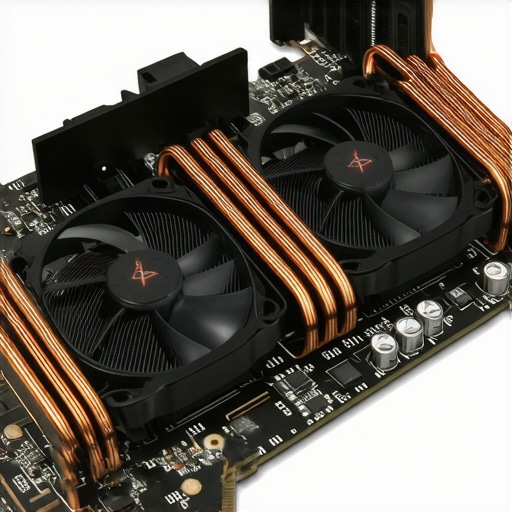
How to spot a lemon before you buy
Not every deal is a winner, and sometimes the best price is on a machine that has already been pushed to its limit. If you are looking at the second-hand market, you have to be a detective. I once almost bought a ‘pristine’ rig until I ran a quick stress test and saw the clocks fluctuating wildly. It turned out the previous owner had used it for crypto 24/7. Learning how to check if a used gaming laptop was used for mining can save you hundreds of dollars and a massive headache. If the fans rattle or the chassis has a slight yellowing near the exhaust vents, walk away immediately.
Balance your acoustics with manual fan curves
Once you have the right machine, you need to master the software. Most people leave their laptops on ‘Auto’ mode, which is the worst thing you can do. Auto mode waits until the laptop is already boiling before ramping up the fans. Instead, use the proprietary software that comes with your rig to set a manual fan curve. I usually set my fans to hit 70% speed the moment the GPU touches 60 degrees Celsius. It’s louder earlier, but it prevents the heat from soaking into the chassis in the first place. You can also significantly reduce the strain by how to lower your gaming laptop fan noise in seconds through simple undervolting. If the internal temperatures are still too high, consider how to choose the right thermal paste for your machine and repasting it yourself; I’ve seen this single step drop temperatures by 10 to 15 degrees on mass-produced units. Finally, don’t forget that your environment matters just as much as your hardware. Elevating the back of the laptop by just an inch can improve intake by 20%. This is one of the simple hack for better airflow on thick gaming rigs that requires zero technical skill but yields instant results. Pairing this with must-have laptop accessories for a seamless setup like a high-pressure cooling pad can make the difference between a three-year lifespan and a six-year one.I’ve seen countless students drop two thousand dollars on a powerhouse machine, thinking it will make them study better, only to realize they hate carrying it to the library. Most people think a faster processor is the key to efficiency, but in my experience, the tactile feedback of the keys and the port layout matter far more for actual output. If you are looking for student laptops that boost productivity and learning, stop obsessing over benchmarks and start looking at the keyboard travel distance. A flimsy keyboard leads to typos, which leads to frustration, which ultimately kills your focus. While everyone tells you to get the latest i7 or Ryzen 7, a stable i5 with a world-class keyboard will actually help you finish that twenty-page thesis faster.
Should you really trust a consumer machine for your 9-to-5?
The biggest “oops” I see professionals make is grabbing a flashy consumer-grade laptop because it was on sale at a big-box store. It’s a classic trap. While unbeatable laptop deals save big on quality devices today, there is a fundamental difference in how these machines are built internally. According to research from Gartner, enterprise-grade hardware typically has a significantly lower failure rate over a four-year period compared to consumer models. This is because business laptops for professionals essential picks 2025 are designed for forty-plus hours of use per week with reinforced hinges and superior thermal management. If you’re running a business on a “Home” edition OS, you’re also missing out on critical security layers. You should definitely check out the 5 key differences between enterprise and home windows to see what you are leaving on the table regarding data protection and remote management. 
The expensive accessory trap that actually slows you down
Another silent killer of performance isn’t the laptop itself, but the junk you plug into it. We all love a good bargain, but why cheap usb-c hubs might be killing your ports is a conversation I have to have almost weekly with my clients. I’ve seen two-thousand-dollar motherboards fried by a ten-dollar dongle that couldn’t handle the basic voltage delivery for a monitor. Instead, invest in must-have laptop accessories to boost your work setup that have verified power delivery ratings and solid shielding. Have you ever fallen into this trap and had a port stop working out of nowhere? Let me know in the comments. We need to stop viewing these machines as disposable gadgets and start treating them like the precision tools they are, which means respecting the entire ecosystem of hardware you connect to them.
I have a confession: I used to be the person who let their laptop sit plugged in at 100% charge for months on end. I thought I was being ‘safe’ by keeping it topped off, but I was actually killing the battery from the inside out. If you want your hardware to last, you have to break the consumer habits that manufacturers hope you keep. The reality is that whether you are hunting for top laptop deals in 2025 or squeezing the last bit of life out of a four-year-old workstation, maintenance is the only thing standing between you and a thousand-dollar repair bill.
Stop charging your battery to a full hundred percent
One of the most counterintuitive things I learned was that a full battery is a stressed battery. According to technical documentation from Battery University by Cadex Electronics, lithium-ion batteries suffer significantly when kept at high voltage levels and high temperatures simultaneously. This is exactly the reason your laptop battery wont charge past eighty percent on many modern pro-sumer machines—it is a protective feature, not a bug. I personally use the built-in BIOS limits on my machine to cap the charge at 70%. If you are buying a used rig, you must learn how to verify the battery health of a used laptop purchase before you commit. It takes thirty seconds to run a powercfg report in Windows, and it tells you exactly how much ‘fuel’ the tank can still hold compared to when it was new.
How do I maintain my laptop hardware over time?
The most important tool in my kit isn’t a physical screwdriver, but a piece of software called HWiNFO64. I use it to monitor the ‘SMART’ status of my drives and the exact voltage hitting my CPU. You need to know how to spot a dying SSD before your files vanish because, unlike old mechanical hard drives, SSDs don’t usually make a clicking sound before they fail—they just stop existing. For physical upkeep, I advocate for a biannual ‘deep clean.’ This involves opening the bottom panel to blast out the dust that inevitably cakes onto the fan blades. If you are nervous about doing this, how to find official repair guides for your exact model is your first step to gaining the confidence to maintain your own gear. 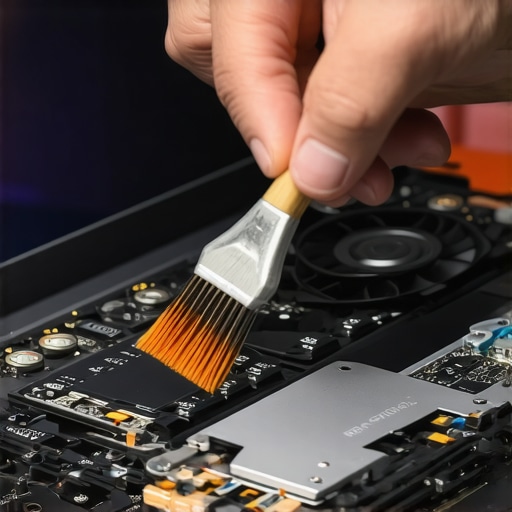
The shift toward modularity and repair rights
Looking ahead to the rest of 2025 and 2026, I see a massive shift in the industry toward repairability. We are finally moving away from the ‘glue everything down’ era. This is why why your next business laptop needs a user replaceable battery is such a hot topic right now. Brands like Framework are proving that you can have a thin machine that is also fully modular. Even if you aren’t ready to build your own, checking how to find out if your laptop can be upgraded before you buy can save you from being trapped with 8GB of soldered RAM that can’t keep up with next year’s software updates. I predict that the ‘Right to Repair’ movement will soon make the truth about modern laptop warranties and repair rights much more consumer-friendly, allowing us to swap parts without voiding our protection.
If you take away nothing else today, let it be this: go download HWiNFO64 or a similar sensor-monitoring tool right now. Check your ‘CPU Package’ temperature while you are just browsing the web. If it’s idling at 70 degrees Celsius, your machine is screaming for help. Don’t wait for the blue screen of death to start caring about what’s happening under the hood. For those of you still using the same setup you had three years ago, consider the best budget SSDs for reviving older student laptops as a cheap way to double your speed without buying a whole new machine.
My Hardest Lessons from a Trail of Dead Motherboards
I’ve spent thousands of dollars learning that the sleekest machine in the showroom is often the most fragile. If I could go back, I would tell myself that portability is a lie if the machine can’t handle a two-hour render or a long gaming session. First, stop trusting the sticker on the palm rest; manufacturers often prioritize marketing over thermal physics. Second, a heavy laptop isn’t a burden—it’s a cooling system. Third, your laptop is a living thing that needs to breathe, so stop using it on blankets. Finally, remember that why your next business laptop needs a user replaceable battery 2 isn’t just a niche concern; it’s the difference between a five-year investment and a two-year rental.
The Digital Kit That Keeps My Gear Screaming Fast
You don’t need a degree in computer science to keep your machine healthy, but you do need the right data. I rely on HWiNFO64 for real-time heat monitoring because it catches spikes before they cause permanent damage. For hardware knowledge, I treat Battery University like a bible for preserving cell life. When it comes to productivity, I always look for must-have laptop accessories to boost your work setup that prioritize function over flashy RGB lights. If you’re on a budget, don’t ignore the corporate world; learning how to snag a refurbished enterprise machine for under 300 is the ultimate pro-move for students and writers.
Reclaiming Your Tech Independence in 2025
We are entering an era where you don’t have to be at the mercy of planned obsolescence. By choosing machines with modular parts and monitoring your thermals, you are taking control of your digital life. Whether you are hunting for game-changing gaming laptops for serious players in 2025 or a reliable workstation for your first startup, remember that the best machine is the one that stays out of the repair shop. You have the tools and the knowledge now—go find a rig that actually works as hard as you do. Have you ever had a laptop die right after the warranty expired? Let me know your horror stories in the comments below.