
I sat there staring at my brand new, thousand-dollar machine, feeling a weird mix of excitement and absolute dread. I’d just snagged one of those game-changing gaming laptops for 2025, expecting it to be a beast right out of the box. Instead, within twenty minutes of firing up a heavy workload, the bottom panel was hot enough to leave marks on my lap. The fans were screaming, and the performance started dipping. It’s a classic case of thermal throttling, and it’s a heartbreak every tech enthusiast knows too well. I didn’t buy a high-performance machine just to have it choke under pressure. That was the lightbulb moment: if I wanted this laptop to actually live up to its specs, I had to open it up and fix what the factory got wrong. Today, I’m going to walk you through exactly why we decided to rip off the heatsink of a pristine device and replace the factory goop with something better. [IMAGE_PLACEHOLDER]
Manufacturers Are Cutting Corners Where You Can’t See
It feels almost criminal to take a screwdriver to a device you just bought, but here’s the cold, hard truth: mass production prioritizes speed over precision. Most big brands use industrial grade thermal interface material that is designed to last five years in a warehouse, not to provide the best cooling for your nightly sessions. I learned this the hard way years ago when I tried to save a dying machine and realized the factory paste had turned into a dry, chalky brick. If you want to stop your gaming laptop from thermal throttling, you have to look past the shiny exterior. We’re swapping the paste because even a 5 to 10-degree drop in temperature can extend the life of your motherboard by years.
Does voiding your warranty actually make sense?
I get it—the fear is real. You do not want to turn your expensive investment into a paperweight. However, many people do not realize that in many regions, simply opening your laptop does not automatically void your rights, as explored in the truth about modern laptop warranties and repair rights. According to a report by the Federal Trade Commission (FTC), Warranty Void if Removed stickers are often legally unenforceable in the United States under the Magnuson-Moss Warranty Act. My biggest mistake early on was being too timid. I let a perfectly good business laptop cook itself into oblivion because I was scared of a sticker. We’re not just chasing lower numbers on a screen; we’re chasing reliability. Have you ever noticed your brand new laptop getting suspiciously loud during simple tasks? Drop a comment and tell me if yours is running hotter than it should!
The Hidden Cost of Factory Precision
When a laptop rolls off the assembly line, the thermal paste is often applied by a machine or a pre-stamped pad. These are designed for good enough contact. But since the heatsink and the chip are not perfectly flat—a phenomenon called microscopic air gaps—you need a high-quality medium to bridge that gap. By using premium laptop accessories like high-conductivity paste, we ensure that every bit of heat is moving away from your expensive CPU and into the copper pipes where it belongs. It is the difference between a car with a clogged radiator and one that is ready for the race track. It is a simple fix that requires patience, but the results speak for themselves.Before you touch a single screw, you need a clean, static-free workspace. I once made the mistake of trying to repaste a device on a shag carpet—don’t be that guy. You’ll want 99% isopropyl alcohol and some lint-free wipes. If you aren’t sure where to start, you should how to find official repair guides for your exact model so you don’t snap a hidden plastic clip. This isn’t just for game-changing gaming laptops for serious players in 2025; even a high-end top business laptops for productivity in 2025 can benefit from a thermal refresh if the fans are constantly spinning up. 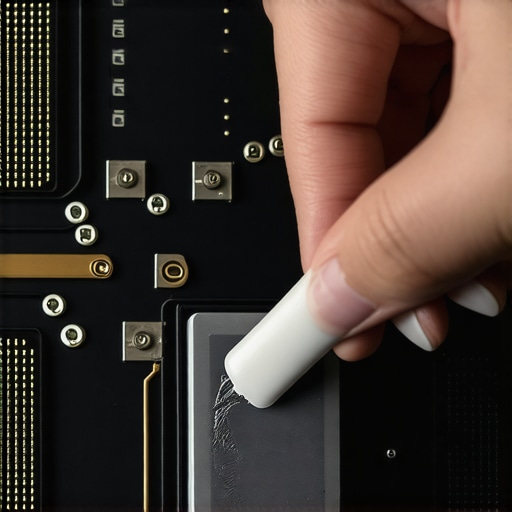
Wipe Away the Factory Mistakes with Isopropyl
Once you’ve removed the bottom panel, you’ll see the copper cooling assembly. Unscrew the heatsink in the numbered order stamped on the metal; this prevents the plate from warping. When I first pulled the cooler off my old rig, I found the thermal paste had overflowed onto the motherboard like a spilled milkshake. That excess doesn’t help cooling; it just makes a mess. Use your alcohol and wipes to get the CPU and GPU dies so shiny you can see your reflection. It is a bit like prepping a wall for paint—if the surface isn’t perfect, the bond will fail. For those working with older machines, this is also a great time to check if the best budget SSDs for reviving older student laptops might be worth an install while the hood is open.
The Tiny Pea That Saves Your Hardware
Now comes the moment of truth: the application. There are endless debates online about ‘X’ patterns versus ‘Pea’ shapes, but for most laptop dies, a small grain of rice in the center is plenty. The goal is a layer so thin it’s almost translucent once compressed. I remember being overzealous on a friend’s laptop and using half a tube; the temperatures actually went up because the paste acted as an insulator instead of a conductor. If you’re looking to how to lower your gaming laptop fan noise in seconds, this physical contact is the single most important factor. Use must-have laptop accessories for a seamless setup like a small plastic spreader if the die is particularly large.
Reassemble with Caution and Precision
When you put the heatsink back on, follow that numbered screw sequence again, but in reverse. Don’t crank the screws down all at once. Tighten each one a little bit at a time to ensure even pressure across the chip. It is like tightening the lug nuts on a car tire; uneven pressure leads to air gaps, and air gaps lead to thermal throttling. While you’re in there, make sure you why you should never use a vacuum on your keyboard or internal fans, as the static can kill components instantly. Instead, use a can of compressed air to blow out the fins. This ensures that your student laptops that boost productivity and learning remain quiet during a library session rather than sounding like a jet engine.
Thin Chassis Designs Often Kill Performance
Most people shopping for game-changing gaming laptops for 2025 are obsessed with the spec sheet. They see an i9 processor or an RTX 4080 and assume they are getting the best of the best. However, after years of benchmarking these machines, I have realized that the hidden downside of ultra-thin gaming laptops is that they almost never reach their advertised clock speeds. Manufacturers cram high-wattage components into shells that are too thin to dissipate heat, leading to immediate throttling. It is a common industry secret: a ‘weaker’ GPU in a thicker chassis with better cooling will often outperform a ‘stronger’ GPU in a razor-thin body because it can actually maintain its boost clock. If you are hunting for top laptop deals in 2025, do not just look at the chip name—look at the thermal headroom. 
Is a Higher TDP Actually Better for Your Workflow?
This brings us to a nuance most reviewers skip: Total Design Power (TDP). Two laptops might have the same processor, but one might be configured at 35W while the other runs at 55W. This makes a massive difference in video rendering and compiling code. According to a 2023 reliability report by Consumer Reports, nearly 25% of high-performance laptops encounter hardware issues within three years, often exacerbated by the extreme heat cycles found in these compact, high-wattage designs. For those looking at student laptops that balance power and portability perfectly, choosing a mid-range TDP is often the sweet spot for longevity.
The Proprietary Hardware Trap to Avoid
Here is the ‘oops’ factor that bites most buyers a year into ownership: the lack of modularity. I strongly suggest you how to find out if your laptop can be upgraded before you swipe your card. We’ve seen a trend where even top business laptops for productivity in 2025 are soldering everything from RAM to Wi-Fi cards to the motherboard. If a single $20 component fails, you are looking at a $600 motherboard replacement. This is specifically why why we avoid buying laptps with proprietary power bricks whenever possible; if that unique charger dies and the company stops making it, your laptop becomes e-waste. It is a cynical design choice that prioritizes planned obsolescence over the user experience.
Stop Chasing the Wrong Features
I see students all the time spending extra on features that actually make their lives harder. For instance, why we dont recommend touchscreen laptops for coding is simple: they add weight, drain battery, and usually come with a glossy finish that is impossible to read under library lights. Similarly, why you should never buy a laptop with a 720p screen is about more than just ‘sharpness’—it is about screen real estate. You cannot fit two windows side-by-side on a low-res panel, which kills your productivity. Instead of overpaying for a 4K screen on a 13-inch device, put that money into must-have laptop accessories to boost your work setup, like a high-quality dock or a vertical stand. Have you ever fallen into this trap of buying a high-spec machine only to have it underperform or break? Let me know in the comments!If you’ve felt that sting of a slow machine, the good news is that maintenance isn’t a one-time surgery. To keep my gear running like new, I rely on a specific set of tools that go beyond the basic screwdriver. I swear by the iFixit Pro Tech Toolkit—not because it’s flashy, but because the steel bits actually grip the tiny, soft screws found in student laptops that balance power and portability perfectly without stripping them. There is nothing worse than a rounded screw head when you are trying to upgrade. I also keep a stash of 99% isopropyl alcohol; I avoid the 70% version because the higher water content can leave residues or cause corrosion on delicate logic boards. If you’ve ever had to deal with the best way to clean a sticky keyboard without breaking the keys, you know that having a non-conductive spudger and lint-free wipes makes the difference between a quick fix and a broken switch. 
Hardware Monitoring Is Your Best Early Warning System
You cannot fix what you cannot measure. I personally use HWInfo64 to keep a constant eye on my junction temperatures and fan RPMs. It’s a habit I picked up from reading the deep-dive technical analysis on sites like NotebookCheck, where they emphasize that ‘average’ temperatures often hide dangerous ‘hot spots’ on the silicon. By monitoring individual core deltas, I can see exactly when my thermal paste is starting to degrade or when a fan bearing is beginning to fail before it causes a system crash. This is especially vital if you are hunting for top laptop deals in 2025 on the used market. You should always how to verify the battery health of a used laptop purchase and run a twenty-minute thermal stress test before the return window closes to ensure the previous owner didn’t cook the internals.
How do I maintain my laptop’s thermal health over time?
The secret isn’t just repasting once; it’s environmental control and consistent cleaning. I’ve seen perfectly good game-changing gaming laptops for serious players in 2025 die early because they were used on high-pile carpets that acted as a vacuum for pet hair. Dust is a silent killer that clogs the micro-fins of your heatsink. I make it a rule to blow out my fans with compressed air every three months. If you’re traveling, knowing how to keep your laptop cool in a hot car is just as important as the hardware itself because extreme heat cycles eventually fatigue the solder joints on the motherboard.
The Future Is All About Repairability
Looking ahead, I predict we are going to see a massive divide in the market. On one side, we’ll have disposable, ultra-thin machines with everything soldered down. On the other, a resurgence of modularity driven by ‘Right to Repair’ legislation and brands that prioritize the user’s ability to swap parts. We are already seeing this with the only 3 brands that still make easily repairable laptops that allow you to replace the entire mainboard or upgrade the ports individually. This shift is huge for anyone who wants their investment to last a decade instead of two years. If you want to get ahead of the curve, I challenge you to download a sensor monitoring tool today and check your ‘Thermal Throttling’ flag while running a heavy task. If it says ‘Yes,’ it’s time to take action. Don’t wait until you see how to spot a dying ssd before your files vanish because of heat-induced data corruption.
Why I Stopped Fearing the Screwdriver and Embraced Maintenance
Over the years, I have realized that being a tech owner should not be a passive experience. My first lightbulb moment came when I discovered that ‘good enough’ for a factory assembly line is usually ‘too hot’ for the long-term health of high-end silicon. A hard-earned lesson I often share is that the environment matters just as much as the hardware; for instance, why you should never use your laptop on a soft blanket is a rule that saves more motherboards than any software patch ever could. I have also learned that software monitoring is your best early warning system—catching a five-degree spike today prevents a catastrophic system failure six months from now.
[IMAGE_PLACEHOLDER]
The Hardware Lifeline Toolkit for Cooler Gaming
I do not believe in buying every gadget on the shelf, but a few specific tools are non-negotiable for my workbench. First, a high-quality precision screwdriver set is vital; cheap bits will strip your screws and leave you with a permanently sealed chassis. Second, 99% Isopropyl alcohol is the only cleaning agent I trust to leave a perfectly residue-free surface for new paste. Finally, before you start any internal surgery, you must how to find out if your laptop can be upgraded so you know exactly which components are accessible. If you are nervous about the power source, reviewing the most common errors when replacing a laptop battery can help you avoid accidental short circuits while the protective shield is removed.
Take the Heat Off Your Investment
Taking control of your hardware is the ultimate way to ensure your game-changing gaming laptops for 2025 actually survive until the next decade. It might feel intimidating to crack open that chassis for the first time, but the peace of mind that comes with a cool-running, silent machine is worth every second of preparation. You have invested the money in a high-spec machine; now invest the time to make it run perfectly. Have you ever noticed a massive temperature drop after a simple internal cleaning or a fresh repaste? Let me know your results in the comments below!