
I remember that sickening “thwip-clack” sound like it was yesterday. I was sitting at my desk, looking at my favorite mechanical keyboard—the one I used to write every single one of my reviews—and noticed a few crumbs from a late-night snack. I was in a rush. Instead of grabbing a proper cleaning kit or even a can of compressed air, I dragged my high-powered household vacuum over. I thought, “Hey, more suction means a cleaner board, right?” Wrong. I didn’t just suck up the crumbs; I created a localized lightning storm of static electricity that fried my controller board instantly. It was a $200 mistake that taught me a lesson I’ll never forget. Today, I want to save you from that same heartbreak and explain why that vacuum in your closet should stay far away from your expensive gaming laptops and workstations.
Keep the Suction Away From Your Circuitry
The biggest issue isn’t just the physical force of the vacuum pulling at your keycaps—though losing a key into a dusty vacuum bag is its own kind of nightmare. The real invisible enemy is Electrostatic Discharge (ESD). When air rushes through a plastic vacuum nozzle at high speeds, it generates a massive amount of static. While you might use must-have laptop accessories to boost your work setup, a standard vacuum is the one accessory that will definitely ruin it. I once thought my business laptops were shielded enough to handle a quick pass, but I was dead wrong.
Is the threat of static electricity actually worth the worry?
It sounds like a myth, doesn’t it? We walk on carpets and touch doorknobs all the time. But the components inside your keyboard and laptop are incredibly delicate. According to the EOS/ESD Association, some electronic components can be damaged by a discharge of just 10 volts. To put that in perspective, you won’t even feel a static shock until it hits about 3,000 volts. You could be killing your hardware without ever feeling a thing. I learned this the hard way when I tried to clean a friend’s student laptops and ended up causing ghost-typing issues that never went away. It’s much safer to learn the best way to clean a sticky keyboard without breaking the keys than to risk a total hardware failure. Have you ever had a “quick clean” turn into a “need to buy a new laptop” situation? I’d love to hear your horror stories so I know I’m not alone!
The Safe Way to Expel Dust Without Frying Your Board
To clean a keyboard safely, you need to think like a surgeon, not a demolition crew. The goal is to move debris out without introducing a charge. Start by powering down your machine entirely. If you are working on game-changing gaming laptops for serious players in 2025, this is non-negotiable because those high-performance boards are particularly sensitive to accidental shorts. Turn the device upside down and give it a gentle, firm pat on the back. You would be surprised how much hair, skin cells, and ‘mystery crumbs’ will fall out just by using gravity.
Blast Away Debris with Compressed Air
Once gravity has done its job, reach for a can of compressed air. This is the gold standard for a reason. Hold the can upright—never tilt it, or you risk spraying liquid propellant onto your electronics—and use short, controlled bursts. Angle the straw so you are blowing the dust *out* from under the keys, rather than pushing it deeper into the chassis. This same technique is incredibly effective when you need to learn how to lower your gaming laptop fan noise in seconds by clearing the vents. I usually work in a zigzag pattern, starting from the top left and moving across the rows.
Use Isopropyl Alcohol for the Grime
Air alone won’t fix the oils from your fingertips. For that, you need 70% or higher isopropyl alcohol and a lint-free cloth. This is why why we still carry a microfiber cloth in our laptop bags at all times. Dampen the cloth—never soak it—and gently wipe the surface of each key. If you have particularly stubborn gunk, a Q-tip dipped in alcohol works wonders for the sides of the keycaps. I once tried to use a generic paintbrush to sweep under my keys while cleaning one of my favorite student laptops. Halfway through, a plastic bristle snapped off and wedged itself deep inside the scissor switch. I spent forty minutes with a pair of tweezers and a magnifying glass, sweating because I thought I’d snapped the delicate hinge. Now, I strictly use the 10 tool every laptop owner should keep in their desk—a dedicated, anti-static electronics brush.
Pick Up Dirt with Specialized Cleaning Slime
For those remaining microscopic particles that air can’t budge, cleaning putty is your secret weapon. It’s satisfying to use and far safer than a vacuum. Simply press it into the keys and lift. We’ve found this to be the best keyboard cleaning slime we actually tested for getting into those 1.5mm travel gaps. If you are dealing with a spill rather than just dust, you’ll need a more invasive approach, like the best way to clean a sticky keyboard without breaking the keys, which involves carefully popping the caps. Just remember that many modern laptops use ultra-thin butterfly or scissor switches that are extremely fragile, so check your manual before prying anything off.I see it all the time with colleagues who swear by their business laptops for professionals: they think ‘durable’ means ‘indestructible.’ There is a common belief that if you pay for enterprise-grade hardware, you can skip the fine-tuned maintenance. But here is the contrarian truth: high-end machines are often more finicky because they pack more components into smaller spaces. While I love that we only buy business laptops with spill-resistant keyboards, people mistakenly treat them as if they are waterproof. Those drainage holes are designed to buy you time to save your data, not to allow you to finish your latte over an active circuit board. I have seen more ‘spill-resistant’ boards fried by overconfidence than by the liquid itself.
The Heat Trap That Most Users Ignore
One of the most dangerous ‘traps’ I see involves how people handle heat management on game-changing gaming laptops for serious players in 2025. Everyone knows laptops get hot, but most people assume the internal fans will handle everything. In reality, modern thin-and-light designs rely on the chassis itself to dissipate heat. When you use your machine on a soft surface, you aren’t just blocking the vents; you are insulating the bottom plate. According to a technical report by the IEEE (Institute of Electrical and Electronics Engineers), for every 10°C rise in operating temperature, the long-term reliability of semiconductor components is roughly halved. This is why learning how to stop your gaming laptop from thermal throttling in summer is a survival skill, not just a performance tweak.
Does thermal throttling actually matter if you are not a pro gamer?
It absolutely does. Throttling is not just about losing frames in a game; it is a sign that your hardware is in ’emergency mode’ to prevent permanent damage. If your business laptops are constantly ramping up fans during simple Zoom calls, your thermal paste might be drying out or your vents are likely choked. This leads to the most common ‘Oops’ factor: the ‘silent killer’ known as the swollen battery. Heat causes the lithium-ion cells to off-gas. If you notice your trackpad becoming hard to click or your laptop not sitting flat on a table, stop immediately. You need to know how to tell if your laptop battery is swelling before it bursts.
The Warranty Myth and Your Right to Repair
Another nuance people miss involves the truth about modern laptop warranties and repair rights. Most users assume that opening the bottom case to blow out dust voids their warranty. In many regions, including the US under the Magnuson-Moss Warranty Act, ‘warranty void if removed’ stickers are often legally unenforceable for basic maintenance. Manufacturers want you to think you are helpless so you will pay for their service plans. In my experience, a user who knows how to replace their own laptop fan in under 20 minutes will keep their machine running five years longer than someone who relies on a manufacturer’s depot. Don’t be afraid to get to know the inside of your machine. It is the difference between owning a tool and being a slave to its planned obsolescence. Have you ever fallen into the trap of thinking your ‘rugged’ laptop could handle more than it actually could? Let me know in the comments!Once you’ve moved past the fear of opening your device, the real maintenance begins. I don’t believe in those cheap, one-size-fits-all ‘computer repair kits’ you see on late-night infomercials. I’ve stripped enough screws to know that quality matters. I strictly use a precision bit driver set with S2 steel bits—specifically the iFixit Pro Tech Toolkit—because it’s the only way to ensure you don’t ruin the tiny Torx screws found on top business laptops for productivity in 2025. Combine that with a non-conductive spudger and you have the 10 tool every laptop owner should keep in their desk. If you’re serious about performance, you should also look into how to choose the right thermal paste for your machine. Replacing the factory-applied ‘toothpaste’ with a high-conductivity compound like Thermal Grizzly Kryonaut can drop your temperatures by 5-8°C instantly. 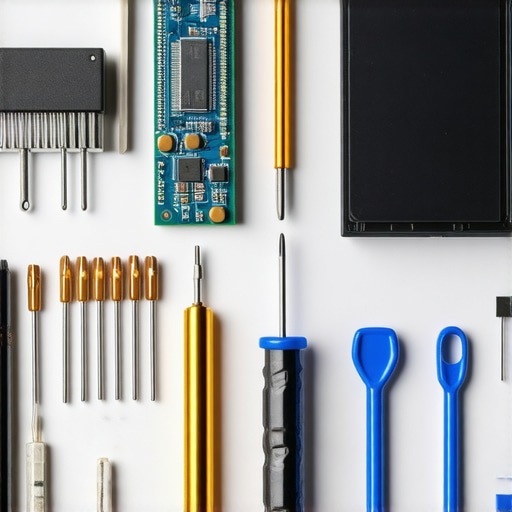
How do I keep my hardware running like new for years?
Maintenance isn’t just a physical act; it’s a digital one. I’m a huge advocate for ‘software-first’ diagnostics. Before I ever pick up a screwdriver, I run HWInfo64 to check sensor data. This tool is a godsend because it reveals exactly when your VRMs are overheating or if your battery is reaching its cycle limit. It’s also vital to know how to spot a dying SSD before your files vanish. According to Backblaze’s 2023 Drive Stats, while SSDs are generally more reliable than HDDs, they exhibit a distinct ‘wear-out’ phase after about four years of heavy use. I make it a habit to check my S.M.A.R.T. data once a month. If you are hunting for top laptop deals in 2025, this is the first thing you should check on a used machine.
Stop Guessing and Start Using Repair Manuals
One of the biggest mistakes I see is people ‘winging it.’ Even as someone who has opened hundreds of machines, I never start a teardown without looking up the OEM service manual. You need to learn how to find official repair guides for your exact model because modern internal layouts are a maze of ribbon cables and hidden clips. For students on a budget, remember that why your student id is the best tool for laptop discounts doesn’t just apply to buying new; many parts manufacturers offer educational pricing on replacement batteries and screens. I predict that in the next few years, we will see ‘AI-driven health sensors’ built into motherboards that will predict a fan failure weeks before it happens. Until then, you are the chief engineer of your setup. I challenge you today: download a hardware monitor, check your peak temperatures, and see if your machine is actually breathing as well as it should.
The Most Expensive Mistakes You Can Avoid Today
Reflecting on my years of hardware mishaps, a few truths stand out that I wish I’d known from day one. First, never underestimate the power of a single spark. We think of static as a minor annoyance, but it is a silent killer for delicate silicon. Secondly, those ‘compressed air’ substitutes like leaf blowers or high-powered household vacuums are never worth the risk; they lack the precision and the anti-static properties required for modern electronics. Lastly, waiting for a problem to occur is already too late. Proactive cleaning prevents the microscopic dust buildup that eventually leads to permanent hardware degradation.
A Few Tools Every Owner Needs on Their Desk
You don’t need a professional laboratory to keep your gear in top shape. My personal ‘survival kit’ includes items that are both affordable and highly effective. I swear by 70% Isopropyl alcohol and a high-quality microfiber cloth; it’s exactly why we still carry a microfiber cloth in our laptop bags wherever we go. For the heavy lifting, I always recommend the 10 tool every laptop owner should keep in their desk—a simple anti-static brush—which will do more for your cooling vents than any vacuum ever could. If you are feeling adventurous, learning how to choose the right thermal paste for your machine is a total game-changer for long-term temperature management.
#IMAGE_PLACEHOLDER_E#
Stop Fearing the Inside of Your Machine
At the end of the day, your laptop is a tool designed to serve you. Whether you are using game-changing gaming laptops for serious players in 2025 or a reliable workhorse for the office, taking ten minutes a month for basic maintenance will save you hundreds of dollars in repair bills. Don’t let the fear of ‘breaking something’ stop you from performing the basic care your hardware deserves. You are now equipped with the knowledge to keep your gaming laptops and workstations running cool, fast, and static-free for years to come. Have you ever had a ‘quick clean’ go horribly wrong, or did you discover a trick that saved your machine? Let me know in the comments below!