
I still remember the smell of ozone and the sinking feeling in my gut when my “bargain” laptop gave up the ghost right in the middle of my sophomore year midterms. I had spent my entire summer savings on a shiny machine that looked great in the brochure, but it couldn’t handle more than three Chrome tabs without sounding like a jet engine. It was a classic mistake—I fell for the marketing fluff instead of looking at the long-term durability.
Your Freshman Laptop Shouldn’t Become a Paperweight by Junior Year
Most students—and their parents—think they are saving money by grabbing whatever is on the front page of a circular. But I’ve learned the hard way that a cheap hinge or a non-upgradeable RAM slot is a ticking time bomb. Today, I’m going to walk you through the exact checklist I wish someone had handed me back then. We’re moving past the “budget-friendly” traps and looking at how to spend your money once, and only once, to get a machine that actually goes the distance. [image] Whether you are looking for student laptops that balance power and portability perfectly or you need a tank for engineering school, the principles remain the same. Have you ever had a computer die on you at the worst possible moment? I’d love to hear your story in the comments, because honestly, we’ve all been there.
Is it actually possible to find one machine that stays fast until graduation?
It feels like a tall order when software gets heavier every year. I once made the mistake of thinking I could get by with the bare minimum, and I spent the next three years squinting at a terrible 720p screen that made research papers a literal headache. The reality is that the average laptop lifespan is under threat; according to a report by the U.S. PIRG, many manufacturers make repair and longevity difficult to encourage more frequent purchases. But if you know what to look for, like the only 3 brands that still make easily repairable laptops, you can beat the system.
Stop Chasing the Lowest Price and Start Looking for Quality
When you’re browsing through unbeatable laptop deals, it’s easy to get blinded by a low number. However, durability is about more than just a fast processor. You need to consider how that machine will survive being crammed into a backpack with heavy textbooks or surviving the occasional coffee spill in a crowded lecture hall. I’ve found that student laptops that boost productivity usually have a few things in common: sturdy chassis, long battery life, and screens that don’t wash out under fluorescent library lights. I also learned to stop ignoring must-have laptop accessories that protect the investment, like a decent sleeve. You don’t need a game-changing gaming laptop unless you’re actually a gamer, but you do need something built with intention. We’re going to dive into exactly which specs matter and which ones are just expensive distractions.Think of your laptop’s RAM like the surface area of your desk. If you’re trying to write a thesis, analyze a complex dataset, and stream a lecture all at once on a tiny desk, things are going to fall off the edge. I once bought a slim ultrabook with 8GB of “soldered” RAM, thinking I’d never need more. By junior year, the software updates for my coding environment were so heavy that my machine spent more time “thinking” than actually working. I ended up having to buy a whole new laptop because I couldn’t add a $40 stick of memory. Before you buy, you must learn how to find out if your laptop can be upgraded. If the RAM is soldered and the storage is fixed, you are buying a machine with a built-in expiration date.
Build Your Machine for the Long Haul
Stop Compromising on Non-Upgradeable RAM
Aim for a minimum of 16GB if you can swing it, or at least ensure there is an open slot for future expansion. You’ll also want an SSD with at least 512GB of space. Cloud storage is helpful, but when you’re trying to finish a project in a campus basement with spotty Wi-Fi, you’ll want those files stored locally.
Get a Screen That Doesn’t Strain Your Eyes
You are going to spend thousands of hours staring at this panel. Do not settle for anything less than a 1080p IPS display. I cannot stress enough why you should never buy a laptop with a 720p screen; the lack of vertical space means you’ll be scrolling twice as much through every research paper. Look for student laptops that balance power and portability perfectly to ensure you aren’t carrying a five-pound brick that looks like a blurry mess under library lights. 
Leverage Your Student Status for Better Hardware
Most students leave money on the table by buying at standard retail prices. Use the hidden price history tools every deal hunter needs to track when prices actually drop below their seasonal averages. More importantly, remember why your student id is the best tool for laptop discounts—major manufacturers often have hidden education portals that shave hundreds off the MSRP of professional-grade machines.
Keep Your Laptop Healthy Through Senior Year
Longevity isn’t just about the specs you buy; it’s about the maintenance you perform. I’ve seen perfectly good laptops die early because of a “crunchy” keyboard or a swollen battery that went ignored. Learn the best way to clean a sticky keyboard without breaking the keys so a spilled energy drink doesn’t lead to a $200 repair bill. If you’re buying second-hand to save cash, always check how to verify the battery health of a used laptop purchase before handing over any money. A refurbished business laptop with a fresh battery often outperforms a brand-new “budget” plastic laptop in the long run.
Most people think business laptops are only for people in suits, but it’s a huge mistake to ignore them just because you’re a student. While everyone is hunting for unbeatable laptop deals on shiny plastic models, the real pros look at top business laptops for productivity in 2025. I used to be one of those people who thought a student laptop had to look a certain way, but after my third plastic hinge snapped, I realized that consumer-grade machines are often built to be replaced, not repaired. A study by VDC Research suggests that enterprise-grade devices have significantly lower failure rates over a three-year period compared to consumer devices, largely due to better thermal management and chassis reinforcement. Have you ever fallen into this trap? Let me know in the comments.
Why Business Laptops Beat Student Brands Every Single Time
The contrarian truth is that a three-year-old refurbished business machine is often a better investment than a brand-new budget consumer laptop. Business-class hardware is designed for 40+ hours of use a week under rigorous conditions. When you look at business laptops for professionals, you’re paying for components that can handle heat better. Most student-focused laptops use cheaper cooling systems that lead to performance drops the moment you open a second Zoom window. If you prioritize longevity, you want a machine where you can easily swap the battery or clean the fans. 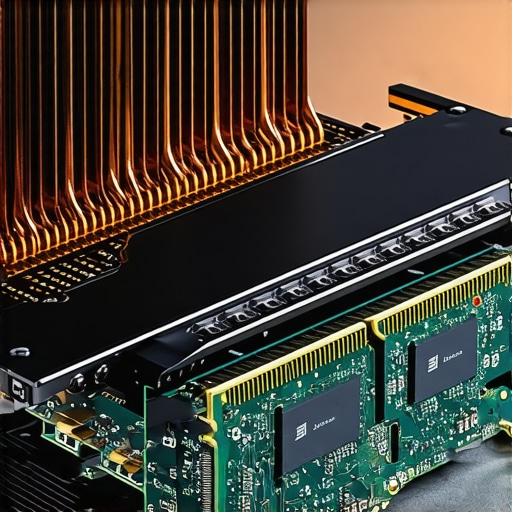
How do you know if those top-tier specs are actually being throttled?
This is where the “oops” factor kicks in. You might see a great deal on game-changing gaming laptops for serious players in 2025 and think the high-end GPU is a win. However, if the chassis is too thin, the system will down-clock itself to prevent melting. I’ve seen students buy powerful rigs only to realize they perform like a budget machine because of the hidden downside of ultra-thin gaming laptops. To combat this, I always tell people to look into how to lower your gaming laptop fan noise in seconds or even consider why we swapped the thermal paste on our brand new laptop to keep things running at peak speed.
The Critical Accessories Nobody Tells You About
We focus so much on the laptop that we ignore the peripherals that actually protect the machine. A major trap is buying the cheapest dongles available. I’ve found that why cheap USB-C hubs might be killing your ports is a real concern; they can cause power surges that fry your motherboard. Instead, invest in must-have laptop accessories to boost your work setup that have built-in power protection. Even something as simple as choosing student laptops that boost productivity through better port layouts can save you from having to carry a brick of adapters in your backpack every day. Remember, the goal isn’t just to buy a laptop; it’s to build a system that survives your degree.
I’ve seen so many students treat their laptops like disposable appliances, but a little bit of proactive care can easily double your machine’s lifespan. If you’re already looking at top business laptops for productivity in 2025, you’re starting with a solid foundation, but even a rugged tank needs an oil change. I personally set a “Maintenance Sunday” once a month. I use a simple microfiber cloth—one of those 7 small items every student should keep in their laptop bag—to wipe down the screen and use compressed air to blast out the vents. Dust is the silent killer of performance because it chokes your fans, causing the system to heat up and slow down. In fact, learning how to stop your gaming laptop from thermal throttling is just as important for a business machine as it is for a rig playing the latest AAA titles.
Keep the Guts Cool and the Hinge Happy
One of the most physical points of failure I see is the screen connection. You can learn why your laptop hinge is destined to fail and how to prevent it by simply changing how you open the lid; always lift from the center, never the corners, to distribute the torque evenly. If you’re feeling brave, I highly recommend checking out why we swapped the thermal paste on our brand new laptop. Most manufacturers use a generic, thick paste that dries out after eighteen months. Swapping it for a high-quality compound like Thermal Grizzly can drop your temperatures by 10 degrees Celsius instantly. 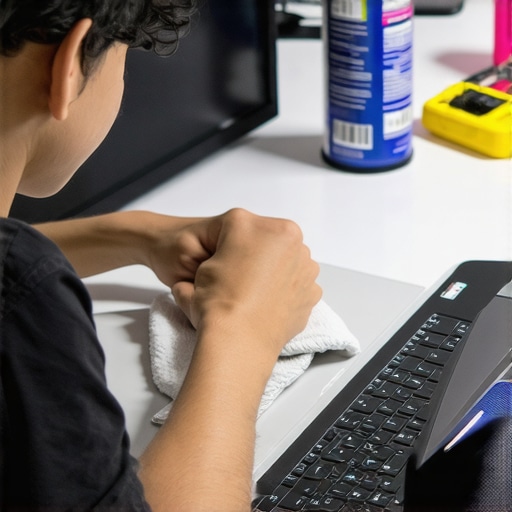 According to technical documentation from iFixit, modularity is the only way to truly future-proof a device, which is why I always check how to find official repair guides for your exact model before I even hit the checkout button.
How do I maintain my laptop’s peak performance over four years?
Software maintenance is just as critical as cleaning the fans. I use the “powercfg /batteryreport” command in the Windows terminal once a term to see exactly how many cycles my battery has gone through. If you’re buying a used machine from unbeatable laptop deals, you must know how to verify the battery health of a used laptop purchase. I also keep an eye on my storage health; knowing how to spot a dying SSD before your files vanish has saved me from losing entire semesters of work more than once. I predict that by 2026, we’ll see “Right to Repair” scores become a mandatory label on all consumer electronics, making it much easier for you to choose the only 3 brands that still make easily repairable laptops.
Tools That Turn a Student Rig into a Professional Station
When you get back to your dorm, you shouldn’t be hunched over a tiny screen. I’ve found that why we chose this specific dock for our dual monitor setup came down to port reliability and heat management. Adding must-have laptop accessories to boost your work setup—like a proper mechanical keyboard and a high-refresh-out dock—can make a mid-range student laptop feel like a $3,000 workstation. If you want to take your setup to the next level today, I challenge you to run a battery cycle report and check if your SSD is running at more than 80% capacity. If it is, it’s time to offload some files to the cloud to keep your write speeds fast.
I’ve spent years testing hardware, and if there is one thing I’ve learned, it’s that the ‘cheapest’ option usually costs the most in the long run. When you are sifting through the latest tech catalogs, it is easy to get distracted by thin bezels and high-resolution marketing. However, the real value lies in the details that aren’t printed on the box.
What the Sales Glossies Won’t Tell You About Real-World Durability
The hardest lesson I ever learned was that a high specs-to-price ratio often hides a low quality-of-life ratio. First, ignore the benchmark scores for a second and look at the screws; if you can’t see them, you probably can’t fix it. I now only look at the only 3 brands that still make easily repairable laptops because being able to swap a battery yourself is the difference between a four-year machine and a two-year paperweight. Second, the ‘student’ label is often just a marketing gimmick to sell under-powered hardware in bright colors. Real value lies in finding student laptops that balance power and portability perfectly without sacrificing the internal cooling or build quality. Finally, never trust a ‘sealed’ battery—it’s essentially a ticking clock for your machine’s usability, which is why your next business laptop needs a user-replaceable battery if you want it to survive past sophomore year.
My Personal Survival Kit for Hardware Longevity
To stay ahead of the curve and avoid the heartbreak of a mid-semester failure, I rely on a specific set of tools and habits. I always cross-reference top laptop deals in 2025 with historical price trackers to ensure a ‘sale’ is actually a bargain rather than a cleared-out inventory of lemons. For physical maintenance, I carry a small pouch containing the 7 small items every student should keep in their laptop bag, which includes a high-quality microfiber cloth and a specialized screwdriver. I also keep a digital copy of the truth about modern laptop warranties and repair rights on my phone. Knowing your rights when a hinge fails can save you hundreds of dollars in unnecessary out-of-pocket repair costs.
Build a Machine That Actually Grows With You
Choosing a computer shouldn’t feel like a gamble. When you prioritize repairability and high-quality cooling, you aren’t just buying a tool; you’re securing your academic peace of mind. Whether you are hunting for unbeatable laptop deals or looking to invest in a premium workstation, remember that the best machine is the one that stays out of the repair shop. You’ve got enough on your plate with finals, internships, and research projects—your hardware should be the one thing you never have to worry about. Invest in quality once, and your future self will thank you every time you open that lid. Which laptop feature do you wish you had prioritized on your last purchase? Let me know in the comments below!