
I remember sitting on my porch last summer, tea in hand, ready to finally watch that epic cinematic trailer everyone was talking about. I’d just unboxed a gorgeous new machine—one of those premium business laptops with sleek, top-firing speaker grilles flanking the keyboard. I thought I was in for an auditory treat. Then the soundtrack hit a low note, and… nothing. It sounded like a bumblebee trapped in a soda can. That moment of pure disappointment is exactly why I’ve started being much more ruthless during my hardware hunts. It’s easy to get lured in by the promise of direct sound, but if there’s no soul—no low-end—to that sound, you’re better off with a pair of headphones. Today, I’m going to pull back the curtain on why those top-firing speakers are often a marketing distraction and how you can spot a machine that actually delivers a full soundstage.
Stop Falling for the Front-Facing Audio Trap
For years, I made the mistake of thinking that speaker placement was the only thing that mattered. I figured if the sound was pointed at my ears instead of my lap, it would automatically be better. I even convinced a friend to pass up some unbeatable laptop deals just because the speakers were bottom-firing. I was wrong. The reality is that many manufacturers use top-firing placement to hide the fact that they’ve used tiny, cheap drivers with zero acoustic volume. According to research published by the Audio Engineering Society (AES), low-frequency reproduction in compact enclosures is strictly limited by the physical air volume the speaker can move, which is why thin laptops often sound so hollow regardless of where the grilles are. When you’re looking at student laptops, this lack of bass isn’t just a bummer for movies; it makes every video call and lecture sound sharp and fatiguing. Have you ever felt like your laptop was literally shouting at you without any warmth? It’s a common frustration that we need to stop accepting as the norm.
Is it actually possible to get decent bass in a thin chassis?
You might be skeptical. After all, a laptop is only so thick, right? But I’ve tested enough hardware to know that some brands actually put in the work, using force-canceling woofers to create depth without shaking the chassis apart. If you find yourself stuck with a tinny machine, you might find the hidden trick to getting better audio through software EQ helpful, but it’s never a perfect fix for bad hardware. I’ve learned the hard way that a pretty grille doesn’t equal a premium experience. In the next section, I’ll show you the specific specs I look for—and the ones I ignore—to ensure my next daily driver doesn’t sound like a 1920s radio.
Hunt for Acoustic Volume Rather Than Placement
The first thing you need to realize is that sound is just moving air. Think of a laptop chassis like a kick drum; if you shrink the drum to the size of a pancake, it’s never going to give you that deep, chest-thumping ‘oomph.’ When you browse top laptop deals in 2025, don’t just look at where the speakers are. Look at how much internal space the manufacturer dedicated to the speaker enclosures. I once spent a weekend comparing two high-end machines. One had flashy top-firing grilles, but the other, a slightly thicker model, had massive internal chambers. The thicker one wiped the floor with the ‘premium’ thin model because the air had room to breathe. This is specifically why most business laptops have terrible speakers—they prioritize thinness over the physical laws of acoustics. If the spec sheet mentions ‘cm³’ of acoustic volume, pay attention; that’s the number that actually determines if your music will have any body.
Look for Force-Canceling Woofers in the Spec Sheet
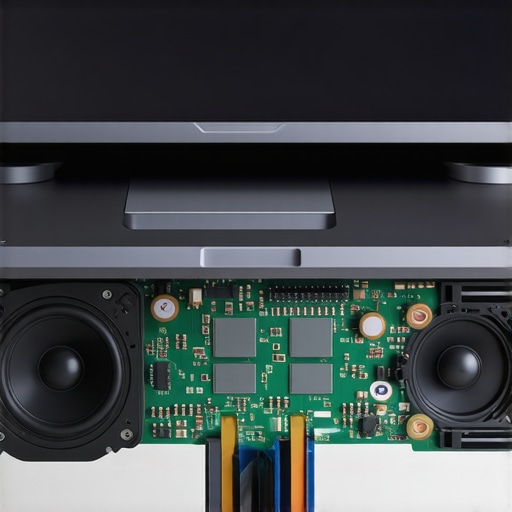
If you want real bass in a laptop, you need force-canceling woofers. This tech places two speakers back-to-back to cancel out the vibrations they send into the laptop frame. Without this, a powerful speaker would just make your keyboard rattle and your trackpad feel like a vibrating massage chair. I remember testing a unit from one of those game-changing gaming laptops that lacked this. Every time a bass-heavy explosion went off in-game, the ‘C’ and ‘V’ keys literally buzzed against my fingers. It was distracting and felt cheap. High-end machines that get this right can produce surprisingly deep tones without any chassis buzz. It’s the difference between a refined home theater and a car with a loose trunk lid rattling from too much bass. If you’re struggling with a machine that already rattles, you might need must-have laptop accessories like a solid stand to dampen the vibration, but that’s just a temporary fix for physics.
Spot the Difference Between Real Grilles and Aesthetic Vents
Manufacturers are sneaky. They often put rows of holes on the top of the deck that look like speakers but are actually just cooling vents—or worse, just for show. When you are evaluating the hidden costs of choosing an ultra-thin business laptop, take a flashlight to those grilles. If you can’t see the shimmer of a speaker driver underneath, they are likely feeding you bottom-firing sound through a fake vent. I once bought a ‘multimedia’ powerhouse only to realize the top grilles were completely sealed plastic. The sound was actually coming out of the side ports. If you’ve already been burned by this, the hidden trick to getting better audio is to use a specific software EQ to boost the mids, which can help clarity when bass is non-existent. But honestly, the best move is to check teardown photos before you buy. If the drivers look like they belong in a greeting card, skip it.
The Vibration Test You Should Run Immediately
When you get a new machine, don’t just play a ‘bass test’ video on YouTube. Crank the volume to 80% and play a piece of orchestral music or a podcast with a deep-voiced host. Place your hands on the palm rests. If you feel a sharp, high-frequency vibration rather than a solid, low-end resonance, the drivers are struggling and the chassis is too thin to handle the output. This is a common issue with student laptops that balance power and portability, where every gram of weight saved comes out of the speaker magnets. A good speaker system should feel like it’s filling the room, not just buzzing in your lap. If it fails this test within the first 48 hours, it’s a sign that the audio was an afterthought.
I’ve seen a lot of people fall for the ‘Pro’ branding, thinking that a higher price tag automatically translates to a better acoustic experience. It doesn’t. In fact, many of the top business laptops for productivity in 2025 are the worst offenders. They assume you’ll spend your life tethered to a headset during Zoom calls, so they sacrifice speaker volume for an extra millimeter of thinness. This is a massive trap. Everyone says that modern engineering has solved the ‘thin laptop’ sound problem, but in my experience, the physics of sound haven’t changed. If there is no physical depth for the air to move, you’re just getting glorified tweeter sound.
Don’t Let the ‘Tuned By’ Sticker Fool You
You’ve seen the stickers: ‘Audio by [High-End Brand]’ or ‘Tuned by [Famous Engineer].’ Here is the nuanced truth most reviewers miss: those brands often just provide a software EQ profile for $2 hardware. According to a study by Harman International, while digital signal processing (DSP) can improve the perceived clarity of small speakers, it cannot overcome the physical limitations of a driver that lacks excursion. When you are hunting for unbeatable laptop deals, ignore the logo on the palm rest. Instead, look for the actual wattage of the speaker system. A 2W speaker tuned by a legendary brand will almost always sound worse than a generic 5W speaker with a proper resonance chamber. I’ve seen game-changing gaming laptops deliver incredible audio simply because they had the chassis thickness to accommodate real magnets, not because they had a fancy logo.
Can an External DAC Actually Save Your Tinny Speakers?
This is a common question from people who realize their new machine sounds flat. They think buying a high-end Digital-to-Analog Converter (DAC) will fix the speakers. It won’t. A DAC improves the signal going to your headphones, but it can’t fix the physical limitations of a 10mm laptop driver. If you’re unhappy with the internal sound, you’re better off looking into must-have laptop accessories like compact desktop speakers rather than chasing software ‘hacks.’ I once wasted fifty dollars on a premium DAC hoping it would make my ultra-thin work machine sound like a home theater. It was a total ‘oops’ moment; the signal was cleaner, but the speakers still sounded like a tin can. If you’ve already bought into the hidden costs of choosing an ultra-thin business laptop, accept that the internal audio has a hard ceiling.
Why Your Gaming Beast Might Sound Like a Phone
It’s a common myth that ‘gaming’ equals ‘multimedia power.’ I’ve tested plenty of game-changing gaming laptops for 2025 that have incredible GPUs but speakers that sound like a smartphone from 2012. Manufacturers often assume gamers use headsets to hear footsteps, so they spend the audio budget on the 3.5mm jack circuitry rather than the speakers. If you want a machine that does both, you have to be obsessive about the specs. Look for ‘quad-speaker arrays.’ Two tweeters for the highs and two woofers for the lows is the only way to get a balanced soundstage in a portable frame. If you find a machine with only two drivers, it’s going to struggle with any music that has a bassline. Have you ever fallen into this trap of buying a high-spec machine only to realize the speakers were an afterthought? Let me know in the comments. I’m curious if you’ve found the hidden trick to getting better audio through specific placement or if you’ve just given up and stayed on headphones 24/7.
Once you’ve identified a machine with decent drivers, the real battle begins: keeping them from sounding like a static-filled mess after six months of use. I’ve seen so many student laptops that balance power and portability lose their audio clarity simply because the owner didn’t realize that dust is the literal enemy of vibration. If a single crumb or a cluster of pet hair gets trapped in that tiny resonance chamber, it creates a physical ‘buzz’ that no amount of software updates can fix. I make it a habit to use a low-pressure air duster every two weeks. You should definitely check out my guide on how to clean the dust out of your laptop without opening it to prevent these micro-obstructions from ruining your Netflix sessions.
The Tools You Need to Stop the Rattle
Sometimes, the issue isn’t the speaker itself but the chassis it’s bolted to. Over time, the tiny screws holding the speaker module in place can vibrate loose, especially on high-performance machines. If you start hearing a ‘plastic’ rattle, you don’t necessarily need a new computer; you just need to tighten things up. For this, I never travel without the specific screwdriver kit you need to open 90 of modern laptops. It’s a lifesaver for business travelers. I once fixed a rattling speaker on a flight using a T5 bit, and the passenger next to me thought I was a wizard. It’s also vital for other maintenance, like when you need to know how to replace a dead laptop fan without voiding the warranty, which often involves moving the speaker wires out of the way.
How do I maintain my laptop’s audio health over time?
Maintenance is about both the physical and the digital. On the physical side, avoid playing audio at 100% volume for extended periods, as this can cause ‘driver fatigue’ where the diaphragm loses its elasticity. On the digital side, be wary of ‘Volume Booster’ browser extensions. These often use digital clipping to increase loudness, which can send a squared-off signal to your speakers that physically overheats the voice coils. According to technical documentation from Texas Instruments, persistent clipping is the number one cause of premature failure in Class-D amplifiers found in modern laptops. Instead of boosting the volume past its limits, I suggest investing in must-have laptop accessories like a decent pair of external speakers or a dedicated headset for those moments when you really need to crank it up.
What the Future of Laptop Sound Looks Like
I’m actually quite optimistic about where integrated audio is going. We are starting to see the emergence of MEMS (Micro-Electro-Mechanical Systems) speakers. Unlike traditional drivers that use magnets and coils, MEMS speakers use silicon membranes that are incredibly fast and precise. As noted by Dr. Sean Olive, a Senior Fellow at Harman, the future of portable audio lies in ‘computational acoustics’—using AI to compensate for the tiny size of the hardware. This means the business laptops for professionals of 2027 might finally sound as good as a dedicated bookshelf speaker. Until then, you have to rely on your ears and a bit of manual tweaking. My favorite advanced tip? Use Equalizer APO to apply a ‘High Pass Filter’ at 80Hz; it stops your tiny speakers from trying to play sub-bass they can’t handle, which cleans up the mids and prevents distortion. Give that one specific tweak a try tonight—you’ll be shocked at how much clearer your hidden trick to getting better audio becomes when the drivers aren’t choking on low-end frequencies.
What Decades of Hardware Testing Taught Me
If there’s one thing I’ve learned from tearing apart hundreds of machines, it’s that your desk surface matters as much as the drivers. A thin laptop placed on a hollow wooden desk acts like a resonant chamber, whereas the same machine on a felt pad sounds muted and dead. Always test your sound on a solid, reflective surface before you judge the hardware too harshly. I’ve also realized that ‘Surround Sound’ on a laptop is almost entirely psychological; don’t pay a premium for Atmos branding if the machine lacks the physical drivers to back it up. Why most business laptops have terrible speakers is often a choice of budget over physics, and no amount of software can fully replace a lack of acoustic volume.
Tools That Actually Save Your Audio
I don’t just rely on the factory settings when I get a new machine. Here is the toolkit I personally use to ensure I’m getting the most out of any portable setup:
- Equalizer APO with Peace Interface: This is the absolute gold standard for fixing a messy frequency response. It allows you to dial in specific frequencies to compensate for chassis rattle.
- The Vibration Check: I always keep the specific screwdriver kit you need to open 90 of modern laptops in my drawer. Often, a ‘blown’ speaker is just a loose screw vibrating against a plastic mount.
- The High-Pass Filter Trick: Setting a filter at 80-100Hz prevents tiny drivers from attempting sub-bass, which significantly reduces distortion across the rest of the spectrum.
#IMAGE_PLACE_FINAL#
Your Journey Toward Better Portable Sound
We spend so much time obsessing over pixel counts and refresh rates that we often forget that half of the cinematic experience is auditory. Whether you are scouring the web for top laptop deals in 2025 or trying to breathe life into an old workhorse, remember to trust your ears over the stickers on the palm rest. Sound is a physical medium, and understanding the physics of moving air will save you more money than any seasonal sale ever could. Don’t settle for ‘good enough’ when a few manual tweaks can transform your daily driver into a multimedia powerhouse. Have you ever bought a laptop that sounded great in the store but turned out to be tinny and hollow once you got it home? Let me know your worst audio disappointments in the comments below!