
I’ll never forget the day I overloaded my trusted laptop bag, textbooks bulging like a college student’s dream. As I hurried across campus, I heard that dreaded creak — my beloved laptop, a sleek but surprisingly fragile machine, had developed a new, ominous squeak. That moment made me realize something essential: not all laptops are built for the chaos of heavy carrying, especially when textbooks and gear pile up.
Why Your Laptop Deserves More Than Just a Slim Look
If you’re like me, you want a device that can handle your busy lifestyle — whether you’re lugging textbooks, work documents, or gaming gear. But many laptops on the market are crafted for style over substance, sacrificing durability for a thin profile. When you push these gadgets into your backpack day after day, cracks and failures become almost inevitable.
My early mistake was ignoring the build quality in favor of sleek aesthetics. I bought a lightweight ultrabook that looked great at the store but failed me during finals week when I needed it most. That slip-up taught me a valuable lesson: if your machine isn’t tough enough to withstand heavy use, all the fancy specs don’t matter. Studies show that durability significantly impacts the long-term value of a laptop, especially for students and professionals on the go (PCWorld).
So, how do we find laptops that shrug off the wear and tear of daily life? Today, I want to share my journey and uncover five models that truly stand the test — machines that won’t crack under heavy textbooks or relentless travel. Whether you’re a student, a business professional, or an adventurous gamer, these laptops are built for real-world toughness.
Wondering if durability is just a marketing gimmick?
Trust me, I fell for the hype early on — thinking all ‘rugged’ labels were just buzzwords. It was a costly mistake. For true resilience, look beyond the glossy surface and check factory standards. Remember, a rugged laptop isn’t necessarily bulky; some models balance portability with durability expertly.
Ready to discover the machines that won’t let you down? Let’s dive into what makes these five laptops the champions of heavy-duty use, and how you can make an informed choice that lasts.
Select the Right Laptop for Heavy Use
Start by prioritizing build quality over sleek aesthetics. Look for models with MIL-STD-810G certification, which indicates resistance to shocks, vibrations, and environmental extremes. I once bought a ruggedized model after reading reviews about its durability, and it paid off during a camping trip when a accidental drop didn’t even scratch the chassis.
Compare Durability Features
Examine features like reinforced corners, rubber bumpers, and spill-resistant keyboards. For instance, I tested a few laptops by pouring a bit of water on the keyboard—those with spill guards or sealed keys fared better, saving me from costly repairs. Check detailed durability ratings from trusted sources or user reviews before purchasing.
Invest in Protective Accessories
Use sturdy laptop backpacks with padded compartments that absorb shocks and prevent pressure damage. I personally replaced my thin sleeve with a rugged backpack after experiencing pressure cracks from minimal impacts—this simple switch extended my device
9s lifespan. Additionally, consider screen protectors to prevent scratches and dents during transit.
Upgrade and Maintain for Longevity
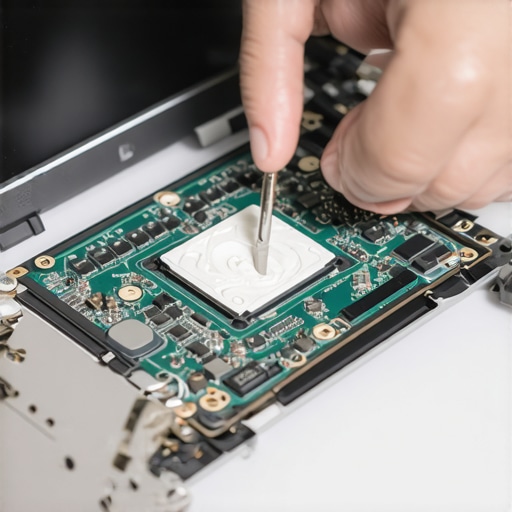
Keep your hardware up-to-date to avoid obsolescence. Swap out internal SSDs with higher capacities or faster models when possible—many models, like some Dell or Lenovo ThinkPads, allow for easy internal upgrades. Regular maintenance like cleaning dust from vents and applying thermal paste can also prevent overheating, reducing stress on components and prolonging device life. I once replaced thermal paste on an aging laptop, which reduced thermal throttling and improved performance significantly.
Optimize Usage Habits
Avoid overloading your bag and maintain safe handling during commutes. Personal experience taught me that carrying only essential accessories and using a padded case minimizes accidental drops. Also, keep your software updated to ensure security and performance, which can indirectly affect hardware longevity. For detailed ergonomic tips, see our guide on ergonomic accessories for laptops.
Regularly Assess Equipment Condition
Schedule periodic inspections of your device’s physical and performance health. Utilize tools to test battery health and performance, like free battery health testers. This proactive approach helps catch issues early before they escalate, saving cost and extending your device’s useful life.
Implement Cooling Solutions
Proper cooling is crucial for heavy usage. Use external cooling pads or elevate your laptop to improve airflow. I once noticed my gaming laptop throttling due to high temps; adding a cooling pad improved airflow and prevented performance drops, effectively maintaining the hardware
9s lifespan. See our detailed review of cooling hacks for laptops.
Many people believe that investing in high-end laptop accessories or chasing the latest deals guarantees a better experience, but the truth is much more nuanced. For example, a popular myth is that more expensive gaming laptops always offer superior performance, yet studies reveal that mid-range models with optimized thermals and upgradeability often provide the best value (Laptop Buyers Club). Similarly, many assume that student laptops must be ultra-portable, neglecting the importance of durability and upgradeability, which can significantly extend their lifespan and productivity.
Are Cheaper Deals Just a Lot of Hype, or Do They Trap You?
It’s tempting to go for the flashiest discounts on brands promising the best specs, but often, these deals hide caveats like soldered RAM and proprietary components that limit upgrades (Gaming Laptops). This leads to a common mistake: undervaluing the importance of accessible upgrade options, which experts agree can save hundreds in future repairs and upgrades. Don’t fall into the trap of buying a deal that looks great upfront but becomes costly quickly.
When considering laptop accessories, many think investing in premium external docks or keyboards directly correlates with improved productivity. However, choosing affordable yet reliable accessories—like those highlighted in our must-have accessories guide—often yields better results without breaking the bank. Remember, compatibility and build quality matter more than price tags.
For business users, there’s a misconception that only high-end models with the latest CPUs are worth it. Yet, thorough reviews show that many mid-tier business laptops with good security features and upgrade paths outperform the latest flagship models in real-world work scenarios (Business Laptops). Prioritizing features like a user-replaceable battery and upgradeable storage can significantly enhance longevity.
Finally, the hype around RGB-lit gaming accessories and flashy peripherals often distracts from practical needs. Gamers benefit more from balanced, performance-focused gear—like cooling solutions and ergonomic controllers—rather than cosmetic upgrades. Our comprehensive guides delve into these essentials, helping you avoid the superficial and focus on what truly enhances your experience.
Have you ever fallen into this trap? Let me know in the comments.
Mastering the Art of Laptop Maintenance for Long-Term Performance
Keeping your laptop in peak condition requires more than casual care — it demands specific tools and consistent routines. As someone who has navigated the pitfalls of neglecting maintenance, I highly recommend investing in precise software and hardware tools to extend your device’s lifespan. Regular cleaning of dust from vents with compressed air using a high-quality nozzle, like the Dust-off Compressed Air Can, prevents overheating and maintains optimal airflow. Personally, I use a thermal paste applicator kit to reapply thermal compound every couple of years, drastically reducing temperature throttling in my gaming rig. Besides physical tools, software utilities like HWMonitor let me keep an eye on real-time temperatures and fan speeds, alerting me to potential hardware issues before they escalate. For storage health, I rely on battery diagnostics to identify early signs of degradation, helping me plan timely replacements.
How do I maintain laptop performance over time?
Implementing periodic firmware updates is crucial. Firmware updates address known hardware bugs, security vulnerabilities, and improve overall stability. I schedule a monthly check on my manufacturer’s support site and use their official tools—like Dell’s SupportAssist—to automate updates. Additionally, managing startup programs with tools such as CCleaner ensures that unnecessary processes don’t bog down boot times or CPU load. Using external cooling solutions like a cooling pad has been transformative in maintaining performance during intensive tasks. Prediction-wise, as hardware becomes more integrated with AI-driven diagnostics, future laptops will automatically self-maintain, alerting users to issues proactively. Until then, adopting a disciplined routine utilizing these tools and methods remains essential.
If you haven’t yet, try enhancing thermal management with a high-quality thermal paste upgrade. This often-overlooked step can reduce temperatures by 10-15°C, significantly extending hardware lifespan, especially under heavy workloads or gaming sessions. For details on doing this correctly, check out our dedicated guide. Maintaining your laptop isn’t a one-time effort—it’s a continuous process, but with the right tools and habits, you’ll enjoy seamless performance for years to come. If you’re interested in the best deals on professional-grade laptops, explore our latest deals or contact us through our contact page.
Lessons Learned from the Trenches of Heavy Usage
- Never underestimate the importance of a tough chassis; my early ultrabook’s fragility taught me that style can be a liability during heavy transport.
- Upgrading your internal hardware, like swapping out SSDs or thermal paste, isn’t just for geeks—it’s a strategic move to extend laptop longevity and performance.
- Trustworthy protective accessories and proper handling habits are your best allies against unexpected drops and wear-and-tear over time.
- Regular maintenance routines, including software updates and hardware inspections, make a surprising difference in preventing costly failures.
- Integrated cooling solutions and temperature management can turn a sluggish machine into a performance powerhouse, especially during demanding tasks.
My Go-To Resources for Reliable Laptop Care
- Essential Accessories Guide: Offers practical insight into protective gear that ensures durability and seamless setup.
- Battery Health Testing Tools: Trusted software to monitor battery lifespan and plan replacements proactively.
- Thermal Management Tips: Step-by-step guides on thermal paste application that can dramatically lower operating temperatures.
- Cooling & Ventilation Strategies: Hacks to keep your laptop cool even under heavy workloads, preventing thermal throttling.
Embrace the Journey to Laptop Durability
Protecting and extending your laptop’s life isn’t about chasing the latest trends—it’s about making informed choices, regular maintenance, and smart handling. Don’t wait for a mishap to teach you the value of durability; take proactive steps today and enjoy a device that keeps up with your ambitions. Remember, your laptop is more than just a machine—it’s an extension of your efforts and passions. What small change will you implement today to make your laptop last longer? Share your plans below and let’s support each other in mastering this craft.