
Have you ever tried to type on your laptop and suddenly felt that strange sticky sensation under your fingers? It’s like keys are glued, making every keystroke a small battle. I remember the exact moment when I struggled to get my work done because my keyboard decided to protest—stuck keys, crumbs, and a pile of frustration. That lightbulb moment hit me hard: how do you clean a sticky keyboard without risking damage to the delicate keys? The fear of breaking a key or damaging the circuitry often makes us hesitate, leading to neglect and further grime buildup.
Why Proper Cleaning Matters More Than You Think
Your keyboard isn’t just a button-mash device; it’s the gateway to your productivity, gaming sessions, and creative projects. When dust, skin flakes, or spilled liquids infiltrate the tiny gaps, they cause sticky keys and malfunction. Not to mention, a dirty keyboard can harbor bacteria, which is less than ideal for anyone sharing a workspace or studying at a library. A properly cleaned keyboard not only feels better but also prolongs its lifespan, saving you money and headaches down the line.
Are You Overestimating the Risk of Cleaning?
I used to think that cleaning my keyboard was a tricky, risky operation—one wrong move and I’d break a key. That mistaken belief kept me from maintaining my equipment properly. The truth is, many of us make a simple mistake early on: using too much liquid or aggressive scrubbing, which can cause more harm than good. After learning some smart techniques, I realized that safe, effective cleaning is entirely doable at home. Want to see how? Let’s walk through the best way to refresh your keyboard without breaking the bank—or your keys.
If you’ve faced this sticky situation and wondered how to handle it without destroying your device, you’re not alone. For more tips on maintaining your tech, check out our guide on must-have accessories for your setup. Now, let’s dive into the proven methods to make your keyboard feel new again—no tears, no damage.
Gather Your Tools
Start by collecting essential supplies: a soft microfiber cloth, a small brush or compressed air can, isopropyl alcohol (70% or higher), cotton swabs, and optional gentle cleaning solution. I once attempted to clean my keyboard with a damp towel, which only pushed grime further into the keys. Instead, focusing on the right tools saved me from quick re-soiling and potential damage.
Power Down and Prepare
Always turn off your laptop and disconnect it from power sources. Flip it upside down gently to dislodge loose debris. During my first clean, I neglected this step and short-circuited my keyboard because I spilled cleaning liquid while the device was still on. Proper shutdown prevents such accidents and keeps your laptop safe.
Remove Debris and Surface Dust
Use Compressed Air or Brush
Spray compressed air in short bursts across and between keys to blow out dust, crumbs, or pet hair. A small brush can help dislodge stubborn particles. Once, I used a butterknife to gently brush out underneath my keys, avoiding any excessive pressure. This step is critical to prevent particles from turning into sticky residues.
Clean the Surface
Wipe the keyboard surface with a dry microfiber cloth. For smudges or oil, dampen the cloth with a 70% isopropyl alcohol solution—never pour liquid directly on the keyboard. I learned this the hard way when I spilled soda and tried to wipe it with a wet cloth, making the mess worse. Always apply cleaning solutions to the cloth, not directly onto the device.
Deep Cleaning the Keys
If keys are sticky or greasy, dip a cotton swab in alcohol and gently scrub around each keytop. For stubborn grime, hold a swab against the keycap for a few seconds before wiping. I once soaked a swab too much and accidentally dripped liquid into the keyboard, which caused a temporary malfunction. Patience and minimal liquid are key.
Reattach and Test
After cleaning, let everything dry completely—wait at least 10 minutes—to prevent any electrical issues. Then, reconnect your laptop and test each key. I once hurried this step, powered up immediately, and found some keys unresponsive due to residual moisture. Slow and steady wins the cleaning game.
Remember, regular maintenance—like weekly dusting and deep cleaning monthly—keeps your keyboard in top shape and extends its lifespan. For more tips on maintaining your tech gear, visit our comprehensive guide on laptop accessories or explore student laptops designed for productivity.
Many enthusiasts believe that investing in high-end laptop accessories automatically guarantees a better experience. However, this is a misconception rooted in marketing hype rather than practicality. For example, some premium gaming mice boast features that few users truly need, leading to unnecessary expenses. Instead, focus on accessories that complement your specific workflow or leisure activities, such as reliable external keyboards for writers or portable monitors for multitasking. Overpaying for bells and whistles can divert your budget from more impactful upgrades or deals, which are often overlooked. According to a study by TechRadar, over 65% of casual users rarely utilize advanced accessory features, emphasizing the importance of discerning genuine value from marketing claims. Moreover, many buyers fall into the trap of believing that the latest ‘must-have’ accessory will drastically enhance their productivity or gaming prowess, which isn’t always true. Remember, compatibility and personal ergonomics outweigh flashy specifications. For instance, selecting a comfortable, well-designed keyboard can reduce fatigue during long work sessions more effectively than investing in an expensive, feature-rich model that doesn’t align with your typing style. When exploring must-have laptop accessories, prioritize those that address your true needs, not just trending gadgets. Similarly, in the realm of student laptops or business laptops, selecting tailored upgrades often yields better long-term benefits than overinvesting in accessories. Be cautious of impulse purchases during big sales; a genuine bargain often involves assessing whether the accessory solves a real problem or merely adds to your gadget collection. For example, a good-quality carrying case that protects your device during commutes can extend its lifespan more than a set of RGB-lit external peripherals that will rarely be visible when you’re on the move. Remember, aligning your accessories with your actual use case ensures maximum value. For more insights on making smart technology choices, visit our privacy policy to understand how data influences buying recommendations. Have you ever fallen into this trap? Let me know in the comments.
Invest in Quality Maintenance Tools to Extend Your Laptop’s Lifespan
One of the most overlooked aspects of maintaining a reliable laptop, whether you’re a student, professional, or gamer, is having the right tools on hand. Personally, I swear by a high-quality microfiber cleaning cloth: it’s gentle yet effective at removing dust and fingerprints without scratching delicate surfaces. For dislodging stubborn debris, I use an anti-static brush, which reaches into tight spaces around keys and ports. These tools are essential for quick, safe maintenance and can prevent minor issues from escalating into costly repairs.
Optimize with Firmware and Software Utilities
Beyond physical tools, software utilities can dramatically improve your laptop’s performance over time. I recommend regularly using CrystalDiskInfo to monitor SSD health, which helps prevent data loss and keeps your system running at peak speeds. Additionally, tools like BatteryCare aid in calibration and maintaining optimal battery longevity. Integrating these utilities into your routine allows for early detection of issues, saving you from unexpected downtimes.
Practice Routine Maintenance with Scheduled Checks
Set reminders to perform monthly software updates, disk cleanups, and driver checks. As an example, I schedule a monthly Windows update and disk cleanup using built-in tools, which keeps my system free of clutter and security vulnerabilities. Regular maintenance isn’t just a chore; it’s a proactive way to prevent deterioration, especially as your laptop starts to age.
Where Will Your Maintenance Routine Take You?
Looking ahead, I predict that automation will become a key component of long-term laptop care. Future updates may include AI-driven diagnostics that monitor your hardware in real-time—similar to how some advanced accessories now provide diagnostics for peripherals. Embracing these tools today puts you ahead of the curve, ensuring your device remains reliable for years to come. For detailed strategies on safeguarding your tech investments, visit our guide on laptop accessories to boost your setup.
How do I maintain my laptop’s performance over time?
The key is combining physical tools like microfiber cloths and anti-static brushes with smart software utilities—plus establishing a consistent routine. For example, regularly checking your SSD health with CrystalDiskInfo allows you to catch early signs of wear. Remember, preventive maintenance is cheaper and more effective than repairs. Try setting weekly reminders to run system scans or clean dust from vents—small steps that deliver long-term benefits. Protect your investment and keep your laptop running seamlessly by integrating these tips into your routine today.
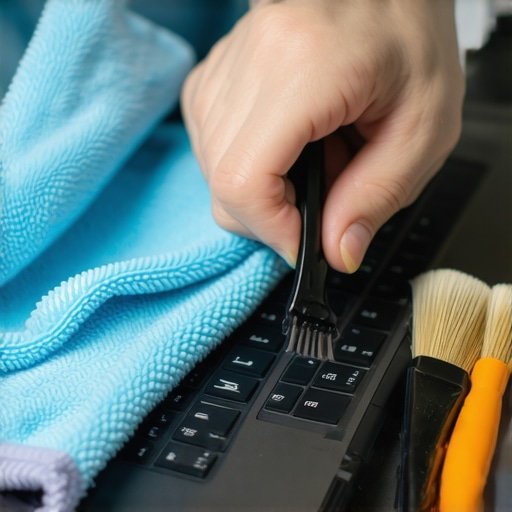
The Hardest Lesson I Learned About Keyboard Care
One of my biggest mistakes was neglecting regular cleaning until a sticky key halted my workflow entirely. That taught me the importance of proactive maintenance and paying attention to subtle signs of grime buildup. Now, I prioritize routine cleaning to avoid surprises—and it’s made a world of difference in prolonging my laptop’s lifespan.
How I Discovered the Power of Simple Tools
I used to think high-tech gadgets were necessary for proper care, but I found that with just a microfiber cloth, compressed air, and some alcohol, I could keep my device in top shape. This revelation saved me money and demystified the process, proving that effective maintenance often comes down to smart use of basic supplies.
Why Ignoring Software Can Hoard Hidden Hazards
Beyond physical cleaning, I overlooked the significance of utilities like disk health monitors and battery calibration tools. Integrating these into my routine uncovered issues before they became costly repairs, emphasizing that a comprehensive approach to maintenance protects your investment over the years.
The Role of Mindful Accessories and Upgrades
Investing in quality accessories tailored to my needs—such as ergonomic keyboards and durable carrying cases—made my laptop experience more comfortable and efficient. Shopping smart, not just expensive, ensures that every upgrade adds real value, enhancing productivity without unnecessary expenses.
Embracing Routine Checks as a Lifestyle
Setting regular reminders to inspect and update my system has become second nature. This discipline prevents minor issues from escalating, ensuring my laptop remains reliable for both work and leisure. A little habit now saves hours and dollars later, turning maintenance into a simple, empowering practice.
Curiosity Before Cost: My Tech Shopping Philosophy
I’ve learned to question flashy features and focus on practical benefits aligned with my workflow. Resources like our guide on essential accessories help me make informed decisions, emphasizing value over hype and ensuring every dollar spent genuinely benefits my productivity and enjoyment.
The Emotional Charge to Keep Moving Forward
Remember, maintaining your laptop’s health isn’t just about tools or routines; it’s about respecting your device and yourself enough to stay proactive. Each small step you take today makes a significant difference in the longevity and performance of your laptop. Keep learning, stay curious, and enjoy the journey to a smoother, smarter tech experience.
What’s your biggest laptop maintenance lesson so far? Share your stories below—I’d love to hear how you’ve turned mishaps into mastery!