
I remember sitting at my desk last Tuesday, staring at forty-seven icons scattered across my wallpaper like digital confetti. My coffee was getting cold, and I had just spent ten minutes hunting for a single PDF I’d saved an hour before. It was a mess. My brain felt exactly like my screen—cluttered, loud, and completely incapable of doing any deep work. For years, I told myself that a busy desktop meant I was a busy professional. I would buy the latest laptop accessories and think I was organized, but the reality was that my productive setup was actually a giant distraction machine. Today, we are clearing the digital debris to find your flow state.
My journey from digital chaos to a zen workspace
The mistake I made early on was treating my desktop like a junk drawer. If I needed a file, I would just save it to the main screen. Within a month, I could not even see my wallpaper anymore. I thought I was being efficient, but I was actually killing my productivity. This isn’t just about making things look pretty; it is about neurobiology. According to researchers at the Princeton University Neuroscience Institute, multiple visual stimuli compete for neural representation. Basically, every icon you see is a tiny tug on your brain’s attention. Today, I am going to show you how to strip away the noise so you can actually get things done. Have you ever felt like your computer is working against you instead of for you?
Is a minimalist desktop actually just a waste of time?
You might be thinking that organizing icons is just a fancy way of procrastinating. I get it. I used to think that too. But once I simplified my view, my output doubled. We are going to dive into the specific folder structures and hidden settings that keep your eyes on the prize. If you are using one of the best business laptops for productivity, you simply do not have time to waste on icon hunting. Keeping a clean workspace is a prerequisite for high-level output.
The first steps to reclaiming your focus
The absolute first thing we need to do is clear the visual field. We often forget that our hardware setup affects our digital habits too. For instance, I found that using specific laptop stands changed the way I interacted with my secondary monitors, which in turn changed where I parked my files. I also realized that laptops with centered trackpads help me navigate more intentionally, reducing those erratic mouse movements that lead to accidental folder opening. Let us start with the one folder rule to instantly clear your vision and prepare your mind for the heavy lifting.
Empty Your Screen in Exactly Sixty Seconds
The first rule of a zen workspace is what I call the Daily Dump. Last winter, I missed a project deadline because I couldn’t find a final draft buried under thirty-two screenshots named Screen Shot [Date]. I had to explain to a client why a $1,200 project was late just because I was too lazy to name a file. To prevent this, you need a single folder on your desktop titled STAGING. Highlight every single icon on your screen right now and drag them in there. Your brain will instantly feel a weight lift. This creates a firewall between your current task and your past clutter. If you are browsing unbeatable laptop deals to upgrade your power, don’t bring your old habits to a new machine. Clear the field first so you can actually see the pixels you paid for.
The Automated Janitor That Cleans While You Sleep
Manual cleaning is for people with too much time. Use the built-in ‘Stacks’ feature on macOS or a third-party organizer like Fences on Windows. These tools act like a digital janitor, grouping your files by type or date automatically. It is like having a filing cabinet that sorts itself while you are away from your desk. When I started using these, I realized that many of the files I thought were essential were actually just digital lint. If you are using business laptops for professionals, your time is literally money. Don’t spend it moving icons around. Set the rules once, and let the software handle the heavy lifting.
Stop Hunting and Start Typing
The mouse is often the enemy of the flow state. Every time you reach for it to find a folder, you break your concentration. I’ve found that using Spotlight or PowerToys Run allows me to launch any file in two seconds without ever looking at the desktop. To maximize this, you need to look into the hidden settings that make your laptop keyboard faster. Adjusting your key repeat rate and learning a few global shortcuts will make your desktop icons irrelevant. Think of your desktop as a beautiful vista, not a toolbelt. Keep the tools hidden in the search bar and the vista clear for inspiration.
Your Hardware Dictates Your Digital Habits
We often blame our lack of organization on laziness, but sometimes it is the hardware. If your desk is cramped, you tend to dump files on the screen because you feel ‘boxed in.’ Using the best vertical docks to save space can physically open up your environment, which psychologically encourages you to keep your digital space clean too. When I switched to a vertical setup, I stopped seeing my laptop screen as a dumping ground and started seeing it as a dedicated workstation. Combine this physical shift with the best keyboard layouts for coding and high-speed typing to ensure that your input is as clean as your output. A streamlined physical setup naturally leads to a streamlined digital one.But here is where most people get it wrong: they think a more expensive screen automatically means a better workflow. I’ve seen countless professionals hunt for unbeatable laptop deals solely based on 4K resolution. They want that crisp, ‘Retina’ look. But in my experience, chasing pixels is a trap that actually kills your battery and strains your eyes.
The 4K myth is costing you more than just money
On a standard 14-inch laptop, the human eye can barely distinguish between 1440p and 4K at a normal working distance. What you actually feel at the end of an eight-hour shift isn’t a lack of pixels; it is a lack of light. This is why students should prioritize screen brightness over resolution. If you are working in a coffee shop or a brightly lit office, a 500-nit screen at a lower resolution will serve you ten times better than a dim 4K panel. High resolution often forces you to use ‘scaling,’ which can make some professional apps look blurry anyway. Stop paying for pixels you can’t see and start paying for the backlight you actually need.
Does 120Hz actually make you a faster worker?
We often associate high refresh rates with gaming, but there is a hidden nuance here for professionals too. Research published in the Journal of Vision indicates that higher refresh rates reduce the neural effort required for the brain to track movement on a screen, such as a scrolling spreadsheet or a moving cursor. When I switched to a high-refresh panel, my evening headaches almost vanished. It turns out that high refresh screens are better even for non-gamers because they smooth out the micro-stutters that cause subconscious eye fatigue. If you are looking at business laptops for professionals, don’t ignore the Hertz.
The expensive mistake of chasing thinness over airflow
Here is the ‘oops’ factor I see most often: buying an ultra-slim machine for heavy-duty tasks like video editing or 3D design. We’ve been conditioned to think that ‘thin and light’ is the pinnacle of engineering. However, physics is a cruel mistress. In a chassis that is only 15mm thick, there is nowhere for the heat to go. This is why you should avoid slim gaming laptops for heavy rendering. You might have the fastest CPU on paper, but within five minutes of work, the system will start ‘thermal throttling’—slowing itself down to prevent melting. You end up with a $2,000 machine that performs like a $600 one because it’s choking for air. I’ve been there, watching my render times double because I wanted a laptop that looked ‘sleek.’ If you’re already hearing your gaming laptop fans sound like a jet engine, you’re already losing the performance battle. It is much better to learn how to stop your gaming laptop from thermal throttling before you commit to a form factor that can’t handle your workload. Have you ever fallen into this trap? Let me know in the comments.Maintaining that ‘new laptop’ feel isn’t just about a fresh install of Windows; it is about the hardware hygiene that most people ignore until they hear a grinding sound. I personally keep a small toolkit in my drawer because the 10 tool every laptop owner should keep in their desk is often the only thing standing between a five-year machine and a two-year paperweight. If you’ve spent weeks hunting for unbeatable laptop deals, you want that investment to last. One of the most overlooked parts of maintenance is the cooling system. Over time, dust turns into a felt-like carpet inside your heat sinks. If you do not address it, you will eventually need to learn how to replace your own laptop fan in under 20 minutes. I do a deep clean every six months, and the temperature drop is always staggering. Keeping your hardware clean ensures your student laptops that boost productivity do not turn into glorified space heaters.
How do I keep my setup efficient for the next five years?
Consistency is the secret sauce. You cannot just clean it once and forget it. I set a calendar reminder for ‘Tech Sunday’ once a quarter. This is when I check my battery health and look for signs of physical wear. I am particularly paranoid about internal damage, so I am always checking how to tell if your laptop battery is swelling before it bursts. It sounds extreme, but for business laptops for professionals, a failing battery can warp the entire chassis and ruin the trackpad. While you are at it, give your inputs some love. I use the best way to clean a sticky keyboard without breaking the keys to keep my typing speed at its peak. 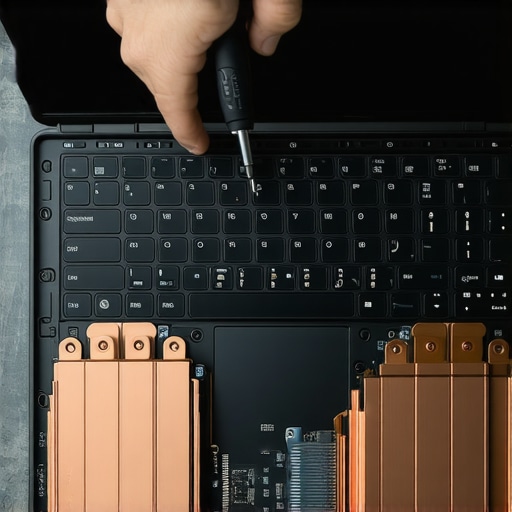 According to technical analysis from the experts at Igor’s Lab, the ‘pump-out’ effect in thermal paste can lead to significant hotspots on your CPU die within just 12 months of heavy use, especially in thin-and-light designs. This is why I recommend learning how to choose the right thermal paste for your machine. It is a fifteen-dollar fix that can prevent a five-hundred-dollar repair down the road. And when you are buying new, remember that some designs are built to be disposable. This is why we avoid laptops with soldered ram at all costs. If one chip goes bad on a soldered board, the whole machine is essentially trash. Look for upgradeable slots so you can scale your RAM as software gets hungrier in the future. The trend is moving toward modularity, but we are not there yet. My advanced tip for today: download a hardware monitor like HWInfo64 and log your idle temperatures today. In six months, check them again. If they have risen by more than 5 degrees Celsius at idle, it is time to open the case and clear the dust. Do not wait for a thermal shutdown to tell you there is a problem.
What I Learned After Spending Thousands on Productivity Dead Ends
If there is one thing I’ve realized after years of testing gear, it’s that a $3,000 price tag won’t save you from a $0 organization system. I used to think more pixels meant more output, but the reality is that visual friction—like a messy desktop or a screen that isn’t bright enough—will exhaust you faster than any CPU bottleneck. One of the biggest mistakes you can make is settling for outdated display tech; why you should never buy a laptop with a 720p screen comes down to eye strain and lost real estate. Also, never underestimate the power of repairability. I now lean toward longevity, which is why we only buy laptops with individual key repair options to ensure a single accidental crumb doesn’t brick the whole board. It’s better to have a slightly slower machine that works perfectly than a powerhouse that’s constantly overheating.
The Gear That Keeps My Professional Flow from Breaking
Building a resilient workspace isn’t about buying every gadget on the market; it’s about curated quality. Whenever I’m hunting for unbeatable laptop deals, I look for machines that support my specific physical needs first. My toolkit is simple: a high-quality screwdriver set, a can of compressed air, and a reliable hardware monitor. #IMAGE_PLACEHOLDER_E# In fact, the 10 tool every laptop owner should keep in their desk is my secret weapon for extending the life of any device I own. For those who are just starting their professional journey, choosing business laptops for professionals with modular components like upgradeable RAM is the single best way to future-proof your career.
Start Rebuilding Your Digital Sanctuary Today
Your workspace is a direct reflection of your mental clarity. When you clear the icons, dust out the vents, and choose hardware that actually fits your environment, you aren’t just ‘fixing a computer.’ You are removing the barriers between your ideas and your execution. Whether you are searching for high-end business laptops or just trying to squeeze another year out of your current setup, remember that you are in control of your digital environment. Take that first step today—clear that desktop, find your flow, and let your machine finally work as hard as you do.
Have you ever found a specific setting or physical tool that completely changed how you work on your laptop? Let me know in the comments below!