
I’ll never forget the sinking feeling in my gut when I opened up my cousin’s “deal of the century” laptop last summer. We had a shiny new 2TB NVMe drive sitting on the desk, ready to breathe new life into his machine. But as soon as the backplate came off, my heart dropped. Instead of the standard M.2 slot I usually see in the best business laptops, there was this strange, proprietary connector staring back at us. It wasn’t just a different shape; it was a financial dead end. To get more storage, he’d have to pay the manufacturer three times the market rate for a drive that wasn’t even faster. That moment changed how I look at every single spec sheet. Today, I want to show you exactly why these custom slots are a dealbreaker and how you can check if your laptop can be upgraded before you swipe your card.
The Expensive Mistake I Made So You Don’t Have To
Years ago, I fell for the marketing hype of a super-slim workstation. It looked incredible, but I ignored the “fine print” about its internal components. When the SSD eventually started showing signs of failure—something you can learn to catch if you know how to spot a dying SSD—I realized I was stuck. I couldn’t just go to a local shop or find budget SSDs to fix it myself. I had to send the whole unit back to the factory and pay a premium for a proprietary part. According to a report by iFixit, repairability is declining in favor of “planned obsolescence,” and proprietary storage is a huge part of that trend. It’s a move that limits your freedom and forces you into their ecosystem.
Is proprietary storage actually worth the extra cost?
You might hear sales reps claim these custom connectors offer “unmatched speeds” or “optimized thermal performance” that standard parts can’t touch. Honestly? Don’t buy it. For 99% of us—whether you’re hunting for unbeatable laptop deals or a rig for school—a standard Gen4 NVMe drive is more than enough. The performance gain of a proprietary slot is usually negligible for daily tasks, but the “repairability tax” you pay later when something breaks is massive. It’s a trade-off that rarely benefits the consumer.
Stop Letting Manufacturers Lock Your Data Away
When a manufacturer uses a non-standard slot, they aren’t just selling you a laptop; they’re selling you a lockbox they hold the only key to. If your motherboard dies and you have a standard drive, you can usually just pop it into a cheap enclosure and grab your files. With proprietary slots? Good luck finding an adapter that actually works without spending a fortune. I’ve seen too many student laptops become expensive paperweights because of one tiny, non-standard part. Have you ever been told a simple upgrade was “impossible” because of a weird part inside your machine? I’d love to hear your story. We need to stick to brands that still make easily repairable laptops to send a clear message that we value our right to repair.
How to Hunt for Red Flags Before You Buy
Checking a spec sheet for the amount of storage is easy, but finding out how that storage is connected takes a bit of detective work. Manufacturers love to hide these details in the fine print. To avoid getting stuck with a machine you can’t fix, you need to be proactive. I learned this the hard way when helping a friend shop for unbeatable laptop deals on a used workstation last fall. On paper, it was a beast. But a quick serial number search revealed the drive was a ‘blade’ style proprietary unit. We walked away and found him one of the top business laptops for productivity in 2025 instead, specifically because it used a standard NVMe slot.
Read the Official Repair Guides First
Before you even look at the ‘Buy’ button, search for the service manual. You should learn how to find official repair guides for your exact model. These documents are gold mines because they show the actual motherboard layout. Look for terms like ‘M.2 2280’ or ‘PCIe NVMe.’ If the manual mentions a ‘proprietary module’ or ‘SSD assembly’ that looks like a custom PCB, that is a massive warning sign. For student laptops that boost productivity, having a standard drive is the difference between a five-minute fix and a $400 factory repair.
Check the Internals for That Tell-Tale M.2 Shape
If you have the laptop in front of you, or if you are looking at internal photos on review sites, look for the ‘M.2’ connector. A standard drive is a slim, rectangular stick held down by a single screw at the end. Proprietary drives often have different notch patterns (keys) or are wider than a standard 22mm stick. In game-changing gaming laptops for serious players in 2025, you want to see at least one open M.2 slot for future expansion. If the drive is soldered directly to the board—common in ultra-thin designs—it’s not just proprietary; it’s permanent. 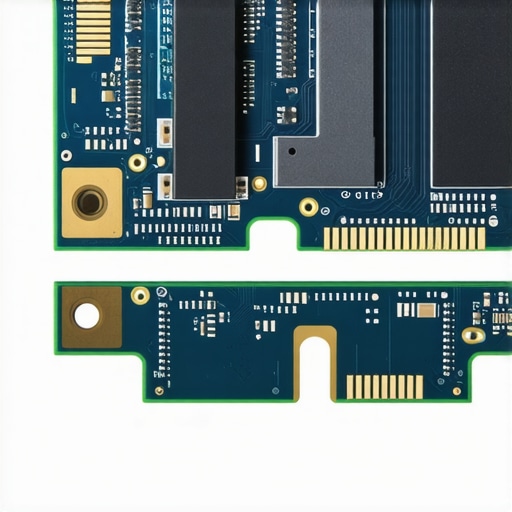
The Secret Cost of Having a Non-Standard Machine
Beyond just the repair bill, proprietary storage messes with your entire workflow. Think of your laptop like a car; if you could only buy tires from one specific dealership, they could charge whatever they wanted. That’s exactly what happens here. When you use must-have laptop accessories for a seamless setup, like high-speed external enclosures, they rely on you being able to move your drive easily. If your motherboard dies and you have a proprietary drive, your data is effectively held hostage unless you buy an expensive, niche adapter. Always verify the connector type via community forums or teardown videos before committing to a purchase. Knowing how to check if your laptop can be upgraded is the single best way to protect your investment from planned obsolescence.You might think that paying more for a ‘Pro’ badge guarantees you a machine built to last, but the reality is often the opposite. Many people assume that business laptops for professionals are the gold standard for longevity, yet several leading manufacturers have moved toward soldering components or using custom storage shapes to force their thin-and-light agendas. In my experience, the biggest mistake is equating ‘premium build’ with ‘user-focused design.’ Just because a chassis is milled from a single block of aluminum doesn’t mean the guts are designed to help you. In fact, if you don’t insist on a user-replaceable battery and standard storage slots, you are essentially renting that laptop until the first component fails.
Why Business Class Labels Hide Soldered Secrets
The industry is currently obsessed with thinness, but that comes at a massive cost to repairability. I’ve seen countless student laptops that boost productivity in the short term, only to become unfixable because the SSD is part of the logic board. While companies claim this improves reliability by reducing the number of physical connections, data from the Public Interest Research Group (PIRG) suggests that non-modular designs actually shorten a device’s average lifespan by several years. If you are a power user, you need to look past the marketing. Always check if the model you’re eyeing is one of the only 3 brands that still make easily repairable laptops before committing.
Can Proprietary Storage Actually Outperform Standard NVMe?
The short answer is no, not in a way that justifies the price. While some manufacturers argue that proprietary pin layouts allow for better thermal dissipation, the truth is that a high-quality M.2 drive paired with decent must-have laptop accessories to boost your work setup, like a thermal pad or a properly ventilated stand, will perform just as well. For example, when you’re pushing game-changing gaming laptops for serious players in 2025 to their limits, the bottleneck is almost always the GPU’s heat, not the storage connector shape. Proprietary drives are often just standard controllers on a different-shaped PCB. #IMAGE_PLACE_HOLDER_C#
The Adapter Trap That Could Fry Your Motherboard
Here is the ‘oops’ factor most people miss: if you buy a laptop with proprietary storage and it dies, your first instinct will be to find an adapter on a marketplace to recover your data. This is where things get dangerous. I’ve seen dozens of cases where a $15 adapter from an unverified seller had a reversed pinout, sending 12V straight into a 3.3V data line. Just like why cheap USB-C hubs might be killing your ports, these non-standard adapters are a gamble with your entire system’s life. If you aren’t careful, you won’t just fail to get your data; you’ll fry the drive itself. Knowing how to stop your gaming laptop from thermal throttling is important, but preventing a total electrical short from a bad proprietary adapter is vital. Have you ever fallen into this trap or been told a repair was impossible because of a weird part? Let me know in the comments.
Why I Always Carry a Precision Toolkit in My Bag
I’ve learned the hard way that the difference between a minor annoyance and a total hardware failure often comes down to a single loose screw or a bit of trapped dust. While most people are hunting for top laptop deals in 2025 based on the sticker price, I’m looking at the chassis screws. If I see Torx or Phillips, I’m happy; if I see glue, I run. My toolkit isn’t just for show; it’s my insurance policy. Every Sunday, I do a quick physical check of my machine. I make sure the hinge is tight because I know how to fix a laptop hinge that wont stay up, but preventing the wobble is much easier than repairing a cracked frame. I also make it a habit to wipe down my screen and keys daily. It sounds trivial, but why we still carry a microfiber cloth in our laptop bags is simple: skin oils are acidic and can actually erode the protective coating on premium displays over time.
The Dust Bunny is Your CPUs Worst Enemy
If your fans are screaming like a jet engine during a simple Zoom call, you have a thermal problem that no software update can fix. In game-changing gaming laptops for serious players in 2025, the heat density is so high that even a tiny layer of lint across the copper fins can drop your clock speeds by 30%. I personally use a small electric duster—never canned air, which can spit liquid propellant—to clear my vents every three months. If you are adventurous, I highly recommend learning why we swapped the thermal paste on our brand new laptop. According to testing by the experts at Gamers Nexus, factory thermal paste application is often inconsistent, and switching to a high-conductivity compound like Thermal Grizzly Kryonaut can drop temperatures by 5-10 degrees Celsius instantly. 
How do I maintain my laptop speed over several years?
Maintaining performance isn’t just about the hardware; it’s about managing the ‘software rot’ that accumulates. Every semester, I tell my followers looking for student laptops that boost productivity to do a clean install of Windows or macOS. It clears out the bloatware and background processes that eat your RAM. If you don’t want to go that far, at least learn how to lower your gaming laptop fan noise in seconds by adjusting your power curves. I predict that within the next two years, we will see ‘AI-driven thermal management’ that automatically adjusts fan curves based on your specific ambient room temperature, but until then, manual maintenance is king. For those using business laptops for professionals, your focus should be on battery longevity. I use a battery threshold tool to stop my charge at 80%, which significantly extends the life of the lithium cells. My advanced tip for you today: Download a hardware monitor tool like HWInfo64 and check your ‘SSD Wear Leveling’ once a month. If that number drops too fast, you might have a rogue app writing unnecessary data to your drive. Catching it early can save your data and your wallet.
The Hardest Lessons I Learned About Modern Laptop Guts
Over the years, I’ve realized that the ‘cool’ factor of a razor-thin chassis often hides a nightmare of non-standard parts. First, if you see glue instead of screws, you are looking at a countdown to obsolescence. Second, never assume a ‘Pro’ label means easy access; some of the most expensive business laptops for professionals are actually the hardest to service because components are soldered down. Finally, the best way to vote for repairability is with your wallet by sticking to the only 3 brands that still make easily repairable laptops. It’s about long-term value, not just hunting for unbeatable laptop deals that might cost you more in repairs later.
My Go-To Resources for Avoiding a Lemon
I don’t expect you to memorize every motherboard layout. Instead, I rely on a few trusted pillars. I always check official teardowns and service manuals before recommending any student laptops that boost productivity. To keep my current gear running, I invest in must-have laptop accessories to boost your work setup, such as a high-quality precision driver set for annual cleaning. Lastly, before buying, I use the hidden price history tools every deal hunter needs to ensure I’m getting a fair price for a machine that uses industry-standard components. #IMAGE_PLACEHOLDER_E#
Your Tech Should Work for You, Not the Other Way Around
At the end of the day, a laptop is a tool to help you achieve your goals, whether that’s acing a semester or climbing the ranks in game-changing gaming laptops for serious players in 2025. Don’t let a proprietary SSD connector turn your high-performance machine into a disposable toy. When you choose devices like the top business laptops for productivity in 2025, you’re choosing freedom and longevity. Stay curious, stay informed, and never be afraid to look under the hood. Have you ever been shocked by what you found inside your laptop case or been told a repair was impossible? Let me know your upgrade horror stories in the comments below!