
I remember the pit in my stomach when I walked into a local tech outlet and saw the exact Dell XPS I’d just paid $1,800 for sitting in a ‘damaged box’ corner for $1,100. It wasn’t even a holiday sale. It was just there, tucked behind a stack of printer paper, waiting for someone who knew where to look. I felt like I’d been robbed in broad daylight, but the only thief was my own lack of knowledge about how these massive retailers actually move their imperfect inventory. We are talking about top-tier machines that usually carry a ‘pro’ price tag, now sitting at prices that look like typos. It changed how I shop forever. If you are tired of paying the ‘new box’ tax, I am going to show you exactly how to hunt down these hidden gems without getting burned by a dud.
Stop Paying the New Box Tax on Premium Gear
Getting a high-end machine doesn’t have to mean eating ramen for six months. The secret isn’t waiting for Black Friday; it is finding the inventory that retailers are desperate to hide from their main showroom floors. When someone returns a laptop because they didn’t like the color or the box got a dent in the shipping container, it enters a sort of retail purgatory. This is where the real unbeatable laptop deals live. Early in my hunting days, I made the mistake of thinking every discount was a good one. I once bought a ‘refurbished’ unit from a random social media ad that arrived with a trackpad so greasy it felt like a pizza box. I didn’t know how to tell if that refurbished deal is actually just used, and I paid the price in frustration. Today, I am going to show you how to skip that heartache and find top laptop deals in 2025 that actually feel like new. Have you ever found a deal that felt too good to be true, only to find out it was actually a hidden warehouse steal?
Is the Warehouse Label Just a Cover for Broken Junk?
It is the biggest fear every bargain hunter has. You see a price slashed by 40% and assume the motherboard is about to melt or the SSD is already dying. But here is a surprising fact: according to a report by CNBC, retail returns in the U.S. reached a staggering $743 billion in 2023. A massive portion of this is ‘buyer’s remorse’ or simple logistical damage to the packaging. This means thousands of business laptops for professionals are sitting in warehouses right now, fully functional but legally unable to be sold as ‘new.’ The trick is knowing which retailers have the most transparent grading systems. You can even negotiate a better price on an open box laptop if you know where the scuffs are. We aren’t looking for ‘broken’ gear; we are looking for ‘homeless’ gear that needs a desk to sit on. Let’s get into the specific places you need to be checking every Tuesday morning.The first thing you need to realize is that retail inventory is a living, breathing thing that resets on a strict schedule. Most big-box stores process their weekend returns on Monday nights, which makes Tuesday morning the golden hour for finding fresh stock in the ‘damaged box’ section. I have found that while the Sunday morning strategy for finding hidden Amazon coupons is a great warm-up for small accessories, the real heavy lifting for hardware happens when you refresh the ‘Warehouse’ filters mid-week. You are not just looking for a discount; you are looking for a logistical error in your favor where the hardware is pristine but the paperwork is a mess.
Hunt the Specific Inventory Grade
When you are browsing online, do not just click the generic ‘used’ filter. You need to hunt for ‘Acceptable’ or ‘Good’ ratings where the description specifically notes ‘packaging is damaged’ or ‘repackaged.’ This is the holy grail of deal hunting. It usually means the tech inside hasn’t been touched by human hands, but the cardboard box met a forklift in a bad mood at the distribution center. I once bought one of the game-changing gaming laptops for serious players in 2025 for a client. The listing claimed there was a ‘large scratch on top surface.’ When it arrived, I realized the scratch was actually on the removable plastic protective film, not the laptop itself. I effectively saved $400 because a warehouse worker didn’t peel back a layer of plastic.
Stack Your Student ID for Maximum Damage
Next, you have to weaponize your status or the status of those around you. If you or anyone in your household has a .edu email address, you are leaving money on the table if you do not use it during the checkout of an open-box item. I recently helped a friend pick out one of those student laptops that balance power and portability perfectly, and by stacking a warehouse discount with a student verification portal, we shaved another 10% off the already slashed price. It turns out that understanding why your student id is the best tool for laptop discounts is not just for buying new gear; it is a loophole that retailers rarely close on their imperfect inventory.
Verify the Hardware Before the Return Window Slams Shut
Once the machine is in your hands, the clock starts ticking. You have a limited window to prove the retailer wrong and ensure you did not actually buy a lemon. First, check the vitals immediately. You need to know how to spot a dying SSD before your files vanish because a previous owner might have swapped the original high-speed drive for a cheap dud before returning the unit. It is a dirty trick, but it happens more often than you think. Run a battery cycle report to ensure it hasn’t been used for 500 hours in a crypto mine, and listen for ‘coil whine’—that high-pitched buzzing that can signify a motherboard on its last legs. If you find even a tiny cosmetic issue not mentioned in the listing, you can often negotiate a better price on an open box laptop by jumping on a chat with customer service instead of just shipping it back. If you stick to the only 4 brands we trust for rugged build quality, you are already starting the game with a massive structural advantage.Most people believe that if they buy the latest processor, they are set for five years, but that is the first big lie of the retail world. In reality, I have seen 2025 models get outperformed by 2023 machines simply because of ‘thermal choking.’ We have been conditioned to hunt for the thinnest, sleekest chassis available, yet the hidden downside of ultra-thin gaming laptops is that they often lack the physical space to move heat. When the heat builds up, the system slows down your expensive CPU to save itself from melting, leaving you with a $2,000 Facebook machine. If you are a power user, stop chasing the ‘air’ aesthetic and look for the girth that allows for proper airflow. I have even used tactics to stop your laptop from overheating on your bed, but even the best hacks can’t save a poorly designed ultra-thin frame.
Why is your high-end GPU performing like a budget model?
The industry has a dirty little secret called TGP, or Total Graphics Power. You might see two different game-changing gaming laptops for serious players in 2025 both sporting an RTX 4070 badge. However, one might be restricted to 65 watts while the other is allowed to pull 140 watts. According to data from the hardware experts at NotebookCheck, the performance gap between the same GPU model at different wattages can exceed 30%. This is the ultimate ‘oops’ factor for the unwary buyer. You think you are getting a steal on a ‘Pro’ model, but you are actually buying a handcuffed version of the hardware. Always check the wattage in the fine print before you commit to those unbeatable laptop deals.
The Touchscreen Tax for Professionals
Another common mistake is opting for a touchscreen on a machine meant for serious work. Unless you are a digital illustrator, the touchscreen is a battery-killing, glare-prone gimmick that adds unnecessary weight and cost. It is one of the main reasons why we skip the touchscreen version of every laptop when configuring machines for clients. For those hunting top business laptops for productivity in 2025 expert recommendations, you will notice the best units prioritize matte screens to handle office lighting. If you ignore this, you will find yourself searching for ways why we avoid laptops with glare-prone glossy screens just to get through a spreadsheet without a headache.
Don’t Kill Your Motherboard with Cheap Extras
Finally, do not let your guard down once you have the laptop. I have seen more motherboards fried by a $15 ‘bargain’ hub than by actual accidents. There is a terrifying trend where why cheap USB-C hubs might be killing your ports through poor power delivery negotiation. When you are building out your workspace, only look for must-have laptop accessories to boost your work setup that have verified power protection. Saving twenty bucks on a dock is not worth risking a thousand-dollar motherboard. Have you ever fallen into this trap of buying based on the name on the box rather than the specs inside? Let me know in the comments.
Why I personally open every machine I buy
Once you have snagged one of those top laptop deals in 2025, the real work begins. Most people think maintenance is just deleting old files, but I look at it like a car enthusiast looks at an engine. If you want that silicon to last, you have to get comfortable with what is under the hood. I have a personal rule: if the manufacturer didn’t use liquid metal, I am probably going to look into why we swapped the thermal paste on our brand new laptop. Factory paste is often applied by a machine that prioritizes speed over coverage, leading to ‘hot spots’ that kill your performance. I have seen brand-new business laptops for professionals drop 10 degrees Celsius just from a repaste. It sounds intimidating, but learning how to find official repair guides for your exact model makes the process surprisingly simple.
How do I maintain my hardware without breaking it?
The goal is to keep the airflow as clear as the day you unboxed it. I suggest a quarterly ritual: use a can of compressed air, but do it right. I have seen people fry their fans by letting them spin at high speed from the air pressure, which generates a back-current that can damage the motherboard. Always hold the fan blade still with a toothpick. If you aren’t ready to open the chassis, you can still learn how to clean the dust out of your laptop without opening it to prevent that inevitable thermal throttling. For monitoring, I rely on HWiNFO64. It is the gold standard for seeing exactly what your sensors are reporting. According to the technical documentation from the Intel Developer Zone, consistent operation near the Tjunction max temperature significantly accelerates electromigration, effectively shortening your CPU lifespan. Keeping things cool is not just about fan noise; it is about making sure you do not have to hunt for unbeatable laptop deals again in eighteen months.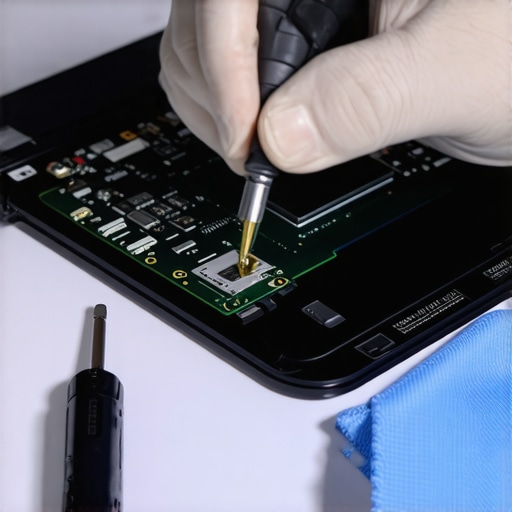
The Toolset Every Laptop Owner Actually Needs
Stop using the screwdriver from your kitchen drawer. Precision matters. I only use the iFixit Mako kit because the bits are hardened steel and won’t strip those tiny M2 screws that hold your how to find out if your laptop can be upgraded dreams together. If you are a student, these are the must-have laptop accessories to boost your work setup that actually pay for themselves. I predict that by 2027, the right to repair movement will force even the biggest brands to adopt the modularity we see in Framework laptops. We are moving away from soldered RAM and toward machines that grow with you. Until then, you need to be your own tech support. My advanced tip for today: download a battery health tool and check for ‘wear level.’ If it is over 15% within the first year, get that warranty claim in now. Don’t wait for it to fail; be proactive and keep your investment alive.
Hard Truths About Those 40 Percent Discounts
After years of hunting through warehouse bins, I realized that the biggest risk isn’t a scratched lid; it’s a tampered internal component. Always look at the screw heads under a bright light. If they look worn or ’rounded,’ you are not the first person to try and see how to find out if your laptop can be upgraded. This is a red flag that a previous buyer might have swapped out the RAM or SSD before returning it. Also, never ignore the scent of the machine. If it smells like a heavy smoker’s house or a cheap air freshener, no amount of cleaning will save those internal fans from eventual failure. Most importantly, do not let the urgency of a ‘limited stock’ label cloud your judgment; use the hidden price history tools every deal hunter needs to ensure that ‘clearance’ price is actually the lowest it has ever been.
#IMAGE_PLACEHOLDER_E#
The Only Gear I Trust Near My Logic Board
My toolkit for vetting these machines is simple but non-negotiable. I rely on the iFixit Mako kit because stripping a proprietary screw is the fastest way to turn a great deal into a permanent disaster. For internal diagnostics, HWiNFO64 is my primary tool for tracking real-time thermals to ensure the cooling system isn’t compromised. I also check how to find official repair guides for your exact model before I even hit the ‘buy’ button—if a machine is glued shut and unrepairable, it’s a pass for me. These resources ensure you aren’t just buying a temporary gadget, but a long-term investment. I also recommend cross-referencing any ‘refurbished’ claims with how to spot a fake warranty on refurbished gear to protect your wallet from fly-by-night sellers.
Take the Leap and Claim Your New Desk King
You now have the blueprint to stop paying the ‘new box’ tax and start owning premium hardware for a fraction of the cost. The retail giants count on you being too afraid to buy the ‘imperfect’ unit, but now you know that the imperfection is usually just on the cardboard, not the silicon. Whether you are hunting for unbeatable laptop deals or looking for a high-end workstation that will last for years, the power is in the details. Don’t be afraid to go find that diamond in the warehouse purgatory. Have you ever discovered a hidden hardware defect in an open-box deal after you got it home? Let me know in the comments below!