
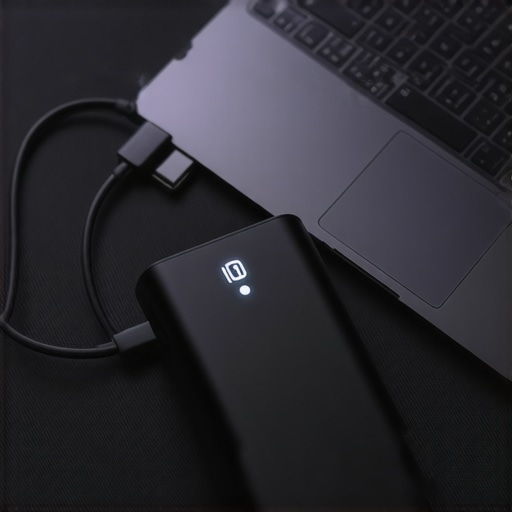
I was stuck in the back of a stuffy regional jet, three hours into a cross-country flight, with a major deadline looming and my screen flashing a desperate 2% battery warning. I confidently pulled out a heavy, black power bank I’d bought on a whim at the airport, thinking I was prepared. I plugged it in. Nothing. Not even a flicker of life. I spent the rest of the flight staring at my own reflection in a dead screen, feeling like a total amateur. It was a classic rookie mistake: I thought any big battery could handle a laptop. I was wrong, and it cost me a full day of work. Today, I’m going to make sure that never happens to you. We are looking at the few external packs that actually have the muscle to juice up student laptops that balance power and portability and even power-hungry game-changing gaming laptops for 2025 adventures.[IMAGE_PLACEHOLDER]
The High-Wattage Trap That Most People Fall Into
Most people assume that if a power bank can charge their phone ten times, it’ll surely handle a laptop at least once. That’s exactly where I tripped up. I once spent sixty dollars on a 30,000mAh monster that could only output 10 watts. For business laptops for professionals, that’s like trying to fill a swimming pool with a cocktail straw. The laptop simply ignores the charger or, even worse, continues to drain while plugged in. You need to look for ‘Power Delivery’ or PD. If you do not have a pack that pushes at least 60W or 100W, you’re just carrying around an expensive paperweight. I’ve since learned my lesson and only rely on must-have laptop accessories to boost your work setup that actually meet these rigorous specs. Have you ever been stranded with a dead laptop and a power bank that refused to help?
Is a heavy battery pack really worth the extra bag weight?
I get it. Your bag is already heavy enough with textbooks or work files. You might wonder if you should just fix your laptop battery if it only lasts one hour instead of carrying more gear. But here is the reality: modern software is a battery hog. Even the most efficient top-tier business laptops can struggle during an eight-hour day of intense video calls and data processing. A dedicated laptop power bank isn’t just an accessory; it is your insurance policy against the anxiety of the 1% battery alert.
Why Power Delivery Wattage is the Only Stat That Matters
When it comes to external power, capacity (the mAh) is just the size of the tank; wattage is the size of the pipe. According to the USB Implementers Forum (USB-IF), the Power Delivery specification allows for much higher power levels than standard USB, and you specifically need a pack that supports the higher voltage profiles. Most of us need 100W PD chargers for our workstations to keep things running at full speed without compromise. If you try to use a weak charger, you might even see the real reason your laptop power brick is getting extremely hot as it struggles to meet the demand. This isn’t just about ‘finishing a charge’; it’s about being able to work at full brightness without watching that percentage drop anyway. Now that you know why the cheap gas station banks won’t cut it, let’s get into the specific models I’ve personally tested in the field.
Flip Your Laptop Over and Find the Input Numbers
Before you spend a dime, you need to know exactly what your machine demands. I spent years guessing until I realized the answer is literally etched into the bottom of the case. Look for the ‘Input’ section near the serial number. You will see a number followed by a ‘V’ (Volts) and another followed by an ‘A’ (Amps). Multiply them. If your laptop says 20V and 3.25A, you need a 65W output. If you are running game-changing gaming laptops for serious players in 2025, that number might jump to 100W or higher. If your power bank can’t push that specific wattage, your laptop will treat it like it’s not even there. It’s like trying to jump-start a semi-truck with a lawnmower battery; the chemistry just doesn’t scale down.
Your Cable is Probably the Weakest Link
This is where I failed during a project in Chicago. I had the right 100W bank, but I used a cheap ‘braided’ cable I bought because it looked cool. Halfway through my flight, the connection kept dropping. It turns out, standard USB-C cables are only rated for 60W. To get the full speed for top-tier business laptops, you must use an E-Marked cable rated for 5A/100W. Without that little chip inside the cable telling the laptop it’s safe, the system throttles the speed to a crawl to prevent a fire. I learned the hard way that you should never skimp on must-have laptop accessories to boost your work setup. Always look for the ‘100W’ branding right on the cable housing itself.
#IMAGE_PLACE_HOLDER_B#
Stay Under the 100Wh TSA Limit
There is a hard ceiling on how much power you can legally carry onto a plane. The FAA and most international carriers cap individual batteries at 100 Watt-hours (Wh). Most ‘20,000mAh’ banks fall around 74Wh, which is safe. However, some massive packs designed for business laptops for professionals push right up to 99.9Wh. I once saw a traveler at security have a $200 power station confiscated because it was 105Wh. If you want to pick a student laptop that lasts all four years, pair it with a 99Wh bank—it gives you the maximum legal juice for those cross-country hauls without risking heartbreak at the TSA bin. If you aren’t sure of the math, check the label for ‘Wh’ specifically; if it’s over 100, leave it at home.
Stop Charging at 80 Percent to Save the Cells
When you are using an external pack, don’t try to top off your laptop to 100%. The last 20% of a charge takes the most energy and generates the most heat because of the way lithium-ion physics work. If you are trying to fix your laptop battery if it only lasts one hour, you should actually stop the external charge once you hit 80%. This keeps the power bank from wasting energy as heat and prevents you from having to spot a fake charger before it fries your motherboard due to over-voltage stress. Think of the power bank as a reserve tank, not a permanent wall outlet. Use it to get back into the safe zone, then unplug it to keep both batteries healthy.
While managing your charge levels is vital, there is another layer to this efficiency puzzle: the ‘Capacity Lie.’ Most people see a ‘20,000mAh’ label and assume they are getting exactly that. But here is the nuanced reality: that rating is almost always based on the battery’s internal 3.7V voltage, whereas your laptop requires 20V. According to power conversion studies by Battery University, the energy lost during the step-up process from 3.7V to 20V—combined with heat dissipation—means you’re often lucky to see 65% of that advertised capacity actually reach your device. If you are hunting for unbeatable laptop deals save big on quality devices today, you have to factor in that your ‘massive’ power bank is effectively much smaller than it looks in practice.
The Passthrough Charging Trap You Should Avoid
Many premium packs offer ‘passthrough charging,’ which lets you charge the bank and your laptop simultaneously from one wall outlet. It sounds like a dream for business laptops for professionals essential picks 2025, but it is often a silent killer. This process creates a ‘heat sandwich’ inside the bank. The cells are being drained and filled at the same time, which causes rapid chemical degradation. I once bricked a high-end unit in six months by using it as a permanent hub. Instead, use must-have laptop accessories for a seamless setup like a dedicated multi-port wall charger for your desk and reserve the battery pack for the road. Have you ever fallen into this trap? Let me know in the comments.
Can a high-wattage power bank actually damage my smaller student laptop?
This is the most common fear I hear from people buying student laptops that balance power and portability perfectly. If your laptop only needs 30W, will a 100W bank fry it? The short answer is no. This is the beauty of the USB-C Power Delivery ‘handshake.’ The power bank and the laptop communicate before a single drop of high-voltage juice flows. The laptop only requests what it can handle. In fact, using a higher-rated bank is better because the bank won’t have to work at its absolute limit, meaning it runs cooler and lasts longer. It is one of those must-have laptop accessories to boost your work setup situations where ‘overkill’ is actually a synonym for ‘reliability.’
Stop Worrying About the Brand and Look at the Controller
You will see a lot of fancy branding on game-changing gaming laptops for serious players in 2025, but the secret to a good power bank isn’t the logo—it is the controller chip. Cheap banks use generic buck-boost converters that provide ‘dirty’ power with high ripple voltage. This is often the real reason your laptop charge port feels loose or why your trackpad acts glitchy when plugged in; the electrical noise interferes with the sensitive touch sensors. Stick to brands that explicitly mention their safety certifications and read the truth about high wattage chargers and battery longevity to understand how these chips protect your hardware. It is the difference between a steady flow and a chaotic surge that could eventually lead to motherboard failure.
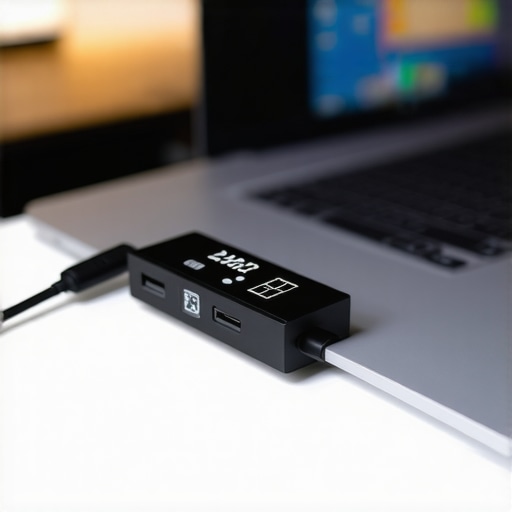
The internal controller is your laptop’s first line of defense, but if you want to be proactive, you need to see what is happening in real-time. I never travel without a tiny USB-C inline power meter. It is a small, clear dongle that sits between your cable and your laptop, showing you the exact voltage and amperage being drawn. I’ve caught ‘fast chargers’ that were actually trickling power at 5V because of a handshake error, and I only knew because of that little screen. It is one of those must-have laptop accessories to boost your work setup that pays for itself the first time it helps you troubleshoot a faulty cable. If you see your wattage fluctuating wildly, it is a sign that either your power bank is overheating or your laptop is throttling the intake to protect the battery cells.
How do I keep my power gear healthy for years?
Maintenance for external batteries and chargers is surprisingly simple but often ignored. First, stop wrapping your cables tightly around the power brick. This creates internal micro-tears in the copper wiring, which leads to resistance and heat. Instead, use the ‘over-under’ coiling method used by stage technicians. Second, keep your ports clean. A tiny bit of lint in a USB-C port can prevent the pins from making full contact, causing the port to heat up. I use a plastic toothpick from the specific screwdriver kit you need to open 90 of modern laptops to gently clear out debris every few months. Finally, avoid extreme temperatures; leaving your power bank in a hot car in July is the fastest way to chemically age the lithium-ion cells by half a decade in a single afternoon.
The Next Frontier of Mobile Energy
We are currently entering a massive shift in how we power our devices. According to the USB Power Delivery Specification Revision 3.1 released by the USB-IF, the new ‘Extended Power Range’ (EPR) allows for up to 240W over a single USB-C cable. This means the days of carrying proprietary, brick-sized chargers for game-changing gaming laptops for 2025 adventures are nearly over. We are already seeing GaN (Gallium Nitride) technology shrinking 140W chargers down to the size of an old MacBook 60W brick. If you are looking at top-tier business laptops for productivity in 2025, make sure they support PD 3.1 so you can take advantage of these universal high-speed hubs.
As these standards become more common, the price of high-capacity banks will continue to drop. You should keep an eye on unbeatable laptop deals save big on quality devices today specifically for bundles that include high-wattage GaN chargers. If your current machine is struggling, don’t rush to replace the whole unit; sometimes you just need to fix your laptop battery if it only lasts one hour by recalibrating the software and switching to a cleaner, more stable power source. My challenge to you: Go grab a cheap USB-C meter and check if your current charger is actually hitting the speeds it promised. You might be surprised at what your hardware is actually doing behind the scenes.
What Most Labels Won’t Tell You About Real Capacity
After years of testing hardware in coffee shops and airport terminals, I’ve realized that the number on the box is only half the story. There is a specific ‘Efficiency Gap’ that catches most users off guard. Because power banks have to convert their internal 3.7V energy up to the 20V your laptop needs, you naturally lose about 20-30% of the energy as heat. This means a 20,000mAh bank isn’t actually providing 20,000mAh to your device. If you are browsing unbeatable laptop deals save big on quality devices today, always look for the ‘Watt-hour’ (Wh) rating instead of mAh. It is a much more honest measurement of how much work that battery can actually perform. I’ve also learned that charging your laptop from 0% is less efficient than ‘topping it off’ from 40%; the lower the internal battery, the more current it demands, which generates more heat and wastes more of your external pack’s juice.
The Toolset I Use for Total Power Confidence
Building a reliable mobile setup isn’t just about the battery itself; it is about the ecosystem you build around it. To keep my gear running for years, I rely on a few specific items that go beyond the basic charger. First, I always keep the specific screwdriver kit you need to open 90 of modern laptops in my bag. Why? Because a dusty fan makes your laptop run hotter, and a hot laptop consumes significantly more power. I also suggest pairing your battery with the best carry-on laptop sleeves that fit the tsa rules to ensure your power bank and cables aren’t being crushed or bent during transit. Finally, a small USB-C power meter is the ultimate ‘truth-teller’ that ensures your cables are actually delivering the wattage you paid for.
Start Building Your Mobile Power Station Today
You don’t have to be a tech expert to stop the ‘dead battery’ anxiety. It starts with understanding that your laptop is a high-performance machine that requires high-performance fuel. By choosing high-wattage PD sources and using high-quality must-have laptop accessories to boost your work setup, you are giving yourself the freedom to work from anywhere without looking for a wall outlet. Whether you are a student or a professional, having that extra 99Wh in your bag is the ultimate productivity hack. Don’t wait until you’re at 2% in the middle of a flight to realize your gear isn’t up to the task. What is the weirdest place you’ve ever had to hunt for a power outlet? Let me know in the comments below!