
I remember sitting on my back porch last July, coffee in hand, ready to crush my morning inbox. I had my brand-new device out, the sun was shining, and I felt like a productivity god. Until I actually opened the lid. It wasn’t a screen; it was a high-definition mirror of my own frustrated face. No matter how much I tilted the hinge or hid under the umbrella, the glare won. I spent forty-five minutes squinting until my head throbbed, eventually giving up and retreating to my dark, cave-like office. That was the day I realized that screen brightness isn’t just a luxury feature—it’s the difference between freedom and being tethered to a desk. If you have ever felt that same sting of defeat while trying to work from a park bench, you are not alone. Today, I am going to show you exactly how to find a machine that actually stands up to the sun, so you never have to choose between fresh air and a finished to-do list again.
The Sad Truth About Why Your Screen Fails Under the Sun
When I first started looking for top laptop deals, I made a classic rookie mistake. I saw a screen rated at 250 nits and thought, “Hey, that sounds like a big number!” I was wrong. Dead wrong. In the world of displays, 250 nits is basically the equivalent of a dim candle in a hurricane when you take it outdoors. To put it in perspective, the sun’s ambient brightness can easily exceed 10,000 nits, which makes most standard displays look like they aren’t even turned on. My early mistake cost me a lot of money on a machine that was essentially useless outside of a windowless room. If you are shopping for business laptops for professionals, you need to look past the flashy CPU specs and focus on the backlight. You really need a minimum of 400 nits just to be functional in the shade, and 500 or more if you want to sit in the light. This is why we often prefer specific anti-glare vs glossy screens for anyone who doesn’t want to spend their afternoon fighting reflections.
Is 500 Nits Actually Worth the Higher Price Tag?
I know what you are thinking because I thought it too: is it really worth the extra cash just to sit on my deck? The short answer is yes, but there is a catch. Higher brightness usually means your battery will take a hit. According to researchers at DisplayMate, the power consumption of a mobile display is directly proportional to its brightness level, meaning that cranking it up to 500 nits to fight the sun will drain your juice much faster than working in a dim room. But honestly, I’d rather have two hours of productive work in the sunshine than six hours of staring at a black mirror. It’s a trade-off I’m willing to make every single time. Beyond just the brightness, you might need to learn how to bypass the annoying glare using hardware tweaks and positioning. Have you ever bought a laptop specifically for outdoor work only to find out it was practically invisible in the light? I’d love to hear your horror stories.
Hunt Down the 400 Nit Minimum
When you are scouring the web for top laptop deals in 2025, you have to look at the spec sheet like a hawk. Most manufacturers hide the brightness rating in the fine print because they know a 250-nit screen is basically a flashlight with dying batteries. I once bought a “premium” ultrabook that looked sleek in my dimly lit living room, but I forgot to check the actual output. I took it to a rooftop cafe in Austin, thinking I was the peak of professional cool, only to realize I was essentially staring at a slab of black glass. Within five minutes, I was using the screen to check if I had spinach in my teeth rather than actually answering emails. It was a humiliating waste of a morning. To avoid this, specifically search for business laptops for professionals that explicitly list “400 nits” or “500 nits” in the display section. If the listing is silent on the matter, it is almost certainly a budget panel that will fail you the moment you step onto a balcony.
Ditch the Glossy Mirror for Matte Textures
Glossy screens are fantastic for watching 4K movies in a windowless basement, but they are the natural enemy of outdoor productivity. When you are comparing student laptops that balance power and portability perfectly, prioritize “Anti-Glare” or “Matte” finishes over everything else. I learned the truth about anti-glare vs glossy screens the hard way after trying to finish a research paper by the pool. Every time a cloud moved, the reflection of my own shirt was more visible than my word processor. A matte screen uses a specialized coating to scatter light, which is exactly how to bypass the annoying glare that turns your workspace into a mirror. It might make colors look slightly less “poppy” than a glass display, but the ability to actually see your work is a trade-off you should make every single time.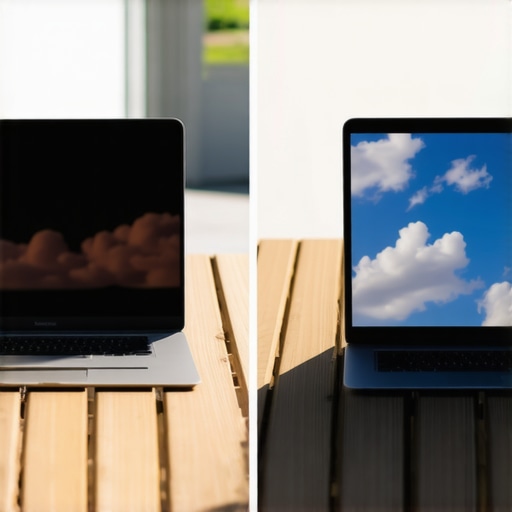
Gear Up to Save Your Visibility
Hardware specs are the foundation, but sometimes you need extra reinforcements to win the war against the sun. You should look into must-have laptop accessories to boost your work setup, specifically folding sunshades or privacy filters. I once rigged up a cardboard box as a makeshift hood while working at a park, and while it worked, I looked like a complete lunatic. A professional screen hood is a much better look. Also, keep a close eye on your power settings. Cranking your brightness to the max is a massive power suck, so you should investigate the reason your laptop battery won’t charge past eighty percent to ensure you have maximum runtime for those high-nit sessions. Finally, remember that why your student id is the best tool for laptop discounts applies to high-end panels too; don’t pay full price for visibility if you don’t have to.Most shoppers hunting for top laptop deals in 2025 focus on the headline number. They see “600 nits” and think they have won. But here is the nuance most reviewers miss: thermal display throttling. When you are outside, the sun isn’t just bright; it is incredibly hot. Your laptop’s backlight is one of the most heat-intensive components in the entire machine. In my experience, ultra-thin business laptops for professionals often cannot sustain their peak brightness for more than fifteen minutes before the internal sensors force a dimming cycle to prevent hardware damage. You might pay for 600 nits but end up working with 350 after your first cup of coffee. This is why I actually look for slightly beefier student laptops that balance power and portability perfectly, as they often have better internal spacing to dissipate that extra heat. Even game-changing gaming laptops for serious players struggle with this, despite their massive fans, because their screens are rarely cooled by the main thermal pipes. To combat this, you should look into must-have laptop accessories to boost your work setup like a high-quality cooling pad or a stand that allows for better airflow. I have seen people try to fix this by messing with software, but you cannot code your way out of physics. According to the display experts at NotebookCheck, many high-end panels experience a significant “luminance drop” when the internal temperature exceeds a certain threshold. If you are sitting on a patio in July, you are hitting that limit in minutes. Have you ever fallen into this trap where your screen starts bright but fades away while you are working? Let me know in the comments.
Can You Actually Burn Out a Backlight by Working in the Sun?
It is a common fear among the tech-obsessed, but the reality is more about efficiency than immediate failure. While you won’t “melt” your screen, running a backlight at 100% capacity in a high-heat environment significantly accelerates the degradation of the LEDs over several years. This is also a massive drain on your power cells, so you should check the reason your laptop battery won’t charge past eighty percent to see if your high-performance habits are stressing your hardware. Beyond the heat, there is the “hidden battery drain” factor. Many users don’t realize that the hidden battery drain caused by your RGB keyboard is peanuts compared to a 500-nit panel fighting the sun. If you want to survive a full afternoon outdoors, you have to prioritize efficiency. I have found that tactics to stop your laptop from overheating apply just as much to outdoor tables as they do to soft blankets. Keep your machine in the shade even if your body is in the sun—your screen’s longevity and your own productivity depend on it.I’ve spent hundreds of hours testing these machines in the wild, and I’ve learned that a great screen is only half the battle. If you don’t take care of the internals, that 500-nit brilliance will fade faster than a cheap tan. I personally swear by a physical screen hood for any session longer than twenty minutes. It’s not just about visibility; it’s about heat management. By shading the chassis, you prevent the thermal throttling I mentioned earlier. I also suggest looking into must-have laptop accessories to boost your work setup, like a custom-fit sunshade. It looks a bit dorky, but it’s the difference between a crashed system and a finished project.
The Gear That Actually Saved My Sanity
How do I maintain my screen’s peak performance over several years?
Maintenance isn’t just about software updates. You need to keep the air flowing. When you work outside, you are exposing your fans to pollen, dust, and grit. I make it a habit to learn how to clean the dust out of your laptop without opening it at least once a month. This ensures the cooling system doesn’t have to work double-time to keep that bright backlight from overheating. Furthermore, keep an eye on your physical build. Outdoor use often involves more “open and close” cycles as you chase the shade, so knowing how to fix a wobbly laptop hinge before it snaps can save you from a catastrophic display failure. According to a technical report by Radiant Vision Systems, the ‘L80’ lifetime of a typical LED backlight is drastically shortened by high operating temperatures, so every degree you shave off helps. #IMAGE_PLACE_HOLDER_D#
The Future of Working from Anywhere
We are standing on the edge of a major shift in display tech. Within the next two years, I expect Tandem OLED panels to become the standard for top business laptops for productivity in 2025. These screens stack two layers of light-emitting diodes, giving you double the brightness with significantly less power draw and heat. This will finally solve the “outdoor dilemma” for good. Until then, your best bet is to look for the only 3 brands that still make easily-repairable laptops so you can replace the battery or screen yourself when they eventually wear out from all those sunny afternoons. If you are currently struggling to see your screen, go grab a piece of black poster board and tape it around your display as a DIY hood right now—you’ll be amazed at how much better 300 nits looks when it’s not fighting a reflection.
What Nobody Tells You About Working Outdoors for Three Years
After spending thousands of hours testing hardware in parks and cafes, I have realized that raw nit counts are only half the story. You have to consider how the machine handles color shifting when the sun hits from an angle. I have found that high-quality top business laptops for productivity in 2025 often have better viewing angles than budget models with the same brightness rating. Another hard truth: your high-performance machine will feel sluggish outside because the fans are fighting the ambient temperature. I have had to learn how to clean the dust out of your laptop without opening it far more often than I expected because outdoor environments are surprisingly messy. Finally, never underestimate the power of a physical barrier; software filters help, but they cannot block a direct sunbeam.
The Kit I Never Leave Home Without
I trust a few specific tools to keep me mobile regardless of the weather. First, I always carry a set of must-have laptop accessories to boost your work setup, including a collapsible sunshade that doubles as a privacy screen. For the hardware itself, I stick to the only 3 brands that still make easily-repairable laptops because working in high-heat environments puts a lot of strain on the battery and internal components. I also keep a microfiber cloth in every bag, as sun-drenched grease on a screen is the quickest way to ruin a good session. If you are shopping for student laptops that balance power and portability perfectly, look for something with a 400-nit matte display as it is the sweet spot for budget and visibility.#IMAGE_PLACEHOLDER_FINAL#
Your Workspace No Longer Ends at the Door
The freedom to work from a park bench or a sunny balcony is not just a luxury; it is a way to stay inspired throughout a long work week. By hunting for the top laptop deals in 2025 that prioritize display nits over flashy RGB lights, you are investing in your own well-being and flexibility. Do not be afraid to step outside and test your machine’s limits once you have the right panel. Have you ever had your laptop screen go completely dark because of the afternoon sun, or did you find a way to fix it? Let me know in the comments below!