
I will never forget the sheer panic of standing at the airport security line in Chicago, frantically digging through a literal bird’s nest of black cords, only to realize my proprietary laptop brick was still sitting on my bedside table back home. I was traveling to a crucial presentation with three different devices and three massive, heavy adapters. It was heavy, it was messy, and it was a total failure. If you have ever felt your stomach drop because you left one crucial cord behind, or if you are simply tired of your travel backpack looking like a copper wire recycling bin, I promise you there is a much better way to travel. Today, we are going to untangle this mess once and for all so you can pack lighter, work faster, and never lose another brick. First, let us talk about the single biggest mistake I made for years: carrying a separate power brick for every single gadget. I used to pack a chunky block for my work machine, a smaller one for my tablet, and a third plug for my phone. It is a massive waste of space, especially when modern technology offers elegant solutions like high-output multi-port adapters. Transitioning to a streamlined setup starts with understanding the best compact chargers for mobile professionals, which can handle all your gear simultaneously without weighing you down. Of course, you also need to make sure you are pairing that charger with the best usb-c cables for fast charging and data to actually get the speed you paid for.
Stop Carrying Three Power Bricks on Every Trip
For the longest time, I assumed that using anything other than the original charger that came in the box would ruin my battery. This fear kept my bag stuffed with heavy proprietary plastics. But here is the reality: modern USB-C Power Delivery (PD) has completely changed the game. According to USB-IF specifications, standard PD chargers dynamically negotiate power output with your device, meaning a high-wattage charger will not fry a smaller device like your phone or headphones. By investing in a single, high-quality GaN (Gallium Nitride) charger with multiple ports, you can easily power your laptop, phone, and accessories from one wall outlet. This is a massive win for anyone using student laptops that boost productivity and learning while constantly moving between classes and cafes. But before you swap everything out, you must ensure your gear is safe. You need to learn how to tell if your laptop charger is actually safe to use to avoid cheap knock-offs. Once you have the right block, you will want to implement the best way to label your laptop cables for travel so you always know which cord goes where at a single glance. Have you ever reached into your bag only to pull out a giant, tangled knot of cords that took ten minutes to unravel? Tell me about your worst travel cable nightmare in the comments below!
Is a single multi-port charger really safe for all my expensive gear?
Yes, GaN Technology is Actually Safer Than Your Original Brick
Many travelers hesitate to leave their manufacturer-supplied bricks behind because they fear frying a sensitive device. However, high-quality Gallium Nitride (GaN) chargers are not just smaller; they are significantly smarter. Think of a modern GaN charger as an intelligent power traffic controller. Instead of pushing a constant, aggressive current, it negotiates directly with your device’s internal power management chip. If you plug in a low-power accessory, the charger scales down instantly. This smart negotiation is why modern professionals can confidently power everything from resource-heavy top business laptops for productivity in 2025 expert recommendations down to a simple wireless earbud case using the exact same port.
Calculate Your Total Wattage to Avoid Thermal Throttling
Before you purchase a single charger, you need to audit your gear. Look at the tiny text printed on your laptop’s original power brick. It will list an output wattage (for example, 65W, 100W, or 140W). To build a truly streamlined setup, your single multi-port charger must have a total capacity that matches or exceeds your largest device’s requirement when used alone. I learned this lesson the hard way during a presentation in Denver. I plugged my power-hungry workstation and my phone into a cheap multi-port block. Because the charger couldn’t distribute enough juice to both, my laptop began to choke, dropping frames and stuttering mid-slideshow. To prevent this, you must learn how to tell if your laptop is being throttled by its charger before you find yourself in a high-stakes meeting.
Choose the Right Cables or Waste Your Money
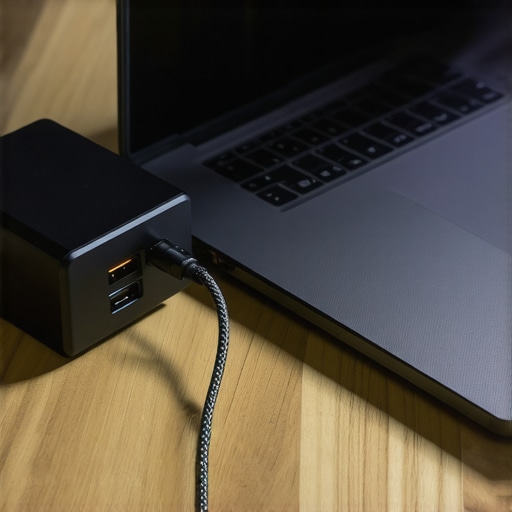
Your ultra-compact charger is only as fast as the copper highway connecting it to your computer. Many travelers grab the thinnest, cheapest cable they find at an airport kiosk, only to wonder why their machine takes four hours to charge. Standard USB-C cables are often capped at 60W. If your laptop demands 100W, a standard cable acts as a massive bottleneck, throttling your charging speeds to a crawl. When selecting your travel kit, always pair your high-output brick with must-have laptop accessories to boost your work setup, including e-marked USB-C cables rated for 100W or 240W Power Delivery. This ensures that whether you are editing video on the go or powering up high-performance game-changing gaming laptops for serious players in 2025, the power actually reaches the battery at maximum speed.
Organize by Ports and Power Priorities
When using a multi-port charger, port priority matters. Most multi-port GaN blocks do not distribute power evenly. Typically, the topmost USB-C port is engineered to deliver the maximum rated wattage (e.g., 100W), while the secondary ports share the remaining capacity. If you plug your phone into port one and your laptop into port two, you are actively slowing down your computer. Make it a habit to plug your laptop into the primary port first. For students utilizing student laptops that balance power and portability perfectly, mastering this port layout ensures your machine stays topped up even during short breaks between classes.
While finding a single multi-port GaN charger solves the physical clutter in your travel bag, the tech industry has set several subtle traps that can still leave you stranded. Everyone online tells you to just look at the brand name and buy the sleekest option, but in my experience, the design details of your machine matter far more than the logo on the lid. We need to talk about the hidden realities of charging standards, component limits, and how computer manufacturers quietly restrict your hardware’s potential.
The Proprietary Connection Trap They Do Not Want You to Know About
Many consumers believe that buying a modern computer ensures universal compatibility. This is a costly misconception. Manufacturers often design machines with custom power pins that force you into their closed ecosystems. If you are shopping for a new machine, you should understand why we avoid laptops with proprietary power connectors. These customized jacks are expensive to replace, completely incompatible with universal GaN chargers, and incredibly difficult to source in a pinch when you are traveling abroad. If your device cannot charge via standard USB-C Power Delivery, you are still chained to a single proprietary brick.
Why does my laptop still charge slowly on a high-wattage universal block?
The Hidden Handshake of Proprietary Power Protocols
Even when a device features a physical USB-C port, manufacturers sometimes restrict the charging speed unless you use their official accessory. For example, some high-performance systems require 130W of power but will only pull 60W from a third-party GaN charger because of software locks. According to power delivery engineering studies from the USB Implementers Forum, these artificial limitations are often framed as safety measures, but they frequently serve to keep users buying first-party accessories. Always check your system specifications to ensure it supports open USB-PD standards at maximum wattage before assuming a universal block will solve your problems.

The True Cost of Chasing Thinness Over Practical Cooling
Another major trap is the obsession with ultra-thin designs. In our quest to pack light, many of us fall for sleek profiles, only to find our systems screaming under minimal workloads. When you buy a super-thin laptop, you are often sacrificing thermal headroom. This is why the hidden cost of buying an ultra-thin gaming laptop or mobile workstation is so high; without space to dissipate heat, the internal processor instantly throttles its speed. This limits your actual performance to a fraction of what you paid for, regardless of how powerful your travel charger is.
Have you ever fallen into this trap or bought an accessory that limited your machine’s performance? Let me know in the comments below!
Once you have ditched your old power bricks and designed your dream travel charging kit, the battle is only half-won. The real challenge is keeping your hardware in peak condition over years of airport security bins, cramped coffee shop tables, and packed bags. In my personal travel routine, maintaining my gear is just as important as buying it in the first place. I have seen incredibly expensive setups fail prematurely simply because of poor physical maintenance and lack of organization. To avoid these costly mistakes, I rely on a few specific habits and tools to protect my investment.
How I Personally Keep My Gear Working Like New
The first rule of long-term gear survival is physical protection. No matter how premium your device is, throwing it unprotected into a backpack with metal chargers and cables is a recipe for disaster. This is why I always protect my machine with the best laptop sleeve for maximum drop protection before packing it away. It absorbs the shock of hectic travel and keeps aluminum lids from getting scratched by stray zipper teeth. Additionally, I make sure to clean my inputs regularly. Dust and pocket lint accumulate inside USB-C ports, preventing proper electrical contact. Instead of using metallic tools that can short out the pins, I use a simple wooden toothpick and a quick blast of compressed air to clear the debris.
How do I maintain my laptop charging kit over time?
Establish a Strict Cable Wrapping and Storage Routine
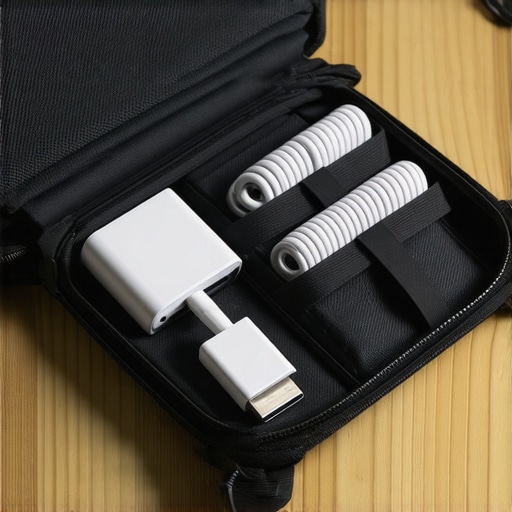
To keep your expensive high-output cables from failing internally, you must stop wrapping them tightly around your hand. This creates micro-tears in the copper wiring. Instead, I use the professional “over-under” cable-coiling method, which relieves tension on the internal conductors. Once coiled, I secure each wire and place them into a dedicated tech organizer. If you are constantly on the move, learning the secret to organizing your laptop bag for heavy travel will completely change how quickly you unpack and repack your workspace. Additionally, I highly recommend using a dedicated surge protector when working from unfamiliar hotel rooms. I learned this lesson the hard way in a small hotel abroad, which is why we now only use high quality surge protectors for laptops to guard against unstable electrical grids.
The Future of Travel Power is Smart and Modular
Looking ahead, the industry is moving toward even smarter power negotiation. We are starting to see the rise of USB-PD 3.1 Extended Power Range (EPR) cables and chargers, which can deliver up to 240W of power. This means that soon, even the most demanding gaming rigs and mobile workstations will run entirely on compact, universal USB-C blocks. According to the official USB Implementers Forum (USB-IF) technical specifications, this standard safely manages higher voltages through advanced communication protocols between the cable and the computer. In the future, you will not need to make any compromises between port portability and peak machine performance.
My challenge to you today is to audit your travel bag before your next trip. Take five minutes to check the wattage labels on your devices and see if you can replace your current multi-brick mess with a single, high-quality GaN charger and e-marked cables. It is a small upgrade that makes an incredible difference in your daily workflow.
The Hardest Lessons I Learned Managing Mobile Power Gear
Getting your portable power setup down to a science takes more than just buying a high-wattage brick. After years of testing cables, swapping adapters, and recovering from dead batteries in stressful situations, I discovered several fundamental truths about travel tech:
- Power ratings on the box are often a lie: A multi-port block might advertise itself as a “100W Charger,” but that speed is usually restricted to a single port when no other devices are plugged in. The moment you add a phone, that 100W split can drop your laptop down to 45W or 65W, triggering slow charging or battery drain.
- Cables are the weakest link: You can buy the most expensive GaN block on the market, but pairing it with cheap, generic cords is a recipe for failure. In my experience, why most cheap usb-c cables fail within three months comes down to poor strain relief and low-grade copper internal wiring that cannot handle high-current thermal loads.
- Heat is your battery’s silent killer: Running your computer on a soft surface like a hotel bed while charging at maximum speed causes extreme thermal buildup. This is why you should never use your laptop on a soft blanket if you want to keep your internal battery healthy for more than a couple of seasons.
My Personal Travel Power Toolkit
I do not rely on standard manufacturer advice. Instead, I build my mobile setup using specialized resources and tools that prioritize real-world reliability over theoretical marketing claims:
- The USB-IF Product Search Database: Before buying any high-wattage USB-C cable or charger, I verify its certification on the official USB Implementers Forum registry. This ensures the hardware meets strict safety standards.
- A USB-C Power Inline Multimeter: This tiny, affordable hardware plug lets you see exactly how many watts your laptop is pulling in real-time, helping you instantly diagnose why a machine is charging slowly.
- Premium Thermal Management: When pushing your laptop to its performance limits on the road, skip the bulky cooling accessories. We found that why most laptop cooling pads are a waste of money comes down to poor airflow engineering; a simple set of rubber feet to prop up the back of your machine does a far better job.
- Smart Storage Cases: I always recommend semi-rigid tech pouches over soft bags. They prevent cables from bending past their minimum bend radius and shield your delicate chargers from drop damage.
The Future of Your Travel Workflow is Wire-Free and Lightweight
Streamlining your bag is not just about saving physical space; it is about freeing up your mental energy. When you step onto a plane knowing a single pocket-sized GaN charger and two certified cables can power your entire workflow, the anxiety of travel simply melts away. You can focus on your presentation, finish your creative project, or enjoy your journey without scanning every wall for an outlet. It takes a small upfront investment in quality gear, but the daily convenience of a truly optimized setup is worth every single penny.
Have you ever had a cheap airport travel cable fail on you right before an important meeting? Let me know your worst travel charging stories in the comments below!