
I sat there with my brand new, $500 “ultra-wide” gaming desk, staring at my laptop like it was a tiny island in a vast, dark sea. I had to stretch my arms out like I was reaching for a long-lost relative just to type a single email. It was a disaster. I’d fallen for the marketing—the RGB strips, the cup holder, and the aggressive “Z-shaped” legs. But the reality? My wrists were screaming, and my neck felt like it had been twisted by a chiropractor on a bad day. I made the classic mistake of thinking a desk built for a desktop tower would somehow be “premium” for my portable rig. It wasn’t.
Your “Pro” Gaming Desk is Sabotaging Your Setup
Most of these desks are designed with one goal in mind: fitting three 27-inch monitors and a massive PC tower. When you swap that for one of the game-changing gaming laptops for serious players in 2025, everything breaks. The depth is usually too large, forcing you to choose between leaning forward or losing precious desk real estate. I’ve spent years testing must-have laptop accessories for a seamless setup just to fix the mess my “cool” desk created. Today, I’m going to help you avoid the same expensive errors I made and find a workspace that actually respects your laptop’s unique needs.
Is a dedicated gaming desk actually worth the hype?
To be honest? For most laptop users, the answer is a resounding “no.” We often get blinded by aesthetics. I remember my first big mistake: buying a desk with a built-in full-surface mousepad that looked cool but trapped heat like a blanket. According to research by the Cornell University Ergonomics Web, improper desk height and depth are the primary contributors to Musculoskeletal Disorders (MSDs) in office environments. My “gaming” desk was essentially a fast track to carpal tunnel. If you’ve ever felt like you’re fighting your desk just to get comfortable, you’re not alone. Have you ever bought a piece of “gamer” gear that looked great in photos but felt terrible in practice?
Why Extra Depth is the Real Enemy
Laptop users need their screens closer than desktop users because the screens are smaller. When a desk is 30 inches deep, you end up pushing your laptop toward the middle, leaving a vast, useless “no-man’s land” behind it. This ruins your posture and makes airflow management on thick gaming rigs much harder because you’re more likely to shove the exhaust vents against some decorative trim. You need to focus on height and reach, not just how many LED strips you can fit on the underside. We’ll look at how to stop your machine from thermal throttling in summer by choosing surfaces that actually help, rather than hinder, your cooling fans.
Kill the Dead Space with the 24-Inch Rule
I call it the “T-Rex effect.” When you use a standard 30-inch deep office desk for a laptop, you end up pulling the machine toward your chest while your elbows float in mid-air. This is a posture death sentence. For laptop users, a depth of 24 to 26 inches is the sweet spot. It allows you to keep the screen at the correct focal distance without turning the back half of your desk into a graveyard for old receipts and half-empty coffee mugs. If you are already stuck with a deep desk, pull the laptop closer and use that back area for one of the 3 external monitors that won’t break a student’s budget to turn the void into a productive second screen.
Ditch the Stack of Books for a Real Riser
I learned this the hard way during a high-stakes client meeting. I had my laptop propped up on three thick hardcovers and a box of tissues to get the webcam at eye level. Mid-sentence, the tissues gave way. My laptop slid, my coffee spilled, and I spent the next twenty minutes frantically wondering how we saved a water-damaged macbook for under 10 dollars. Don’t be me. A dedicated riser is one of those must-have laptop accessories to boost your work setup. It fixes your neck angle and, more importantly, it gets the bottom intake vents off the desk surface.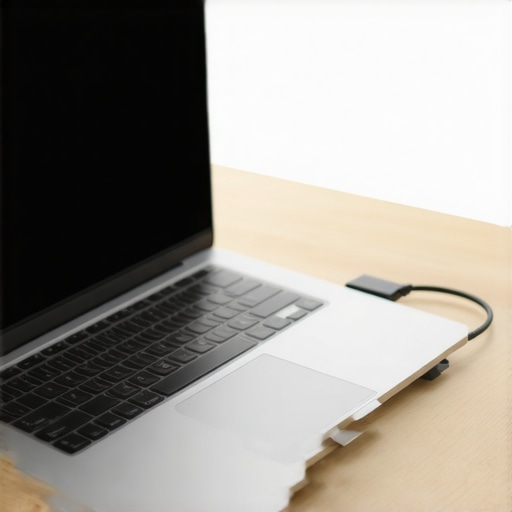
Prioritize Airflow Over Aesthetics
Glass desks are the enemy of high-performance machines. They look sleek, but they are terrible at heat dissipation and they show every single smudge from your palms. If you are running game-changing gaming laptops for serious players in 2025, you need a surface that breathes. I prefer solid wood or high-quality laminate with a matte finish. If you’re noticing your machine getting loud, check out how to lower your gaming laptop fan noise in seconds. It’s usually a combination of the surface material and the “suffocation” caused by sitting flat on a desk.
Stop the Cable Spaghetti Before It Starts
Because laptops are meant to be mobile, you’re constantly plugging and unplugging. A desk with built-in grommets or a simple underside tray is non-negotiable. I use a single-cable solution by investing in the most reliable usb-c hubs for multi-monitor setups. This allows me to dock my machine with one port, keeping the desk surface clean and preventing the dreaded “port fray” that happens when cables hang at awkward angles. If your ports already feel a bit wonky, you might want to look into the real reason your laptop charge port feels loose before it’s too late.
The Expensive Hub Trap You Need to Avoid
Most people think that as long as a USB-C hub has the right ports, it’s a good deal. I used to be one of them until I realized why cheap usb-c hubs might be killing your ports. There is a hidden nuance in how these devices handle Power Delivery (PD). When you’re hunting for top laptop deals in 2025, you might be tempted to save $30 on a generic dock, but that’s a recipe for disaster. According to a technical analysis by the USB Implementers Forum (USB-IF), non-compliant docks often lack the necessary shielding and voltage regulation to protect your motherboard from power surges. I’ve seen hundreds of dollars of hardware turned into a paperweight because of a $15 ‘bargain’ adapter. If you want to keep your machine safe, stick to the only 3 usb-c docks that dont overheat during transfers and provide stable power.
Why does your Wi-Fi drop when you plug in a dock?
It sounds like a ghost in the machine, but it’s actually physics. This is a common advanced headache: USB 3.0 ports and cables emit radio frequency interference that operates at the 2.4GHz band—the exact same frequency your Wi-Fi and wireless mouse likely use. If your business laptops for professionals are suddenly losing signal, it’s probably not the internet; it’s the lack of shielding on your peripherals. This is why your wi-fi signal drops when you plug in a usb drive or a poorly shielded hub. To fix this, I always recommend moving your wireless dongles to the opposite side of the laptop from your high-speed data cables. It’s a small adjustment that saves hours of connectivity frustration.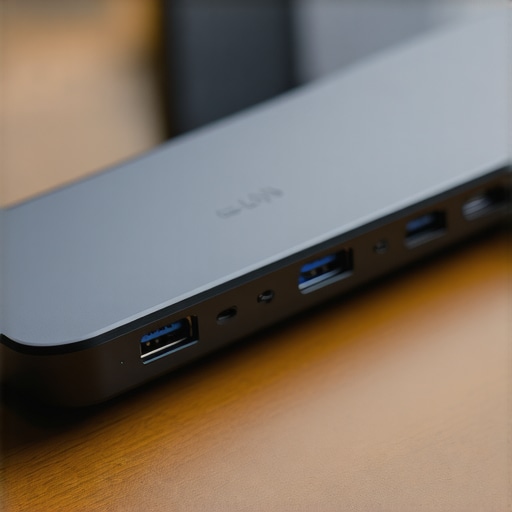
The Hidden Price of RGB Everything
We all love a bit of flair, but if you’re using student laptops that balance power and portability perfectly, that rainbow glow is your battery’s worst enemy. Most users don’t realize the hidden battery drain caused by your rgb keyboard can shave up to 15% off your runtime. In my experience, ‘gaming’ peripherals often prioritize flash over efficiency. I’ve found that switching to a high-quality mechanical board without the light show actually improves focus and longevity. If you’re looking for something that won’t kill your productivity, check out 3 student laptops with keyboards that actually feel good to type on instead of relying on external gimmicks. Have you ever fallen into the trap of buying gear that looked great but actually made your setup harder to use? Let me know in the comments. Keeping your rig lean and mean is about knowing which ‘features’ are actually bugs in disguise.
Stop Your Internals from Cooking
It’s one thing to have a great desk, but it’s another to keep the machine on top of it from eating itself alive. I’ve seen $3,000 rigs turn into sluggish paperweights in eighteen months because the owners treated them like appliances rather than high-performance engines. If you are using game-changing gaming laptops for serious players in 2025, you need to understand that heat is a cumulative debt. Every hour you spend gaming while your vents are half-blocked by a stray notebook is a minute shaved off your GPU’s lifespan. I personally make it a habit to check my temps every month. If I see a 5-degree creep, I know it’s time to look at how to choose the right thermal paste for your machine. Most factory paste is applied by a machine and is ‘good enough,’ but if you want longevity, you’ll eventually need to get your hands a little dirty.
How do I keep my laptop running like new for years?
The secret isn’t just cleaning the outside; it’s managing the chemistry of your hardware. I always tell people to check their battery settings immediately. There is a specific reason your laptop battery wont charge past eighty percent on many modern machines, and it’s actually a feature, not a bug. Keeping a battery pinned at 100% while plugged in is like keeping a rubber band stretched to its limit—eventually, it loses its snap. According to a technical whitepaper by the IEEE Power Electronics Society, lithium-ion degradation accelerates significantly when cells are held at high voltage and high temperature simultaneously. By capping your charge, you’re essentially doubling the usable life of that internal cell. If you’re looking for top business laptops for productivity in 2025, look for models that have these ‘conservation modes’ built into the BIOS.
My Favorite Tools for a Shiny Setup
Beyond the internal software, the physical tools you keep in your drawer matter. I’ve tried the compressed air cans, and frankly, they just blast dust deeper into the chassis. Instead, I’ve moved to a two-pronged approach. First, I use the best keyboard cleaning slime we actually tested to lift the skin oils and crumbs out of the mechanical switches without needing to pop the keys off. Second, I never travel without a dedicated cloth. There’s a logical reason why we still carry a microfiber cloth in our laptop bags: modern screen coatings are incredibly fragile. One wipe with a paper towel or a rough t-shirt can leave micro-scratches that ruin your resale value when you’re ready to hunt for top laptop deals in 2025.
What the Next Decade of Portables Looks Like
We are entering an era where ‘thinness’ is finally taking a backseat to ‘repairability.’ I predict that by 2027, the standard for business laptops for professionals will shift toward modular components. We’re already seeing the start of this, and it’s a direct response to the truth about modern laptop warranties and repair rights being challenged globally. You should start prioritizing brands that let you swap the SSD or RAM yourself. If you’re a student, your student ID is the best tool for laptop discounts on these newer, more sustainable models. My advanced tip for today? Go into your power settings right now and set a ‘Battery Threshold’ at 80% if you plan on keeping your laptop docked at your desk for the next week. It is the single easiest thing you can do to prevent a battery swell three years down the line.
The Hardest Lesson I Learned About Desk Depth and Shoulder Pain
I used to think that bigger was better when it came to my workspace, but that philosophy nearly ruined my posture. I spent years fighting for comfort because I didn’t realize that my laptop required a fundamentally different geometry than a desktop tower. The biggest lightbulb moment for me was realizing that every piece of gear on your desk is either helping your machine breathe or helping it suffocate. If you are constantly adjusting your chair, the problem isn’t the chair—it’s the reach. If you are hunting for top laptop deals in 2025, remember that the savings you find on the machine should be reinvested into a setup that keeps your body and your hardware in peak condition.
A Look Inside My Gear Drawer
I’ve trimmed my setup down to the essentials that actually move the needle. To keep my keys from getting that gross, shiny texture, I swear by the best keyboard cleaning slime we actually tested; it gets into the crevices that a brush simply can’t reach. For connectivity, I stopped gambling with generic hardware and moved to the only 3 usb-c docks that dont overheat during transfers because thermal stability in your hub is just as important as it is in your CPU. Finally, I’ve found that the best way to organize your desktop for deep focus isn’t about buying more plastic organizers, but about ruthlessly eliminating any cable that doesn’t have a specific, shielded purpose.
Transform Your Desk into a Command Center
Your workspace is more than just a place to put your computer; it is the environment that dictates how long you can perform at your peak. Whether you are using game-changing gaming laptops for serious players in 2025 or a portable workstation for the office, the goal is the same: frictionless productivity. Don’t wait until your neck hurts or your ports start failing to make these changes. Start with the 24-inch rule today and see how much your focus improves. Have you ever bought a desk or an accessory that looked amazing in the box but was a total nightmare to actually use? Let me know your workspace horror stories in the comments below!