
I still remember the afternoon my favorite work laptop crossed the line from professional tool to greasy eyesore. I was finishing up a grueling proposal, looking down at my keyboard, and there they were: shiny, slick, grease-slicked keys that looked like they had been wiped with a slice of pizza. Even worse, the ‘E’ and ‘S’ legends were starting to fade into oblivion. It felt cheap, it felt dirty, and no amount of microfiber wiping could fix it. That is when I realized I was fighting a losing battle against cheap ABS plastic. If you spend hours typing every day, you deserve a tactile experience that actually lasts. That is precisely why switching to a high-quality set of PBT keycaps on your external board or choosing devices with premium key textures is the ultimate game-changer for your desk. Today, we are going to look at how this simple material upgrade rescues your fingers from that dreaded oily shine and keeps your setup looking brand new for years.
Back when I first started building my home office, I made the classic rookie mistake of buying the flashiest RGB keyboard I could find, completely ignoring the plastic compound of the keys. Within three months, those keys felt like cheap toys. It is a common pitfall, especially when you are trying to assemble must-have laptop accessories for a seamless setup without looking at the fine print. I learned the hard way that not all plastics are created equal, and ABS simply cannot stand up to the friction and oils of daily productivity.
Are PBT keycaps really worth the extra cash?
You might be wondering if a simple change in plastic formulation actually justifies spending your hard-earned money. The short answer is a resounding yes. Polybutylene Terephthalate (PBT) is a dense, brittle polymer that resists wear, heat, and solvents far better than standard Acrylonitrile Butadiene Styrene (ABS). According to chemical engineering standards published on ScienceDirect, PBT exhibits significantly higher chemical resistance and lower moisture absorption compared to other common consumer plastics, which explains why it never develops that annoying greasy sheen. When you pair your laptop with one of the the best keyboards for writers on a budget that feature PBT keycaps, you are investing in a textured, matte finish that feels incredibly satisfying to type on, mile after mile. Have you ever looked down at your laptop setup and cringed at the greasy, worn-out look of your keyboard? Let me know in the comments below! Let us look at why this material makes such a massive difference for your daily workflow.
How to Choose and Install PBT Keycaps Without Stripping Your Switches
Getting rid of that oily sheen is not just about wiping down your deck; it requires physically changing the contact point. I learned this lesson the hard way during a late-night coding marathon on my primary workstation. In my impatience, I used a flathead screwdriver to pry off my old keys, instantly snapping the stem off my ‘W’ key and ruining a premium mechanical switch. To avoid my messy mistake, you must follow a deliberate, tool-based approach to swap your caps safely.
Invest in a Wire Keycap Puller over Plastic Ring Pullers
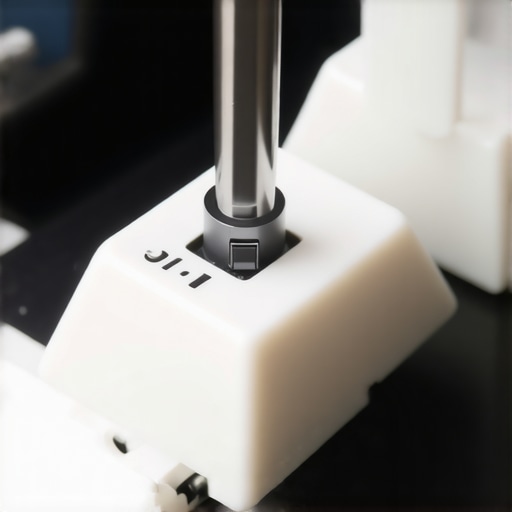
Never use the cheap, ring-shaped plastic pullers that often come free in the box. Those rigid plastic teeth scrape against the sides of your keycaps, leaving permanent micro-scratches. Instead, use a wire keycap puller. Wire pullers easily slip under the corners of the key, allowing you to pull straight upward with even pressure. This distributes the tension across the entire switch housing, protecting the delicate stem underneath. If you are currently shopping for hardware upgrades, taking the time to learn how to choose a laptop with the best keyboard travel can help you decide whether a desktop mechanical board or a premium laptop deck fits your typing style better.
Identify Your Layout and Keycap Profile
Before buying a replacement set, you need to verify your keyboard layout. While standard ANSI (US layout) is highly common, many compact keyboards use non-standard bottom rows, smaller right-shift keys, or unique spacebar sizes. Additionally, you must choose a profile. Cherry and OEM profiles feature a sculpted design that angles each row to match your fingers, while DSA or XDA profiles are completely flat. If you find your wrists aching after long typing sessions, aligning your layout with proper ergonomics is just as critical as knowing how to find the best viewing angle for your laptop stand to prevent physical fatigue.
Execute the Swap with Care
When installing your new PBT keycaps, alignment is everything. Gently place the keycap stem over the cross-shaped switch stem. Press down firmly with your thumb until you feel the key seat completely. If you feel sudden resistance, stop immediately. Misaligned stems can bend the switch housing, forcing you to learn how to fix a sticky key without replacing the entire keyboard. For larger keys like the spacebar or shift keys, make sure you align the metal stabilizer bars or plastic inserts carefully before pressing down, ensuring a balanced, wobble-free keystroke across the entire board.
Is the expensive double-shot molding process actually a gimmick?
Many consumers assume that buying any keycap set labeled ‘PBT’ guarantees an indestructible typing experience. In my experience, however, cheap single-shot PBT keycaps are almost as prone to warping and thin acoustics as the basic ABS keys they replace. The real magic lies in double-shot PBT molding, where two separate layers of plastic are fused together during manufacturing. According to mechanical engineering data from the Society of Plastics Engineers, this dual-injection process prevents legend wear entirely because the letter is molded from a different layer of plastic rather than printed on top. If you fall for ultra-cheap aftermarket kits, you will likely end up with keys that feel hollow and have crooked legends within weeks, completely defeating the purpose of upgrading your workspace.
This cheap material trap is not limited to keycaps. I see the exact same mistake when people buy secondary peripherals. We often search for top laptop deals in 2025 unlock incredible savings today, only to pair our high-end machines with sub-par peripherals. For instance, buying a premium mechanical keyboard but plugging it in with a generic connector is a recipe for frustration. It is incredibly easy to accidentally bottleneck your performance because why most cheap usb-c cables fail within three months comes down to the same cost-cutting measures and thin copper wiring used in budget factories.
The Crucial Difference Between Mechanical Solid Feel and Desk Clutter
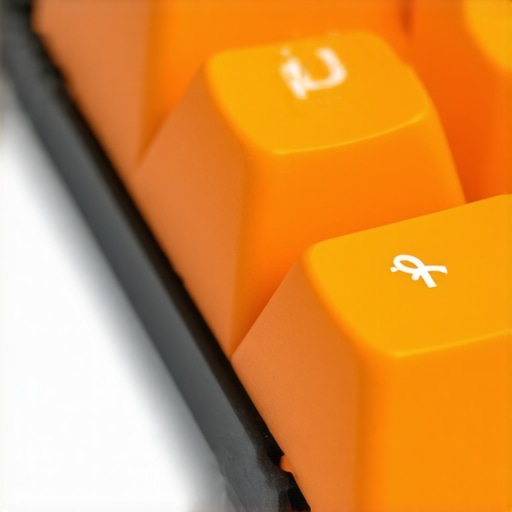
Another common misconception is that adding heavy-duty mechanical accessories to your setup will make it noisy and impractical for professional environments. People look at professional setups and think they need to compromise on aesthetics or sound dampening to get durability. In reality, pairing a solid PBT keyboard deck with proper dampening foam creates a deep, muted ‘thock’ sound that is actually quieter than the clicky, rattling keys found on typical cheap office boards. If you are configuring a workspace for productivity, choosing the right physical foundation is just as essential as looking into must-have laptop accessories to boost your work setup to keep your workflow streamlined and distraction-free.
Have you ever fallen into this trap of buying cheap accessories only to have them wear out or fail in a few months? Let me know in the comments below! If you are ready to build a reliable workstation from the ground up, take a look at our expert recommendations on business laptops for professionals essential picks 2025 to find a computer with a chassis and typing deck built to survive years of heavy daily use.
Now that you know the difference between cheap ABS plastic and premium double-shot PBT keycaps, the next logical step is keeping that upgraded hardware pristine for the long haul. I used to think that once you bought premium gear, it simply took care of itself. That was a costly assumption. Dust, skin oils, and microscopic debris find their way into the finest mechanical switches, gradually degrading the tactile response. To maintain that fresh-out-of-the-box feel, I run a strict maintenance routine every three months using a custom toolkit.
How do I maintain my PBT keycaps and mechanical switches over time?
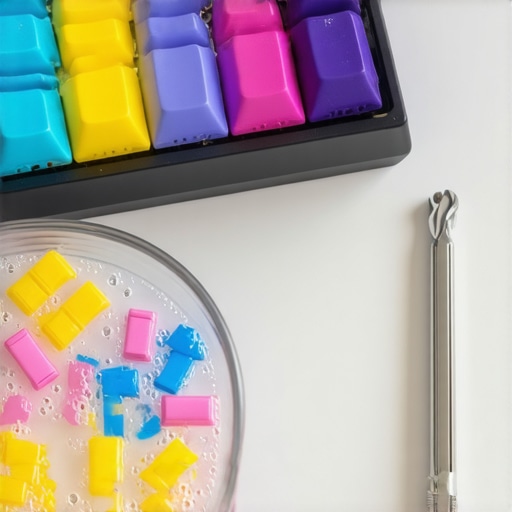
To keep your setup looking pristine and functioning perfectly, you need more than just a can of compressed air. Every quarter, I completely strip my board using my wire keycap puller. I place the PBT keycaps in a bowl of warm water mixed with a few drops of mild dish soap, letting them soak for about thirty minutes to dissolve skin oils. Because PBT is highly resistant to chemicals, you do not have to worry about the plastic degrading or losing its matte texture. While the caps dry, I use a dedicated switch duster and a small brush to clear debris from the switch housing. If you are using a portable machine for classes, taking care of your input devices is just as crucial as choosing student laptops that boost productivity and learning to keep your workflow uninterrupted.
For the switches themselves, keeping them dust-free prevents the dreaded chatter where keys register double-taps or fail to actuate at all. If you ever encounter a stubborn, sticky key during this process, do not panic and tear the switch apart. Knowing how to fix a sticky key without replacing the entire keyboard will save you hours of frustration and protect your costly mechanical investments. When reassembling, make sure the keycaps are 100% dry; any trapped moisture can seep into the switch stems and short out your keyboard’s PCB.
Looking ahead, the future of typing ergonomics and peripheral design is rapidly moving toward hybrid solutions. We are starting to see manufacturers integrate premium, high-travel mechanical switches directly into thinner chassis, bridging the gap between desktop performance and mobile convenience. This evolution is particularly exciting for mobile power users. In fact, keeping your peripherals optimized is just as important as knowing why your gaming laptop performance drops when unplugged, ensuring you get consistent, reliable tactile feedback whether you are plugged into a dual-screen workstation or working from a coffee shop.
If you want to experience the massive difference a premium typing deck makes, I highly recommend starting with a simple, high-quality wire keycap puller and a basic set of double-shot PBT keycaps. Swap out just your primary alphanumeric keys first to feel the immediate difference in grip, texture, and acoustic depth. If you are also in the market for a highly durable machine that handles heavy daily typing without breaking a sweat, explore our expert reviews on the top top business laptops for productivity in 2025 expert recommendations to elevate your entire professional workflow.
Now that you know the difference between cheap ABS plastic and premium double-shot PBT keycaps, the next logical step is keeping that upgraded hardware pristine for the long haul. I used to think that once you bought premium gear, it simply took care of itself. That was a costly assumption. Dust, skin oils, and microscopic debris find their way into the finest mechanical switches, gradually degrading the tactile response. To maintain that fresh-out-of-the-box feel, I run a strict maintenance routine every three months using a custom toolkit.
How do I maintain my PBT keycaps and mechanical switches over time?
To keep your setup looking pristine and functioning perfectly, you need more than just a can of compressed air. Every quarter, I completely strip my board using my wire keycap puller. I place the PBT keycaps in a bowl of warm water mixed with a few drops of mild dish soap, letting them soak for about thirty minutes to dissolve skin oils. Because PBT is highly resistant to chemicals, you do not have to worry about the plastic degrading or losing its matte texture. While the caps dry, I use a dedicated switch duster and a small brush to clear debris from the switch housing. If you are using a portable machine for classes, taking care of your input devices is just as crucial as choosing student laptops that boost productivity and learning to keep your workflow uninterrupted.
For the switches themselves, keeping them dust-free prevents the dreaded chatter where keys register double-taps or fail to actuate at all. If you ever encounter a stubborn, sticky key during this process, do not panic and tear the switch apart. Knowing how to fix a sticky key without replacing the entire keyboard will save you hours of frustration and protect your costly mechanical investments. When reassembling, make sure the keycaps are 100% dry; any trapped moisture can seep into the switch stems and short out your keyboard’s PCB.
Looking ahead, the future of typing ergonomics and peripheral design is rapidly moving toward hybrid solutions. We are starting to see manufacturers integrate premium, high-travel mechanical switches directly into thinner chassis, bridging the gap between desktop performance and mobile convenience. This evolution is particularly exciting for mobile power users. In fact, keeping your peripherals optimized is just as important as knowing why your gaming laptop performance drops when unplugged, ensuring you get consistent, reliable tactile feedback whether you are plugged into a dual-screen workstation or working from a coffee shop.
If you want to experience the massive difference a premium typing deck makes, I highly recommend starting with a simple, high-quality wire keycap puller and a basic set of double-shot PBT keycaps. Swap out just your primary alphanumeric keys first to feel the immediate difference in grip, texture, and acoustic depth. If you are also in the market for a highly durable machine that handles heavy daily typing without breaking a sweat, explore our expert reviews on the top top business laptops for productivity in 2025 expert recommendations to elevate your entire professional workflow.
The Hardest Lessons I Learned Fighting Keyboard Shine and Friction
My journey from greasy keys to a pristine, tactile haven taught me several unexpected lessons. First, I learned that a clean desk surface doesn’t stop oils from transferring; our fingertips naturally secrete sebum that attacks cheap ABS plastic relentlessly over time. Another eye-opener was realizing that expensive doesn’t always equal durable. I once bought a high-end keyboard that looked incredibly sleek, but within four months, the spacebar was polished to a mirror finish simply because the manufacturer skimped on the polymer mixture. Finally, I discovered that changing your key textures can genuinely reduce physical typing fatigue. The subtle texture of double-shot PBT gives your fingertips just enough traction to prevent sliding, which reduces micro-strain in your hands over an eight-hour workday.
My Essential Workspace Care Kit
When it comes to keeping your peripherals performing like new, you do not need an expensive industrial setup. Here are the precise tools I rely on to maintain my rig:
- A Dedicated Wire Puller: Avoid plastic ring alternatives at all costs to prevent scraping the outer edges of your keys.
- Premium Brush Set: An anti-static nylon brush set is perfect for sweeping out dust from mechanical switch housings without static discharge.
- Mild Dish Soap: It remains the safest, most effective way to break down accumulated oils on PBT plastic without degrading the surface texture.
- Dampening Foam Pads: If you use mechanical boards, adding a simple layer of foam inside the case creates that quiet, deep acoustic profile that won’t disrupt your office.
Make the Switch to Durable Tactile Materials
There is no reason to settle for slippery, worn-out keys that make your modern office setup look cheap and outdated. Making the upgrade to textured PBT plastic is one of those simple, satisfying projects that completely redefines your physical relationship with your computer. Once you feel the difference of a textured, matte key cap under your fingertips, you will never want to return to standard ABS. Take control of your typing experience and give your workspace the professional, long-lasting touch it deserves.
Have you ever struggled with greasy, shining keys on your office setup? Let me know in the comments below!