
I remember staring at my phone screen, my thumb hovering over the ‘Send Message’ button, my heart racing. A high-end Razer Blade was listed for less than half the price of a mid-range tablet. It looked pristine. I thought I’d found the holy grail of unbeatable laptop deals. But something felt off. My gut was screaming, but my wallet was cheering. I almost sent the money via a non-refundable app, convinced I was about to score the ultimate gaming setup. Spoiler alert: I wasn’t. That ‘seller’ vanished the moment I asked for a photo of the serial number. It was a wake-up call that changed how I browse Marketplace forever. [image_placeholder_1]
Why Scammers Love Your Social Media Feed
Social media has become a digital minefield for anyone hunting for student laptops that boost productivity or high-end workstations. Scammers don’t just post fake ads; they play on our emotions. They know we want to save money. According to the Federal Trade Commission, social media was the most profitable platform for scammers in recent years, with losses totaling billions. I’ve been there. I once bought what I thought was a ‘lightly used’ machine, only to find out I didn’t know how to check if a used gaming laptop was used for mining. It died three weeks later. Today, I’m going to show you exactly how to peel back the curtain and see these listings for what they really are: traps.
Are these deals actually worth the hype?
You see a post with five blurry photos and a description that says ‘Moving today, must sell fast!’ and you think you’ve hit the jackpot. Most of the time, you’re just looking at a stolen photo from an old eBay listing. Have you ever felt that sinking feeling in your stomach when a seller refuses to meet in a public place or demands a deposit before you’ve even seen the device? Tell me in the comments if you’ve ever walked away from a ‘deal’ that felt just a bit too suspicious.
The Red Flags That Scream Fraud
The first thing I always look for isn’t the price—it’s the profile. If someone is selling top business laptops for productivity but their account was created yesterday and they have zero friends, run. I made the mistake of trusting a ‘local’ seller who turned out to be operating from a different continent. They’ll offer to ‘ship it’ for free if you pay through Friends and Family apps. Don’t do it. You lose all buyer protection. If you are a student, your student ID is the best tool for laptop discounts on official sites, so why risk it on a sketchy Instagram post? Always verify the seller’s history and look for inconsistencies in their story. Before you even think about handing over cash, you should know how to verify the battery health of a used laptop purchase, because a dead battery is the least of your worries if the whole listing is a lie. We’ll also look at how to tell if that refurbished deal is actually just used and what that means for your security. Let’s dig into the specific technical checks you need to perform to keep your money safe.To stop being a target, you need a system that forces scammers to reveal themselves before you ever leave your house.
Force the Seller to Prove They Actually Have the Laptop
Scammers almost always work with stolen images from expired eBay listings or high-end tech blogs. I once spotted a gorgeous Dell XPS for $500, but the lighting in the photos looked like a professional studio. I messaged the seller and asked them to take a new photo of the laptop next to a common kitchen fork. Why a fork? Because no scammer has a library of stolen photos featuring specific household cutlery. They ignored me and deleted the post within ten minutes. If a seller can’t provide a custom photo with a specific item or a handwritten note, they do not have the device in their possession.
Demand a BIOS Photo with Your Name
Don’t just settle for a picture of the lid or the Windows desktop. Ask the seller to boot the machine into the BIOS screen and place a handwritten note with your name and the current date next to the screen. This proves the hardware is actually functional and matches the internal specifications they claimed in the ad. While you’re at it, check the serial number against manufacturer databases. If they’re selling student laptops that balance power and portability perfectly, the BIOS will confirm if it is actually the model they advertised or a cheaper, older variant with a swapped shell.
Look for Signs the Laptop Was Worked to Death
Just because a laptop turns on doesn’t mean it is healthy. Think of a used laptop like a second-hand car; a shiny wax job can hide a blown engine. I’ve seen beautiful machines that were used 24/7 in hot, dusty closets for years. You absolutely need to know how to check if a used gaming laptop was used for mining because a GPU that has been pushed to its thermal limit for a year is a ticking time bomb. 
The Thirty Minute Stress Test Rule
When you meet in person, never let the seller rush you. Tell them upfront that you need twenty minutes to run a benchmark. Bring a USB drive pre-loaded with portable software like HWInfo or CrystalDiskInfo. If the laptop suddenly shuts down or the fans sound like a jet engine taking off during a basic test, walk away immediately. You should also use this time to how to verify the battery health of a used laptop purchase using these tools. A battery with a 40% wear level is a hidden expense that ruins the value of any deal.
Don’t Get Stuck with a Fake SSD
Fake storage is a massive problem on local marketplaces right now. A listing might claim to have a 2TB NVMe drive, but it is actually a cheap, slow 256GB SATA drive with modified firmware designed to lie to the Windows operating system. If you know how to spot a fake nvme drive on marketplace, you can call out the fraud on the spot. If the price seems too good to be true, use the hidden price history tools every deal hunter needs to see what that exact model actually sells for on the open market. If you find discrepancies but the hardware is legit, you can use the data to how to negotiate a better price on an open box laptop or a used unit.
Test Every Single Port Individually
I once bought what I thought was a mint-condition workstation, only to realize later that the primary charging port was physically broken inside. I didn’t have a device to plug in during the meet-up, and it cost me $150 in repairs. Now, I always carry a small thumb drive and a pair of wired headphones. Plug them into every single port. If a port feels wobbly or fails to register the device, it is a sign of a failing motherboard connection or serious physical abuse.Thinking beyond the physical ports, we need to dive into the ‘spec sheet’ obsession that lures so many buyers into bad deals. Everyone tells you to buy the highest number you can afford, but in my experience, a flagship processor inside a cheap, plastic chassis is a recipe for disaster. This is where the nuance of business laptops for professionals essential picks 2025 really shines. These machines aren’t just about the numbers; they are built for a five-year lifecycle, unlike consumer models designed to survive only through the warranty period. According to a long-term reliability study by SquareTrade, nearly one-third of all laptops fail within three years, but enterprise-grade hardware consistently shows lower failure rates because of superior internal structural support.
Specs don’t tell the whole story
It is incredibly easy to get blinded by a listing that boasts an ‘Intel Core i9′ or ’32GB of RAM.’ But here is the contrarian truth: a high-end chip in a thin-and-light laptop often performs worse than a mid-range chip in a thicker, better-cooled machine. When the cooling system can’t keep up, the laptop intentionally slows itself down to prevent melting. If you don’t know how to stop your gaming laptop from thermal throttling in summer, you are essentially paying for power you can never actually use.
Why does that flagship i7 feel slower than a budget i5?
Advanced users often overlook the TDP (Thermal Design Power) limits set by the manufacturer. A ‘U-series’ i7 processor designed for battery life will almost always lose a raw performance race against an ‘H-series’ i5 designed for power. Scammers and uninformed sellers love to highlight the ‘i7’ badge while hiding the fact that it’s a low-power version that struggles with basic multitasking. This is one of the 5 key differences between enterprise and home windows machines that actually matters for your daily workflow.
Stop buying laptops with everything soldered down
The biggest ‘oops’ factor I see today is the ‘Thinness Trap.’ Manufacturers are increasingly soldering the RAM and the SSD directly to the motherboard. If one single memory chip fails three years from now, your entire laptop becomes a paperweight. Before you buy, you must learn how to find out if your laptop can be upgraded. If the RAM is soldered, you are stuck with what you have forever. 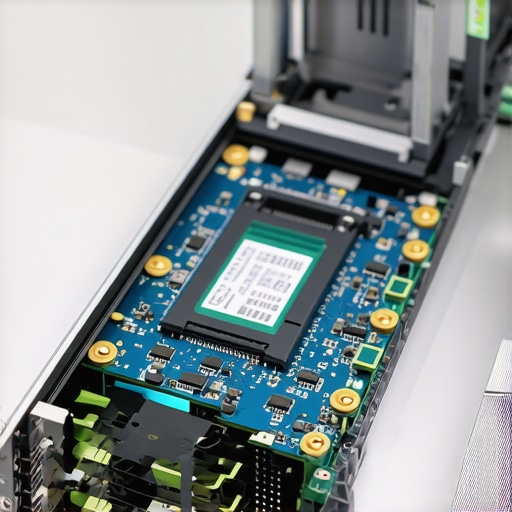
The hidden value of repairability
I always lean toward the only 4 brands we trust for rugged build quality because they often prioritize user-serviceable parts. A used laptop is a much safer bet when you know you can swap the battery yourself. That is exactly why your next business laptop needs a user-replaceable battery—it turns a ‘dead’ deal into a machine that lasts another four years. Always look for the only 3 brands that still make easily repairable laptops to ensure your investment doesn’t vanish the moment a single component acts up. Have you ever fallen into the trap of buying a laptop that was impossible to fix? Let me know in the comments.
I’ve spent thousands of hours testing machines, and the difference between a laptop that lasts two years and one that lasts seven isn’t the brand—it’s the maintenance routine. I always start with the software. I use CrystalDiskInfo weekly because you absolutely need to how to spot a dying ssd before your files vanish. It gives you a raw health percentage; anything below 90% makes me nervous. For my game-changing gaming laptops for serious players in 2025, I keep HWInfo64 running in the background. It monitors every sensor in the machine, from the fan RPM to the voltage across the RAM.
Tools that live in my tech kit
Physical maintenance is where most people fail. I’ve seen horror stories of people using vacuums on their rigs, but you should why you should never use a vacuum on your keyboard. The static build-up can literally arc to the motherboard and kill the device instantly. Instead, I stick to the basics. I why we still carry a microfiber cloth in our laptop bags—it’s not just for fingerprints, but for preventing screen oils from eating into the anti-glare coating. If things get messy, knowing the best way to clean a sticky keyboard without breaking the keys involves using specialized cleaning slime or very high-percentage isopropyl alcohol.
How can I maintain my laptop health over the long haul?
The real killer is heat. According to Intel’s official technical documentation for their mobile processor lineup, the maximum T-junction temperature—the point where the silicon begins to throttle or shut down—is typically 100°C. If your laptop is hitting this during basic tasks, your internal cooling is clogged. I don’t believe in bulky cooling pads; usually, the best ways to cool your laptop without a bulky pad involve a simple laptop riser and undervolting the CPU to reduce the heat soak. If that doesn’t work, I look for how to find official repair guides for your exact model and perform a thermal paste repaste.

Beyond the thermals, you have to manage the battery. For business laptops for professionals essential picks 2025, I always set a charge limit of 80% in the BIOS or through management software. Keeping a battery at 100% while plugged in all day is the fastest way to cause internal swelling and cell degradation.
Why I am betting on modular hardware
The throwaway culture of tech is finally hitting a wall. I predict that by 2027, the most sought-after unbeatable laptop deals won’t be for the thinnest machines, but for the most repairable ones. We are already seeing this with the only 3 brands that still make easily repairable laptops who are gaining market share by letting users swap their own motherboards and upgrade components as needed. My advice? Try this tonight: Download CrystalDiskInfo and check your drive’s health status. If you are in the yellow, start your backup now.
Hard Lessons from My Own Laptop Graveyard
If there is one thing I have learned after buying dozens of machines, it is that a deal is only good if the machine stays out of the trash bin for at least three years. My biggest lightbulb moment was realizing that stripped screws are the ultimate red flag; they tell you a previous owner was inside the machine without the right tools or care. I also learned to smell the exhaust—if a laptop smells like heavy smoke or pet dander when the fans kick in, that scent is likely permanent and can even indicate internal residue. Most importantly, I now use a 24-hour cooling-off rule. If I am still excited about the price after a full day of research, only then do I message the seller. If they won’t let you check the battery health or run a quick benchmark, walk away immediately. Patience is your best defense against buyer’s remorse.
The Essential Toolkit I Carry to Every Meetup
I never walk into a transaction empty-handed. My goal is to find the flaws before the money changes hands. Along with my USB stress-test tools, I always bring a few physical items to verify the condition. I carry a microfiber cloth in my bag to wipe down the screen and check for hidden keyboard bite marks or delamination that only show up under direct light. [image_placeholder_5] Once you have secured a clean machine, you can start looking for laptop accessories to boost your work setup, such as a high-quality GaN charger or a reliable dock. To make sure you are getting a fair price, I suggest checking the latest top laptop deals in 2025 to compare refurbished retail prices against local marketplace asks before you commit.
Stop Chasing Specs and Start Buying Quality
It is easy to get distracted by flashy numbers, but the real win is finding a machine that fits your lifestyle without constant technical headaches. Whether you are hunting for unbeatable laptop deals or a specific professional workstation, remember that your time is more valuable than a small discount. Buy from people who treat their gear well, and don’t be afraid to walk away if your gut tells you something is wrong. You now have the system to spot scammers and hardware failures before they cost you a dime. Have you ever had a marketplace deal go south, or did you find a legendary bargain? Let me know in the comments below.