
I still remember the sharp, metallic smell of ozone filling my bedroom three years ago. I’d just bought one of those top laptop deals and was eager to pop the back off to see if I could swap out the RAM. I didn’t think twice about the plush rug under my feet or the thick wool sweater I was wearing. One tiny, almost imperceptible snap from my finger to the motherboard, and my brand-new machine became an expensive paperweight. I learned the hard way that static isn’t just a nuisance; it’s a cold-blooded hardware assassin that doesn’t leave a footprint.
Your Living Room Carpet is a Hardware Assassin
It happens faster than a blink. We’re talking about Electrostatic Discharge (ESD). Most of us think about static as that funny thing that makes your hair stand up after sliding down a plastic slide, but for the delicate traces on a modern motherboard, it’s like a lightning bolt hitting a shed. Whether you are upgrading student laptops that balance power and portability perfectly or tinkering with the internals of high-end business laptops for professionals, the danger remains exactly the same. The components inside are becoming smaller and more sensitive every year, meaning it takes even less of a charge to bridge a gap and fry a circuit. If you are working on a machine where parts are soldered, you aren’t just looking at a cheap fix; you’re looking at the hidden costs of repairing modern thin and light laptops which often means replacing the entire board. Today, I’m going to show you how to properly ground yourself so you never have to feel that gut-punch of a dead screen. It’s a simple set of habits that I now follow religiously before I even touch a screwdriver. We will talk about the right surfaces, the right tools, and the ‘touch-test’ that saves laptop lives.
Is This Whole Static Danger Actually Real?
You might think, ‘I’ve opened my PC a dozen times while wearing socks on a carpet and nothing happened.’ Honestly? You’ve been lucky. According to data from the ESD Association, a human can’t even feel a static discharge until it reaches about 3,000 volts, yet many modern microchips can be permanently damaged by as little as 10 to 100 volts. That means you could be ‘killing’ your components slowly, causing those ‘random’ blue screens or stutters that people usually blame on bad software. I used to be a total skeptic too, until I realized why my laptop felt sluggish after three months—I’d likely semi-fried a voltage regulator during a simple cleaning. It didn’t die immediately, it just became unreliable. Have you ever felt that tiny spark when touching a metal door handle and wondered if your tech is safe? Tell me your ‘zap’ stories in the comments. One thing I didn’t realize back then was how much the air around me played a role. In the winter, when the heater is blasting and the air is bone-dry, your home becomes a giant capacitor. Every step you take across the room is building up a potential charge that is looking for a way out. If you’re working on game-changing gaming laptops for 2025, which are packed with dense, power-hungry components, the risk is even higher. I’ve found that simply changing where you work—moving from the carpeted office to the kitchen tile—can be the difference between a successful upgrade and a call to the manufacturer’s support line. Before you even think about how to replace your laptop thermal paste or adding must-have laptop accessories to your internal slots, we need to make sure you aren’t carrying a hidden charge. It only takes a second to do it right, but it saves you from a lifetime of tech-induced regret and a very light wallet.
Clear the Deck Before You Open the Case
First things first: get off the carpet. If you’ve been hunting through top laptop deals in 2025 to find a project machine, don’t kill it before you’ve even booted it. I once tried to swap a drive while sitting cross-legged on a shag rug; I thought I was being careful because I wasn’t moving around, but the friction of my jeans against the rug was building a silent wall of voltage. Now, I always set up on a wooden kitchen table or a dedicated workbench. If you absolutely must work in a carpeted room, find the best laptop desks that dont wobble on carpet and place a rubber mat under your feet. This breaks the circuit between you and the floor, providing a primary layer of defense before you even touch a screwdriver.
The Ten Dollar Tool That Saves Thousands
The most reliable way to stay grounded is an anti-static wrist strap. It’s one of those must-have laptop accessories to boost your work setup that most people ignore until they fry a motherboard. You clip the alligator end to a grounded metal object—like the metal chassis of a plugged-in (but powered off) desktop PC or even a metal radiator pipe—and wear the band around your wrist. This ensures you and the equipment stay at the same electrical potential. When I was working on my first set of business laptops for professionals, I felt like a dork wearing the ‘leash,’ but that leash is what kept the sensitive logic boards alive in a bone-dry office environment.
Tap the Metal to Dump the Charge
If you don’t have a strap, you have to use the ‘touch-and-go’ method. Before touching any internal component, touch a metal part of the laptop’s internal frame or the casing of the power supply. This discharges any immediate static buildup from your skin. You have to do this every single time you reach back into the machine. I remember a particularly stressful afternoon trying to figure out how to replace your laptop thermal paste without breaking anything; I was so focused on the goop that I forgot to re-ground myself after reaching for a paper towel. A tiny spark jumped to the heatsink. I got lucky that time, but it’s a gamble you shouldn’t take with game-changing gaming laptops for serious players in 2025 where the components are packed tighter than a sardine can.
Handle Components Like Fine China
When you finally move to install parts, never touch the gold or silver ‘teeth’ (the connectors). Whether you are upgrading student laptops that balance power and portability perfectly or swapping out cards because we only buy laptops with user replaceable wifi cards, always grab the hardware by the edges of the green or black PCB. Your skin oils are slightly conductive and acidic; combined with a tiny static charge, touching the pins directly is the fastest way to cause a ‘latent failure’—that dreaded scenario where the laptop works for a week and then mysteriously dies. Always keep the new parts in their silver anti-static bags until the very second you are ready to slot them in.But here is where even the pros get sloppy: thinking those anti-static bags are invincible. I’ve seen seasoned techs toss a motherboard onto the outside of an anti-static bag, thinking it is safe. It is not. The outer layer of many shielding bags is often conductive, meaning you are essentially resting your sensitive hardware on a surface designed to move electricity around. It is a classic ‘oops’ factor that turns a routine upgrade into a disaster. Everyone says that expensive top business laptops for productivity in 2025 are more durable, but in my experience, their dense internal layouts make them significantly more prone to cross-talk and ESD damage than the clunky plastic shells of the past.
Expensive Metal Frames Won’t Save Your Circuits
It is a common myth that a premium magnesium or aluminum chassis acts as a perfect Faraday cage. While it helps with external interference, the moment you open that case to add more memory, you are bypassing the shield. This is exactly why we never buy laptops with soldered ram for longevity; if you zap a soldered chip, the whole machine is toast. On a modular board, you might just lose a single stick of RAM. I’ve found that users who obsess over why most laptop cooling pads are just loud paperweights often neglect the internal thermal health that starts with clean, un-zapped components.
Can a Humidifier Replace Your Grounding Strap?
I get asked this constantly by people living in dry climates: if I keep the room at 50% humidity, am I safe? Not necessarily. While higher humidity does help dissipate static, it doesn’t eliminate the risk of a high-voltage discharge from your body. A technical standard by the ESD Association (ANSI/ESD S20.20) highlights that while humidity reduces the magnitude of the charge, human movement still generates enough potential to bypass the gate oxide in modern processors. This is especially dangerous when handling game-changing gaming laptops for serious players in 2025, where the trace widths are so microscopic that even a ‘low’ 100-volt hit can create a permanent crater in the silicon. #IMAGE_PLACE_HOLDER_C#
The Hidden Danger of Reusing Anti-Static Bags
Another trap is the ‘vintage’ bag. Those silver bags don’t last forever. The thin metallic layer can crack or oxidize over several years. If you are digging into student laptops that boost productivity and learning and using a bag from 2018 to hold your new NVMe drive, you might be inviting trouble. Always use fresh bags or, better yet, keep the component in its original retail packaging until the last second. And for the love of your hardware, the rule about why you should never use your laptop on a soft blanket applies even when the case is closed, but it’s a death sentence when the internals are exposed. Have you ever fallen into this trap or seen a ‘dead on arrival’ part that was actually just a victim of a bad handling habit? Let me know in the comments.
I’ve seen people spend three grand on game-changing gaming laptops for serious players in 2025 only to let them choke to death on a layer of cat hair and dried-out thermal goop within eighteen months. It’s a tragedy because, with about twenty dollars in tools and thirty minutes of your time, you can effectively double the lifespan of your machine. When I’m setting up a new workstation, I don’t just look for must-have laptop accessories for a seamless setup; I look for the gear that lets me perform ‘surgery’ when the performance starts to dip.
Stop the Sludge Before It Kills Your CPU
The number one killer of performance isn’t aging silicon; it’s heat. If you’ve noticed why your laptop fan only gets louder after cleaning, it’s usually because you’ve pushed dust deeper into the heatsink fins rather than removing it. I personally use a small electric duster—never those cans of compressed air that can spray freezing liquid if you tilt them wrong. I make it a habit to perform a deep clean every six months. If you are dealing with student laptops that balance power and portability perfectly, those thin fans are incredibly fragile. According to technical documentation from Thermal Grizzly, the longevity of high-performance thermal grease depends heavily on the mounting pressure and avoiding the ‘pump-out’ effect caused by rapid temperature cycling. This is why I suggest learning how to replace your laptop thermal paste without breaking anything as a mandatory skill for any power user.
The DIY Upgrades That Actually Matter
Most people think a slow laptop means it’s time to check the unbeatable laptop deals for a replacement. Often, it just means your wireless card or your storage is bottlenecking you. I recently found that why we replaced our laptop wi-fi card with an intel ax210 was the single best 20-dollar investment I ever made. It turned a stuttering connection into a gigabit powerhouse. For those using business laptops for professionals, having a reliable connection is more important than a slightly faster CPU clock speed. Don’t be afraid to crack the case—as long as you’ve followed my grounding advice from earlier.
How do I make my laptop battery last five years?
The secret isn’t a magic app; it’s chemistry. Lithium-ion batteries hate being full and they hate being empty. Most modern top business laptops for productivity in 2025 come with BIOS settings that let you limit the charge to 80%. Use it. If your laptop stays plugged in 90% of the time, keeping it at 100% is slowly cooking the cells. I also recommend you how to calibrate your laptop battery for better accuracy once every three months to ensure the Windows percentage meter isn’t lying to you. In the near future, I predict we will see a massive shift back toward modularity. With the ‘Right to Repair’ movement gaining steam, the ‘disposable’ laptop era is ending. We are already seeing companies like Framework lead the charge, and I expect the big players to follow suit by 2027.
My Advanced Tip: If you want to see an immediate drop in temperatures without even opening your case, you need to learn how to undervolt your gaming laptop for better temps and performance. It’s essentially giving your CPU less ‘juice’ while maintaining the same speed, which reduces heat output and fan noise instantly. Try it tonight using a tool like Throttlestop; your ears (and your motherboard) will thank you.
The Hard Lessons I Learned From One Tiny Spark
I used to think technical safety manuals were just written by lawyers to avoid lawsuits. I was wrong. The biggest ‘lightbulb moment’ for me was realizing that ESD damage is cumulative; you might not kill your business laptops for professionals today, but you are shortening their lifespan every time you handle them with static-filled hands. I also learned that ‘software lag’ is a myth more often than not—it is usually just a cry for help from a thermal-throttled CPU. Lastly, I realized that while we all hunt for top laptop deals in 2025, the real savings come from the machine you already own that you didn’t accidentally fry during a RAM upgrade. Treating your internals with the same respect as the screen is the hallmark of a true power user.
The Small Toolkit That Saves Big Money
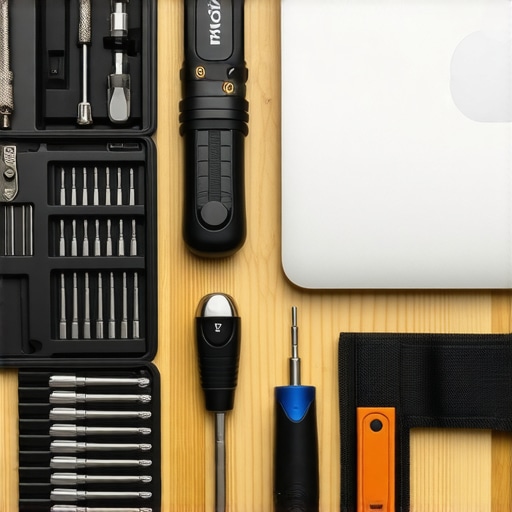
I don’t go anywhere near my workbench without a few specific items that I trust implicitly. First, 99% isopropyl alcohol is the only fluid I allow near a logic board because it evaporates almost instantly without leaving conductive residue. Second, I always use a magnetic project mat to keep those microscopic screws from student laptops that balance power and portability perfectly from disappearing into the void. I also recommend keeping a dedicated ‘tech drawer’ for your must-have laptop accessories for a seamless setup so you aren’t hunting for a spudger while the back of your machine is exposed to the air. These tools turn a nerve-wracking repair into a controlled, successful procedure.
#IMAGE_PLACEHOLDER_E#
Don’t Be Afraid to Master Your Own Machine
Technology shouldn’t be a black box that you are scared to touch. Once you respect the simple physics of static and heat, you move from being a mere consumer to being a caretaker of your hardware. Whether you are pushing the limits of game-changing gaming laptops for serious players in 2025 or just trying to get through a semester on a budget, that confidence is priceless. You have the power to make your tech last twice as long as the average user simply by slowing down and grounding yourself. Stop worrying about why your new gaming laptop feels slower than your old desktop and start taking the proactive steps to keep it running at peak performance. Have you ever had that terrifying moment where a laptop wouldn’t turn back on after a cleaning? Let me know your close calls in the comments!