
I was sitting in my favorite local coffee shop, nursing a lukewarm latte and feeling pretty good about my ultra-slim laptop. It was light, fast, and looked like a piece of modern art. Then, without warning, the screen flickered and died. No smoke, no sizzle—just a sudden, expensive brick on my table. I figured I would take it home, pop the back off with the specific screwdriver kit you need to open 90 of modern laptops, and swap out whatever had fried. What I found inside changed how I buy tech forever. Everything—the RAM, the storage, the Wi-Fi card—was soldered directly to the motherboard. A tiny component failure meant a $900 repair bill. It was a brutal wake-up call that “thinness” has a very high price tag. Today, I want to pull back the curtain on what’s really happening inside those sleek chassis and help you avoid the disposable tech trap.
The Soldering Curse That Kills Longevity
We have all been seduced by the marketing. They promise “infinite portability” and “razor-thin profiles,” but they rarely mention that these designs often come at the cost of your right to repair. When you look at the hidden costs of choosing an ultra-thin business laptop, you start to realize that the sticker price is just the beginning. I made the classic mistake early on of prioritizing aesthetics over internal layout. I ignored the warnings about integrated components because I wanted something that would not weigh down my bag. I even tried to how to replace your laptop thermal paste without breaking anything on one of these machines, only to realize the heat pipe was glued in place. These design choices are not accidents; they are barriers.
Is Ultra-Thin Design Actually Worth the Risk?
It is a fair question to ask yourself while browsing top laptop deals in 2025. According to data from iFixit, repairability scores for the thinnest flagship laptops have plummeted, with some scoring as low as 1 out of 10. This is not just an inconvenience; it is a planned obsolescence strategy. If you cannot even how to fix a wobbly laptop hinge without replacing the entire top assembly, the manufacturer has won. Have you ever been told a repair would cost more than the laptop itself? I would love to hear your horror stories—it helps the rest of us know which brands to watch out for.
Why We Stopped Buying Laptops with Soldered Parts
The trend of non-upgradable hardware is the biggest hurdle for anyone looking for a machine that lasts more than three years. This is why we never buy laptops with soldered RAM for longevity anymore. When the memory fails—and it eventually might—you are stuck replacing the whole logic board. Even for student laptops that balance power and portability perfectly, we now look for at least one open slot or a modular SSD. It is about peace of mind. Knowing that if a single part fails, I can fix it for $50 instead of $500 is the ultimate “pro” feature. In the next section, I will show you the specific specs to look for that guarantee your laptop can actually be opened and serviced by a human being.Buying a modern laptop is a lot like buying a car; you would not buy a sedan if the hood was welded shut and you could not even check the oil. Yet, that is exactly what millions do every year when they prioritize aesthetics over modularity. To stop being a victim of the thinness tax, you need to change your pre-purchase routine and look for the internal logic of the machine before you fall in love with the screen resolution.
Spot the Red Flags Before You Swipe Your Card
Look for the SODIMM Label
When you are scouring through technical specifications, LPDDR is usually the first major red flag for anyone who cares about longevity. It stands for Low Power Double Data Rate, and while it is efficient, in nearly all modern ultra-portables, it means the memory is permanently soldered to the motherboard. What you actually want to see are SODIMM slots. This is the difference between being able to upgrade your machine yourself when you realize why 8gb of ram is no longer enough for modern browsing or being forced to donate a perfectly functional laptop to a recycling center because it cannot handle a new Windows update. I remember helping my neighbor who picked up a sleek budget machine for her home office; eighteen months later, it was stuttering under the weight of basic multitasking. Because the RAM was fixed, her only upgrade path was buying a whole new computer. We eventually pivoted and looked into how to find a used thinkpad that actually lasts three more years because those older enterprise machines were built to be opened.
Why You Should Hunt for Service Manuals First
Before I recommend business laptops for professionals, I always perform one specific search: Laptop Model Service Manual PDF. If a manufacturer like Dell or HP provides a comprehensive guide showing you exactly how to remove the battery, fans, and storage, you have found a winner. If the only documentation available is a quick start guide with zero technical diagrams, the manufacturer does not want you inside that machine. This is particularly vital when choosing student laptops that boost productivity and learning. Students are notoriously tough on hardware, and the ability to swap out a keyboard after a late-night soda spill—instead of replacing the entire top casing—can save a semester.
Decode the Spec Sheet Like a Pro
The spec sheet is where companies hide the truth about their disposable designs. You have to hunt for keywords like user-replaceable or expandable. In the frenzy of hunting for top laptop deals in 2025, it is easy to miss the fine print that says storage non-upgradable. I once inspected a friend’s new gaming rig that seemed like an incredible bargain, only to discover the SSD used a proprietary connector that made it impossible to swap for a larger drive later. Learning how to spot a fake ssd in a used laptop listing is one thing, but knowing if you can even replace a real one is just as important. Always double-check that the NVMe drive is a standard M.2 2280 form factor. 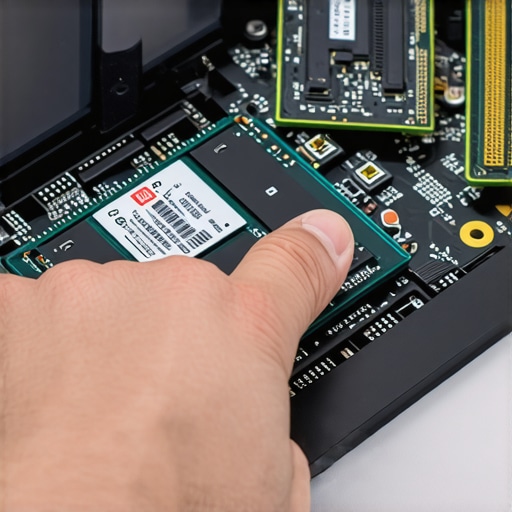
Check the Screws on the Bottom Plate
This is the most direct physical test you can perform. Pick up the device and flip it over. Are there visible screws, or is the bottom plate a seamless, monolithic sheet of plastic or aluminum? Visible Phillips or Torx screws are an invitation; a seamless bottom is a Keep Out sign. If you see rubber feet that look like they are hiding screws, be prepared for a fight with adhesive. This often comes as a shock to people who focus on must-have laptop accessories for a seamless setup but forget the basics of maintenance. If you cannot get the back off without a heat gun and a prayer, you will never be able to clear the dust out of the cooling fans, which is the leading cause of thermal death in thin laptops.Buying a modern laptop is a lot like buying a car; you would not buy a sedan if the hood was welded shut and you could not even check the oil. Yet, that is exactly what millions do every year when they prioritize aesthetics over modularity. To stop being a victim of the thinness tax, you need to change your pre-purchase routine and look for the internal logic of the machine before you fall in love with the screen resolution. It is easy to get blinded by a spec sheet that screams ‘RTX 4070’ or ‘i9 Processor,’ but here is the nuance most people miss: wattage matters more than the name on the box. You might see two different machines at different price points while hunting for top laptop deals in 2025, both claiming to have the same graphics card. However, the thinner one might be capped at 60W while the thicker one runs at 140W. This is why gaming laptops still struggle with thermal throttling in small frames. According to comprehensive testing by the hardware experts at NotebookCheck, the performance delta between these seemingly identical cards can be as high as 30% simply due to power limits.
Why Identical Specs Do Not Mean Identical Speed
The ‘oops’ factor usually hits about three months into ownership. You realize your thin-and-light beast is overheating, so you go out and buy a cooling accessory. In my experience, this is a major trap. I have found that why most laptop cooling pads are just loud paperweights; they rarely drop internal temperatures by more than a degree or two because they do not align with the internal airflow design. If you really want to boost performance, you are better off learning how to force your laptop to use the dedicated gpu in every app or ensuring your thermal paste is not dried out. 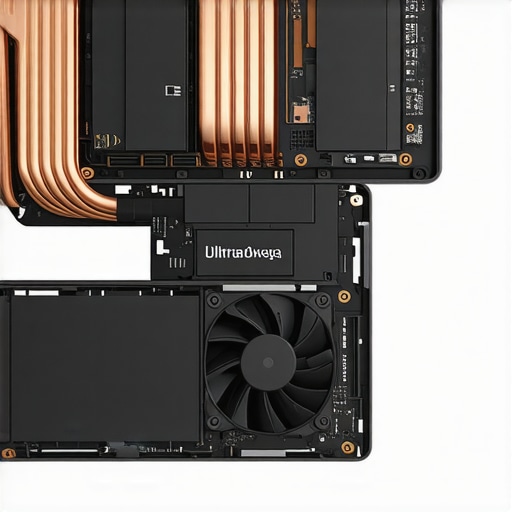
Stop Relying on External Fans to Save Your Hardware
When browsing for student laptops that boost productivity and learning, do not just look at the CPU generation. Look at the cooling pipes. A student’s laptop will often live on a bed or a rug, which is the fastest way to kill a machine with bottom-intake fans. Most people assume ‘Pro’ laptops are just for branding, but they usually have better internal heat dissipation logic. If you have ever had a laptop suddenly slow down while you were in the middle of a project, you have experienced thermal saturation, where the laptop throttles its own brain to keep from melting.
How Much Does Thermal Throttling Actually Tank Your Real-World Frame Rates?
If you are looking for game-changing gaming laptops for serious players in 2025, you need to understand that after 20 minutes of heavy load, your clock speeds will likely drop. This is not just about gaming, though. Even when selecting top business laptops for productivity in 2025 expert recommendations, you have to watch out for ‘skin temperature limits.’ Some brands throttle the processor not because it is too hot for the chip, but because the chassis would be too hot for your lap. This is also where hardware quality comes into play; the real difference between consumer and enterprise grade ssds often comes down to their ability to sustain high speeds without overheating during massive file transfers. Have you ever fallen into the trap of buying a laptop based on the box specs alone, only to be disappointed by the actual performance? Let me know in the comments.
I have spent years reviving machines that others had left for dead, and in my experience, ninety percent of the time, the fix was a simple five-dollar can of compressed air and a bit of software discipline. If you want to keep your hardware running like day one, you need to be proactive. I personally use HWInfo64 to keep an eye on my sensor data. If I see my CPU hitting 95C while just browsing, I know it is time for a deep clean. You can actually learn how to clean the dust out of your laptop without opening it if you are nervous about the warranty, but eventually, you will need to go deeper to clear the real blockages.
How do I maintain my laptop hardware over several years?
Maintaining a laptop is not just about the physical components; it is about the environment you create for it. I never place my gaming rig on a blanket because it acts like a thermal blanket. Instead, I look for must-have laptop accessories to boost your work setup that focus on airflow, like a simple mesh riser. You should also be aggressive with your operating system. I regularly how to disable windows features that eat your battery life because background telemetry is not just a privacy concern—it is a constant, low-level load that keeps your fans spinning and wearing out prematurely.

The Software Suite Every Power User Needs
Most users ignore their battery health until it is too late and they are desperately searching how to fix your laptop battery if it only lasts one hour. I prevent this decay by using manufacturer tools or third-party apps to cap my charge at 80% when I am plugged in at my desk. This one small habit can double the lifespan of your lithium-ion cells. I also swear by the iFixit Pro Tech Toolkit for any physical interventions. Even if you are dealing with a company where why this specific brand still uses proprietary screws is the standard, having the right Pentalobe or Torx bits on hand is the difference between a DIY fix and a two-week RMA wait. For storage health, I recommend following the technical documentation from manufacturers like Crucial; their briefs on Total Bytes Written (TBW) explain exactly why filling your drive to 99% capacity is a death sentence for both speed and reliability.
The Future is Repairable Again
Looking ahead, I predict we are entering a new ‘Golden Age of Repairability’ driven by aggressive right-to-repair legislation in the EU and North America. Brands that once fought against consumer access are starting to offer official parts stores and repair guides. The trend of ‘disposable thinness’ is finally hitting a wall because people are tired of the waste. My advice? Try this today: download a hardware monitor like HWInfo64 and check your ‘Thermal Throttling’ flags while running a benchmark. If you see ‘Yes’ in red, it is time to stop being a passive user and start maintaining your machine before the hardware fails.
Lessons from a Decade of Fried Motherboards
After tearing down hundreds of machines, I have realized that the thinness craze is often a marketing trick to shorten the upgrade cycle. One major lightbulb moment for me was discovering that thermal management is more important than raw CPU clock speed for long-term reliability. I also learned that if a brand hides their service manual, they are essentially telling you that your purchase is a long-term rental, not an investment. Finally, always remember that an extra pound of weight usually means an extra two years of usable life through better cooling and modular ports. Portability is a fantastic feature, but it should never come at the cost of your ability to troubleshoot a simple component failure.
The Hardware Survival Kit for Modern Power Users
You do not need a degree in electrical engineering to maintain your machine, but you do need the right tools. I never start a maintenance session without the specific screwdriver kit you need to open 90 of modern laptops. Beyond the physical tools, I rely heavily on HWInfo64 for real-time monitoring and the community-driven teardowns on iFixit. These resources have saved me thousands of dollars by allowing me to identify a failing fan before it took out my entire GPU. When you are scouting for top laptop deals in 2025, these tools help you verify if that “bargain” is actually a repairable gem. I also recommend keeping a small supply of high-quality thermal paste and a microfiber cloth in your desk drawer; they are the ultimate preventive medicine for high-performance chips.
#IMAGE_PLACEHOLDER_E#
Take Back Control of Your Tech
Choosing your next machine is a vote for the kind of industry you want to see. By prioritizing modularity and opting for business laptops for professionals that actually allow you to swap the RAM, you are pushing back against the disposable tech culture. Your laptop should serve you, not the other way around. Don’t be afraid to open that bottom plate and clear out the dust—it is the first step toward true hardware independence. I promise that once you fix your first internal component, you will never look at a “glued-shut” ultra-portable the same way again. What is the one hardware failure that cost you the most in time or money? Let me know in the comments below!