
I will never forget the sickening sound of my first major tech heartbreak. It wasn’t a software glitch or a blue screen of death; it was a simple, physical crunch. I was sitting in the back of a lecture hall, trying to tilt my screen to avoid the harsh overhead fluorescent lights, when the thin plastic frame around the display just snapped. The hinge had put too much pressure on the brittle casing, and suddenly, my brand-new laptop looked like a broken toy. I made the classic mistake of looking at the processor and the RAM while completely ignoring the structural integrity of the frame. It is a painful lesson I don’t want you to repeat during your midterms. Today, we are going to fix that by identifying exactly why those flimsy plastic borders are a red flag and how you can find a machine that actually survives the four-year gauntlet of university life.
Stop Buying Laptops That Snap Like Dry Twigs
Many manufacturers love using plastic bezels because they are cheap to produce and keep the total weight of the device low on a spec sheet. However, for a student who is constantly shoving their machine into a stuffed backpack or opening and closing the lid fifty times a day, plastic is a mechanical liability. When you look at student laptops that balance power and portability perfectly, you will notice the top-tier options move away from these fragile frames. We are here to ensure your investment does not end up in a repair shop before your first semester ends. It is about prioritizing a chassis that protects the expensive screen panel inside, rather than just chasing the lowest price point.
Is a little bit of plastic really that big of a deal?
You might think I am being a bit dramatic here. After all, it is just a frame, right? Unfortunately, the bezel is often the primary structural support for the entire display assembly. According to repairability experts at iFixit, stress concentrations at the hinge mounting points are the single most common cause of mechanical failure in modern ultra-portable devices. When that plastic cracks, it stops holding the hinge in place, which then puts direct pressure on the fragile display cable. I once tried to ignore a tiny hairline fracture in my bezel, only to have the entire screen stop working a week later. If you want to avoid my expensive mistake, you need to learn how to pick a student laptop that lasts all four years. Have you ever felt that terrifying flex or heard a creak when you open your laptop from one corner? If so, you are already dealing with the exact problem we are talking about.
Why Metal or Bonded Glass Always Wins for Campus Life
Campus life is a contact sport for electronics. You are biking to class in the rain, dropping your bag on hard library floors, and cramming your life into a small messenger bag. Finding the only student laptops that actually survive a backpack drop usually involves choosing a design with a reinforced lid or an edge-to-edge glass display. These materials distribute force across the entire surface rather than focusing it on a weak plastic strip. If you have already started to notice a bit of a wobble in your current machine, you might want to look into the $10 tool that fixes every squeaky laptop hinge before the plastic gives way entirely. Choosing a more durable build is not just about aesthetics; it is about the peace of mind that your computer will actually be there when you need to finish that final paper.
How to Stress Test a Hinge Without Breaking It
Finding a machine that survives the commute starts with a physical evaluation that most people skip. I remember walking into a tech outlet last year specifically looking for unbeatable laptop deals save big on quality devices today. I found a model with a spec sheet that looked like a dream—i7 processor, plenty of storage, and a low price—but when I tried the ‘one-finger lift’ test, the entire base of the laptop lifted off the table and the screen wobbled for nearly five seconds. That wobble is a clear indicator of poor weight distribution and weak hinge tension. If the screen can’t stay still while you are typing on a library table, it definitely won’t survive being opened and closed a dozen times a day between lectures. 
The Infamous One-Handed Opening Trick
To properly gauge build quality, try opening the laptop from the far left or far right corner rather than the center. If you see the screen panel bowing or flexing significantly, walk away. This flex puts immense pressure on the internal layers of the LCD, which can lead to dead pixels or ‘pressure spots’ over time. You should be looking for how to find a lightweight laptop that doesnt flex when you type to ensure the chassis is rigid enough to protect the display. A rigid frame acts like an exoskeleton; without it, the delicate internal electronics are absorbing every bump and vibration of your backpack.
Look Beyond the Outer Shell for Hidden Metal
Not all plastic is created equal, but you should always aim for a magnesium alloy or CNC aluminum frame if your budget allows. Many students get lured in by top laptop deals in 2025 that look premium but are actually just silver-painted plastic. To tell the difference, feel the temperature of the palm rest; metal will feel significantly colder to the touch than plastic. If you are stuck with a plastic model, check the area around the ports. If the plastic around the USB-C or charging port feels thin or hollow, that is where the first crack will appear. Understanding the real reason your laptop charge port feels loose usually comes down to the internal plastic housing snapping long before the electronics actually fail.
Why Port Support Matters More Than You Think
Ports are the mechanical joints of your digital life. Every time you shove a charger in, you are applying force to the motherboard unless there is a dedicated metal bracket reinforcing that port. When I was a sophomore, I killed a perfectly good laptop because the charging port broke internal solder joints after just one year of heavy use. This is why I always suggest checking the only 3 brands that still make easily repairable laptops before committing. These manufacturers often use modular ports that can be swapped out for twenty dollars, rather than requiring a whole new motherboard. To keep your current machine safe, consider adding 7 small items every student should keep in their laptop bag, including a right-angle adapter to reduce the leverage and stress on your most-used connections. If you already feel a bit of play in the display, learning how to fix a wobbly laptop hinge before it snaps can save you hundreds in repair costs down the line.Let’s dig deeper because there is one mistake I see students make more than any other: the thinness trap. We have been conditioned by marketing to believe that a laptop is only ‘premium’ if it is as thin as a paper notebook. But here is the contrarian truth: ultra-thin designs are often a cooling disaster that throttles your performance. When manufacturers shave off those last few millimeters, they sacrifice the heat pipes and fans necessary to keep the CPU happy. This leads to the hidden downside of ultra-thin gaming laptops or high-end productivity machines; they might have the best specs on paper, but they slow down to a crawl the moment you actually start a heavy task like video editing or gaming. It is a classic ‘Oops’ factor where you pay for power you cannot actually use.
Why You Should Probably Skip the Touchscreen This Year
Another myth I have to debunk is the supposed necessity of a touchscreen for taking notes. In reality, most students find that the extra weight and significant battery drain are not worth the gimmick. Beyond the battery hit, glossy touchscreens are notorious for reflections. I always tell people to look at why we avoid laptops with glare-prone glossy screens especially if you plan on studying near a library window or outdoors. A matte screen might not look as flashy in the store, but your eyes will thank you after a six-hour study session.  A study by SquareTrade on laptop reliability found that nearly one-third of laptops fail within the first three years, and mechanical failures from poor chassis design are a primary driver. This is why you need to use the hidden price history tools every deal hunter needs to ensure you are not just buying a ‘deal’ that is cheap because the internal structure is substandard. Have you ever fallen into the trap of buying a laptop just because it looked sleek, only to have it overheat or crack within months? Let me know in the comments!
Can You Actually Repair These Modern Paper-Thin Boards?
The short answer is: rarely. As devices get thinner, many brands have started soldering RAM and storage directly to the motherboard. This is why understanding why 8gb of ram is no longer enough for modern browsing is such a critical concept; you cannot just ‘add more’ later. If you buy a machine with limited, non-upgradable RAM today, you are essentially setting an expiration date on that device. Always check how to find out if your laptop can be upgraded before you swipe your card. If the RAM is soldered, you need to buy for your future needs, not just what you need for this semester’s essays.
The Exact Kit I Use to Save My Tech
When I realized that my $2,000 investment was slowly cooking itself alive, I didn’t take it to a generic repair shop. I bought the specific screwdriver kit you need to open 90 of modern laptops and decided to take matters into my own hands. Modern electronics are intimidating, but most maintenance is just adult LEGO. My personal holy grail of tools is a set of non-conductive nylon spudgers and a magnetized driver bit set. Without these, you will inevitably strip the tiny screws or scratch the motherboard, turning a simple cleaning job into a total loss. 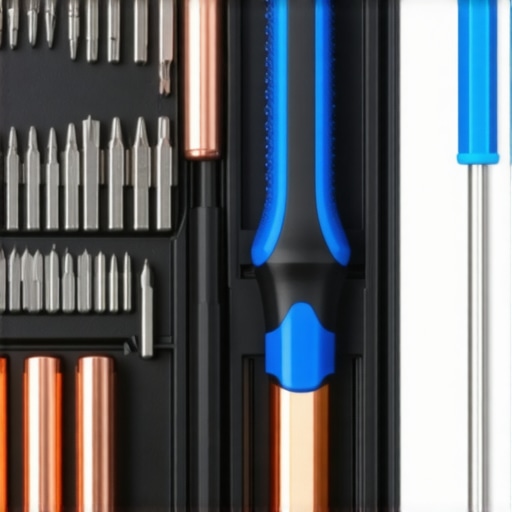
Why Your First Move Should Be a Deep Clean
We often forget that a laptop is essentially a high-powered vacuum cleaner. It sucks in dust, pet hair, and lint every second it is running. This debris creates an insulating blanket over your heat sinks. As noted in the IEEE Standard for Environmental Assessment of Electronic Products, thermal stress is the primary catalyst for premature component failure. This is why I religiously show people how to clean the dust out of your laptop without opening it using short, controlled bursts of compressed air. If you let that dust settle, your fans will work harder, consume more battery, and eventually burn out. If the worst happens, you will need to know how to replace a dead laptop fan without voiding the warranty, a skill that has saved me from buying a whole new machine more than once.
Why Your Hardware Needs Better Thermal Goop
Many manufacturers use the cheapest possible thermal interface material to save pennies. This is exactly why we swapped the thermal paste on our brand-new laptop the moment it arrived. By using a high-conductivity diamond-based compound, we dropped our operating temperatures by nearly 12 degrees Celsius. That is the difference between a machine that lasts two years and one that lasts seven.
How do I keep my laptop running like day one for four years?
Maintenance is not just physical; it is about the best way to configure a new business laptop to avoid bloatware that eats your resources. I recommend a clean slate approach: wipe the drive and install a fresh version of the OS to remove the tracking software that comes pre-installed. Beyond that, focus on the only 3 ways to genuinely speed up a slow laptop, which usually involves aggressive startup management and ensuring your SSD has at least 20 percent free space for over-provisioning. I predict that by 2027, right-to-repair legislation will force even the biggest brands to move away from glued-shut designs toward the modularity we currently only see in enthusiast circles. My advanced tip for you: download a hardware monitor today. If your CPU is hitting 95 degrees while just watching YouTube, your thermal paste has likely turned into a dry crust, and you need to intervene. To round out your kit, check out these must-have laptop accessories to boost your work setup which include the external fans and stands that help your internal cooling system breathe.
Lessons from a Decade of Fried Motherboards
After helping dozens of classmates recover files from “dead” machines, I have realized that 90% of failures are preventable. First, never trust a laptop that gets hot to the touch while just browsing; heat is the silent killer of internal solder joints. I also learned that even if your device has a privacy shutter, you should know why we use tape on our webcams even if they have shutters to ensure total hardware-level security during late-night study sessions. Most importantly, remember that a “good deal” is only a deal if the chassis can survive a 30-minute bike ride in a backpack. I’ve seen too many high-spec machines die because a single drop cracked a plastic hinge mount that couldn’t be replaced.
The Gear That Actually Saved My Degree
You don’t need a massive toolkit to keep your tech running, but you do need the right basics. I swear by the specific screwdriver kit you need to open 90 of modern laptops for those times you need to blow out dust or upgrade your storage. To keep your wrists healthy during long essay sessions, I recommend looking into the only laptop stands that dont shake while you type. For the actual commute, I only trust the most durable backpacks for students who carry too many textbooks to provide the necessary padding for the edges of the screen. Finally, if you are a library regular, the best quiet mice for students in quiet study zones will save you from the glares of your peers during a silent finals week.
#IMAGE_PLACEHOLDER_E#
Build a Setup That Doesn’t Give Up
Choosing between different student laptops is about more than just comparing RAM and CPU speeds; it is about choosing a partner for your academic journey. When you prioritize a rigid frame and maintainable internals, you are buying yourself peace of mind. Don’t wait for a flicker on the screen or a creak in the hinge to start taking care of your investment. A little proactive maintenance today ensures your work is still there on graduation day. Have you ever had a laptop hinge snap on you right before a major deadline? Let me know in the comments below!