
I spent three hundred dollars on a chiropractor last month because I thought I was being ‘ergonomic.’ I had just snagged one of the latest top business laptops for productivity and decided it deserved a high-end throne. I bought the sleekest, tallest stand I could find. Two weeks in, my neck felt like it was being gripped by a pair of hot pliers. I had fallen for the classic marketing trap: the belief that simply lifting the screen solves every postural woe. It did not. In fact, it just traded a dull neck ache for toasted shoulders and the beginnings of carpal tunnel. I was hunched over like a question mark, staring at a screen that was too high while my wrists angled upward like a T-Rex trying to play the piano. It was a disaster. [image placeholder]
The Hidden Danger of Lifting Your Screen Too High
We have been told for years that ‘eye level’ is the holy grail of desk setups. But here is the kicker that the manufacturers forget to mention: when you lift your laptop, you bring the keyboard with it. I tried typing on my game-changing gaming laptop while it was perched six inches off the desk. My shoulders were permanently shrugged, and my elbows were floating in mid-air. According to the Cornell University Ergonomics Research Laboratory, the design of a laptop is inherently problematic because the keyboard and screen are joined. If the screen is at the right height for your neck, the keyboard is at the wrong height for your wrists. Most stands only address half the problem while doubling the stress on your joints.
Are these expensive accessories actually worth the hype?
You see them in every ‘aesthetic’ desk setup on social media—those minimalist aluminum arms and bamboo risers. But most of them are designed for looks rather than the human spine. I wasted so much money on laptop accessories that were essentially just expensive paperweights. If you aren’t using an external mouse and keyboard, a high stand is almost certainly doing more harm than good. Have you ever felt that sharp, nagging pinch between your shoulder blades after an hour of ‘ergonomic’ typing? That is your body telling you that the marketing lied. Have you found yourself constantly adjusting your seat just to find a comfortable angle that never quite comes?
Stop Reaching Up to Type
The biggest mistake I made early on was trying to find the ‘perfect’ stand that did everything. I wanted it to be portable, tall, and stable enough to type on directly. But the truth is, if you are using your laptop built-in keys, you need laptop stands that don’t shake and keep the angle incredibly low. The moment you go high, you must disconnect your peripherals. Today, I am going to break down the specific height ratios you need to stop the slouch and save your back without throwing away your favorite gear. We are going to fix your workspace for good.
Separate Your Screen from Your Keyboard Immediately
The first rule of laptop survival is simple: a laptop is a fundamental design compromise, not a permanent workstation. To fix the ergonomic nightmare, you must treat your laptop purely as a display. I remember trying to type on my laptop while it was perched on a stack of heavy textbooks during a late-night coding session; my hands were positioned near my chin, and I looked like a frantic squirrel. The fix was a dedicated external peripheral. If you want to avoid that physical toll, you should understand why we only use mechanical keyboards for all-day coding. By placing the keyboard flat on the desk and the laptop on a riser, you decouple the two components that are fighting your natural anatomy. This simple split allows your hands to rest at desk level while your eyes remain forward-facing.
The Top-Third Rule for Perfect Screen Height
Your eyes should naturally hit the top third of the screen when you are looking straight ahead. If you are looking down, even slightly, your head—which weighs about as much as a bowling ball—starts to pull on your neck muscles and upper back. I found that using laptop stands that don’t shake allowed me to elevate my device exactly six inches off my desk surface. This small shift stopped the tension headaches within a single week. It is like the difference between wearing shoes that fit versus ones two sizes too small; you do not realize how much pain you were in until it stops. 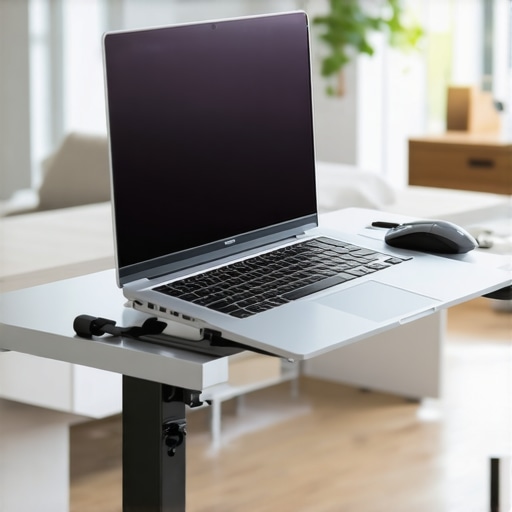
Kill the Shrug with Proper Elbow Alignment
Most people lift their laptops and then try to reach up to use the built-in trackpad. This forces your shoulders into a permanent shrug near your ears, which is a recipe for chronic tension. Instead, keep your elbows at a 90-degree angle, tucked close to your ribs like a professional sprinter. To achieve this, you need a dedicated pointing device separate from the machine. We often suggest the only travel mouse we actually enjoy using because it supports the hand naturally without forcing a stressful claw grip. This setup ensures that your business laptops for professionals function as part of a ergonomic system rather than an isolated tool that slowly ruins your posture.
Stability Matters More Than Portability
If your setup wobbles every time you type, your body will subconsciously tense its muscles to compensate for the movement, leading to fatigue. This is why we focus so much on finding the best laptop desks that don’t wobble on carpet. When I first started working remotely, I used a flimsy plastic folding tray. Every time I hit the ‘Enter’ key, the screen vibrated like an earthquake. My eyes were constantly micro-adjusting to the blur, leading to massive eye strain. You want a foundation that feels like a rock. Furthermore, when adjusting your stand, be careful with the pressure applied to the chassis. It is vital to learn how to find a lightweight laptop that doesnt flex when you type to ensure the machine can handle being mounted on various laptop accessories without warping the internal components or damaging the screen hinges over time.
The Thinness Obsession is Killing Your Hardware
Everyone tells you that a ‘pro’ laptop needs to be as thin as a wafer, but after a decade of testing gear, I am here to tell you they are wrong. The market has been flooded with ultra-slim devices that look stunning but perform like paperweights after twenty minutes of real work. When you investigate the hidden costs of choosing an ultra-thin business laptop, you realize the primary casualty is thermal management. I once bought a flagship model for two thousand dollars, thinking its slim profile was the peak of engineering, only to find that it was perpetually ‘throttling’ its speed to avoid melting its own internals. I was paying for an i9 processor but getting the performance of an i5 because there was no room for air to move. If you are hunting for unbeatable laptop deals, do not be blinded by a skinny chassis.
Does your hardware actually match the marketing stickers?
Most buyers obsess over the CPU name without ever looking at the Thermal Design Power (TDP). A high-end chip in a thin frame is like putting a supercar engine in a lawnmower; it will overheat before you reach top speed. This is exactly why gaming laptops still struggle with thermal throttling in small frames even in 2025. According to research published by the Institute of Electrical and Electronics Engineers (IEEE), prolonged exposure to high internal temperatures leads to ‘electromigration,’ a process where the physical paths in your processor literally degrade over time. You are not just losing speed today; you are shortening the lifespan of your machine. This is why the real reason your laptop feels sluggish after three months often has more to do with heat and dust than software updates. 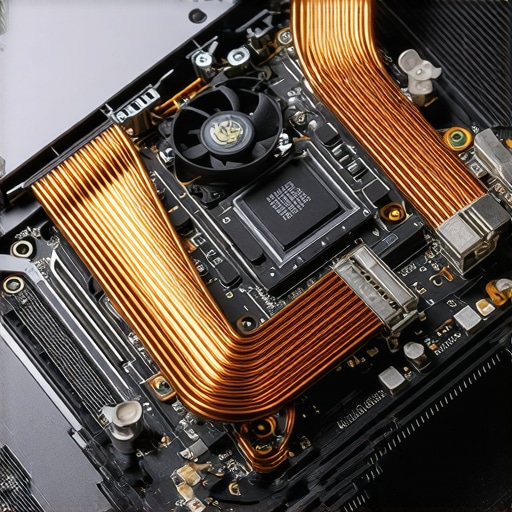
Why Enterprise SSDs Win the Long Game
Here is a nuance most reviewers skip: not all storage is created equal. The real difference between consumer and enterprise-grade SSDs is write endurance and sustained performance. If you are doing heavy data entry or video editing, a cheap drive found in a ‘budget’ laptop will slow to a crawl once its cache is full. I have seen countless users think their computer is dying when, in reality, they just have a drive that cannot handle a full day of work. If you want a machine that lasts, you need to look at the components that are actually repairable. We focus on the only 3 brands that still make easily repairable laptops because being able to swap a failing fan or a slow drive is the ultimate ergonomic for your wallet.
The 4K Resolution Trap on Small Screens
Stop buying 4K screens on 13-inch laptops. It is a massive mistake that hurts both your eyes and your productivity. On a small panel, 4K forces the operating system to scale to 200% or more, which often breaks the layout of professional software and drains your battery 30% faster than a standard HD screen. I much prefer the truth about matte vs glossy screens for office productivity—usability beats pixel density every single time. A matte 1080p screen is often better for your eyes and your workflow than a glossy 4K mirror that reflects every light in the room. Have you ever fallen into this ‘spec-sheet’ trap where a higher number actually made your daily life harder? Let me know in the comments.
Dust is the Silent Productivity Killer
I’ve seen three-thousand-dollar machines turned into glorified space heaters because the owner wouldn’t spend five minutes with a can of compressed air. Every six months, your fans become magnets for pet hair and microscopic debris. When those vents clog, your CPU clocks down to a crawl to prevent a literal meltdown. I make it a habit to learn how to clean the dust out of your laptop without opening it at least once a quarter. It is the cheapest performance boost you will ever find. If you ignore this, you’ll eventually find yourself searching for top laptop deals in 2025 far sooner than your budget originally intended. Beyond the internals, the physical touchpoints matter too. Nobody likes a slick, shiny keyboard, so I always recommend knowing how to clean a greasy trackpad without causing damage to keep that matte finish feeling like new. It isn’t just about aesthetics; skin oils can actually degrade the protective coatings on high-end business laptops for professionals over time.
The Ten-Dollar Kit Every Owner Needs
If you want to truly own your hardware, you need to be able to get inside it. I stopped being afraid of my tech the moment I bought the specific screwdriver kit you need to open 90 of modern laptops. Most manufacturers rely on you being intimidated by a Torx T5 or a Pentalobe screw. Once you have the bits, you can swap out a dying battery or upgrade your RAM in twenty minutes. This is especially vital for student laptops that balance power and portability perfectly, as those machines often take a beating in backpacks and need minor tighten-ups to the hinges every semester. 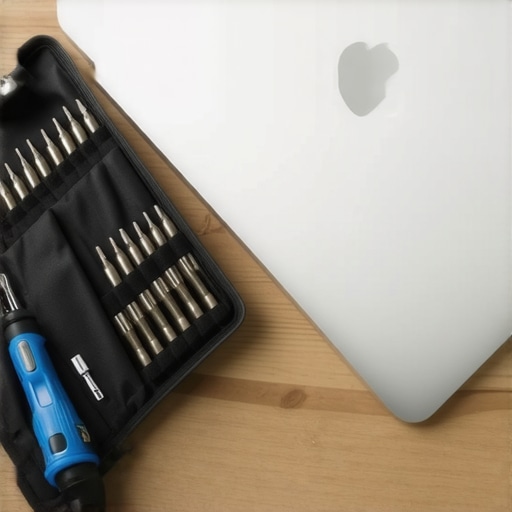
How can I maintain my laptop’s performance over three years?
The secret is a combination of thermal management and software hygiene. Research from the University of Maryland’s Center for Advanced Life Cycle Engineering (CALCE) shows that thermal cycling—the constant heating and cooling of internal components—is the primary driver of solder joint fatigue. To mitigate this, I use a dedicated hardware monitor to keep my temperatures in check. If I notice a spike, I check the real reason your laptop feels sluggish after three months and usually find a background process gone rogue. I also take the time to how to disable windows features that eat your battery life to reduce the overall load on the system. You don’t need a new computer; you need a cleaner operating system. By applying the only 3 ways to genuinely speed up a slow laptop, you can easily add two years to the lifespan of even a budget-friendly device.
Future Laptops Will Look Like LEGO Sets
I predict that the era of the ‘disposable’ ultra-thin laptop is nearing its end. Between the growing Right to Repair movement and environmental regulations, the trend is shifting back toward modularity. We are already seeing companies like Framework lead the charge, but expect the big players to start offering more user-swappable components in their game-changing gaming laptops by late 2025. This is great news for your wallet and the planet. My advice? Download a hardware monitor today and check your idle temperatures. If you’re idling above 50 degrees Celsius, it’s time to crack that case open or reach for the compressed air. Stop being a passive consumer and start being a hardware owner.
The Hardest Lesson I Learned While Chasing the Perfect Desk Setup
The most expensive mistake you can make is assuming that a high price tag on business laptops for professionals guarantees a pain-free experience. I learned the hard way that true ergonomics is about the relationship between your eyes, hands, and the surface you work on—not just buying the most expensive stand in the catalog. Here are the lightbulb moments that finally saved my posture and my budget:
- Your battery is a ticking clock: Learning how to fix your laptop battery if it only lasts one hour is more valuable than any extended warranty. Heat is the enemy, so keep that airflow clear.
- Heat kills performance: If you notice the real reason your laptop power brick is getting extremely hot, your system is likely drawing too much power for its cooling capacity. Address it before it fries the motherboard.
- The Specs Trap: A thin chassis often means thermal throttling. Sometimes, the ‘bulkier’ model is actually the faster one because it can actually breathe.
The Kit I Use to Keep My Gear Alive
I don’t trust every shiny new peripheral that pops up in my social media feed. Instead, I rely on a few battle-tested items that actually improve my workflow. First, you absolutely need the specific screwdriver kit you need to open 90 of modern laptops to handle basic maintenance and cleaning. For power management, I’ve moved away from generic bricks; why we only use 100w pd chargers for our workstations is simple—it provides the stability needed for high-intensity tasks. Finally, if you are working from a home office, utilizing the best vertical docks that support dual 4k displays can transform a cramped laptop into a true powerhouse workstation without sacrificing desk space.
Your Workspace Should Serve You
Don’t wait for your neck to start screaming or your fans to start rattling like a can of marbles before you take action. You have the power to extend the life of your machine and protect your physical health at the same time. Whether you are hunting for top laptop deals in 2025 or trying to make your current device last another three years, small adjustments make the biggest impact. Your hardware is an investment in your career and your physical comfort—it’s time to start treating it that way. Which part of your current desk setup is giving you the most trouble right now? Let me know in the comments below.