
I’ll never forget the day I thought I’d outsmarted every tech reviewer on YouTube. I found a glossy ‘gaming’ laptop for just under six hundred bucks, featuring a neon-backlit keyboard and a chassis that looked like a stealth bomber. I bragged to my friends about the unbeatable laptop deals I’d discovered, thinking I was the smartest guy in the room. But two weeks into a marathon of my favorite shooter, the frame rates started dropping faster than my hopes of hitting the leaderboards. The smell of warm plastic filled my room, and the fans sounded like they were preparing for takeoff. It was a wake-up call: in the world of mobile gaming, ‘cheap’ often comes with a hidden tax that doesn’t show up on the sales receipt.
The $500 Mistake That Taught Me Everything
The biggest mistake I made early on was focusing purely on the sticker specs—like RAM and CPU—while completely ignoring the thermal design and the graphics power limit. I bought a machine that technically had a dedicated GPU, but it was so severely throttled to keep the plastic case from melting that it performed worse than some business laptops I’d used for work. It’s a painful realization when you realize you’ve essentially bought a space heater that can’t even run Discord and a game at the same time. This is why we often see why most 300 dollar laptops are just e-waste in a box; they look functional on the shelf, but they lack the ‘soul’ or the cooling to actually do the job. Have you ever bought a device that looked like a beast on paper but felt like a lemon the second you loaded up your favorite game? Let me know, because I’ve been there, and the frustration is real.
Are these budget ‘deals’ just a fast track to frustration?
The skepticism is healthy. Many people ask if it is even possible to get a ‘good’ experience without spending three thousand dollars. The answer is yes, but you have to know where the corners were cut. Often, manufacturers save money by using screens with terrible response times. You might experience the hidden trap of budget gaming screens: motion blur, where everything looks like a smeary mess during fast movements. According to technical analysis by PCMag, heat is the primary killer of laptop longevity, and budget builds often skimp on the high-quality thermal paste and heat pipes found in game-changing gaming laptops for 2025 adventures. You also have to watch out for the real reason your gaming laptop feels sluggish on battery, as cheap units often have power delivery systems that can’t keep up. Today, I’m going to show you exactly how to spot a genuine value and when you’re better off saving your pennies for another month.
Look Past the Big Numbers
Manufacturers know you’re looking for keywords like ‘RTX’ or ‘i7,’ and they use that to mask where they’ve pinched pennies. To find actual unbeatable laptop deals, you have to dig into the Total Graphics Power (TGP). I remember buying a laptop that boasted a high-end GPU, but the manufacturer had capped it at a measly 45 watts to keep the thin chassis from melting. It was a ‘pro’ machine that performed like a five-year-old budget rig. Always look for the wattage in the fine print; a lower-tier card with a high power limit will often outperform a throttled high-end card every single day.
Find the Real Power Limit
If the manufacturer hides the wattage, you can usually see how to tell if your laptop is being throttled by its charger. If you have a beastly GPU but the power brick is only 130W, that laptop is never going to reach its full potential. It’s like putting a lawnmower engine in a Ferrari. This is a common trap in student laptops that balance power and portability perfectly on paper but fail under heavy loads. I’ve spent hours trying to squeeze performance out of these ‘bottlenecked’ machines, and the only real solution is often to learn how to undervolt your gaming laptop for better temps and performance just to keep the clock speeds stable.
Run My Five-Minute Thermal Audit
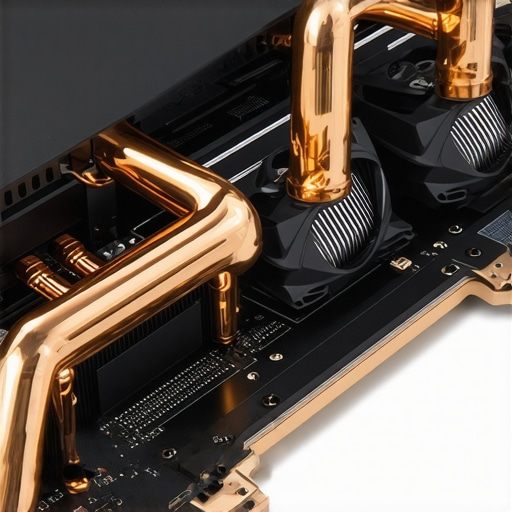
Before you commit, search for ‘teardown’ photos of the model. You want to see thick copper heat pipes and separate fans for the CPU and GPU. One of my biggest regrets was ignoring this for a sleek work machine. I thought I could compensate with extras, but I quickly learned that why most laptop cooling pads are just loud paperweights if the internal airflow is garbage. If the vents are blocked by the screen hinge or if there’s only one fan, you’re looking at a thermal nightmare. For those seeking game-changing gaming laptops for serious players in 2025, cooling is the only spec that truly determines how long your frame rates stay high.
Check the Contact Points First
The parts of the laptop you actually touch—the keyboard and trackpad—are where the ‘budget’ feel hits hardest. I once bought a great-specced machine only to realize the keyboard flexed so much I felt like I was typing on a sponge. If you’re doing more than just gaming, look for top business laptops for productivity in 2025 expert recommendations to see what a real keyboard should feel like. Don’t forget to budget for must-have laptop accessories for a seamless setup, like a decent mouse, because even the best budget laptops usually ship with a trackpad that feels like sandpaper.
Manufacturers love to sell you on ‘sleek’ and ‘portable,’ but here is the contrarian truth: for high-performance tasks, thinness is often the enemy of efficiency. I’ve seen so many people fall for the hidden cost of buying an ultra-thin gaming laptop, only to find the fans scream like a jet engine the moment a browser tab opens. It is a classic bait-and-switch where you pay a premium for a form factor that actually kills the performance you paid for. If you are looking at game-changing gaming laptops for 2025 adventures, look for a bit of ‘heft’—that is where the actual cooling lives. Have you ever fallen into this trap of choosing style over substance? Let me know in the comments.
Thinness is Usually a Thermal Trap
The industry is obsessed with portability, but as a power user, you need to be obsessed with thermal headroom. Most people assume that if two laptops have the same i7 processor, they will perform identically. In reality, according to a deep-dive analysis by Tom’s Hardware, the quality of Voltage Regulator Modules (VRMs) and the wattage limits set by the BIOS can cause up to a 25% performance delta between two machines with the exact same ‘specs.’ This is why some top laptop deals in 2025 unlock incredible savings today on machines that look great but throttle down to a crawl under load. Don’t just buy the chip; buy the chassis that can actually handle the chip’s heat.

Can a Used Pro Rig Beat a New Budget PC?
I frequently get asked if it is better to buy a brand-new $400 consumer laptop or a five-year-old refurbished workstation. My answer is almost always the old pro machine. There is a strong case for buying a used office workstation instead of a new budget pc because the build quality is on a different planet. Business-grade hardware is designed to be repaired, not replaced. One of the biggest mistakes you can make is buying a shiny new budget unit only to realize later why we never buy laptops with soldered ram for longevity. When your RAM is soldered to the board, your laptop has an expiration date from the moment you unbox it. If you can’t upgrade it, you don’t really own it; you’re just renting it from the manufacturer until it becomes obsolete.
Stop Using Your Bed as a Desk
This sounds like basic advice, but even advanced users forget that laptop cooling is a physical process, not a magical one. I’ve had friends complain about ‘defective’ hardware when the real culprit was their duvet. You should understand why you should never use your laptop on a soft blanket: it acts as an insulator and a dust vacuum, choking the intake vents. If your machine is already running hot, you might need to learn how to replace your laptop thermal paste without breaking anything to restore it to its former glory. Once you have your thermals under control, you can focus on productivity by learning how to use a single usb-c cable to connect your entire desk. Real expertise isn’t just about buying the fastest machine; it’s about maintaining the one you have so it stays fast for years.
Once you’ve navigated the minefield of hardware specs and snagged one of those unbeatable laptop deals, the real work begins: keeping that machine running like day one. I’ve seen too many people spend two thousand dollars on a flagship only to have it feel like a paperweight six months later. The culprit is almost always a lack of maintenance. It is not just about the hardware; it’s about the digital hygiene and the physical environment you subject your tech to every single day. If you don’t take control, the real reason your laptop feels sluggish after three months will usually be a combination of background bloat and dust accumulation that you can easily prevent.
The Software Toolkit That Keeps My Rigs Fast
I don’t rely on the ‘optimizer’ apps that come pre-installed by manufacturers. Instead, I use HWiNFO64 to monitor my thermals in real-time. It’s a bit hardcore for some, but knowing exactly which core is overheating tells me if my thermal paste is failing or if I just need to blow out the vents. I also make it a habit to check for firmware updates monthly. Manufacturers often release BIOS patches that fix power delivery issues or improve fan curves. While you’re at it, don’t forget to occasionally look at your power settings; you’d be surprised how often a Windows update resets your machine to ‘Power Saver’ mode, which is the real reason your gaming laptop feels sluggish on battery even when you’re plugged in. For those who want the absolute best prices on future components, I always suggest using the friday afternoon trick for catching warehouse price drops when you’re looking to upgrade your storage or peripherals.
How do I maintain my laptop’s performance over years of use?
Maintenance is a marathon, not a sprint. Every three months, I perform a ritual. First, I use a specialized guide on the best ways to clean a greasy laptop keyboard because oils can actually seep into the switches and cause long-term damage. Next, I do a physical inspection. You should learn how to check your laptop fan for dust without opening it by using a high-intensity flashlight against the intake vents. If you see grey fuzz, it’s time for some compressed air. According to technical teardowns by iFixit, modularity is slowly returning to high-end laptops, but for most current models, the more glue and solder involved, the more critical these cleaning steps become. I also recommend that you how to calibrate your laptop battery for better accuracy every few months. This ensures your ‘10%’ remaining actually means 10% and prevents those heart-stopping random shutdowns during a meeting.

Building a Workspace That Doesn’t Kill Your Hardware
Your desk setup is more than just aesthetics; it’s the life support system for your laptop. I’ve transitioned to a setup where I use how to use a single usb-c cable to connect your entire desk to reduce the wear and tear on my ports. Constant plugging and unplugging is the number one cause of motherboard failure in business laptops for professionals. Furthermore, be careful with your power habits. I’ve learned the hard way why we never leave our laptops plugged in overnight, as constant trickle charging at 100% is the fastest way to swell a lithium-ion battery. Investing in must-have laptop accessories to boost your work setup, like a high-quality vertical stand, can also keep your machine away from spills and improve airflow significantly.
Looking ahead, I suspect we will see AI-driven power management that predicts when you’re about to start a heavy task and pre-cools the system, but until that tech is standard, the responsibility lies with us. My challenge for you today: Download a hardware monitor, check your idle temperatures, and if they’re over 50 degrees Celsius, go grab a can of compressed air and give those vents some love. Your future self will thank you when your laptop is still crushing tasks three years from now.
After a decade of testing hardware, the biggest truth I’ve uncovered is that the spec sheet is only half the story. I’ve realized that small, quality-of-life choices, like why we prefer mechanical switches for laptop docks, contribute far more to my daily productivity than a slight bump in clock speed ever could. Another lightbulb moment was discovering how to fix a sticky key without replacing the entire keyboard; it taught me that most laptop ‘failures’ are actually just minor maintenance hurdles that shouldn’t lead to the landfill. If you prioritize modularity and thermal health over flashy marketing, you’ll find that student laptops that boost productivity and learning can actually last an entire degree program without slowing down.
The Hardest Lesson I Learned After Five Years of Tech Blunders
The most expensive mistake you can make is buying for the person you *hope* to be rather than the person you are. I spent years buying top-tier game-changing gaming laptops for serious players in 2025 only to use them for word processing and light browsing. I’ve since learned that for most users, top business laptops for productivity in 2025 expert recommendations offer a better balance of keyboard quality and battery life. If you aren’t rendering 4K video or playing AAA titles at max settings, that ‘extra power’ is just money disappearing into a fan that’s too loud for a coffee shop.
My Go-To Toolkit for Maximum Longevity
Maintaining a high-performance setup doesn’t require a degree in engineering, just the right gear. I always tell people to focus on must-have laptop accessories to boost your work setup, such as a high-quality vertical stand and a proper cleaning kit. My personal toolkit always includes a microfiber cloth, a high-quality electronic contact cleaner, and a willingness to look up a teardown guide before I panic. I trust sites like iFixit and NotebookCheck for their brutal honesty—they see past the ‘unbeatable laptop deals’ to the actual build quality underneath.
Don’t Just Buy a Machine—Own Your Tech Future
Choosing a laptop is about more than just finding the lowest price; it’s about choosing a tool that empowers your work and play. Whether you are hunting for unbeatable laptop deals or configuring a dream rig, remember that you are in the driver’s seat. Use the thermal checks, look for the wattage limits, and don’t be afraid to buy a refurbished pro machine if it fits your needs better than a shiny budget plastic unit. Your tech should work for you, not the other way around.
Which spec do you prioritize most when you’re shopping for a new rig: raw performance, portability, or sheer battery longevity? Let me know your thoughts in the comments below!