
I remember the exact moment I realized I had been doing it all wrong. I was standing in a humid garage in late July, staring at a dusty MacBook Pro that looked like it had not been opened since the Obama administration. The tag said twenty bucks. Twenty. I bought it, took it home, cleaned the gunk out of the keyboard, and found out it was a fully specced-out model that still sells for five hundred online. Before that, I was wasting hours on bidding wars, but that one attic find changed everything. I have since learned that the best unbeatable laptop deals are not found in a search bar; they are found in the local classifieds and estate listings of people who just want their guest room cleared out. Today, I want to walk you through the exact process I use to spot top business laptops for productivity hidden in plain sight. We are going to cover what to look for, what to avoid, and how to make sure you are not buying an expensive brick.
Why I Quit eBay to Hunt for Laptops in Neighbor’s Attics
The truth is, most people are terrified of buying tech at an estate sale. They see a Sold As-Is sticker and run for the hills. I used to be one of them. Early on, I bought a ThinkPad that looked pristine, only to realize the battery was swollen and the screen had more dead pixels than a Lite-Brite. It was a classic rookie move. I did not know how to buy a used workstation without getting burned back then. But that failure taught me the Neighbor Rule: the best machines are usually the ones owned by professionals who treated their gear like tools, not toys.
Does anyone actually find good laptops at these things?
It is a fair question. You might think estate sales are just for mid-century lamps and floral sofas. However, data from Statista indicates that the global secondary market for electronics is booming, with a valuation expected to cross $150 billion in the coming years. This surge is fueled by the sheer volume of high-quality surplus tech sitting in homes. When you learn how to negotiate a better price on-site, you are accessing a market that professional flippers have not inflated yet. Have you ever spotted a piece of tech at a local sale but walked away because you were not sure if it actually worked? It is time to stop leaving those deals on the table.
Pack Your Digital Field Kit Before You Step Out
You would not go fishing without a rod, and you should not go tech hunting without a bootable thumb drive and a known good charger. Most people at estate sales will tell you they lost the cord years ago. This is often a tactic to hide a dead battery or a fried port. I always carry a high-quality universal power brick because I need to know if the machine actually draws power. While you are at it, make sure you know how to spot a fake charger before it fries your motherboard, because the one they eventually find in a junk drawer might be a cheap knockoff that does more harm than good.
The Specific Tools Every Hunter Needs
Beyond the power cable, bring a small toolkit. I carry the specific screwdriver kit you need to open 90 percent of modern laptops. I remember one specific Saturday in a dusty basement where I found what looked like a premium XPS. The price was suspiciously low. I asked the seller if I could pop the back cover. Two minutes later, I saw a bloated battery pushing against the trackpad. That five-minute check saved me a hundred-dollar headache and a potential fire hazard. If a seller refuses to let you look inside, that is your signal to walk away. 
Power Up and Stress Test Like a Pro
Once you get the machine to post, the real work begins. A laptop that turns on is not necessarily a laptop that works. You need to verify the health of the most expensive components: the screen and the storage. Buying a laptop without checking the panel is like buying a car without looking through the windshield. You must know how to check your laptop screen for dead pixels like a pro by cycling through solid red, green, and blue backgrounds. If you are hunting for student laptops that balance power and portability perfectly, any sign of frame flex or screen flickering is a deal-breaker.
Don’t Ignore the Physical Red Flags
Feel the chassis and listen to the hinges. I once ignored a slight crunch in a hinge on a MacBook Air, thinking it was just a loose screw. Within a month, the internal display cable snapped. Now, I always check how to fix a wobbly laptop hinge before it snaps, but if the plastic or metal is actually cracked, I pass. Also, check the ports. A loose USB-C port is often the first sign of a motherboard that is about to fail. If you are hunting for top business laptops for productivity, every single port needs to be rock solid. People use these machines as workstations, meaning they are constantly plugging and unplugging peripherals. Finally, always check the SSD health using a portable utility. It is surprisingly easy to learn how to spot a fake SSD in a used laptop listing or a local find, ensuring you are getting the speed you are paying for. If the drive has too many power-on hours, use that to your advantage. Knowing how to negotiate a better price based on component wear is the difference between a good deal and a total steal.One of the most dangerous myths in the tech world is that a better spec sheet automatically equals a better experience. I see it all the time: someone buys a ‘deal’ with a high-end processor and plenty of RAM, only to find it lags while opening a simple browser. The reason is simple but often ignored: thermal headroom. In my experience, a mid-range business laptop for professionals with a slightly older processor will often outperform a shiny new consumer laptop because the business machine isn’t aggressively throttling its speed to keep from melting. Most people hunting for unbeatable laptop deals fall into the ‘paper-spec’ trap, ignoring the fact that a thin chassis simply cannot move enough air to maintain peak performance.
Spec Sheets Are Lying To You
If you are looking for game-changing gaming laptops for serious players in 2025, you have to look past the CPU model number. The ‘oops’ factor usually hits when you realize your ultra-slim machine is loud enough to wake the neighbors just by loading a high-resolution video. This is the hidden downside of ultra-thin gaming laptops—manufacturers cram high-wattage components into shells that simply cannot handle the heat for more than ten minutes. This is also why gaming laptops still struggle with thermal throttling in small frames, leading to sudden frame drops right when you need performance most. Have you ever fallen into this trap of buying a machine that looked great on paper but performed like a brick in reality? Let me know in the comments. 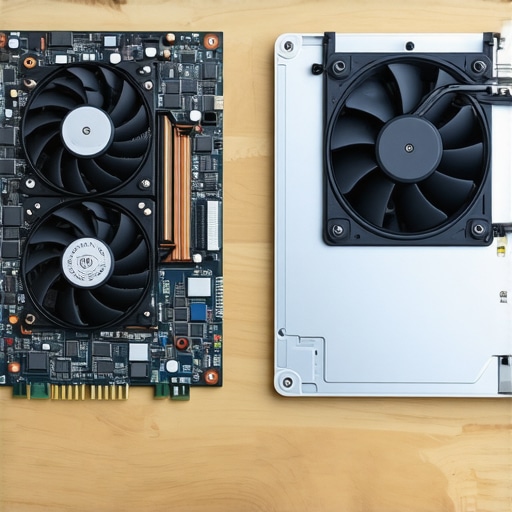
The Cooling Trap That Kills High End Hardware
It is not just about fan noise; it is about long-term survival. When a laptop runs hot constantly, it slowly degrades the battery and the motherboard. I’ve noticed that people often blame a ‘bad battery’ when the real reason your laptop power brick is getting extremely hot is that the internal components are working overtime just to stay alive. A report by Gartner on IT hardware lifecycles suggests that enterprise-grade machines—the kind you find at the estate sales I mentioned earlier—are engineered for a significantly longer ‘mean time between failures’ than the budget plastic laptops found at big-box retailers. If you are picking out student laptops that balance power and portability perfectly, you want something with a magnesium or aluminum frame that acts as a giant heat sink rather than a plastic insulator.
Why a Three Year Old Workstation Beats a New Budget Laptop
Many buyers think all storage drives are created equal as long as the capacity matches. However, the real difference between consumer and enterprise grade SSDs comes down to ‘write endurance’ and controller reliability. A used workstation might have an older drive, but that drive is often rated for ten times the data throughput of a cheap modern one. This is why I always check the specific hardware IDs before I hand over my cash. If I’m looking for top business laptops for productivity, I’d take a three-year-old Latitude or ThinkPad over a brand-new $300 ‘plastic fantastic’ model any day. You aren’t just buying parts; you are buying the engineering that keeps those parts from failing when you have a deadline.Once you have successfully walked away with a used beast, your job is not finished; it is actually just beginning. I have seen too many people find unbeatable laptop deals only to have the machine die six months later because they treated it like a disposable appliance. If you want a machine to last, you have to be proactive. The very first thing I do with any ‘new-to-me’ machine is a full teardown. I know that sounds intimidating, but when you have the specific screwdriver kit you need to open 90 percent of modern laptops, it becomes a thirty-minute ritual that saves you years of frustration. I personally don’t trust the factory thermal solution on a machine that has been sitting in someone’s attic for five years.
Stop the Slow Death of Your Silicon
Most people don’t realize that thermal paste—the stuff that transfers heat from your chip to the cooling system—eventually turns into a brittle, useless crust. This is why we swapped the thermal paste on our brand new laptop and why you should do it on every used one you buy. As noted in Intel’s official technical documentation regarding thermal management, maintaining a chip below its T-junction maximum is critical to preventing permanent silicon degradation. If your fan is spinning like a jet engine while you are just browsing the web, you are killing your hardware. Learning how to replace a dead laptop fan without voiding the warranty or simply cleaning out the existing one can drop your temperatures by twenty degrees instantly. If you cannot open the case yet, at least learn how to clean the dust out of your laptop without opening it to give the internal components some room to breathe.
How do I maintain my laptop hardware over time?
Consistency is the secret sauce. Every six months, I perform a ‘health check’ that involves more than just running a virus scan. I check the physical integrity of the chassis. A tiny bit of friction in the display mechanism today is a snapped frame tomorrow. I always keep the ten dollar tool that fixes every squeaky laptop hinge in my desk drawer. It is a specific type of synthetic lubricant that does not attract dust. By applying a tiny drop to the tension points, I ensure that my top business laptops for productivity stay feeling like new, rather than creaking every time I join a Zoom call. 
The Gear That Separates Owners from Operators
To truly scale your setup, you need to think about the environment where the laptop lives. I have found that even the most powerful game-changing gaming laptops for serious players in 2025 struggle if they are perpetually used on a soft surface like a bed or a couch. You need must-have laptop accessories to boost your work setup, specifically a rigid stand that allows for bottom-intake airflow. Looking ahead, I predict that within the next five years, we will see integrated AI diagnostics built directly into the BIOS of the only 3 brands that still make easily repairable laptops, allowing users to predict a hardware failure weeks before it happens. Until then, we have to rely on our own maintenance schedules. If you are setting up student laptops that balance power and portability perfectly, teach the user that the charger is the most fragile part of the system. Stop wrapping the cord tightly around the brick; that is the fastest way to fray the internal copper. My big challenge to you: grab a tube of high-quality thermal compound tonight and perform a ‘paste-swap’ on your oldest machine. You will be shocked at how much life is left in that old silicon once it can finally stay cool.
The Hard Lessons That Turned Me Into a Tech Hunter
Over the years, I have realized that the most expensive mistake is buying a machine based on emotion rather than data. I once bought a “pristine” laptop because the owner seemed honest, only to find the motherboard was held together by hope and electrical tape. Now, I never leave home without knowing how to find a used thinkpad that actually lasts three more years through rigorous physical stress tests. Another major shift in my mindset was realizing that consumer-grade “deals” are rarely deals at all. I shifted my focus entirely to professional machines because they are built for the long haul. If you are serious about this, you need to stick to the only 3 brands that still make easily repairable laptops to ensure you can actually fix what you find.
#IMAGE_PLACEHOLDER_E#
My Field-Tested Toolkit for On-Site Inspections
You don’t need a van full of equipment to find great gear. I rely on three primary things: my bootable diagnostic drive, a high-quality screwdriver set, and a trusted list of benchmarks. I always recommend checking out must-have laptop accessories to boost your work setup once you get home, because a great laptop deserves a great environment. I also keep a bookmark for how to find hidden warehouse deals on premium laptop brands just in case the local estate sales are dry for a few weeks. These resources are my safety net, ensuring I never pay retail for hardware again.
Start Your Own Hunt for a High-Value Workstation
There is a specific kind of thrill that comes from reviving a piece of “junk” and turning it into a powerhouse workstation. Whether you are looking for a machine to start your business or just need unbeatable laptop deals to save some cash, the opportunity is everywhere. Stop scrolling through the major retailers and start looking where others aren’t. Your perfect machine is likely sitting in a box just a few miles from your house right now. Have you ever found a tech treasure at a garage sale or estate listing? Let me know about your best find in the comments below!