
I still remember the smell—a cloying, sweet, metallic scent drifting up from my desk. I was deep into a late-night project on my laptop when I noticed the trackpad felt stiff. Then I saw it: the bottom casing was literally peeling away from the keyboard. My battery wasn’t just old; it was swelling into a ‘spicy pillow’ that threatened to pop and take my desk with it. I had committed the ultimate sin of the budget-conscious tech enthusiast—I bought a ‘genuine’ replacement from a seller with a name that looked like a cat stepped on a keyboard. It was a terrifying realization that I’d almost traded my safety for a $30 discount. Today, I’m going to make sure you don’t make that same mistake, because finding a reliable cell shouldn’t feel like playing Russian Roulette with your hardware. We’re going to dive into the murky world of third-party vendors and the actual certifications that keep your house from burning down.
Why Saving a Few Bucks on Power Can Cost You Your Laptop
When your battery starts to fail, the instinct is to jump on a marketplace and find the cheapest thing that fits. I get it. I’ve been there. In fact, one of my biggest early mistakes was thinking that a battery is just a plastic case full of generic chemicals. It’s not. A modern battery is a complex piece of electronics that communicates constantly with your motherboard. When I tried to save money on that generic pack, I realized the real reason your laptop power brick is getting extremely hot isn’t always just heavy usage—it’s often the result of poor quality cells drawing current in ways they weren’t designed for. The danger is real. According to data from the Consumer Product Safety Commission, lithium-ion battery incidents remain a critical safety concern, often linked to manufacturing defects or lack of proper protective circuitry in low-end replacements. This isn’t just about your laptop dying early; it’s about physical safety. If you are using must-have laptop accessories to boost your work setup, the most important one is the one inside the machine that keeps the lights on.
Are those $20 generic batteries actually worth the risk?
It’s the question everyone asks when they see the massive price gap between an OEM part and a third-party clone. You think, ‘Surely the brand name isn’t worth an extra $100?’ Sometimes that’s true, but more often, you’re paying for the testing and the protection circuits that prevent overcharging. We’ve all seen the horror stories of why your laptop is getting hot while the lid is closed, and frequently, it’s a cheap battery that doesn’t know when to quit drawing power. I personally prefer the peace of mind that comes with knowing why we only buy laptops with removable battery packs—it makes the whole process of swapping a failing unit much safer and less invasive. Have you ever noticed your laptop’s underside bulging, or perhaps it just shuts off the second you unplug the charger? Before you click ‘buy’ on that suspiciously cheap replacement, let’s talk about what actually matters when looking for a power source that won’t fail you. Once you find a safe unit, you’ll also want to know how to calibrate your laptop battery for better accuracy to ensure you’re getting every minute of promised runtime. Let’s break down how to spot the fakes from the high-quality alternatives.
Ditch the Guesswork by Decoding Your Battery’s DNA
The first thing you need to realize is that ‘compatible with’ is a marketing term, not a technical specification. When you are scouting for a replacement, your mission is to find the exact manufacturer part number (MPN) usually printed in tiny, bold text on the original battery. I remember trying to find a swap for one of the student laptops that balance power and portability perfectly, and I nearly bought a unit that looked identical but had a different voltage. If your laptop expects 11.4V and you shove in a 14.8V cell because the connector fits, you aren’t just giving it ‘extra juice’—you are inviting a localized electrical fire. Always match the voltage exactly; the capacity (mAh or Wh) can be higher, but the voltage is non-negotiable.
Look for the Certification Stamps That Can’t Be Faked
Reliable batteries aren’t just plastic boxes of chemicals; they are regulated safety devices. You want to see the UL (Underwriters Laboratories) logo or the ETL mark. These indicate that a third-party lab has actually stressed the battery to see if it explodes under pressure. Cheap clones often just print these logos on the sticker without actually passing the tests. One red flag I always look for is the weight. I once compared a ‘genuine’ $25 knock-off to an OEM original and the fake felt like a hollow toy. That’s because it lacked the internal shielding and the proper number of cells. If you’re browsing through unbeatable laptop deals, remember that the internal components are where manufacturers often cut corners to hit those low prices. 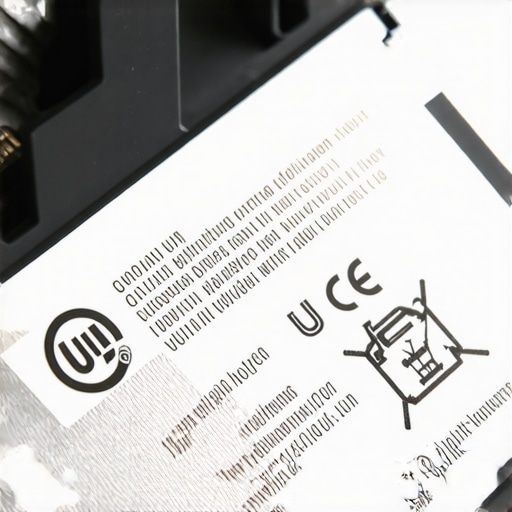
Generate a Windows Battery Report for the Real Truth
Before you even open your machine, let the software tell you what’s wrong. Open your Command Prompt and type ‘powercfg /batteryreport’. This is a game-changer. It gives you a detailed breakdown of the original design capacity versus the current full charge capacity. This is how you spot the reality of 10-hour battery life claims—by seeing how fast your specific cells are degrading. I used this trick on a used machine I bought at an estate sale and realized the battery had already cycled 800 times. It saved me from a laptop that would have died the moment I stepped away from an outlet.
Use the Correct Gear to Avoid a Costly Repair Fail
My biggest ‘rookie’ mistake happened about three years ago. I was swapping a battery in a rush and thought a tiny flat-head screwdriver would work on a Torx screw. I stripped the head so badly I had to use a dremel to get the casing open. I felt like a total amateur. Now, I never touch a machine without the specific screwdriver kit you need to open 90% of modern laptops. While you have the back off to swap the battery, it’s also the perfect time to do some maintenance. Learning how to replace your laptop thermal paste without breaking anything can drastically lower the internal temperature, which in turn extends the life of your brand-new battery. Heat is the number one killer of lithium-ion cells, so keeping the airflow clear is just as important as the battery quality itself.
Most people think that a laptop is a fixed asset—you buy it, use it for three years, and then scour the internet for top laptop deals in 2025 to replace it. I disagree. The real pro move is treating your machine like a modular platform, even in an era of increasingly sealed chassis. One of the biggest myths I encounter is that ‘business laptops’ are always more reliable than gaming machines. In reality, game-changing gaming laptops for serious players in 2025 often have much more robust cooling systems and power delivery than thin-and-light office models. If you can get past the RGB lighting, a gaming rig often survives heavy workloads better than a sleek ultrabook that’s constantly choking on its own heat.
Does high-wattage charging actually degrade your battery faster?
There is a lot of noise about fast charging. You’ll hear people claim that using a 100W brick on a laptop that came with a 65W charger will ‘cook’ the cells. That is simply not how modern Power Delivery (PD) handshakes work. However, the nuance most people miss is heat. A study by Battery University suggests that while the wattage itself isn’t the killer, the internal ambient temperature generated during rapid charging cycles is. If you are constantly fast-charging in a warm room, you are fast-tracking your way to a ‘spicy pillow.’ I always recommend the truth about high wattage chargers and battery longevity to my clients: use the big brick when you’re in a rush, but stick to a lower-wattage, stable source for overnight desk work to keep the chemistry stable.
Another trap I see students fall into is the allure of the 2-in-1. Everyone thinks they need a stylus for notes, but why students should skip the touchscreen trend this semester comes down to two words: repairability and reflections. Touch digitizers add a layer of complexity that makes screen repairs three times more expensive and significantly increases battery drain. For those in high-intensity environments, I suggest looking into student laptops that boost productivity and learning without the gimmicks. You want a matte screen and a keyboard that doesn’t flex, not a screen you’ll rarely draw on after the first week.
Stop buying hardware with built-in expiration dates
The ‘Oops’ factor often comes months after the purchase when you realize your 8GB of RAM is pinned at 95% just by opening Chrome. This is why I have a personal vendetta against certain modern design trends. I cannot stress enough why we never buy laptops with soldered ram for longevity. It is a planned obsolescence trap. If one memory chip fails, your entire motherboard is electronic waste. Before you commit to any of those unbeatable laptop deals, check the internal photos. If you can’t see a SODIMM slot, walk away. Have you ever fallen into this trap of buying a machine that couldn’t be upgraded? Let me know in the comments, because your ‘budget’ find might be costing you way more in the long run.
I used to think that as long as I didn’t spill coffee on my machine, it would last forever. I was wrong. Maintenance isn’t just about disaster prevention; it’s about preventing the slow, silent degradation that turns a snappy machine into a paperweight. If you’ve spent months hunting through top laptop deals in 2025, it’s worth the extra twenty minutes a month to ensure that investment pays off for years. The first thing I tell anyone is to stop ignoring the physical wear on moving parts. A stiff hinge isn’t just a nuisance—it’s a ticking time bomb for your LCD panel. I’ve seen dozens of business laptops for professionals ruined because the user didn’t apply the $10 tool that fixes every squeaky laptop hinge before the plastic mounting points snapped under the tension.
The Pro Toolkit for Hardware Longevity
You don’t need a specialized lab, but you do need precision. Beyond the screwdriver kit I mentioned earlier, your most valuable asset is a can of compressed air and a high-quality microfiber cloth. I personally avoid those cheap ‘cleaning gels’ because they leave a sticky residue that attracts even more debris. Instead, learn the best way to clean your laptop keyboard from crumbs and oil using 70% isopropyl alcohol and patience. This is especially critical for student laptops that boost productivity and learning, which tend to live in backpacks and see more crumbs than a bakery floor. Keeping the keys clean prevents the switches from jamming and keeps the aesthetic resale value high if you decide to upgrade later.
How do I maintain my laptop hardware over time?
Maintenance is a two-front war: physical and thermal. Physically, you want to address structural weaknesses like the heavy metal fix for wobbly laptop hinges. Thermally, you need to monitor your internal sensors. I use HWInfo64 to keep an eye on my ‘Core Thermal Throttling’ flag. If I see that flag tripping during normal tasks, I know it’s time to blast the dust out of the fins. According to technical documentation from Intel’s Thermal Management guidelines, even a 5-degree Celsius increase in sustained operating temperature can measurably decrease the lifespan of voltage regulator modules (VRMs). For those pushing their hardware, I highly recommend learning how to undervolt your gaming laptop for better temps and performance. It’s a software-level tweak that reduces the power draw and heat without sacrificing a single frame of gameplay.
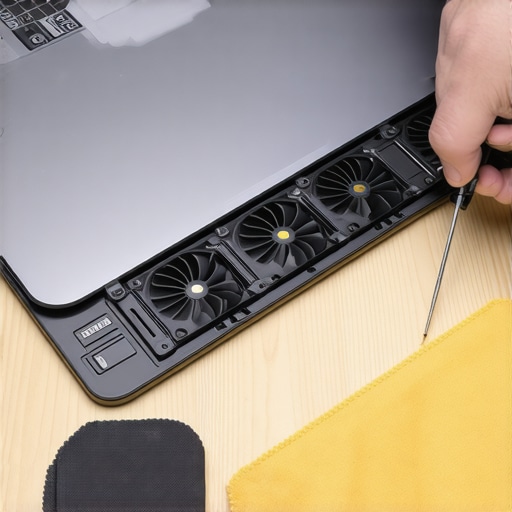
Looking toward the future, the ‘sealed box’ era of laptop design is slowly dying. With the rise of modular brands and the ‘Right to Repair’ movement gaining steam, I predict we will see a return to standardized components by 2027. We are already seeing this shift in game-changing gaming laptops for 2025 adventures, where manufacturers are starting to prioritize accessible fans and swappable Wi-Fi cards again. It’s a win for consumers and a win for the environment. If you want to stay ahead of the curve, start by looking for top business laptops for productivity in 2025 that still offer user-serviceable storage and battery compartments.
My final piece of advice for today is to be proactive rather than reactive. Don’t wait for a blue screen to check your system’s health. I want you to try this right now: download a portable hardware monitor and check your idle temperatures. If you’re idling above 50°C, your machine is crying for a cleaning. It’s a simple five-minute job that can save you a $500 repair bill down the line. We’ll be diving deeper into the specific software suites that can automate this monitoring in the next section.
Three Hard Truths About Replacement Hardware I Learned the Hard Way
Buying tech components isn’t just about reading a spec sheet; it’s about intuition. First, ‘Original’ stickers mean nothing on secondary marketplaces. I’ve seen flawless counterfeits that had half the actual capacity. Always check the seller’s specialization, not just their rating. Second, your software is only a secondary witness. While a digital report helps, your hands are the primary judge. If the trackpad feels stiffer than usual, that battery is already expanding. Finally, don’t let a bad cell discourage you. If you know how to fix your laptop battery if it only lasts one hour, you’re already ahead of 90% of users who simply throw their machines away.
The Tools I Never Travel Without
Maintaining a high-performance machine requires a few trusted companions. I swear by HWInfo64 for thermal monitoring—it’s the gold standard for seeing what’s actually happening under the hood. For those hunting for unbeatable laptop deals, I always keep the Crucial System Scanner handy to verify upgrade paths. I also suggest bookmarking the secret to finding high-end laptops at local estate sales if you want to find quality hardware to practice your repair skills on. These resources, combined with must-have laptop accessories for a seamless setup, ensure your workspace stays functional and safe. #IMAGE_PLACEHOLDER_E#
Your Machine Deserves a Second Life
A laptop is more than a plastic case; it’s an investment in your goals. By taking proactive steps—whether you are rocking game-changing gaming laptops for 2025 adventures or reliable student laptops that boost productivity and learning—you are reclaiming control over your technology. Don’t let a failing battery or a bit of dust turn your workstation into a paperweight. You have the tools, the knowledge, and now the plan to keep your hardware running for years to come. Have you ever had a battery swell up on you, or are you just starting to notice your laptop dying faster? Let me know your experience in the comments below.