
I remember the exact moment my trusty workhorse finally gave up the ghost. I was sitting in a crowded coffee shop, trying to show a client a mock-up, when I heard that sickening crunch. It wasn’t my bagel. It was the hinge of my laptop snapping through the plastic palmrest. Suddenly, I was holding a very expensive clamshell that refused to stay open. I sat there staring at a screen that just wouldn’t stand up on its own. It was a Tuesday, the coffee was cold, and my professional machine had decided it was actually a very expensive doorstop. Every time I tried to type, the display would slowly drift backward until it hit the table with a soft thud. I tried the classic tighten the screw trick, but it didn’t do anything because the plastic anchor underneath had completely disintegrated. That was my lightbulb moment. I realized that modern business laptops are often designed to be thin, but the laws of physics simply do not care about your aesthetic preferences.
Why Most Laptops Eventually Turn Into Floppy Sandwiches
The reality is that manufacturers often anchor heavy-duty steel hinges into thin, brittle ABS plastic. It is a recipe for disaster. I have seen it happen on everything from high-end gaming rigs to student laptops that boost productivity. Early on in my DIY repair journey, I made the amateur mistake of thinking a little bit of epoxy would fix the problem. I globbed it on there, waited twenty-four hours, and the first time I opened the lid, the whole thing shattered even worse than before. Glue simply does not handle the sheer force of a hinge. This is a common issue because the hidden costs of repairing modern thin and light laptops are usually tied to replacing the entire top case just because a tiny plastic nub broke off. If you are dealing with a screen that won’t stay put, we are going to fix that today. Not with glue, but with reinforcement. We are looking at the heavy metal approach: using actual hardware to bridge the gap where the factory plastic failed. This isn’t just about making it work; it is about making it stronger than the day you bought it. Have you ever felt that heart-stopping snap when opening your lid, or are you just starting to notice a little extra play in the screen? [image_placeholder]
Does a metal brace actually work better than glue?
I get the skepticism. Most people think if the factory plastic broke, the machine is destined for the recycling bin. But here is the secret: metal does not fatigue nearly as fast as the polycarbonate blends used in most chassis. According to mechanical engineering data from the Engineering Toolbox, the tensile strength of standard ABS plastic is roughly 40 MPa, while even basic aluminum or steel brackets are orders of magnitude stronger, allowing them to distribute the hinge’s torque over a much wider surface area. Before you start, make sure you have the specific screwdriver kit you need to avoid stripping the tiny screws that hold these machines together. I have rescued machines that were literally held together by tape, and with a few well-placed metal plates or through-bolts, they have gone on to serve another five years. It might not look like a showroom model when we are done, but it will be rock solid. This is why we avoid plastic screen bezels whenever possible. Sometimes, you just need the ten dollar tool that fixes every squeaky laptop hinge to prevent the break in the first place, but if you’re past that point, it is time for the heavy metal fix.
Strip it Down to the Chassis
Before you even think about drilling, you need to expose the skeleton. Use your specific screwdriver kit to remove the bottom cover and the bezel around the screen. You are looking for the ‘bosses’—those little plastic towers that hold the brass threaded inserts. If they are pulverized, which they usually are, we aren’t going to glue them back. We are going to bypass them entirely. I remember my first attempt at this on a bulky old machine; I tried to save the original look by hiding the repair inside, but the plastic just crumbled again under the torque of the screen. Now, I go straight for the ‘through-bolt’ technique. It is the difference between a band-aid and a titanium plate in a leg.
The Through-Bolt Method Saves Laptops
Think of this repair like a sandwich. The bottom of the laptop is one slice of bread, the hinge is the meat, and a wide metal washer on the outside is the other slice. By running a bolt all the way through the casing, the hinge, and an external washer, you distribute the torque across the entire surface of the lid rather than a single 2mm point of plastic. This is vital because the hidden costs of repairing modern thin and light laptops often stem from these exact structural failures. For student laptops that boost productivity, this repair can add years of life for less than five dollars in hardware. 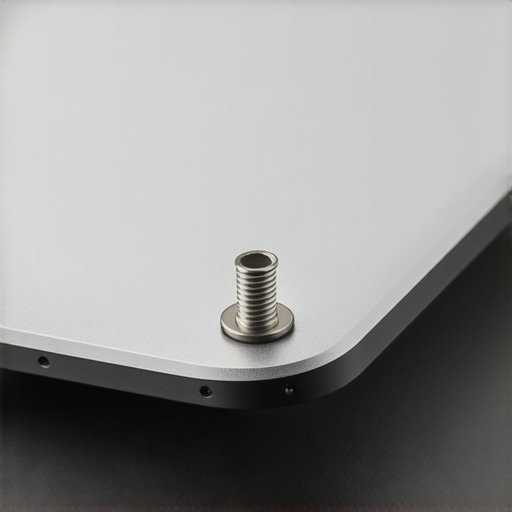
Drill Slow or Pay the Price
This is the part that makes people sweat. You have to drill a hole through your laptop casing. Use a bit that matches the diameter of your M2 or M2.5 bolts. My pro tip: start the hole from the inside where the original screw hole was. This ensures perfect alignment with the hinge. I once rushed this on a friend’s laptop and nicked the display cable—a mistake that turned a simple structural fix into a nightmare. You have to be as careful as when you replace a dead laptop fan; one wrong move and you hit the motherboard or the LCD. Always place a piece of scrap wood behind the plastic you are drilling so it doesn’t crack when the bit bites through.
Adjust the Tension to Stop the Snap
If your hinge was stiff enough to break the plastic, it is too stiff for the machine. You need to loosen the nut on the hinge itself. This is why we avoid plastic screen bezels when we can—they just can’t handle the physics of a tight hinge. A half-turn counter-clockwise with a small socket or needle-nose pliers will make the movement butter-smooth. If you are looking for a new machine and want to avoid this entirely, you should learn how to find a lightweight laptop that doesn’t flex, as those usually have better internal bracing. Once the tension is right and your bolts are through, cap them with a nylon locking nut. This setup won’t vibrate loose even if you’re traveling every day. It transforms a floppy, broken mess into a machine that feels more industrial than it did in the showroom. Adding must-have laptop accessories to boost your work setup might make the desk look better, but this metal reinforcement makes the desk actually usable.This structural fix is a great way to save a machine, but it highlights a bigger issue: the myth that a ‘good deal’ is defined by the spec sheet alone. When most people look for unbeatable laptop deals, they zero in on the processor and the RAM count. I used to do the same until I realized that a fast CPU inside a flimsy chassis is just a high-speed car with no brakes. In my years of repairing and testing hardware, the most common mistake I see is choosing a consumer-grade i7 over an enterprise-grade i5. The consumer machine might be faster for ten minutes, but why gaming laptops still struggle with thermal throttling applies to thin consumer ultrabooks too—they simply can’t dissipate the heat, leading to premature motherboard failure.
Why do enterprise machines outlast flagship consumer models?
It comes down to the ‘Mean Time Between Failure’ (MTBF). According to industry data from reliability studies like those conducted by SquareTrade, consumer-grade laptops have a failure rate significantly higher than business-grade counterparts within the first three years of use. This isn’t just bad luck; it is a design choice. While you are looking for student laptops that balance power and portability, manufacturers are often cutting costs on the internal cooling fins and the very hinge mounts we just fixed. [image_placeholder]
The Soldered RAM Trap Can Kill Your Long-Term Savings
Another nuance that ‘deal hunters’ often miss is the trend of non-upgradable components. This is the ultimate ‘Oops’ factor. You might find a great price on a sleek machine, but why we never buy laptops with soldered RAM is a lesson learned in blood and high repair bills. If a single memory chip fails or if software requirements grow in two years, that ‘deal’ becomes e-waste. This is why I often point professionals toward top business laptops for productivity that still offer SODIMM slots. It’s about more than just speed; it’s about the ability to maintain the machine yourself.
Don’t Ignore the Hidden Trap of Budget Gaming Screens
If you are pivotting toward gaming hardware because it looks ‘tougher,’ beware of the display quality. One of the biggest disappointments for buyers is the hidden trap of budget gaming screens: motion blur. You might have a powerful GPU, but if the panel has a slow response time, every movement will look like a smeared mess. This is why the secret to buying laptops directly from lease returns is so valuable—you get workstation-grade panels that were built for color accuracy and stability, not just flashy marketing numbers. I’ve seen people spend $1,200 on a laptop only to realize they can’t use it outside because the screen isn’t bright enough. Also, be careful with your power settings; understanding the truth about high wattage chargers and battery longevity can save you from a swollen battery down the line. Have you ever fallen into the trap of buying a laptop for its specs only to have it fall apart physically? Let me know in the comments.Once the physical repairs are solid, the battle for longevity moves inside the chassis. I see so many people grab top laptop deals in 2025 only to let the machine choke on dust and bloatware within eighteen months. Heat is the ultimate silent killer of silicon. If your fans are spinning like a jet engine while you’re just browsing Chrome, your machine is screaming for help. I personally swear by a biannual deep clean. I don’t just blow compressed air into the vents; I open the back and physically hold the fan blades still while I clear the dust bunnies. This prevents the air from spinning the fans too fast and generating back-voltage that can fry a header.
Stop the Heat Before it Kills Your Motherboard
Most factory-applied thermal interface materials are, quite frankly, garbage. They are designed for easy assembly, not peak performance. According to the official technical specifications from Thermal Grizzly, their high-performance compounds achieve a thermal conductivity of 12.5 W/mk, which can drop core temperatures by up to 10 degrees Celsius compared to the stock ‘toothpaste’ found in budget rigs. This is why you should learn how to replace your laptop thermal paste without breaking anything. It is a terrifying twenty-minute job the first time you do it, but it effectively resets the clock on your CPU’s lifespan. I’ve done this on everything from game-changing gaming laptops for serious players in 2025 to old office machines, and the results are always the same: lower temps and higher clock speeds. 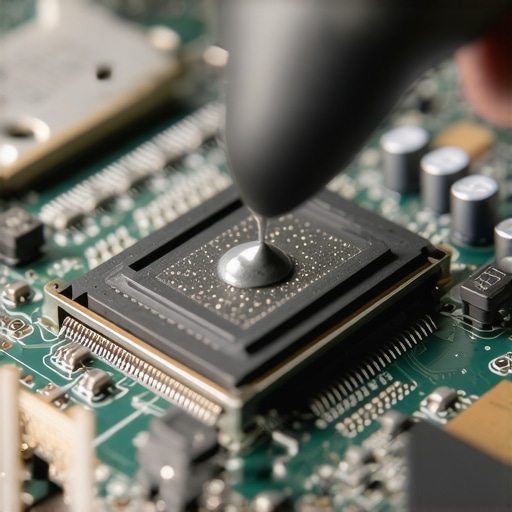
How do I maintain my laptop cooling system over time?
Consistency is more important than expensive gadgets. Beyond the physical cleaning, I use software like ThrottleStop to manage the ‘silicon lottery.’ Many modern chips are fed more voltage than they actually need to stay stable. By learning how to undervolt your gaming laptop for better temps and performance, you are literally asking your hardware to do the same work with less stress. It’s like running a marathon with a lower heart rate.
Software is the Secret to Hardware Longevity
We also need to talk about the ‘Windows Rot’ that kills battery life. Every piece of pre-installed software is a tiny vampire. I always recommend a ‘Clean Install’ of Windows or at least learning how to disable Windows features that eat your battery life. If your CPU is constantly at 5% usage because of background telemetry, your battery is undergoing unnecessary charge cycles. In the future, I predict we will see AI-driven thermal management that predicts workloads to prevent heat spikes before they even happen, but until then, we have to be the brain of the operation. You should also invest in must-have laptop accessories to boost your work setup that prioritize airflow, like simple riser feet. My challenge to you: download a hardware monitor today and check your idle temperatures. If they are over 50 degrees Celsius, it is time to open that case and get to work.
The Brutal Truths I Learned from a Dozen Broken Laptops
After years of stripping screws and bracing cracked frames, I’ve realized that superglue is almost always a mistake. It creates a brittle bond that shatters under the constant tension of a screen lid. Instead, embrace the ‘mechanical bridge’ method; it’s the only way to counteract the fact that the hidden costs of repairing modern thin and light laptops are designed to push you toward a new purchase. Another realization: torque management saves lives. If you don’t use the ten dollar tool that fixes every squeaky laptop hinge to loosen the tension early, you are essentially setting a timer for when the plastic will fail. Finally, stop buying based on the sticker on the palm rest. High-end components in a flimsy shell are the primary reason many student laptops that boost productivity end up in the bin before graduation day.
The Gear That Actually Earned a Permanent Spot on My Desk
You don’t need a professional laboratory to keep your machine running, but you do need the right interface. I never start a teardown without the specific screwdriver kit you need because stripped screw heads turn a fun Saturday project into a nightmare. For internal maintenance, skip the generic tubes and learn how to replace your laptop thermal paste without breaking anything using high-conductivity compounds like Thermal Grizzly Kryonaut. I also recommend keeping a stash of M2.5 nylon locking nuts; they are the unsung heroes of the through-bolt repair. These small hardware investments, combined with must-have laptop accessories to boost your work setup, turn a consumer toy into a professional workstation.
Own Your Hardware Instead of Replacing It
There is a unique kind of satisfaction in hearing that solid click of a repaired hinge and knowing you saved a thousand dollars while keeping a perfectly good motherboard out of a landfill. While companies want you to keep hunting for top laptop deals in 2025, the real power comes from knowing how to sustain what you already own. You have the tools, the knowledge, and the metal—now go fix that machine. Have you ever tried a ‘janky’ DIY fix that actually worked better than the factory part? Let me know below.