
I remember staring at a blinking cursor at 2 AM, my fingers feeling like they were trying to type through a bowl of cold oatmeal. I was using a budget laptop I’d snagged during one of those unbeatable laptop deals, but the keyboard was a total sponge. It was mushy, unresponsive, and honestly, a massive hurdle for my daily word count. My wrists throbbed, and the constant typos were driving me to the brink of a breakdown. Writing should feel like a flow, not a physical struggle against a piece of plastic. If you’ve ever felt like your hardware was actively fighting against your creativity, you’re not alone. I’ve been in that dark place where every keystroke feels like a chore, and I’m here to tell you there is a way out that won’t cost you a month’s rent.
My Fingers Were Literally Begging for Mercy
Writing is hard enough without your tools making it harder. Early in my career, I made the classic mistake of thinking any old board would do as long as the letters didn’t rub off. I spent twenty bucks on a backlit gaming keyboard from a bargain bin, thinking the flashing lights would somehow make me faster or more inspired. Instead, the keys were so stiff and shallow that my hands felt like gnarled claws by lunch. It’s one of those must-have laptop accessories that people often overlook until the physical pain sets in. I even wasted a whole afternoon trying to fix a sticky key on that cheap unit before finally realizing I was just polishing a turd. Since then, I’ve learned that a good typing experience isn’t about the price tag or the branding, but the tactile feedback and the way the keys travel. When I finally switched to one of the only 3 budget keyboards worth using for long essays, it was like a weight lifted off my shoulders. [image]
Are Budget Mechanical Keyboards Actually Worth the Hype?
The short answer is a resounding yes, but there’s a catch that most reviewers won’t tell you. You have to know how to sift through the marketing fluff so you don’t end up with expensive e-waste. According to research published in the International Journal of Industrial Ergonomics, the tactile feedback from mechanical switches can lead to significantly lower typing force, which reduces long-term fatigue over grueling writing sessions. I eventually shifted my focus to finding mechanical switches for laptop docks that offered that premium thocky sound without the premium $200 price point. We’re going to look at why certain cheap boards are actually better than $150 name brands that just spend all their money on advertising. Have you ever bought a keyboard that promised the world but ended up at the bottom of a drawer after just a week? I’m going to make sure that never happens again. We are going to find you a deck that makes you actually want to sit down and write your next novel. It’s time to stop settling for mushy, membrane plastic and start enjoying the rhythmic, satisfying click of a quality machine.
Stop Buying Keyboards That Only Pretend to Be Mechanical
The first thing you have to do is learn the ‘Switch Handshake.’ Most big-box retailers sell ‘mechanical-feel’ or ‘mem-chanical’ boards. These are just standard membrane keyboards with a little plastic clicker added to make noise. They are the tofu of the tech world—trying to look like steak but failing the taste test. I once fell for a $30 ‘gaming’ board that claimed to have mechanical precision. Within three days, the spacebar started sticking, and I had to learn how to fix a sticky key without replacing the entire keyboard just to finish a 500-word blog post. It was a nightmare. Real mechanical boards use individual physical switches for every single key, providing a consistent response that doesn’t degrade over time.
The Secret to the Perfect Writing Switch
When you are sifting through top laptop deals in 2025, look for boards mentioning ‘Hot-Swappable’ PCBs. This is the holy grail for budget buyers. It means if one switch dies, you can just pop it out and put a new one in for fifty cents rather than throwing the whole board away. For the actual typing feel, I always recommend ‘Brown’ switches for writers. They have a tactile bump that tells your brain exactly when the letter has been registered, which actually speeds up your typing over time. ‘Blue’ switches are often too loud for a shared office, and ‘Red’ switches are frequently too sensitive, leading to accidental double letters while you’re deep in thought.#IMAGE_PLACE_HOLDER_B#
Ditch the Rainbow Lights for Better Build Quality
Manufacturers love to distract you with 16.8 million colors of RGB lighting. It is the shiny lure used to hide a flimsy, hollow plastic case. We almost always skip the RGB lighting on our work setups because that manufacturing cost is much better spent on a metal backplate. A metal plate gives the keyboard ‘thud’ instead of ‘ping.’ To test this, try to gently twist the keyboard with your hands. If it creaks or bends, your typing will feel like you are working on a trampoline. You want a solid, heavy base that stays put on your desk, much like the reliable chassis found in the best business laptops for professionals.
Small Details That Make a Massive Difference
Don’t overlook the stabilizers. These are the little dummy switches under the long keys like the Shift, Enter, and Spacebar. On cheap boards, these rattle like a bag of bolts. I remember one specific budget board where the spacebar was so wobbly it felt like it was going to fly off every time I hit it. If you can, look for ‘pre-lubed’ stabilizers. It sounds like a minor technical detail, but it is the difference between a smooth, premium sound and a cheap, plastic clatter. This is one of those must-have laptop accessories for a seamless setup that turns a chore into a hobby. Also, check the connection. While wireless is tempting, a simple USB-C wired connection is more reliable for long sessions. We have found that the reasons why most wireless mice lag in crowded offices also apply to budget Bluetooth keyboards—they often drop the first letter of a sentence when they wake up from sleep mode. If you are using student laptops that boost productivity and learning, sticking to a wired connection ensures you never lose a single keystroke during a late-night essay marathon.Let’s dig deeper into the actual hardware because the biggest mistake I see people make when hunting for top laptop deals in 2025 is prioritizing a ‘new’ status over actual engineering quality. Everyone tells you to buy the latest budget model from a big-box store, but in my experience, why we prefer used enterprise laptops over cheap new consumer models comes down to the chassis. A consumer-grade laptop under $500 is often built with thin plastic hinges that are destined to fail within eighteen months. Meanwhile, an enterprise machine—the kind used by Fortune 500 companies—is designed for a five-year lifecycle of being shoved into bags and dropped on desks.
Does Soldered Memory Actually Kill Your Long-Term ROI?
The ‘oops’ factor that kills most budget purchases is the lack of modularity. Manufacturers are increasingly soldering both memory and storage directly to the motherboard to save space and force upgrades. It is why why we never buy laptops with soldered ram for longevity. If a single memory module fails in a soldered system, you aren’t just out fifty bucks for a new stick; you’re looking at a $400 motherboard replacement. A study by the International Journal of Life Cycle Assessment suggests that extending the life of a single computer from 3 to 6 years can reduce its total carbon footprint and cost of ownership by nearly 40%. By choosing machines with two RAM slots, you’re not just being ‘techy’—you’re being financially literate.#IMAGE_PLACE_HOLDER_C#One major trap I see specifically with game-changing gaming laptops for serious players in 2025 is the screen. Retailers often brag about a high refresh rate but hide a terrible ‘Grey-to-Grey’ response time. You might get 144Hz, but if the response time is 20ms, you will see ghosting and blur that makes fast-paced games unplayable. This is why the hidden trap of budget gaming screens motion blur is so dangerous—it is a spec you won’t see on the sticker. I’ve also seen people get burned by proprietary power connectors. We strictly avoid laptops with proprietary power connectors because if that specific cable breaks while you are traveling, you are stuck with a brick until a $90 replacement arrives. If you are a pro, you need top business laptops for productivity that support universal USB-C charging. Have you ever fallen into the trap of buying a ‘great’ deal only to have the hinges snap or the RAM fail a year later? Let me know in the comments. Before you click ‘buy’ on that next flashy ad, remember to use the friday afternoon trick for catching warehouse price drops on older, sturdier stock instead of chasing the newest, flimsiest plastic.
Keep the Power Flowing Without Frying the Cells
Owning a machine is only half the battle; the real work starts when you try to keep it out of the landfill. I’ve seen so many people score unbeatable laptop deals only to treat the battery like a disposable AA. If you want your investment to survive, you need to stop the cycle of constant 100% charging. I’ve made it a rule for myself: why we never leave our laptops plugged in overnight is because heat and high voltage are the twin silent killers of lithium-ion longevity. According to technical data from Battery University by Cadex Electronics, keeping a battery at high voltage levels and elevated temperatures can degrade its capacity far faster than normal cycle wear. Every six months, I make sure to how to calibrate your laptop battery for better accuracy so my Windows percentage doesn’t lie to me when I’m thirty minutes away from a power outlet.
How can I make this hardware last for five years?
The answer is simpler and cheaper than you think, but it requires getting your hands a little dirty. Most people think their laptop is getting ‘old’ when it slows down, but usually, it’s just choking. Dust builds up in the heat sinks, causing the CPU to throttle its speed to stay alive. I always suggest you learn how to check your laptop fan for dust without opening it first, but eventually, you have to go deeper. Once every two years, I perform a ‘surgical strike’ on my main machine. I open the back and replace your laptop thermal paste without breaking anything. This five-dollar tube of gray goo is the only thing standing between your processor and a slow, heat-induced death. If your machine sounds like a jet engine taking off during a simple Zoom call, this is the fix you’ve been looking for. 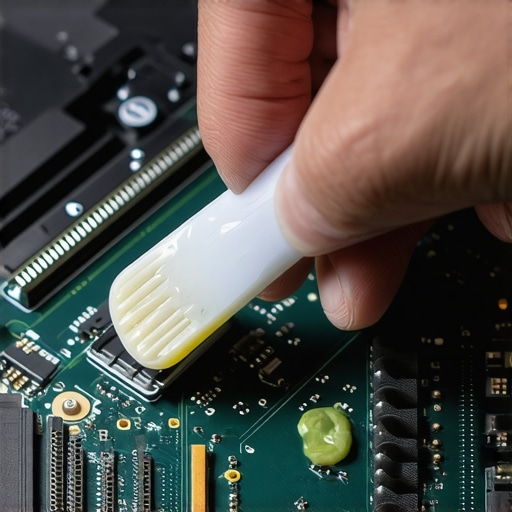
Silence the Scream of a Struggling Fan
If you’ve noticed that why your laptop fan only gets louder after cleaning is a persistent issue, it might be time to look at your software environment. Bloatware and background processes are like digital barnacles slowing down your ship. For my top business laptops for productivity, I run a clean install of Windows every year to wipe away the registry junk. Also, be careful when upgrading your internal storage. The market is flooded with junk right now, so you should learn how to spot a fake NVMe drive on Amazon before you trust your precious data to a twenty-dollar ‘2TB’ special. Looking ahead, I predict we are entering the era of the ‘forever laptop.’ With the rise of modular brands and the ‘Right to Repair’ movement gaining steam, the future isn’t about buying a new plastic slab every three years—it’s about maintaining the high-quality chassis you already own. Don’t let your gear dictate your workflow. Take control of the thermals and the power cycles. If you’re feeling brave today, I want you to look into how to undervolt your gaming laptop for better temps and performance. It’s a free software tweak that can drop your temperatures by ten degrees without losing a single frame of performance.
What the Glossy Stickers Won’t Tell You About Real Value
After a decade of hunting for the best hardware, I’ve realized that the ‘spec sheet’ is often a distraction from actual longevity. I spent years chasing the highest numbers on the box, only to realize that a slightly slower processor in a better chassis is always a win. One of the most painful lessons I learned was that thinness usually comes at the cost of repairability; this is exactly why we avoid laptops with soldered storage at all costs. If you can’t fix it, you don’t really own it—you’re just renting it from the manufacturer until it breaks.
Another lightbulb moment was realizing that ‘new’ doesn’t mean ‘better.’ Some of my most reliable machines were older enterprise models I found by using the friday afternoon trick for catching warehouse price drops. These machines were built to survive boardrooms and heavy travel, making them far sturdier than the shiny plastic consumer units you see on holiday sales.
The Tools I Use to Keep My Gear Alive
If you want your tech to last, you need a small arsenal of digital and physical tools. I always keep hardware monitoring software running to check if my machine is being throttled, and I’m a huge advocate for software tweaks that save your hardware. For instance, I’ve found that learning how to undervolt your gaming laptop for better temps and performance is the single most effective way to extend the life of your CPU without spending a dime. Physically, I suggest you stop wasting money on gimmicks; I’ve seen enough data to prove why most laptop cooling pads are a waste of money compared to a simple, five-dollar repaste job and a clean fan.
Take the Reins of Your Digital Workspace
Your computer shouldn’t be a source of physical pain or financial anxiety. It should be a transparent tool that helps you create, play, and connect. Whether you are hunting for top laptop deals in 2025 or just trying to squeeze another year out of your current deck, the key is to be proactive. You have the power to open the back, clean the fans, and optimize the settings. Don’t be afraid to get your hands a little dirty to ensure your machine serves you, rather than the other way around. Have you ever successfully fixed a piece of hardware that everyone else told you to throw away? Let me know your success stories below!