
I will never forget the sickening ‘crack’ of my brand-new $400 ‘deal’ when I tried to open it with one hand. It was a shiny, silver piece of plastic I’d bought during a massive back-to-school sale, boasting a processor that looked great on a spec sheet. But three months in, the trackpad started ghost-clicking, and the screen had more flex than a professional yoga instructor. I felt like I had been had. That was my lightbulb moment: I was paying for the ‘new’ smell, not actual longevity or build quality. Today, I want to show you why a three-year-old ThinkPad or Latitude is a better investment than any glittery consumer model you will find on a big-box shelf. We are going to solve the ‘budget laptop cycle’ once and for all. Have you ever bought a laptop that felt like a flimsy toy after just a few weeks of use? Reach out and let me know, because I felt like I was the only one falling for the glossy marketing.
Stop Buying Shiny Plastic Junk
One of the biggest mistakes I made early on was obsessing over CPU clock speeds while completely ignoring the chassis. I thought a faster processor meant a better experience, but I did not realize that most budget laptops feel sluggish because they use bottom-tier storage and terrible thermal designs that throttle performance. Consumer models are often built to last exactly as long as the warranty—usually about a year of light use. In contrast, enterprise machines are built for the long haul. According to reliability data from SquareTrade, one-third of all laptops fail within three years, but business-grade units consistently fall on the more durable side of that curve due to rigorous MIL-STD testing for drops, spills, and dust. By buying directly from lease returns, you are getting a $1,500 machine for the price of a budget tablet. It is essentially like buying a well-maintained used Lexus instead of a brand-new Mitsubishi Mirage; the quality of materials is on another planet.
Can an Old Business Machine Really Beat a New Consumer Model?
I get it. You are likely worried about the battery being toast or the screen being dim because it is ‘used.’ It is a totally valid fear. But here is the secret: professional business laptops are modular. If the battery dies, you pop it out and swap it. If you need more RAM, you add it in five minutes—unlike those modern thin-and-lights where every single component is soldered to the board to force you into an upgrade. My old ‘bargain’ was essentially e-waste in a box from the moment I unboxed it because it was unrepairable. We are going to dive into how to pick the right used gems so you can get real work done without the plastic creaking under your palms.
Skip the Big Box Stores and Head Straight to Lease Returns
The first rule of the Used Laptop Club is to stop looking at the ‘refurbished’ tags on massive retail sites and start hunting for lease returns. Think of a corporate lease like a high-end car rental; companies lease thousands of business laptops for three years, and when the contract is up, they ship them back to be liquidated. These machines haven’t been tossed around in a backpack or used for gaming; they’ve lived on desks in climate-controlled offices. Last year, I snagged a Dell Latitude from a medical office liquidation on eBay. When it arrived, the chassis was covered in ugly asset tags and the seller hadn’t even wiped the dust off. But because I knew how to test a used laptop for liquid damage before you buy, I wasn’t scared. I spent twenty minutes with some isopropyl alcohol and ended up with a machine that outperforms most student laptops sold at twice the price today. 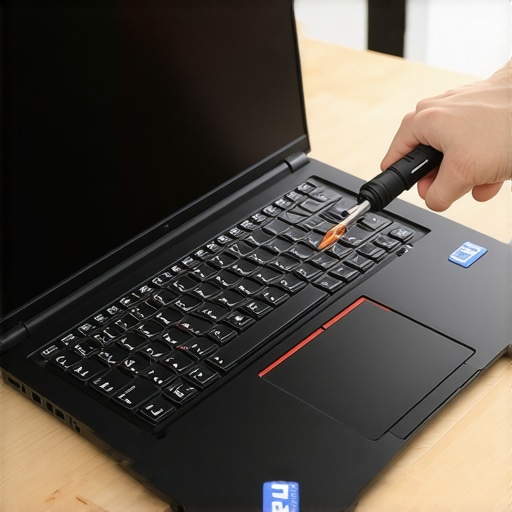
Focus on the Big Three Workhorse Families
Don’t get distracted by random model numbers. You want to stick to the ‘Big Three’: Lenovo’s ThinkPad T-series, Dell’s Latitude 5000 or 7000 series, and HP’s EliteBook line. These are the gold standard because parts are everywhere. If you break a hinge on a budget plastic model, the whole machine is junk because you can’t find the replacement part. But if you encounter a heavy metal fix for wobbly laptop hinges on a ThinkPad, you can find the exact part number in a five-second search. This modularity is why we never buy laptops with soldered RAM for longevity. If your needs change, you should be able to upgrade your hardware, not throw the whole computer away.
Spot a Lemon Before You Click Buy
When browsing listings, the description is your best friend. Always look for the phrase ‘No BIOS Password.’ Some corporate IT departments lock the BIOS, and if you can’t get in, you can’t change the boot order or update deep system settings. It’s a total dealbreaker. You also want to check the screen resolution. Avoid anything labeled ‘HD’ (which usually means 1366×768) and hold out for ‘FHD’ or 1080p. It’s also wise to spot a fake SSD in a used laptop listing by asking the seller for a screenshot of the CrystalDiskInfo report. If they won’t provide it, move on to the next seller. There are plenty of unbeatable laptop deals out there if you are patient enough to look past the first page of search results.
The Five-Minute Refresh Strategy
Once your used gem arrives, don’t just start using it. The first thing I always do is replace the laptop thermal paste. Most three-year-old machines have dried-out factory paste that makes the fan run constantly. For five dollars and ten minutes of work, you can make an old machine run silent and cool. This is also the perfect time to check your laptop fan for dust to ensure the air is moving properly. If the battery is showing its age, don’t panic. Unlike consumer ultrabooks, removable battery packs are common in older business designs, making a ‘new’ laptop experience just one click away. You aren’t just buying a tool; you are building a workstation that you actually control.It is easy to get blinded by a shiny ‘Core i7’ sticker on a $400 consumer machine at a holiday sale. However, here is the contrarian truth: a three-generation-old i5 in a Latitude 7000 series will often feel snappier than a brand-new ‘budget’ i7. Why? Because the budget machine is likely paired with a bottom-tier SSD and a screen so dim you can only use it in a dark basement. I call this the ‘Specs Over Substance’ trap. Most people don’t realize the real reason your laptop feels sluggish isn’t the raw processor speed; it is the lack of thermal headroom and slow storage. If the chassis is thin plastic, it cannot dissipate heat, forcing the CPU to throttle down to keep from melting during basic tasks. Have you ever fallen into this trap? Let me know in the comments. One massive ‘oops’ factor I see constantly is ignoring the nit rating of the display. If you are working near windows, anything under 300 nits is essentially a mirror. Most budget student laptops ship with 220-nit panels just to save the manufacturer $15. You will end up with massive eye strain, which is why we often suggest users reduce eye strain on cheap student laptop screens by simply avoiding them in favor of used pro-grade hardware with better panels. 
Is an older i7 always faster than a newer i5?
Actually, no. Data from hardware benchmarks at AnandTech and Tom’s Hardware consistently shows that architectural shifts—like Intel’s jump to the 12th generation—provide a bigger performance leap than moving up a tier within the same stagnant generation. However, in the world of business laptops, the ‘i7’ branding is often more about corporate prestige and vPro security features than actual real-world speed. For 90% of users, an i5 with 16GB of RAM is the absolute ‘sweet spot.’ This is exactly why we never buy laptops with soldered RAM for longevity. Being stuck at 8GB is a performance death sentence, regardless of how fast the CPU claims to be on the box. Lastly, be extremely wary of the generic ‘refurbished’ label. On many marketplaces, it just means someone wiped the screen and reinstalled the OS. Real value lies in ‘Certified Refurbished’ or direct lease returns where the battery health is verified. Don’t be fooled by 10-hour battery life claims on older units; always assume you might need to calibrate your laptop battery or replace it. This is why we hunt for unbeatable laptop deals in the enterprise sector where replacement parts are cheap and quality is built-in.
The Three Tools That Save My Workflow Every Single Day
Buying the right hardware is only half the battle; the real victory comes in the Day Zero optimization. I have a very specific ritual when a new-to-me machine hits my desk. I don’t trust the factory settings or the generic parts often found in even high-end consumer models. To get a truly professional experience, you need to look under the hood and treat your laptop like a performance vehicle rather than a disposable toy. This isn’t just about speed; it’s about stability and making sure you have must-have laptop accessories for a seamless setup that doesn’t fail when you are on a deadline. When I am out hunting for top laptop deals in 2025, I am already calculating the cost of these small but vital improvements.
How do I keep a used workstation alive for half a decade?
Maintenance isn’t a once-a-year event; it is a series of small, intentional habits that prevent the slow creep of hardware failure. First, I address the power system. Most people destroy their batteries by keeping them at 100% while docked 24/7. I use software-level thresholds to cap charging at 80%, which significantly extends the life of the cells. If you have already noticed a drop in runtime, you should calibrate your laptop battery for better accuracy before assuming it is a lost cause. I also make it a point to check your laptop fan for dust every three months. If you hear a slight whine, do not wait for it to seize or throttle your CPU. A quick blast of compressed air can prevent the overheating that kills performance. This is why we focus on business laptops for professionals because they are designed to be serviced without a specialized degree.
Why I Swap the Wi-Fi Card Before Even Turning It On
The single best $20 upgrade you can make to any used machine is replacing a generic Realtek or Qualcomm Wi-Fi card with an Intel AX210. I do this on every machine because we replaced our laptop wi-fi card with an intel ax210 to gain access to the 6GHz band and rock-solid driver stability. According to the official Intel ARK technical documentation for the AX210 chipset, this module supports Wi-Fi 6E, which virtually eliminates the congestion issues found in crowded coffee shops or student dorms. Before you dive in, make sure you properly ground yourself before opening a laptop to avoid frying the sensitive motherboard with static electricity. This one swap turns a decent laptop into a connectivity powerhouse. 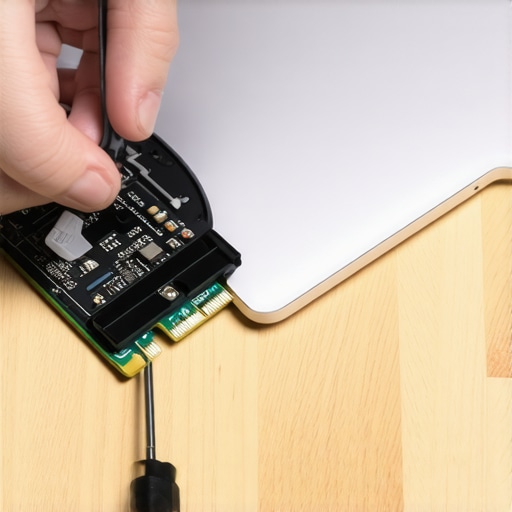
Ditch the Heavy Brick and Go GaN
Stop carrying that heavy, proprietary power brick that came in the box. I have moved my entire workflow to high-wattage Gallium Nitride (GaN) chargers. These are the best small chargers for travel heavy business trips because they can power your phone, tablet, and laptop simultaneously from a single outlet. However, you have to be careful; always tell if your laptop is being throttled by its charger by checking the power delivery (PD) profile in your system settings. If your laptop needs 65W and you give it a 45W phone charger, it will often run slower to compensate for the power deficit. Looking ahead, I predict we are going to see AI-integrated BIOS settings that automatically shift power profiles based on your calendar—knowing exactly when to save juice for a flight and when to dump power into the fans for high-speed coding or gaming. If you want to stop being a victim of the budget hardware cycle, I challenge you: order an AX210 card today and perform your first internal upgrade. It is the gateway drug to truly owning your technology.
Three Myths About Cheap New Laptops That Kept Me Broke
The most expensive laptop I ever owned was actually the cheapest one—because it died in eleven months and had zero resale value. I used to think that a ‘New’ sticker meant reliability, but for business laptops for professionals, ‘used’ often just means ‘broken in’ and ready for another five years of service. Another lightbulb moment was realizing that 16GB of RAM is non-negotiable for modern web browsers; do not let a salesman convince you that 8GB is enough just because the CPU is fast. Finally, I learned that a matte screen with high brightness is worth more than any glossy 4K panel that just reflects your own frustrated face back at you.
My Personalized Gear List for Reviving Old Workhorses
I don’t just buy a used machine and hope for the best; I equip it. To turn a lease return into a daily driver, I always start with must-have laptop accessories for a seamless setup, specifically a high-quality GaN charger that fits in a pocket. I also keep a bookmark on pages for unbeatable laptop deals to catch when specific T-series ThinkPads hit the $250 price floor. If the runtime feels a bit off, I’ve learned to calibrate your laptop battery for better accuracy before spending money on a replacement. These small habits are the difference between a ‘cheap computer’ and a high-performance workstation.
Your Move Toward a Setup That Actually Lasts
The cycle of buying ‘shiny plastic junk’ every two years ends the moment you decide to prioritize build quality over a box-store bargain. You deserve a machine that doesn’t flex when you type and doesn’t thermal throttle when you open more than three tabs. Whether you are hunting for top laptop deals in 2025 or just looking to upgrade your current Wi-Fi, remember that you are the one in control of your hardware. Don’t be afraid to open that back panel and make the machine yours. Which business laptop model are you hunting for on the used market right now?