
I remember the precise moment the excitement died. I had just spent three paychecks on what I thought was a beast of a machine. I sat down at my desk, pushed my old, cable-managed desktop aside, and plugged in my new laptop. I expected to be blown away. Instead, I felt like I was gaming through molasses. The mouse felt floaty, the load times were weirdly long, and the fans sounded like a jet engine taking off in my bedroom. If you have ever stared at a $1,500 receipt and wondered why your five-year-old PC still feels “snappier,” you are in the right place. I’ve been through that frustration, and I want to help you understand what’s really going on under the hood so you can stop second-guessing your purchase. I spent weeks hunting for the best unbeatable laptop deals, thinking I was getting a steal. My mistake was simple: I looked at the names of the parts, not the wattage behind them. I assumed that a mobile processor could handle the same sustained load as a desktop chip with a massive cooler. I was wrong. It’s a hard pill to swallow, but research from hardware experts at Tom’s Hardware shows that thermal throttling can kick in within minutes, dropping your performance by double digits just to keep the laptop from melting. This is especially true when looking at game-changing gaming laptops for 2025 adventures where portability often comes at the cost of cooling capacity.
The Physics Problem You Can’t Ignore
When you shift from a desktop to a laptop, you’re essentially moving from a mansion to a studio apartment. Everything is cramped. In my early days of laptop gaming, I didn’t realize that the real reason your gaming laptop feels sluggish on battery isn’t just about power saving; it’s about the battery’s inability to discharge enough current for the GPU. Even when plugged in, you might find how to tell if your laptop is being throttled by its charger is a vital skill. I once used a third-party travel charger and wondered why my frame rate halved—it turns out the laptop was protecting itself from a low-voltage power brick. Have you ever noticed your laptop slowing down during an intense session despite being plugged in? That’s the “physics tax” in action, and it hits everyone from pro gamers to those using student laptops that boost productivity and learning for creative tasks.
Are gaming laptops actually a bad investment?
I get it—after a bad experience, you might want to swear off laptops entirely. But the truth is, they are incredible tools if you know how to manage them. I used to think I needed a cooling pad for everything, until I realized why most laptop cooling pads are just loud paperweights. The real secret lies in software and optimization. Learning how to undervolt your gaming laptop for better temps and performance saved my machine from the “sluggish” curse without costing me a dime. Today, I’m going to show you how to identify these bottlenecks and reclaim the speed you actually paid for.
Stop Smothering Your Fans with Bedding
One of the fastest ways to kill performance is treating your machine like a pillow. I’ve seen so many people—myself included in the early days—rest their high-end rigs on blankets or carpets. You’re essentially putting a plastic bag over your computer’s mouth. The rubber feet on the bottom are there for a reason: they create a tiny gap for air intake. When you block that, the internal temperature spikes and the CPU slows itself down to avoid literal melting. This is a massive issue for student laptops that balance power and portability perfectly because their slim designs have zero margin for error. If you must work from bed, use a flat tray. I learned this the hard way when my laptop started smelling like hot electronics during a late-night study session. Why you should never use your laptop on a soft blanket isn’t just a suggestion; it’s a hardware survival rule.
Check if Your Power Brick Is Secretly Starving Your Hardware
Not all chargers are created equal. I remember swapping my bulky OEM charger for a sleek, third-party travel brick to save space in my bag. Suddenly, my frame rates in every game tanked. The laptop was receiving just enough power to stay on, but not enough to boost the GPU. You need to verify how to tell if your laptop is being throttled by its charger by checking the wattage output versus what your manual recommends. This happens often with business laptops for professionals essential picks 2025 that use USB-C charging; if the dock or brick doesn’t output 65W or 100W as required, the system will cap its own speed to prevent the battery from draining while plugged in.
The High-Impact Fix of Replacing Factory Thermal Paste
If your machine is more than a year old and still feels hot, the “gunk” between your processor and the heatsink has likely turned into dry clay. Manufacturers often use the cheapest possible thermal interface material to save pennies. I once opened up a flagship machine to find the paste was applied so poorly it was barely touching the chip. I spent an afternoon learning how to replace your laptop thermal paste without breaking anything, and the results were transformative. My idle temperatures dropped by 15 degrees Celsius. In some extreme cases, I’ve even seen users benefit from how we fixed our laptop thermal throttling with a 5 dollar shim to improve the physical contact between the cooling pipes and the silicon. 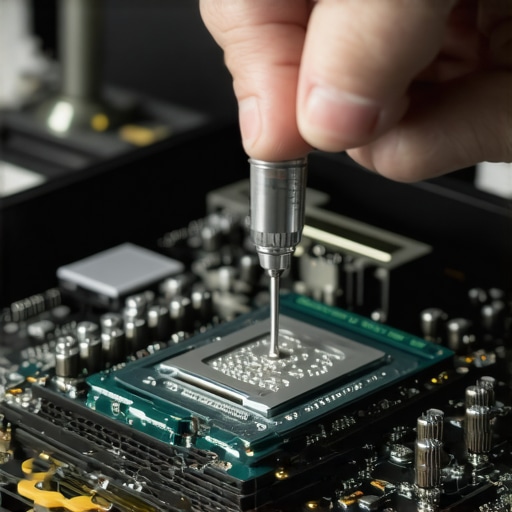
Clean the Dust Without Tearing the Case Apart
You don’t always need a screwdriver to fix a slow machine. Dust is a silent performance killer that insulates components and clogs the tiny fins in your exhaust. Every three months, I use compressed air to blast the vents. However, you have to be careful—spinning the fans too fast with air can actually generate electricity that damages the motherboard. Learning how to check your laptop fan for dust without opening it can save you a trip to the repair shop. If you’ve noticed the real reason your laptop feels sluggish after three months is usually just a buildup of household debris, you’ll realize that a quick cleaning is more effective than any “speed-up” software you can buy.
Simplify Your External Setup to Reduce Latency
Finally, look at what you’re plugging into your machine. A messy desk isn’t just an eyesore; it can cause weird driver overhead and input lag. I used to have five different dongles hanging off my laptop until I figured out how to use a single usb-c cable to connect your entire desk. This streamlines the data flow and ensures your peripheral controllers aren’t fighting for bandwidth. Investing in must-have laptop accessories to boost your work setup like a high-quality powered hub ensures your laptop can focus on the tasks you’re actually trying to perform.
We often get blinded by the shiny specs listed on the box, but the real experience happens in the margins. One of the biggest contrarian views I hold is that high resolution is frequently a trap. I have seen so many people jump at top laptop deals in 2025 because the screen was 4K, only to complain later that the machine felt ‘heavy’ or the battery didn’t last through a morning meeting. In reality, why we avoid 4k displays on laptops under 15 inches is simple: scaling issues and power draw. Research by display analysts at NotebookCheck indicates that high-resolution 4K panels on smaller laptops can decrease battery endurance by as much as 25-30% compared to standard 1080p or 1440p panels, while providing almost zero perceivable benefit at typical viewing distances. This is a classic case where more is actually less, especially for student laptops that boost productivity and learning where staying powered away from an outlet is the priority.
The Soldered RAM Mistake That Will Cost You Everything
The ‘oops’ factor usually hits about two years into ownership. You buy a slim, beautiful machine and realize later that you need more memory for your growing workflow. Then you open it up and see the horror: the RAM is soldered directly to the motherboard. It is a permanent decision you made without even knowing it. This is why we never buy laptops with soldered ram for longevity. If you are looking at business laptops for professionals essential picks 2025, always verify that at least one slot is user-upgradeable. I have seen perfectly good machines become electronic waste because they couldn’t handle a simple software update that required an extra 8GB of RAM. It is a hidden tax on the future of your device that most marketing materials conveniently gloss over.
Is an ultra-thin gaming rig actually worth the thermal headache?
Many readers ask if the new breed of razor-thin gaming machines has finally solved the physics problem. The short answer is no. While game-changing gaming laptops for serious players in 2025 have better heat pipes than ever, the hidden cost of buying an ultra-thin gaming laptop is still the aggressive clock-speed throttling. To keep that sleek chassis from warping, the software will neuter your GPU the second things get intense. I always tell my friends: if you want sustained performance, look for the ‘chunkier’ models that have actual air volume inside. 
The Real Reason Your New Machine Feels Slower Than Your Old One
Sometimes the bottleneck isn’t the hardware at all, but the ‘bloatware’ and configuration mistakes that come pre-packaged. If you’ve just grabbed one of the unbeatable laptop deals from a major retailer, your first step shouldn’t be gaming; it should be a clean install or a massive cleanup. I have found that the real reason your laptop feels sluggish after three months is often just the accumulation of background ‘updater’ services that manufacturers install. To counteract this, simplify your hardware interaction by using must-have laptop accessories for a seamless setup, like a clean USB-C dock that doesn’t require proprietary drivers. Have you ever fallen into this trap of buying for the resolution only to be tethered to a wall? Let me know in the comments below.
I used to think that once a laptop started to age, there was nothing I could do but browse for top laptop deals in 2025 and prepare for a replacement. I was treating my hardware like a disposable appliance rather than a precision tool. The reality is that your laptop’s longevity is dictated by how you treat the battery and the internal components today, not how much you paid for it three years ago. I’ve transitioned from a ‘buy and forget’ mindset to a proactive maintenance schedule that keeps my business laptops for professionals essential picks 2025 running with the same snappiness they had on day one.
Kill the Always Plugged In Habit Right Now
One of the most destructive things I ever did to my gear was leaving it tethered to the wall every single day. Modern lithium-ion batteries hate being kept at 100% capacity for weeks on end; it stresses the cells and accelerates chemical degradation. This is exactly why we never leave our laptps plugged in overnight. According to technical insights from Battery University by Cadex Electronics, keeping a battery at high voltage and high temperature is a recipe for capacity loss. I personally use software like HWiNFO to monitor my battery’s ‘wear level’ percentage. If you notice your runtime dropping, you need to learn how to calibrate your laptop battery for better accuracy. This doesn’t magically fix a dead cell, but it ensures your OS doesn’t shut down at 15% because it miscalculated the remaining voltage.
How do I keep my hardware from feeling like a dinosaur?
The secret isn’t a new CPU; it’s the modular parts that manufacturers don’t talk about. If your internet feels flaky, you don’t necessarily need a new router. In my main workstation, why we replaced our laptop wi-fi card with an intel ax210 was about stability, not just speed. Swapping a $20 card can give an old machine Wi-Fi 6E capabilities, making it feel brand new on a modern network. This kind of targeted upgrade is the best way to scale your setup without spending a fortune on game-changing gaming laptops for serious players in 2025 every single season. Don’t forget the external side either; knowing how to pick a power bank that wont fry your motherboard is essential for anyone who travels frequently for work or study.

Organize Your Travel Kit to Prevent Physical Wear
Physical damage often happens in the bag, not on the desk. I used to just toss my bricks and wires into a backpack until a tangled mess of cables started putting pressure on my USB-C ports. Now, I use the best way to label your laptop cables for travel using small heat-shrink labels. This keeps me from grabbing the wrong 45W charger for a 100W laptop, which stops the system from ‘starving’ during high-load tasks. For those of us using student laptops that balance power and portability perfectly, these small organizational habits prevent the hinge and port strain that usually kills a laptop before its time. I predict that in the next few years, we will see a massive shift toward AI-driven battery management that automatically ‘parks’ cells to preserve health based on your calendar, but for now, the responsibility is on us.
Try this today: Download a tool like BatteryInfoView and check your ‘Design Capacity’ versus your ‘Full Charged Capacity.’ If the gap is larger than 20%, it is time to run a full calibration cycle as I described earlier.
I have spent years chasing the perfect mobile workstation, only to realize that the difference between a high-performance rig and a paperweight is often just a few maintenance habits. It took several overheated motherboards and a lot of wasted money on laptop deals that looked good on paper but failed in the field for me to finally understand the rhythm of these machines.
Hard Lessons from My Most Expensive Hardware Mistakes
The most painful realization was that more money doesn’t always equal more speed if you don’t respect the physics of heat. I used to think I could brute-force performance by buying higher specs, but why most laptop cooling pads are just loud paperweights taught me that internal airflow is the only thing that matters. Here are a few lightbulb moments I wish I had earlier:
- The ‘Cleaning Tax’ is Real: If you aren’t clearing out dust every few months, you are essentially paying for a Ferrari but driving it with a clogged intake. It’s why the real reason your laptop feels sluggish after three months is almost always environmental, not software-related.
- Software is Often the Culprit: I learned how to undervolt your gaming laptop for better temps and performance and discovered that I could get more speed by actually giving the processor *less* power, which kept it from hitting its thermal limit.
- Solder is Forever: I once bought a slim machine thinking I could upgrade it later. I couldn’t. This is why we never buy laptops with soldered ram for longevity now. Always plan for your needs two years from today, not just today.
The Gear and Tools I Trust to Keep My Rigs Fast
I don’t rely on ‘optimizer’ apps that promise to clean your registry. Instead, I use a specific toolkit of hardware and low-level software to maintain my edge. For connectivity, I’ve moved away from messy dongles and learned how to use a single usb-c cable to connect your entire desk, which reduces driver overhead and keeps my workspace sane. I also swear by HWiNFO64 for real-time thermal monitoring and BatteryInfoView to ensure I’m not killing my cells. When I’m on the move, I rely on must-have laptop accessories for a seamless setup like a GaN charger that provides consistent, clean power without the bulk of traditional bricks. These tools aren’t just extras; they are the foundation of a reliable mobile office.
Turn Your Sluggish Machine Into a Long-Term Asset
Your laptop doesn’t have to be a disposable piece of tech. Whether you are hunting for top laptop deals in 2025 or trying to breathe life into student laptops that have seen better days, the secret is proactive care. Don’t wait for the fans to start rattling or the screen to dim. Take ten minutes this weekend to check your battery health and clear your vents. You paid for that performance—don’t let a little bit of dust or a bad power setting take it away from you. Have you ever tried undervolting or a clean OS install and noticed a massive jump in speed, or are you still struggling with a machine that feels ‘floaty’? Let me know your experience in the comments below!