
I was sitting there, exactly three minutes before a high-stakes presentation on my business laptop, when the dreaded 2% battery notification popped up. I grabbed the nearest USB-C cable—a beefy, braided one I bought because it looked tough—and shoved it into my 100W wall brick. Instead of a lightning-fast juice-up, my screen mocked me with a ‘Slow Charger Detected’ warning. By the time the Zoom call started, my screen went black. I realized at that moment that I’d fallen for the oldest trick in the book: assuming all cables are created equal. It turns out, that pretty braided cord was only rated for 10W of power and snails-pace data transfer. If you have ever felt that hot flash of panic when your gear fails you, you are in the right place. Today, I am going to show you exactly how to pick the right cord so you never have to guess if your must-have laptop accessories are actually doing their job or just taking up space in your bag.
Stop Using the Wrong Cord for Your High-End Gear
The biggest mistake I made early on—and it nearly cost me a motherboard—was buying those generic 3-packs of cables from a random vendor because the colors matched my aesthetic. I didn’t understand that why most cheap usb-c cables fail within three months isn’t just about the outer sleeve fraying; it is about the internal wiring being too thin to handle the current. One of those bargain cables actually got so hot it fused to the port of my game-changing gaming laptop. It was an expensive lesson in ‘penny wise, pound foolish.’ The reality is that for modern power needs, the cable needs to talk to your charger. According to the USB Implementers Forum (USB-IF), any cable designed to carry more than 60W (3A) must include an ‘E-Marker’ chip. This chip acts like a traffic controller, telling the laptop exactly how much power it can safely pull. Without it, you are either charging at a crawl or risking a fire. Whether you are hunting for top laptop deals or just trying to keep your current rig alive, the cable is the most underrated part of your setup. Have you ever noticed your phone or laptop getting unusually hot while charging with a specific cord?
Is a Premium Cable Actually Worth the Hype?
I get it. Spending $20 or $30 on a single six-foot cord feels like a scam when you can get a handful for five bucks. But when you are dealing with student laptops that boost productivity, you cannot afford the downtime caused by a fried battery controller. A high-quality cable doesn’t just charge faster; it protects the longevity of your device by providing a stable, clean stream of power. It is the difference between a reliable connection and how to tell if your laptop is being throttled by its charger. We are going to break down the specs you actually need to look for, from Power Delivery (PD) ratings to Thunderbolt compatibility, so you can stop wasting money on tech that belongs in a landfill.
Look for the 100W Stamp Before You Buy
If you are running any of the top business laptops for productivity in 2025, you need a cable that can actually deliver the juice. Think of your cable like a garden hose. If you try to force the water volume of a fire hydrant through a straw, something is going to burst—or in the case of your laptop, it will just refuse to charge. Most of those cheap cords you find at gas stations are rated for 60W at best. If your machine requires 90W or 100W, the laptop will ‘handshake’ with the cable, realize it’s a tiny straw, and throttle your charging speed to a snail’s pace. I once spent an entire hour in a coffee shop thinking my battery was defective, only to realize I was using my Kindle’s charging cord for my workstation. It’s vital to learn how to tell if your laptop charger is actually safe to use and pair it with a cable that has ‘100W’ or ‘5A’ clearly engraved on the housing.
Don’t Let Your Data Crawl Through a Charging Only Cord
Here is where it gets tricky for people with game-changing gaming laptops for serious players in 2025. Just because a cable can charge your laptop doesn’t mean it can move data. I learned this the hard way when I tried to back up a 200GB game library to an external SSD using a ‘premium’ charging cable. The transfer speed was capped at 480Mbps—USB 2.0 speeds from 2001. It was like trying to move a mountain with a spoon. If you are doing serious work, you need a cable rated for at least 10Gbps or, ideally, 40Gbps if you use Thunderbolt docks. When you are looking at must-have laptop accessories for a seamless setup, check the fine print for the ‘SuperSpeed’ logo or a Thunderbolt bolt icon. If it doesn’t have one, it’s just a power cord, not a data cord.
Organize Your Bag So You Never Grab the Wrong Lead
After frying a cheap hub, I became obsessive about my kit. I started using the best way to label your laptop cables for travel: small, colored velcro ties. Blue for high-speed data, red for 100W power-only, and green for ‘standard’ 60W leads. This simple step prevents you from accidentally grabbing your phone charger for your student laptops that balance power and portability perfectly. It also helps when you are using the best small chargers for travel heavy business trips. These compact GaN chargers often have multiple ports, and if you plug a low-rated cable into the primary 100W port, you are wasting the charger’s potential. If you really want to be safe, you should also look into how to pick a power bank that wont fry your motherboard to ensure your entire mobile power chain is secure.I’ve spent years testing game-changing gaming laptops for serious players in 2025, and here’s the truth: the sticker on the box is only half the story. Everyone tells you to buy the fastest processor and the newest graphics card, but in my experience, a ‘weaker’ laptop with better cooling often destroys a ‘flagship’ model that’s gasping for air. This is the nuance that separates the pros from the casual buyers. If you are looking at top laptop deals in 2025, you need to look at the TGP—Total Graphics Power. A high-end GPU limited to 60W of power will perform significantly worse than a mid-range GPU allowed to draw 115W. It is like putting a Ferrari engine inside a lawnmower; it doesn’t matter how much horsepower you have if the chassis can’t handle the heat. This is exactly the real reason your gaming laptop feels sluggish on battery and even while plugged in if the thermals aren’t right. I have seen countless users fall into the hidden cost of buying an ultra-thin gaming laptop, which is basically paying a premium for a device that throttles itself the moment you launch a game. 
Why Does My High-End GPU Perform Like a Budget Card?
The answer usually lies in the manufacturer’s firmware settings and thermal limits. According to technical deep-dives by industry experts at NotebookCheck, the performance delta between the same GPU model in different laptop chassis can be as high as 30%. This is why you should never trust a spec sheet alone. To get the most out of your hardware, you might need to learn how to undervolt your gaming laptop for better temps and performance. This isn’t just for ‘hackers’ anymore; it’s a necessary step for anyone who wants their machine to last more than two years. Another massive ‘oops’ factor is forgetting to check the internals before the return window closes. I see people buying student laptops that boost productivity only to realize they can’t upgrade the RAM a year later. This is why we never buy laptops with soldered ram for longevity. If that single stick of RAM fails, or if you simply need more memory for a new project, your entire laptop becomes a paperweight. Always verify if the storage and memory are user-replaceable. It is also worth investigating why your laptop is getting hot while the lid is closed, as many modern ‘Modern Standby’ settings are actually cooking your components while they sit in your bag. Have you ever fallen into this trap? Let me know in the comments if you’ve ever bought a laptop that didn’t live up to the hype on the box.If you are serious about keeping your business laptops for professionals in top shape, you need a toolkit that costs less than a lunch but saves you thousands in repairs. I’ve seen students with student laptops that balance power and portability perfectly treat their machines like frisbees, wondering why the hinges snap after eighteen months. To avoid this, I use a high-quality electronic contact cleaner and a set of precision drivers once every six months to do a deep clean. You should learn how to check your laptop fan for dust without opening it first, but eventually, you have to get under the hood. Most people are terrified of static, but if you know how to properly ground yourself before opening a laptop, it is a five-minute job that drops your temps by ten degrees.
The Tools That Actually Save Your Motherboard
I don’t care if you have the most expensive game-changing gaming laptops for serious players in 2025; if you don’t refresh the thermal interface, it will die. Technical documentation from Thermal Grizzly notes that standard factory paste often dries out within two years of heavy use, leading to ‘micro-voids’ that trap heat. I personally recommend the ‘pea method’ when you replace your laptop thermal paste without breaking anything. It provides the most consistent spread without creating air bubbles. If your machine is already acting up, we even found that how we fixed our laptop thermal throttling with a 5-shim can be a life-saver for older thin-and-lights that weren’t designed for modern workloads.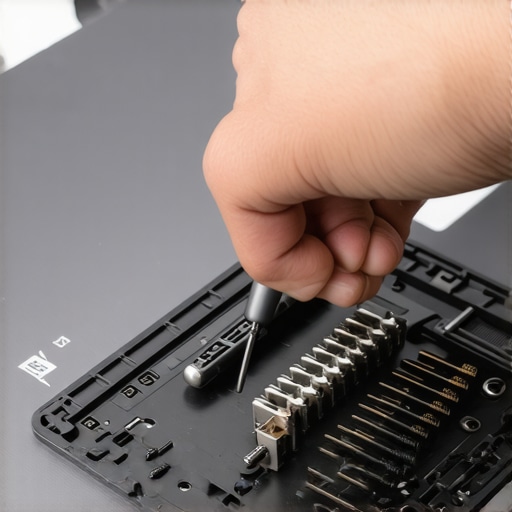
How Can I Keep My Laptop Running Like New for Five Years?
Consistency is the secret sauce. Beyond hardware, your battery is the first thing that will fail you. I use a software limiter to cap my charge at 80% because why we never leave our laptops plugged in overnight is grounded in the chemistry of lithium-ion degradation. You should also regularly learn how to calibrate your laptop battery for better accuracy so your Windows timer doesn’t lie to you. For storage, don’t wait for a crash; learn how to spot a failing laptop hard drive before it dies by checking SMART data once a month. If you are hunting for top laptop deals in 2025, look for models with accessible internals so these maintenance tasks don’t require a degree in engineering.
The Next Decade of Laptop Tech is Modular
I predict we are heading toward a ‘Right to Repair’ revolution where even student laptops that boost productivity will have swappable ports and upgradeable GPUs. We are already seeing this with brands like Framework, and soon, the ‘disposable laptop’ era will end because consumers are tired of the hidden costs of repairing modern thin and light laptops. My advice? Grab a screwdriver kit today and try opening your current machine just to blow out the dust—it’s the single best way to demystify the tech you rely on every day.
Hard-Earned Truths from a Decade of Fried Motherboards
Reflecting on my journey through countless game-changing gaming laptops for serious players in 2025, I have realized that the most expensive hardware is nothing without the right infrastructure. I used to think that a laptop was a set-it-and-forget-it purchase, but I was wrong. The first big lesson? Cheap cables are the silent killers of battery health. I have seen 100W Power Delivery ports degraded to half their speed because of internal pin corrosion on bargain leads. Secondly, don’t ignore the signs of a struggling machine. If you find your charge levels dropping mysteriously, it is worth investigating the reason your laptop battery drains even when it is off before you blame the internal cells. Lastly, I have learned to avoid proprietary tech like the plague. This is why we avoid laptops with proprietary power connectors whenever possible; being able to charge your laptop, phone, and headphones with one universal cable is a vital redundancy plan for when you are on the road.
The Maintenance Toolkit I Carry Everywhere
I do not leave the house for a major project without my tech survival kit. I trust iFixit precision driver sets because the bits do not strip your delicate chassis screws, which is a nightmare when you are trying to perform a quick cleaning. I also keep Thermal Grizzly pads handy for emergency storage swaps. If you are hunting for unbeatable laptop deals, remember that a ultra-cheap machine often costs more in the long run. There is a clear line between a legitimate bargain and why most 300 dollar laptops are just e-waste in a box. I stick to sources that prioritize teardown accessibility, like Gamers Nexus, to see if a laptop is actually built to be serviced or built to be thrown away after the warranty expires.
#IMAGE_PLACEHOLDER_E#
The Power to Protect Your Investment
Technology should serve you, not the other way around. By taking these small steps—buying the right 100W cable, cleaning your fans, and knowing the limits of your hardware—you are not just being picky; you are being a smart owner. Whether you are using student laptops that boost productivity and learning or a top-tier workstation, these habits will save you from the 2% battery panic I faced during my presentation. If you ever hit a wall or have a question about a specific setup, feel free to contact us anytime. Your gear is only as good as the care you give it. Have you ever had a cheap cable or a fake sale ruin your productivity? Let me know in the comments below!