
I’ll never forget the Great Thesis Crisis of 2022. I was sitting in a cramped coffee shop, three hours deep into a 10,000-word document, using what I thought was one of the best student laptops that boost productivity. It had a gorgeous, responsive touchscreen that felt like the height of luxury—until it didn’t. Every time I reached for a snack or adjusted my posture, my palm would brush the glass. Suddenly, the cursor would vanish to the top of the page, or worse, I’d accidentally close my browser tab. By the end of the day, my neck was stiff, my wrists were sore, and I had spent more time fixing ‘ghost clicks’ than actually writing. That was the moment I realized that for those of us who live and breathe behind a keyboard, a touchscreen isn’t a feature; it’s a hurdle. Today, I’m going to explain why we need to move past the gimmick and focus on what actually makes a machine work for you.
The Day My Screen Fought Back
I used to think that skipping the touch option meant I was falling behind the times. I fell into the trap of thinking more features always equaled more value. But after years of testing business laptops for productivity, I’ve learned a hard lesson: ergonomics always beats flashiness. When you are in a heavy typing session, your hands need a stable environment. A touchscreen introduces a level of unpredictability that can break your flow in seconds. One misplaced finger and your meticulously formatted spreadsheet is a mess. I made the mistake of prioritizing a ‘cool’ interface over a solid chassis, and it cost me hours of frustration. If you are looking for a machine that won’t fight you, you should focus on how to find a lightweight laptop that doesn’t flex when you type rather than how many pixels you can poke.
Is This Modern Feature Actually Ruining Your Workflow?
It sounds cynical, doesn’t it? We’ve been told for a decade that ‘touch is the future.’ But have you ever noticed how your arm feels after reaching across a keyboard for twenty minutes? This isn’t just me being picky; it’s a documented ergonomic nightmare. Have you ever accidentally deleted a paragraph because your screen was too sensitive to a stray hair or a sleeve cuff? I certainly have. Tell me, has a touchscreen ever actually made you type faster, or does it just give you more things to clean?
Why Your Shoulders Hate Your Vertical Touchscreen
There is a real physiological reason why we avoid these setups for long-term work. It’s called ‘Gorilla Arm Syndrome.’ Research published in the journal Applied Ergonomics has shown that using a touchscreen in a vertical orientation (like a standard laptop lid) leads to significantly higher muscle fatigue in the deltoids and neck compared to using a traditional mouse or keyboards for high-speed coding. Our bodies aren’t designed to hold our arms outstretched for hours while precision-clicking tiny icons. When I switched back to a non-touch model, the relief was almost instantaneous. Beyond the physical strain, there’s the ‘glossy glare’ problem. Most touchscreens require a glass overlay that reflects every light in the room, making it nearly impossible to see your work without squinting. This is exactly why students should skip the touchscreen trend this semester if they plan on doing any real writing. Setting the stage for a better setup starts with acknowledging that sometimes, the ‘old’ way of interacting with a computer is still the gold standard for a reason. [image_placeholder_1]
Stop the Ghost Clicks Before They Sabotage Your Work
Sometimes the best way to handle a ‘smart’ feature is to disable it entirely. If you’re stuck with a touchscreen you hate, your first move should be software intervention. I remember a grueling 48-hour coding marathon where my screen started detecting ‘ghost touches’ due to static buildup and heat. I was ready to throw the whole machine out the window as the cursor danced uncontrollably across my lines of code. Instead, I learned how to disable windows features that eat your battery life and navigated straight to the Device Manager to kill the HID-compliant touch driver. It turned my frustrating device back into a reliable, stable screen that didn’t fight me every time I pointed at something.
Choose Precision Over Finger Painting
A laptop isn’t a giant smartphone; it is a precision instrument designed for creation. If you are serious about efficiency, you need to transition back to peripherals that respect your ergonomics. For those of us writing 20-page papers or deep-diving into spreadsheets, the only 3 budget keyboards worth using for long essays will do more for your productivity and joint health than a 4K touch display ever could. It is like trying to use a hammer to perform surgery; you might get the job done eventually, but it is going to be messy, inaccurate, and unnecessarily painful for everyone involved.
Invest in Tools That Don’t Require Gymnastics
Your desk setup should be an extension of your body, not an obstacle course. When I finally added must-have laptop accessories to boost your work setup, like a simple riser and a quiet mouse, I realized I hadn’t touched my screen in weeks. The physical distance between your eyes and the monitor is crucial for long-term focus. Reaching forward to scroll or click actually pulls your spine out of alignment and ruins your posture over the course of a workday. #IMAGE_PLACE_HOLDER_B#
Prioritize the Matte Finish for Long Sessions
If you are looking for new student laptops that balance power and portability perfectly, look specifically for matte screens. The truth about matte vs glossy screens for office productivity is that glossy touchscreens are essentially magnets for grease, dust, and distracting glare. I once spent an entire train ride trying to edit a document on a glossy screen, only to realize I was mostly looking at the flickering lights of the carriage reflected in my smudge-covered display. A matte screen lets you work in any lighting condition without the constant distraction of your own reflection.
Configure Your Trackpad for Maximum Efficiency
Instead of reaching for the screen, master the gestures that already exist on your trackpad. Most modern business laptops for productivity allow for custom three-finger and four-finger swipes to switch between apps or desktops instantly. I spent twenty minutes configuring my gesture settings, and it completely eliminated my ‘reach fatigue.’ You can essentially navigate your entire workflow without your wrists ever leaving the palm rest. This small shift in behavior saves minutes every hour, which adds up significantly over a semester or a busy work week.Let’s dig deeper into the world of specs, because if you only look at the stickers on the palm rest, you are likely walking into a trap. We are often told that more is always better, but in my experience, how that ‘more’ is implemented matters significantly more than the number itself. I’ve seen people drop two thousand dollars on a machine only to find it feels sluggish within a year because they missed the nuance of component integration.
The 8GB Memory Trap is Real
The most common advice for students and office workers is that 8GB of RAM is the ‘sweet spot’ for value. I’m here to tell you that this is outdated thinking that will cost you more in the long run. Modern web browsers and operating systems have become resource hogs. When you pick up student laptops that boost productivity, you aren’t just running Word; you’re running twenty Chrome tabs, a Spotify playlist, and probably a background backup service. I’ve found that why 8gb of ram is no longer enough for modern browsing becomes painfully clear when your laptop starts swapping data to the SSD, which leads to micro-stutters and eventual hardware wear. If you want a machine that lasts four years, 16GB is the baseline, not the luxury.
Why does your high-refresh screen still look like a smeary mess?
Have you ever bought a gaming laptop boasting 144Hz or 240Hz, only to find that fast-moving objects still look blurry? This is a sophisticated trap I call the ‘Response Time Gap.’ Manufacturers love to market the refresh rate, but they often hide the GtG (Gray-to-Gray) response time on budget panels. If the pixels can’t change color as fast as the screen refreshes, you get ghosting. This is the hidden trap of budget gaming screens motion blur that ruins the experience of even the most game-changing gaming laptops for serious players in 2025. A study by the display experts at Blur Busters has shown that persistence blur is a physical reality of LCD technology; without strobing or extremely low response times, those high-hertz numbers are just vanity metrics.
Stop buying loud paperweights for your desk
One of the biggest mistakes I see in the ‘optimization’ community is the obsession with cooling pads. We’ve been conditioned to think that more fans equal better performance. However, a study published in Applied Thermal Engineering highlights that unless a laptop has specific intake vents directly over the heat pipes, external cooling pads offer diminishing returns, often only cooling the plastic shell rather than the internal components. In many cases, why most laptop cooling pads are just loud paperweights comes down to the fact that they disrupt the internal airflow designed by the engineers. Instead of a bulky pad, focusing on must-have laptop accessories to boost your work setup like a simple mesh stand that allows the built-in fans to breathe will do more for your frame rates than a dozen cheap external fans. #IMAGE_PLACE_HOLDER_C#
Don’t let thinness kill your long-term investment
We all love a sleek profile, but there is a hidden cost to the ‘thin and light’ revolution: the death of repairability. Many of the top business laptops for productivity in 2025 are moving toward completely soldered internals. This means if one RAM module fails or if you simply need more memory two years from now, you have to buy an entirely new motherboard—or a new laptop. It’s why why we never buy laptops with soldered ram for longevity is a hill I am willing to die on. Always check if the machine has at least one SODIMM slot before you tap your credit card. Have you ever fallen into the trap of buying a ‘sealed’ laptop and regretted it later? Let me know in the comments.I used to be terrified of opening my laptop case. I had this irrational fear that as soon as I popped the bottom panel, a spring would fly out and my warranty would vanish in a puff of smoke. But that fear cost me hundreds of dollars in repair fees for things I could have fixed in ten minutes. If you are serious about your tech, you need to stop treating your machine like a sealed black box and start treating it like a high-performance vehicle that needs an occasional oil change. I’m talking about having the specific screwdriver kit you need to open 90 of modern laptops. When I finally bought a precision set, I realized that half my performance issues weren’t ‘software glitches’—they were just dust bunnies living rent-free in my heat sinks.
Tools That Save Your Machine From the Scrap Heap
Most people wait until something breaks to go shopping, but the best top laptop deals in 2025 won’t matter if you let your current machine die from neglect. I keep a small kit in my desk drawer that has saved me more times than I can count. Beyond a good screwdriver, I swear by a simple tube of non-conductive grease. It’s the 10 dollar tool that fixes every squeaky laptop hinge before it snaps and takes your screen with it. I’ve seen beautiful business laptops for productivity get tossed in the trash because a five-cent hinge seized up. Don’t let that be you. Investing in these must-have laptop accessories to boost your work setup isn’t just about ergonomics; it is about protecting the longevity of your hardware.
How do I maintain my hardware for the long haul?
Maintenance is 90% prevention and 10% intervention. Once every six months, I perform what I call the ‘Deep Breath’ protocol. I use compressed air to blast out the fans, but here is the trick: use a toothpick to hold the fan blades still so they don’t over-spin and damage the bearings. According to Intel’s official Technical Documentation for mobile processors, the Junction Temperature (Tjunction) is the hard limit where your CPU throttles to prevent permanent damage. If your fans are clogged, you are living at that limit every day, which degrades the silicon over time. If you start hearing a grinding noise, you should look into how to stop your laptop fan from rattling without buying parts before the motor gives up entirely. For the truly brave, I recommend learning how to replace your laptop thermal paste without breaking anything. Fresh paste can drop your temps by 10-15 degrees Celsius instantly, giving your laptop a second life.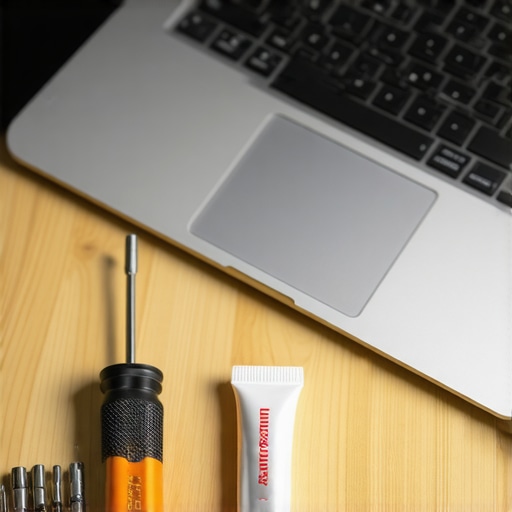
The Future of Your Desk is Modular
I predict that by 2027, we are going to see a massive backlash against soldered components. We are already seeing the first wave of modular machines gaining mainstream traction, and the ‘right to repair’ movement is forcing manufacturers to rethink those proprietary screws. We are moving toward an era where you won’t buy a new laptop every three years; you’ll just swap the processor module. Until that becomes the standard, the best thing you can do for your wallet is to optimize what you have. I want you to try one advanced tip this week: learn how to undervolt your gaming laptop for better temps and performance. It sounds technical, but it’s essentially just telling your laptop to be more efficient with the power it already has. It is the single best way to extend your hardware’s life without spending a dime.
Hard Truths I Learned While Burning the Midnight Oil
After years of obsessing over specs, I’ve realized that the shiny features on the box rarely translate to a better workday. First, your laptop is a tool, not a trophy; if a feature like a touchscreen is making you less efficient or causing physical strain, it is a design failure for your specific needs, regardless of the price tag. Second, the most significant performance boost isn’t always a software download—it often comes from simply getting the specific screwdriver kit you need to open 90 of modern laptops and clearing out the dust that throttles your speed. Finally, stop waiting for your machine to break before you care for it. Proactive maintenance is infinitely cheaper than an emergency replacement.
The Gear That Earned a Permanent Spot on My Desk
I don’t recommend products lightly, but these three interventions changed my workflow completely. I always keep a high-quality Wi-Fi card on hand, specifically why we replaced our laptop wi-fi card with an intel ax210 to ensure my connection never drops during a critical deadline. For my physical health, I have moved away from standard laptop ergonomics and invested in must-have laptop accessories to boost your work setup, including a mechanical keyboard and a stable riser. If you are currently hunting for a new machine, I suggest checking the top laptop deals in 2025 with a focus on port selection and ease of repair rather than just the thinnest chassis. [image_placeholder_final]
Build a Machine That Serves Your Vision
Technology should empower your creativity, not frustrate your process. Whether you are searching for the best student laptops that boost productivity or a powerhouse for a new business venture, remember that you are the one in control. You do not have to accept a ‘standard’ setup if it doesn’t work for your body or your specific workflow. Take the time to customize your gestures, clean your cooling fans, and choose tools that feel like a natural extension of your hands. When your hardware is finally dialed in and the distractions are gone, the only thing left to focus on is the great work you are about to create.
Have you ever had a ‘smart’ laptop feature actually make your life harder or ruin your focus? Let me know in the comments below!